Does iPad Have Headphone Socket Find Out Here

The direct answer is that most modern iPads do not have a headphone socket, but some older models do. If your iPad lacks one, you can still use headphones with USB-C, Lightning, or Bluetooth options.
If you’re asking does iPad have headphone socket, the short answer is: some older models do, but most newer iPads do not. Apple has largely moved iPads to wireless audio and USB-C or Lightning accessories, so the exact answer depends on the model you own or plan to buy.
That makes it important to check the port layout before purchasing headphones, adapters, or a refurbished iPad. If you want a broader refresher on headphone types and how they connect, our guide to types of headphones explained can help you compare your options.
- Model matters: Older iPads may have a 3.5mm jack, newer ones usually do not.
- Check connectors: USB-C, Lightning, and Bluetooth are the main alternatives.
- Adapters vary: Cheap dongles may work, but quality and fit can differ.
- Wireless is convenient: Bluetooth is often easiest for daily use and travel.
- Safety first: Keep listening levels moderate to protect your hearing.
Does iPad Have Headphone Socket in 2026? Quick Answer and What It Means for Buyers
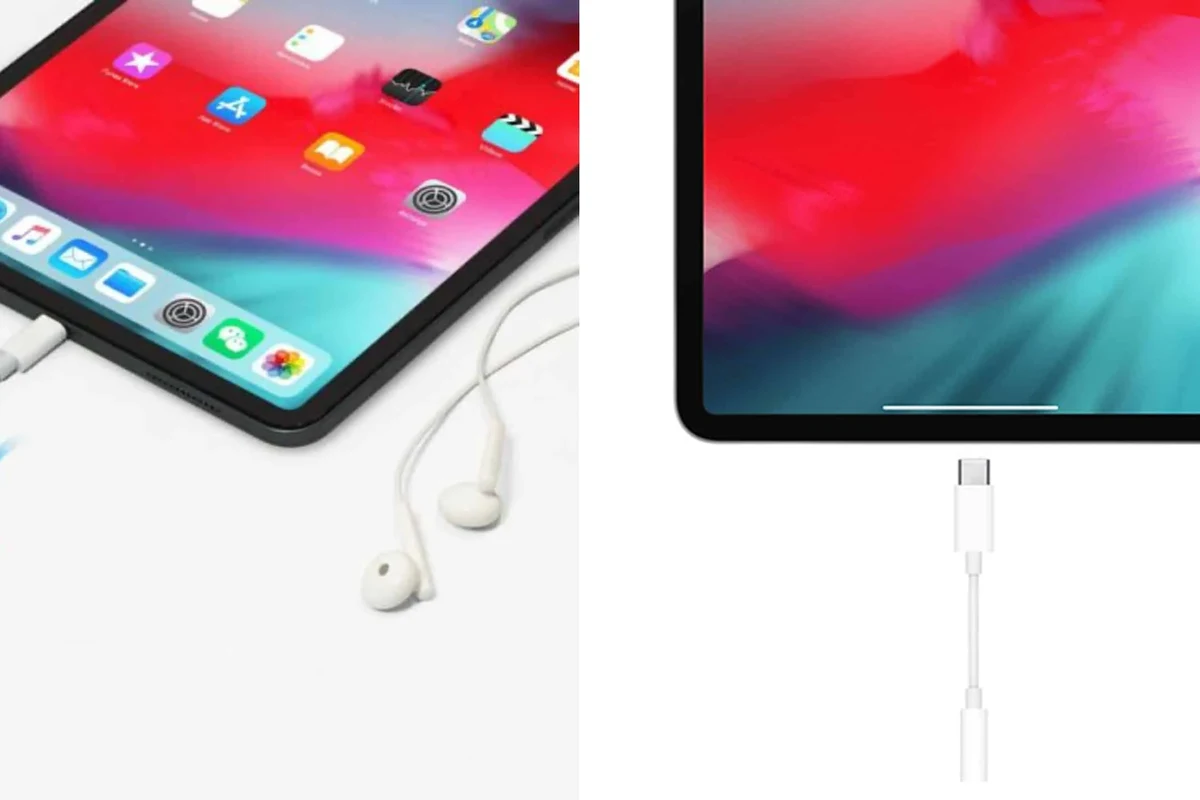
In 2026, most iPads sold by Apple do not include a 3.5mm headphone jack. A few older and budget-oriented models may still have one in circulation through refurbished or used listings, but the current lineup is mostly jack-free.
For buyers, that means you should think beyond the classic wired plug. If you want to keep using wired headphones, you’ll likely need the right adapter or a USB-C/Lightning headset. If you prefer convenience, wireless earbuds or headphones may be the simpler choice, especially for travel and school use.
- Most modern iPads do not have a headphone socket.
- Older iPads may still include a 3.5mm jack.
- USB-C, Lightning, and Bluetooth are the main alternatives.
- Always check the exact model before buying accessories.
Which iPad Models Still Include a 3.5mm Headphone Jack?
Apple’s iPad lineup has changed over time, and the headphone socket disappeared from many models gradually rather than all at once. That’s why one iPad in the same family may have a jack while another does not.
Older iPad generations that kept the headphone socket
Many older iPads, especially earlier standard iPad, iPad Air, and iPad mini generations, included a 3.5mm port. These models were designed when wired headphones were still the default for most users.
If you buy used or refurbished, this is where the confusion usually starts. A listing might say “iPad” without naming the generation clearly, so you may assume it has a headphone socket when it does not. A quick model check is always worth the time.
Current iPad lineup: where the jack is missing
Most newer iPads now rely on USB-C or Bluetooth audio instead of a dedicated headphone jack. That includes many current models across the standard, Air, Pro, and mini ranges, though exact port choices can vary by generation and region.
In practical terms, this means you may still connect wired audio, but usually not directly through a 3.5mm plug. If you already use wired headphones, it helps to understand the difference between wired vs wireless headphones before choosing your next setup.
Apple’s port choices can change across generations, so always verify the exact iPad model number before assuming it has a headphone socket.
Why Apple Removed the Headphone Socket from Most iPads
Apple has never reduced port count for just one reason. The company usually balances design, internal space, accessory strategy, and how people actually use the device.
Design, battery, and waterproofing trade-offs
Removing the headphone socket can free internal space for other components or a slightly cleaner design. It can also simplify the device’s exterior, which is part of Apple’s overall product approach.
That said, there are trade-offs. A missing jack means one more accessory to carry, and it can be inconvenient if you already own good wired headphones. It does not automatically improve sound quality, and it does not guarantee better battery life for every user scenario.
How this change affects everyday listening
For everyday listening, the biggest change is convenience. Wired headphones are easy to plug in and forget about, while wireless setups need charging and pairing.
Some users also notice that dongles can be easy to lose or leave behind. If audio delay matters to you, especially for videos or games, it may help to read our guide on Bluetooth headphone lag fix so you know what to expect from wireless listening.
Many headphone problems blamed on the iPad are actually caused by the adapter, cable, or Bluetooth pairing rather than the tablet itself.
How to Check Whether Your iPad Has a Headphone Port
The easiest way to confirm whether your iPad has a headphone socket is to inspect the edge of the device. On models with a jack, you’ll usually see a small round 3.5mm port along the top or side edge.
Physical inspection tips for new and used iPads
Check for a circular opening large enough for a standard headphone plug. Do not confuse it with the USB-C or Lightning charging port, which is wider and shaped differently.
If you are buying in person, ask the seller to show the port clearly. If you are buying online, zoom in on product photos and compare them with the official model images when possible.
- Look for a round 3.5mm opening on the edge.
- Confirm whether the charging port is USB-C or Lightning.
- Check the exact generation, not just the iPad family name.
- Review photos carefully if buying used or refurbished.
Model number checks before buying refurbished devices
Model numbers are the safest way to avoid mistakes. Refurbished listings can be vague, and “compatible with headphones” does not always mean the device has a built-in headphone socket.
Before buying, compare the model number with Apple’s official product page or a trusted spec listing. This is especially important if you need a wired setup for school, recording, or long listening sessions.
Do not rely on a seller’s short description alone. A missing headphone jack can change which adapters, earbuds, or microphones will work with your iPad.
Best Ways to Use Headphones with an iPad Without a Jack
If your iPad does not have a headphone socket, you still have several good audio options. The best one depends on whether you prefer wired sound, wireless convenience, or low-latency listening.
USB-C headphones and adapters
USB-C headphones plug directly into newer iPads with USB-C ports. This is the cleanest wired-style option because you do not need a separate audio dongle in many cases.
If you already own 3.5mm headphones, a USB-C to 3.5mm adapter can be a practical fix. Just remember that adapter quality varies, and some adapters may work better with certain headphones than others.
If you use a dongle, keep a spare in your bag. Small adapters are easy to misplace, and a backup can save you from being stuck without audio.
Bluetooth headphones and earbuds
Bluetooth headphones are the most flexible option for many iPad users. They remove cable clutter and are ideal for commuting, studying, and watching content around the house.
Sound quality can be very good, but it depends on the headphone model, Bluetooth version, codec support, and your listening habits. If you want a deeper overview of wireless listening, our guide to Bluetooth headphones explained simply is a useful starting point.
Lightning accessories on older iPads
Some older iPads use Lightning instead of USB-C, and that changes which accessories you can buy. Lightning-compatible headphones and adapters exist, but you need to match the connector carefully.
This matters because buying the wrong accessory is a common mistake. If you are comparing older wired-style options with wireless ones, our article on Lightning headphones vs Bluetooth can help you think through the trade-offs.
Cost Comparison: Headphone Adapter vs Wireless Headphones for iPad Users
There is no single best-value answer for everyone. A cheap adapter may be enough for occasional use, while wireless headphones may be worth the extra cost if you listen every day.
Budget-friendly wired setup options
A wired setup usually starts with the lowest upfront cost if you already own headphones. You may only need a compatible adapter, and that can be the simplest way to keep using gear you like.
However, low-cost adapters can vary in durability and audio consistency. If you want to preserve sound quality as much as possible, choose a reputable option and make sure it supports your headphone type properly.
When upgrading to wireless makes more sense
Wireless makes more sense when you value convenience, movement, and fewer cables. It is often the better choice for workouts, commuting, and casual media use.
That said, wireless headphones add charging needs and may introduce latency in some situations. If you play games or watch a lot of lip-sync-sensitive video, you may want to weigh that carefully before upgrading.
Common Mistakes iPad Users Make When Looking for a Headphone Socket
Most headphone compatibility problems come from small assumptions. The iPad family looks similar on the outside, but the ports can be very different depending on the generation.
Assuming every iPad has the same port
This is the most common mistake. One iPad may have a headphone socket while another looks nearly identical but relies on USB-C or Bluetooth only.
Do not assume based on the screen size, color, or generation name alone. Always verify the exact model before buying headphones or an adapter.
Buying the wrong adapter for the wrong connector
Another common issue is mixing up USB-C, Lightning, and 3.5mm accessories. A dongle that works on one iPad may not work on another.
If you are unsure, check the connector on both the iPad and the headphones. This small step can save time, money, and a lot of frustration.
Listening at high volumes for long periods can cause hearing damage. Keep volume at 60% or below for extended sessions.
Expert Advice: What Top Headphone Reviews Recommends Before You Buy
At Top Headphone Reviews, our best advice is simple: buy for the connector you actually need, not the one you wish the iPad had. That means checking the port first, then choosing between wired, wireless, or adapter-based listening.
Warning signs when choosing adapters and headphones
Be cautious if a product listing is vague about compatibility. Phrases like “works with most devices” are not enough when you need a specific iPad connector.
Also be careful with very cheap adapters that have poor fit, weak strain relief, or unclear support for microphones and inline controls. If your headphones sound muddy or inconsistent after connecting, our guide on how to fix muffled headphone sound may help you narrow down the cause.
Best listening setup for students, travelers, and creators
Students often do best with a simple, durable setup that is easy to carry and quick to connect. Travelers usually prefer wireless headphones or earbuds for less cable clutter and easier movement.
Creators may want a more reliable wired connection, especially for monitoring, editing, or reducing delay. If you are trying to decide whether you need extra power for certain headphones, our guide to do headphones need an amp can help explain when amplification matters and when it does not.
If you have hearing concerns, tinnitus, frequent ear fatigue, or pain when listening, speak with an audiologist. A professional can help you choose safer listening habits and a more comfortable headphone setup.
Final Recap: Does iPad Have Headphone Socket and What Should You Do Next?
So, does iPad have headphone socket? Some older iPads do, but most modern models do not. The best next step is to check your exact iPad model, then choose the right audio path based on how you listen.
If you want the easiest setup, Bluetooth may be the most convenient choice. If you prefer wired sound, make sure you buy the correct USB-C or Lightning adapter before you commit to a pair of headphones.
Frequently Asked Questions
Not always. Wired headphones can be more consistent, while wireless models offer convenience and may sound excellent depending on the brand, codec, and your listening needs.
Check the iPad connector first, then confirm whether you need USB-C, Lightning, a 3.5mm adapter, or Bluetooth. Also review microphone support and compatibility if you plan to make calls or record audio.
Yes, especially for travel, study, and noisy spaces. They can improve focus, but comfort, battery life, and fit matter just as much as noise cancelling strength.
It depends on comfort and use case. Over-ear models usually feel more immersive, on-ear models are lighter, and in-ear earbuds are the most portable.
Start with a good seal, proper fit, and a simple EQ adjustment if your music app supports it. Too much bass boost can reduce clarity, so make small changes and listen carefully.
Look at weight, clamping force, ear cushion material, battery life, and build quality. Comfort usually matters more than flashy specs if you listen for hours at a time.