How Do Beats Headphones Work Explained Simply

Beats headphones work by turning audio from your device into sound through built-in drivers, usually with Bluetooth wireless convenience and optional active features like noise cancellation. Their signature sound is typically bass-forward and easy to enjoy, which makes them popular for casual listening and everyday use.
Beats headphones work by combining standard headphone hardware with a sound profile and feature set designed for easy, energetic listening. In simple terms, they take audio from your phone, laptop, or music player, turn it into sound through built-in drivers, and often add wireless convenience, noise control, and microphone features along the way.
If you have ever wondered why Beats tend to sound bold and bass-forward, the short answer is that they are usually tuned for a consumer-friendly presentation rather than a flat studio reference sound. That tuning, plus wireless chips and app/device integration, is what gives Beats their recognizable feel.
- Core function: Beats convert digital audio into sound through internal drivers.
- Sound profile: They usually emphasize bass and punchy vocals.
- Connectivity: Bluetooth and Apple chip features improve convenience and stability.
- Daily use: ANC, transparency mode, and mics shape real-world performance.
How Do Beats Headphones Work? A Simple Explanation of the Core Technology
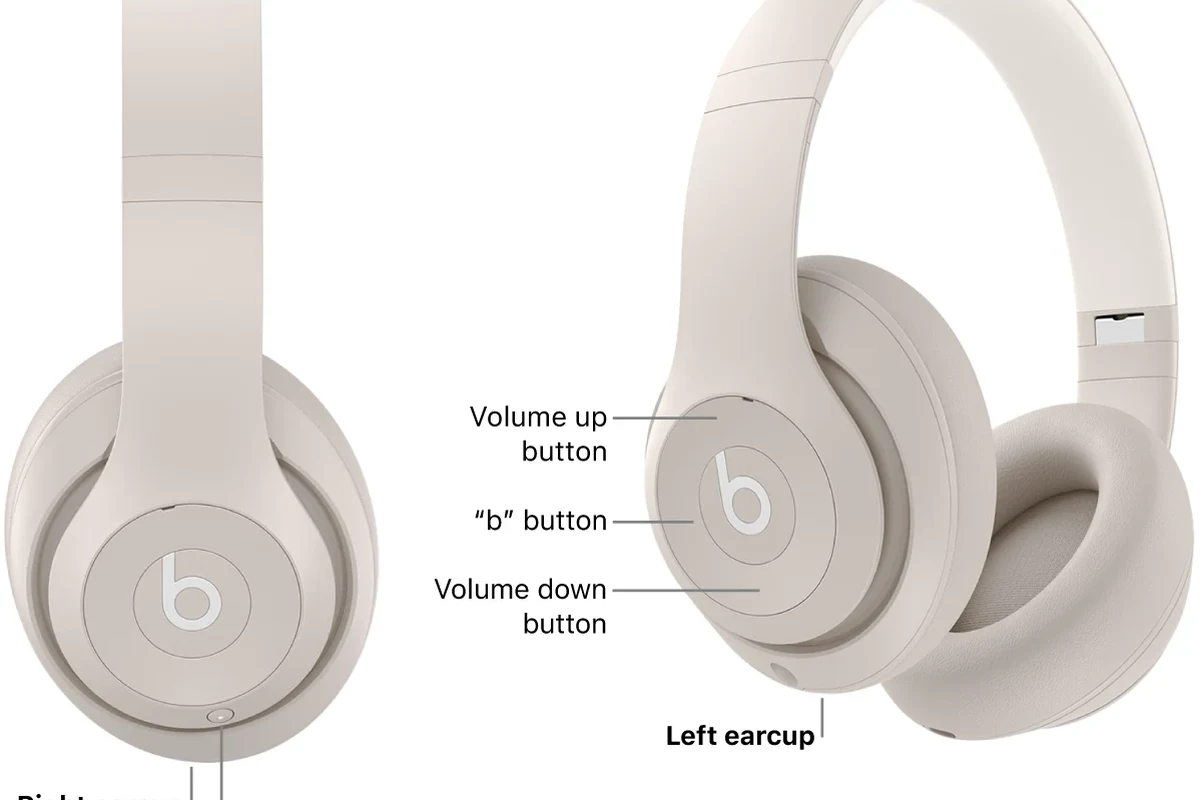
At the most basic level, Beats headphones work like most other headphones: a digital audio signal is sent from a device, then converted into electrical signals, and finally turned into sound by the drivers inside the ear cups or earbuds. The driver is the small speaker component that moves air and creates what you hear.
In wired mode, the signal travels directly through the cable. In wireless mode, your device sends audio over Bluetooth, and the headphones decode that signal internally before playing it back. The exact experience can vary by model, but the core process is always the same: receive audio, process it, and reproduce it through the drivers.
Beats models can differ a lot in sound tuning, battery life, and features depending on the specific product line, so it helps to check the exact model before buying.
What Makes Beats Sound Different: Bass Tuning, Drivers, and Apple/Beats Audio Tuning
Beats headphones are known for a lively sound signature. That usually means stronger bass, clear vocals, and a presentation that feels energetic rather than strictly neutral. For many listeners, this makes pop, hip-hop, EDM, and workout playlists sound more exciting right away.
There is no single “Beats sound” across every model, but the general goal has often been to create a fun, mainstream-friendly balance. That can be a great fit for casual listening, though it may not be ideal if you want a completely uncolored studio monitor style sound.
How the driver size and enclosure shape affect sound
The driver size, the shape of the ear cup, and how well the headphones seal around your ears all affect the final sound. Larger drivers can move more air, which may help create a fuller low end, but size alone does not guarantee better audio.
The enclosure also matters because it influences how sound waves bounce inside the cup. A closed-back design usually traps more bass energy and blocks more outside noise, while a looser fit can reduce bass impact and make the sound feel thinner.
Why Beats often emphasize bass and punchy vocals
Beats often emphasize bass because many listeners enjoy a stronger low-end response for modern music. This can make kick drums, bass lines, and beat drops feel more immediate and satisfying.
Vocals are often kept forward enough to stay clear over that bass lift. The result is a sound that feels bold and polished, even if it is not the flattest or most analytical tuning available.
If you want to shape that sound further, it can help to learn the basics of EQ settings for headphones, especially if you prefer less bass or more vocal detail.
How Beats Connect to Your Devices: Bluetooth, Apple H1/H2 Chips, and Wired Use
Most modern Beats headphones use Bluetooth for wireless listening, which lets them connect to phones, tablets, laptops, and some smart TVs without a cable. Some models also support wired listening, which can be useful when battery is low or when you want a direct connection.
Wireless convenience is a big part of how Beats work in daily life. If you want a deeper background on the connection side of things, our guide to Bluetooth headphones explained simply covers the basics in more detail.
Pairing with iPhone, Android, Mac, and Windows
Pairing is usually straightforward. On iPhone and Mac, some Beats models can pair quickly and may offer smoother device switching thanks to Apple integration. Android and Windows users can also connect normally through Bluetooth settings, though the experience may vary by model and operating system.
If you are using a Windows laptop or desktop, it is worth checking your audio output settings after pairing. Our guides on selecting headphones in Windows 11 and how to connect Bluetooth headphones can help if the device does not appear right away.
What the chip does for speed, stability, and battery efficiency
Some Beats models use Apple H1 or H2 chips, which help with fast pairing, stable wireless connections, and better power management on supported devices. These chips can also improve the convenience side of headphone use, such as switching between devices more smoothly.
That does not mean the chip changes the sound by itself. Instead, it helps the headphones work more efficiently and reliably, which is why many users notice fewer connection hassles and better day-to-day usability.
Active Features That Change How Beats Work in Daily Use
Beyond basic playback, many Beats headphones include active features that affect how they sound and behave in real life. Noise cancellation, transparency mode, and built-in microphones can all change the listening experience depending on where you are.
These features are especially helpful for commuting, office use, and travel. If you want a broader explanation of the technology behind this, see our article on how noise cancelling headphones work.
Noise cancellation and transparency mode explained
Active noise cancellation uses microphones to listen to outside sound, then creates an opposite signal to reduce that noise. It works best on steady sounds like engine hum, air conditioning, or train rumble.
Transparency mode does the opposite job. It lets outside sound in so you can hear traffic, announcements, or people speaking without removing the headphones. If you want a dedicated breakdown, our guide to transparency mode headphones explains the feature in simple terms.
Built-in microphones for calls, voice assistants, and gaming chats
Most Beats headphones include built-in microphones so you can take calls, use voice assistants, and join casual voice chats. The mic quality is usually designed for convenience and everyday communication rather than professional recording.
In quiet spaces, calls often sound clear enough for normal use. In busy places, performance may vary because background noise, wind, and fit can all affect how well the microphones pick up your voice.
Real-World Examples: How Beats Headphones Work During Music, Workouts, and Commutes
In real life, Beats headphones are often chosen because they are easy to use and fun to listen to. Their tuning and feature set make sense for people who want wireless convenience, solid bass, and simple controls without getting deep into audio settings.
Best use cases for bass-heavy tracks and casual listening
Beats can work very well for bass-heavy tracks, upbeat playlists, podcasts, and casual streaming. If you like music that sounds energetic right away, the tuning may feel satisfying without needing much adjustment.
They are also easy to recommend for users who want a simple wireless experience. The combination of easy pairing, portable design, and recognizable sound makes them a practical everyday option for many people.
Why some models suit exercise better than studio-style listening
Some Beats models are better for exercise because they are lightweight, portable, and tuned to keep music lively during movement. A secure fit matters a lot here, since a loose seal can reduce bass and make the sound feel less stable.
Studio-style listening is different. If you want to hear every mix detail in a flat, highly accurate way, a more neutral headphone may be a better match than a consumer-tuned headset.
Common Mistakes People Make When Using Beats Headphones
Many complaints about Beats come from mismatched expectations rather than broken hardware. People sometimes expect a consumer-tuned headphone to behave like a studio reference monitor, which can lead to disappointment.
Fit and settings also matter more than many buyers realize. A poor seal, incorrect EQ, or wrong device output setting can make even good headphones sound weaker than they should.
Expecting studio-neutral sound from a consumer-tuned headset
Beats are usually designed to sound engaging, not perfectly flat. That means the bass may be boosted and the overall presentation may feel more polished than analytical.
If you want a neutral sound for mixing or critical listening, a different headphone style may be more suitable. For a broader buying perspective, our types of headphones explained guide can help you compare consumer, studio, and portable designs.
Ignoring fit, seal, and EQ settings that affect performance
Fit has a big effect on how Beats sound. If the ear cups do not seal well, bass can drop off quickly and the sound may become thin or harsh.
EQ settings also matter. A small adjustment can improve clarity, reduce bass overload, or make speech easier to hear, depending on your preferences and the music you play.
Listening at high volumes for long periods can cause hearing damage. Keep volume at 60% or below for extended sessions.
Beats vs Other Headphones in 2026: Features, Price, and Value Comparison
In 2026, Beats competes with brands that offer strong noise cancellation, customizable sound, and broad device support. The best choice depends less on brand name and more on what you care about most: sound signature, comfort, battery life, ecosystem features, or price.
For readers comparing wireless options, our article on wired vs wireless headphones can help explain the trade-offs before you buy.
How Beats compares with Sony, Bose, and Apple alternatives
Sony and Bose are often associated with strong noise cancellation and more tuning flexibility, while Apple-focused Beats models may appeal to users who already live in the Apple ecosystem. Beats tends to stand out for style, ease of use, and a bass-friendly sound.
That said, the “best” brand is not universal. Comfort, app features, microphone quality, and how the headphones fit your ears can matter just as much as the logo on the box.
When the price makes sense and when another brand may be better
Beats can make sense if you want a recognizable design, simple pairing, and a fun sound profile that works well for everyday listening. They are also attractive if you value convenience more than deep sound customization.
Another brand may be better if you want the most neutral sound, a wider feature set for the same budget, or a specific fit that suits long sessions better. In other words, value depends on your use case, not just the product category.
Expert Advice and Final Recap: What Beats Headphones Do Best and Who They’re For
Beats headphones work best for listeners who want simple wireless use, punchy sound, and a design that fits everyday life. They are not usually the top choice for studio accuracy, but they can be a very good fit for casual music fans, commuters, and active users.
If you are deciding between style, sound, and convenience, start by asking how you will actually use the headphones. That question will usually tell you more than brand marketing ever will.
Key takeaways for buyers choosing between style, sound, and convenience
Choose Beats if you want easy pairing, energetic tuning, and a familiar consumer-friendly sound. Look elsewhere if you need a flatter response, the widest possible soundstage, or the most advanced feature set for the money.
If you have hearing concerns, tinnitus, or discomfort from headphone use, speak with an audiologist or hearing professional before making volume or fit decisions.
For many people, the answer to how do beats headphones work is simple: they turn audio into a lively, bass-forward listening experience with wireless convenience and optional smart features. If that matches your habits, they can be an easy and enjoyable choice.
Frequently Asked Questions
Wireless is usually more convenient and works well for everyday use. Wired can be useful when battery is low or when you want a direct connection, depending on the model.
Some Beats models include active noise cancellation, but not all of them do. Always check the exact model because features can vary a lot.
Most Beats over-ear models are closed-back, which helps with bass and noise isolation. That design is usually better for travel and casual listening than open-back headphones.
Beats headphones typically use dynamic drivers, though the exact design can vary by model. Driver size and enclosure shape both affect bass, clarity, and overall sound.
Check the fit first, because a poor seal can weaken bass and clarity. Then try EQ settings to reduce too much bass or improve vocals based on your preference.
Beats are usually strong for commuting, casual listening, and workouts because they are easy to use and often bass-forward. For studio work, a more neutral headphone may be a better choice.