Does PS5 Controller Have Headphone Jack Explained

Yes, the PS5 DualSense controller has a 3.5mm headphone jack. It works with many wired headphones, earbuds, and gaming headsets for audio and chat.
If you’re wondering does PS5 controller have headphone jack, the answer is yes: the DualSense controller includes a 3.5mm audio port. That means you can plug in many wired headphones, earbuds, and gaming headsets directly for game audio and voice chat on PS5.
- Yes: The DualSense includes a standard 3.5mm audio jack.
- Best use: Wired headsets are great for simple, low-lag gaming audio.
- Mic support: Compatible headsets can handle voice chat too.
- Watch for: Loose plugs, damaged cables, and headset compatibility issues.
Does PS5 Controller Have a Headphone Jack? Quick Answer and What It Means in 2025
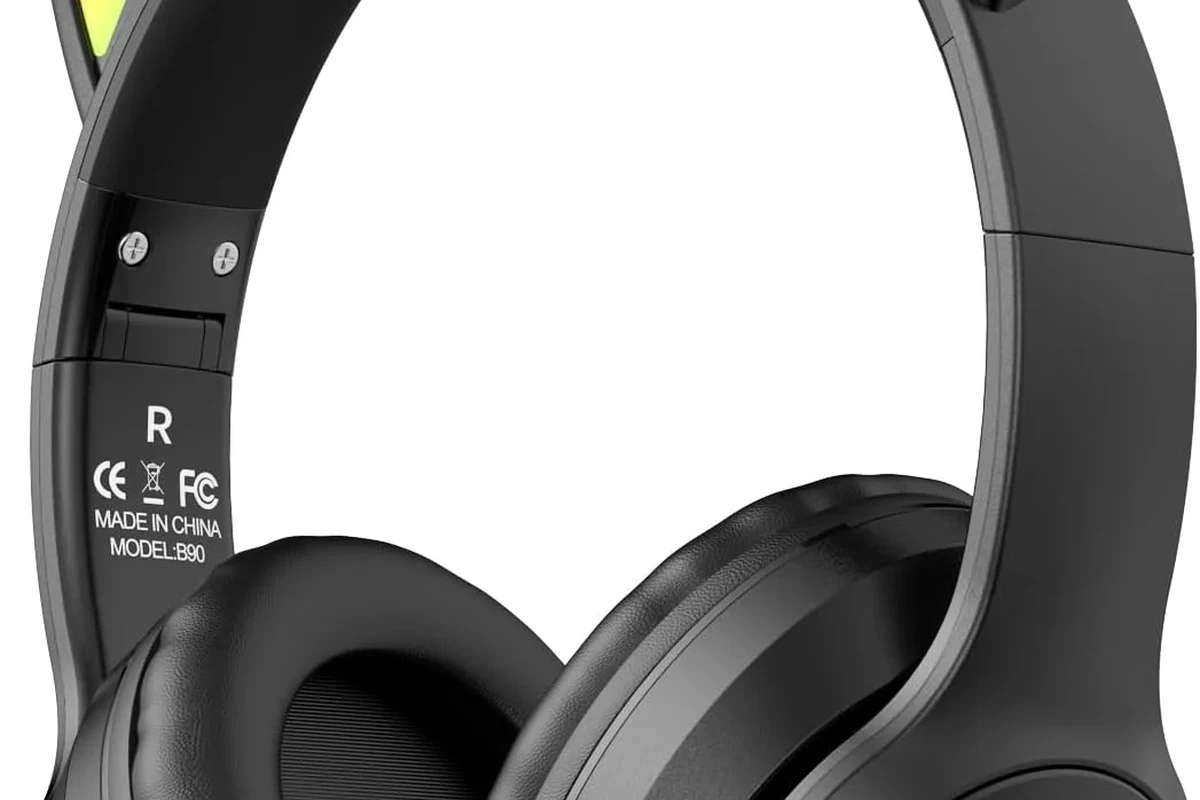
The PS5 DualSense controller still has a built-in 3.5mm headphone jack, and that remains one of its most useful features in 2025. For many players, it’s the easiest way to get instant wired audio without dealing with pairing menus, battery life, or Bluetooth lag.
In practical terms, this port lets you connect a standard wired headset and start playing right away. It’s especially helpful if you want simple plug-and-play audio for single-player games, online chat, or late-night sessions where you want to keep sound private.
For readers comparing console audio options, this is a big advantage over systems that require extra adapters or wireless setup steps. If you’re also trying to understand how headphone ports work on other devices, our guides on phone headphone socket and wired headphones on MacBook show how much compatibility can vary from device to device.
Where the PS5 Controller’s 3.5mm Audio Jack Is Located and How It Works
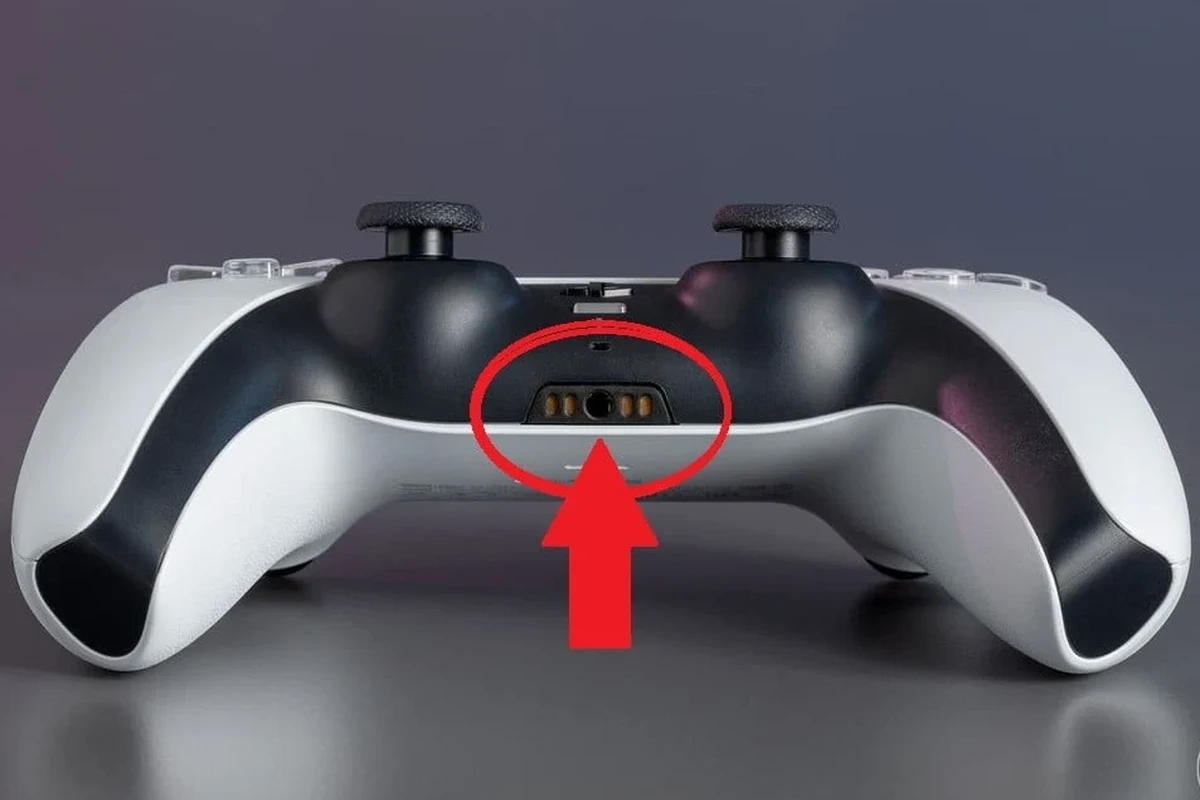
The headphone jack sits on the bottom edge of the DualSense controller, right near the center. It uses a standard 3.5mm connection, which is the same style found on many wired headphones, earbuds, and gaming headsets.
Once you plug in a compatible headset, the PS5 can route game audio, chat audio, or both through that connection. In many cases, the console automatically detects the headset and switches sound output to the controller port.
Compatibility can vary by headset model, especially if the plug uses a nonstandard wiring layout or if the headset depends on a separate USB dongle for full features.
Using Wired Headphones, Earbuds, and Gaming Headsets with the DualSense
Most standard wired headphones with a 3.5mm plug will work, including many earbuds and over-ear gaming headsets. That makes the controller jack a flexible option if you already own a favorite pair of wired cans.
Not every headset will behave the same way, though. Some models are designed mainly for audio only, while others include a built-in mic and inline controls for volume or muting.
If your headset has a combined audio-and-mic plug, check whether it uses the standard four-pole TRRS style. That is usually the safest choice for PS5 controller chat support.
What Audio and Mic Features the Controller Jack Supports
The controller jack can carry both stereo sound and microphone input when the headset is compatible. That means you can listen to game audio and talk in party chat without needing a separate microphone.
In the PS5 settings, you can usually choose whether the controller headset handles all audio or just chat audio. That flexibility is useful if you want to keep system sounds in your headset while adjusting volume to match your comfort level.
Wired headset connections often avoid the delay that can happen with some wireless setups, which is one reason many competitive players still prefer them.
Best Real-World Ways to Use the PS5 Controller Headphone Jack
The controller jack is at its best when you want convenience, privacy, and a stable connection. For many gamers, it’s less about fancy audio features and more about getting reliable sound with zero fuss.
That simple setup is one reason wired headsets remain popular in gaming. If you want a broader overview of headphone styles, our types of headphones explained guide can help you compare in-ear, on-ear, and over-ear options before buying.
Private Gaming for Late-Night Play Sessions
If you game at night, the controller jack is one of the easiest ways to keep audio private. You can hear footsteps, dialogue, and menu sounds clearly without waking anyone else in the room.
Wired earbuds can be especially useful for this because they are light, compact, and easy to wear for shorter sessions. A comfortable fit matters here, since long gaming sessions can get tiring if the headset presses too hard.
Party Chat, Voice Chat, and In-Game Audio on PS5
The controller port is a practical choice for party chat and multiplayer games because it keeps voice and gameplay audio in one place. That makes it easier to hear teammates, react quickly, and avoid missing important audio cues.
If your headset includes a mic, test it in PS5 audio settings before jumping into a match. Small differences in plug style, mic placement, and inline mute switches can affect how clearly your voice comes through.
When a Wired Connection Beats Bluetooth
Wired audio can be a better pick when you want lower latency and fewer connection issues. Bluetooth headphones may be convenient, but some setups can introduce delay or require extra troubleshooting.
For players sensitive to lag, a wired controller connection is often the safer bet. If you’ve ever dealt with wireless delay before, our Bluetooth headphone lag fix guide explains why wired audio can still be the more dependable choice for gaming.
Listening at high volumes for long periods can cause hearing damage. Keep volume at 60% or below for extended sessions.
Common Mistakes Gamers Make When Using the PS5 Controller Audio Port
Even though the PS5 controller headphone jack is simple, a few common mistakes can lead to weak sound, mic problems, or unnecessary wear. Most of these issues are easy to avoid once you know what to check.
Assuming Every Headset Will Sound the Same
Two headsets with the same 3.5mm plug can still sound very different. Driver tuning, earcup design, and fit all affect bass, clarity, and how wide or immersive the audio feels.
That means the controller jack is only part of the experience. If your headset sounds muddy or too sharp, the issue may be the headset itself rather than the PS5 connection.
Forgetting to Check Mic Compatibility and Inline Controls
Some wired headsets work for listening but not for speaking. Others have mic support, but the mute switch or volume wheel may not behave exactly as expected on PS5.
Before assuming the controller port is faulty, check the headset’s wiring, mic type, and any inline buttons. A quick settings review can save a lot of frustration.
- Does the headset have a 3.5mm plug?
- Does it support microphone input?
- Are inline mute and volume controls working?
- Is the plug fully seated in the controller?
Using Damaged Cables or Loose 3.5mm Plugs
Static noise, one-sided audio, or a cut-out mic often points to a worn cable or loose plug. A bent connector or frayed wire can make the headset behave unpredictably.
If sound cuts in and out when you move the cable, the problem may be physical wear rather than a PS5 setting. Replacing a damaged cable early is usually cheaper than dealing with a broken port later.
Forcing a plug into the port or repeatedly twisting the cable can damage the controller jack over time. Insert and remove it gently.
PS5 Controller Headphone Jack vs Wireless Audio: Which Is Better?
There is no single best answer for every gamer. Wired controller audio is usually better for simplicity and low lag, while wireless audio wins on freedom of movement and fewer cables.
If you’re deciding between the two, think about how you actually play. Competitive shooters, couch co-op, and late-night gaming often favor wired setups, while casual players may prefer the convenience of wireless headphones.
Latency, Convenience, and Sound Quality Compared
Wired audio through the controller is typically the easiest route to consistent sound. Because the signal is direct, it can feel more immediate than some wireless options, especially if you are sensitive to delay.
Wireless headphones can still sound excellent, but performance depends on the model, codec support, and how the headset handles processing. If you want to understand wireless behavior better, our Bluetooth headphones explained article breaks down the basics in plain language.
Budget-Friendly Wired Headsets vs Premium Wireless Models
Wired headsets are often the easier budget choice because you do not need a battery or wireless transmitter to get started. That can make them appealing for gamers who want solid audio without spending extra on features they may not use.
Premium wireless models may offer stronger comfort, noise cancellation, or more advanced controls, but those benefits vary by brand and model. If you’re shopping on a budget, the controller jack gives you a straightforward way to use a simple, affordable headset.
Expert Advice: When to Use the Controller Jack and When to Avoid It
The controller headphone jack is a smart default for most PS5 players, but it is not perfect for every setup. The best choice depends on how often you play, what headset you own, and whether you care more about convenience or advanced audio features.
Warning Signs of Audio Distortion, Interference, or Wear
If you hear crackling, buzzing, or intermittent sound, check the cable first. These symptoms often come from a loose plug, damaged wire, or debris in the port rather than a console problem.
Audio that sounds muffled or unbalanced can also point to a poor connection. If that happens, a guide like how to fix muffled headphone sound may help you narrow down whether the issue is your headset, cable, or settings.
If you experience ongoing ear pain, ringing, or hearing changes after gaming, stop using loud audio and consult an audiologist or hearing professional.
How to Protect the DualSense Port from Long-Term Damage
To keep the jack in good shape, avoid yanking the cable when removing your headset. Hold the plug itself, not the wire, and store the controller where the port will not get bent or crushed.
It also helps to avoid leaving a heavy cable hanging from the controller for long periods. That small habit can reduce stress on the port and make the connection last longer.
If you switch between headsets often, keep one dedicated wired headset for the PS5. Fewer swaps usually mean less wear on the controller jack.
Final Verdict: Is the PS5 Controller Headphone Jack Worth Using?
Yes, the PS5 controller headphone jack is absolutely worth using for most players. It is simple, widely compatible with standard wired headsets, and often gives you the most direct audio path with the least setup.
For many gamers, that makes it the best everyday option. Wireless audio can still be a great choice for comfort and freedom, but the controller jack remains a reliable feature that is easy to recommend.
Recap for Buyers, Casual Players, and Competitive Gamers
Casual players will likely appreciate the plug-and-play convenience. Buyers on a budget can use it to get solid gaming audio without paying for extra wireless hardware.
Competitive players may prefer it for its stable connection and lower risk of lag. In short, if you want a simple answer to does PS5 controller have headphone jack, yes—and it is still one of the most practical features on the DualSense.
Frequently Asked Questions
Wired headphones often offer lower latency and a more stable connection. Sound quality still depends on the headset model, fit, and tuning.
Check for a standard 3.5mm plug, mic support if you need chat, and comfortable ear cushions for long sessions. Build quality and cable durability also matter.
Over-ear headphones usually give better comfort and a fuller soundstage for long sessions. Earbuds can be more portable and lightweight, but fit and isolation vary.
Yes, driver type and frequency response affect bass, clarity, and overall balance. A well-tuned headset with the right fit often matters more than one spec alone.
Start with a proper fit and check PS5 audio settings before changing anything else. If needed, use mild EQ adjustments rather than boosting bass too heavily.
Look for moderate weight, soft ear cushions, and a headband that does not clamp too tightly. Breathable materials and a stable fit can make long sessions easier.