How Do Wired Headphones Work: Simple Guide

Wired headphones work by turning an audio signal from a U.S. phone, computer, game console, or music player into sound. The source sends changing electrical current through the headphone cable. Each earcup uses that current to move a tiny speaker driver. The moving driver creates pressure changes in the air, and your ears hear those changes as music, speech, or other sound.
The process is simple in concept:
Audio source → cable → amplifier → headphone driver → air movement → sound
Wired headphones may receive an analog signal through a 3.5 mm or ¼-inch plug. USB headphones receive digital audio and convert it inside the headphones. Both types use a cable, but the signal path is different.

What Are the Main Parts of Wired Headphones?
Wired headphones have five key parts: the audio source, connector, cable, driver, and ear enclosure. Some models also include a microphone, volume controls, or active noise cancellation.
1. The audio source
The audio source stores or receives the sound. Common sources in the United States include:
- Smartphones
- Laptop and desktop computers
- Tablets
- Game consoles
- Televisions
- Portable music players
- Stereo receivers
- USB audio devices
The source sends an audio signal. That signal represents the shape and timing of the sound wave.
For example, a recorded voice contains many changes in air pressure. A digital device stores those changes as numbers. An analog headphone output turns those numbers into a changing electrical signal.
2. The connector
The connector joins the headphone cable to the audio source. Common wired headphone connectors include:
- 3.5 mm plug: Common on computers, game controllers, older phones, and audio equipment.
- ¼-inch plug: Common on home stereo receivers, musical instrument amplifiers, and studio equipment.
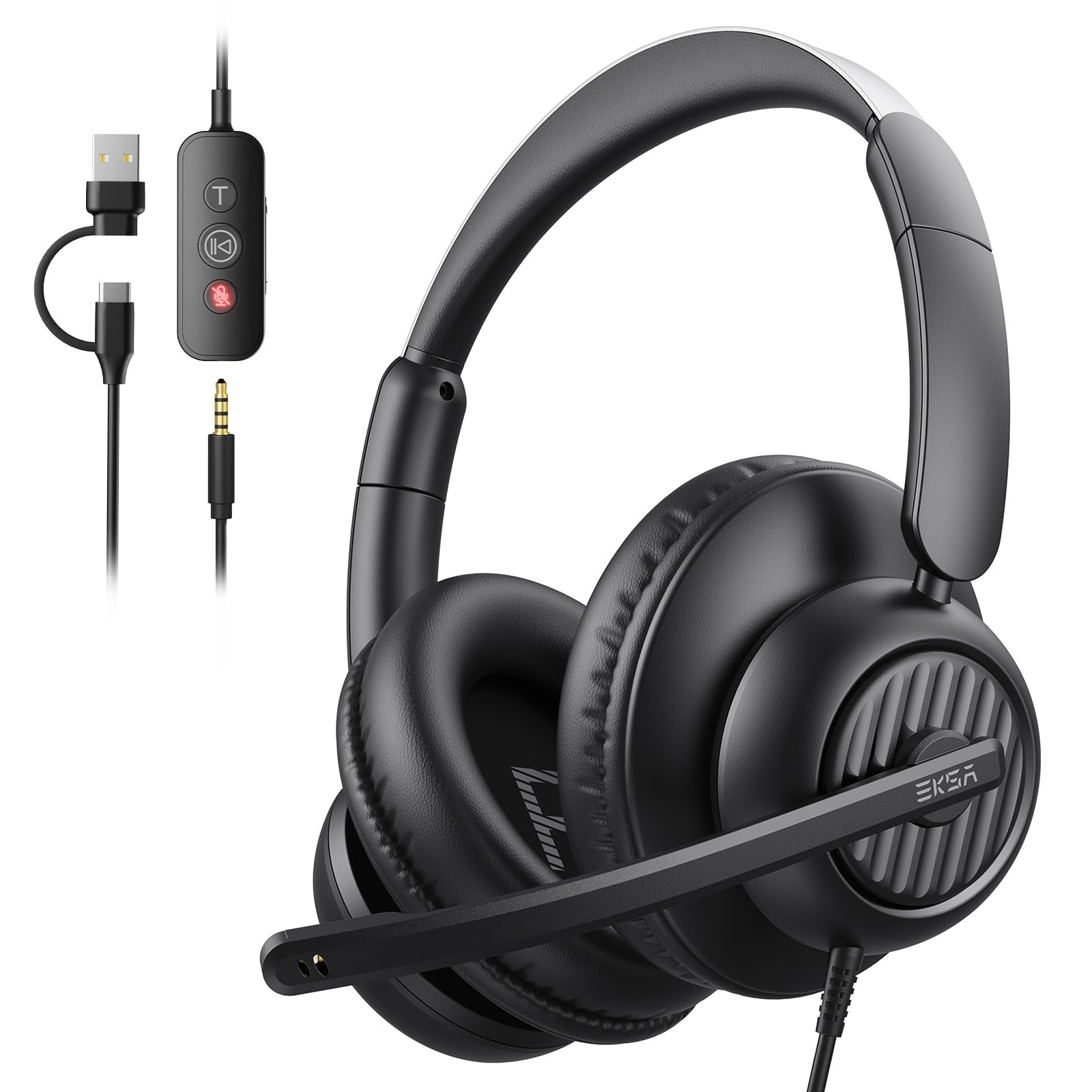
- USB-A or USB-C: Carries digital audio to headphones with built-in conversion hardware.
- Lightning: Used by some older Apple-compatible headphones and adapters.
A plug can carry more than audio. A four-contact 3.5 mm plug, called a TRRS plug, may carry left audio, right audio, ground, and microphone signals.
3. The cable
The cable carries the electrical signal. Most headphone cables contain separate conductors for:
- Left-channel audio
- Right-channel audio
- Electrical ground
- Microphone or control signals, when included
The cable usually has a thin insulating layer around each conductor. The insulation keeps the channels from touching and reduces short circuits.
Cable quality can affect durability and resistance. However, a more expensive cable does not automatically create better sound. A cable must mainly be compatible, intact, and low enough in resistance for the headphone design.
4. The driver
The driver is the small speaker inside each earcup or earbud. It changes electrical energy into mechanical motion.
Many wired headphones use a dynamic driver. A dynamic driver contains:
- A permanent magnet
- A voice coil
- A diaphragm
- A suspension system
The voice coil sits in the magnetic field. When the audio current changes, the coil moves. The coil pushes and pulls the diaphragm. The diaphragm then moves air.
Other headphones may use planar magnetic or electrostatic drivers. These designs use different structures, but they perform the same basic job: convert an electrical signal into air movement.
5. The ear enclosure
The earcup or earbud helps direct sound toward your ear. It also affects how much outside sound enters.
An open-back headphone lets some air and sound pass through the back of the earcup. It may create a more open presentation, but nearby people can hear some of the music.
A closed-back headphone blocks more outside sound and limits sound leakage. The enclosure can also change bass response by controlling the air around the driver.

How Does a Wired Headphone Driver Create Sound?
A wired headphone driver creates sound through electromagnetic force. The current from the source changes direction and strength many times per second. The driver follows those changes.
Here is the process:
- The audio device sends a changing voltage through the cable.
- The voltage creates current in the driver’s voice coil.
- The coil interacts with the permanent magnet.
- That interaction moves the coil back and forth.
- The coil moves the diaphragm.
- The diaphragm changes air pressure.
- Your ear detects those pressure changes as sound.
A low bass tone moves the diaphragm at a low rate. A high treble tone moves it at a higher rate.
For example, a 100 Hz tone causes the driver to complete about 100 movement cycles each second. A 10,000 Hz tone causes about 10,000 cycles each second. The driver must respond quickly and accurately across the range of frequencies that humans can hear.
The audio signal is not a stream of sound traveling down the cable. It is an electrical pattern that tells the driver how to move. The sound itself appears when the driver moves air near your ear.
What is the role of the magnet?
The magnet provides a steady magnetic field. The voice coil becomes an electromagnet when current flows through it. The interaction between the permanent magnet and the voice coil creates motion.
Reversing the current reverses the force on the coil. Increasing the current usually increases the force. This lets the driver follow the shape of the audio signal.
What is the role of the diaphragm?
The diaphragm is the part that pushes air. It must be light enough to start and stop quickly. It must also be strong enough to avoid unwanted bending.
A diaphragm that moves too much or behaves unevenly can create distortion. The driver design, enclosure, ear seal, and electrical circuit all affect the final sound.

How Does the Audio Signal Travel Through the Cable?
The answer depends on whether the headphones are analog or USB.
Analog wired headphones
Traditional analog headphones receive an already-converted electrical audio signal. The source performs the digital-to-analog conversion, if the music began as a digital file.
The path often looks like this:
Digital music file → DAC → headphone amplifier → analog cable → headphone driver
A DAC, or digital-to-analog converter, changes digital numbers into a continuously changing electrical signal.
A headphone amplifier increases the signal’s voltage and current so it can move the driver with enough force. Many phones, computers, and controllers contain a small headphone amplifier.
The 3.5 mm plug usually carries two audio channels:
- Left channel
- Right channel
A stereo recording sends different information to each channel. The two drivers work together to create a sense of position and space.
USB wired headphones
USB headphones receive digital data instead of an analog audio signal. The conversion hardware sits inside the headphones or in the cable.
The path looks like this:
Digital source → USB cable → DAC inside the headphone system → amplifier → driver
USB headphones may include extra electronics for:
- Digital volume control
- Microphone processing
- Equalization
- Virtual surround sound
- Active noise cancellation
- Firmware functions
USB headphones need device support and power from the USB connection. A 3.5 mm analog headset usually does not need a separate digital driver, although some devices may require an adapter.
Why can a USB headset sound different from a 3.5 mm headset?
The two connections may use different DACs, amplifiers, signal processing, and volume controls. The headphone driver may be the same, but the electronics can change the result.
This does not mean USB is always better. A good analog output can sound clean, while a poorly designed USB circuit can add noise or distortion. The design of the complete system matters more than the connector alone.

What Do Headphone Impedance and Sensitivity Mean?
Impedance and sensitivity help show how much power a wired headphone needs. They are useful when deciding whether a phone, laptop, controller, or headphone amplifier can drive a particular model.
Impedance
Impedance is the headphone’s resistance to alternating current. It is measured in ohms, shown as Ω.
A low-impedance headphone may need less voltage to reach a useful volume. A high-impedance headphone may need more voltage from the amplifier.
Common headphone impedance values can range from below 20 Ω to several hundred ohms. The number alone does not determine whether a headphone will play loudly. Sensitivity also matters.
Sensitivity
Sensitivity describes how much sound a headphone produces from a given electrical input. Manufacturers may list it as:
- Decibels per milliwatt, written dB/mW
- Decibels per volt, written dB/V
These measurements are not directly interchangeable without calculation.
A headphone with high impedance but high sensitivity may work well from some devices. A low-impedance headphone with low sensitivity may still need more power than expected.
A simple power calculation
If you know voltage and impedance, you can estimate electrical power with:
[
P = \frac{V^2}{R}
]
Where:
- P is power in watts
- V is voltage
- R is impedance in ohms
For a hypothetical 32-ohm headphone receiving 1 volt:
[
P = \frac{1^2}{32} = 0.03125 \text{ watts}
]
That equals about 31 milliwatts.
This calculation does not predict safe listening volume by itself. Real loudness also depends on sensitivity, music peaks, fit, frequency, and the output limits of the source.
Why do some headphones need an amplifier?
A separate headphone amplifier may help when:
- The headphones are too quiet from the source
- The sound distorts at high volume
- The source cannot provide enough voltage or current
- You need a physical volume control
- You want a particular audio interface or studio setup
An amplifier cannot repair a damaged driver or create detail that is absent from the recording. It only provides a suitable electrical signal when the source output is not enough.

What Is the Difference Between Wired and Wireless Headphones?
Wired headphones receive audio through a physical cable. Wireless headphones receive audio through radio communication, such as Bluetooth, and use a battery-powered amplifier and driver system.
| Feature | Wired headphones | Wireless headphones |
|---|---|---|
| Audio connection | Cable | Bluetooth or another wireless link |
| Battery | Usually not needed for basic audio | Required for wireless operation |
| Digital conversion | In the source or adapter | Inside the headphones |
| Latency | Often very low | Can vary by device and codec |
| Controls | May be passive or inline | Usually powered electronics |
| Compatibility | Depends on plug or adapter | Depends on wireless support |
| Failure points | Cable, plug, driver | Battery, radio link, firmware, driver |
Wired headphones are not automatically higher quality. They avoid some wireless limits, such as battery use and radio compression, but their performance still depends on the driver, amplifier, source, fit, and recording.
Wired connections can also create problems. Newer phones may lack a headphone jack. A USB-C adapter may contain its own DAC, and not every adapter supports every headset feature.

Why Do Wired Headphones Stop Working?
A wired headphone problem often comes from the plug, cable, adapter, or source rather than the driver.
Use this troubleshooting order:
1. Check the volume and mute controls
Raise the volume on the source and the headset. Check whether the device sends audio to the correct output.
On a computer, confirm that the wired headphones are selected as the active output. On a game console, check both game audio and chat settings.
2. Remove the adapter
If the headphones use a USB-C, Lightning, or ¼-inch adapter, connect them to a compatible source without the adapter when possible. A damaged or incompatible adapter can cause silence, one-channel audio, or microphone failure.
3. Test another source
Connect the headphones to another compatible device. This helps separate a headphone fault from a source fault.
- If the headphones fail on several sources, inspect the headset.
- If they work elsewhere, check the original source or adapter.
4. Inspect the plug and cable
Look for:
- Bent plug contacts
- Dirt in the audio port
- Cuts or crushed sections
- Fraying near the plug
- Damage near the earcup
- Intermittent sound when the cable moves
Do not force a plug into a port. If a port contains dust, follow the device maker’s cleaning instructions. Avoid inserting metal tools into the port.
5. Check for one-sided sound
One-sided sound may result from:
- A broken conductor
- A loose plug
- A damaged jack
- A balance setting
- A failed driver
- A headset wiring mismatch
Check the left-right balance setting before replacing the headphones.
6. Check the microphone separately
A microphone may not work when:
- The plug has three contacts instead of four
- The source uses a different TRRS wiring standard
- The adapter supports audio but not microphone input
- The device has selected another microphone
- The inline control is damaged
A headset splitter may be needed on some desktop computers with separate headphone and microphone ports.
Signs of a failing cable
A cable is likely failing when sound cuts out as you bend it near the plug or earcup. Crackling that changes with cable movement is another common sign.
Do not repeatedly bend the cable to confirm the fault. That can worsen the damage. Replace the detachable cable when the headphone design allows it.

How Can You Use Wired Headphones Safely?
Wired headphones can contribute to hearing damage when they play loud sound for long periods. The risk depends on loudness and exposure time, not on the cable itself.
The National Institute on Deafness and Other Communication Disorders advises keeping personal listening devices at no more than about 60% of maximum volume as a general practice. It also recommends taking breaks and using well-fitting or noise-canceling headphones to reduce the need to raise volume.
NIOSH uses an occupational exposure reference in which 85 dBA is allowed for 8 hours, with permitted exposure time falling as sound level rises. That workplace reference is not a personal guarantee of safe listening for every person or device.
Use these practical steps:
- Lower the volume when possible.
- Take regular listening breaks.
- Avoid raising the volume to overcome traffic or loud machinery.
- Stop if you notice ringing, muffled hearing, pain, or discomfort.
- Keep enough awareness of vehicles, alarms, and people around you.
- Do not share ear tips without cleaning them.
If ringing or reduced hearing continues after listening, stop using the headphones and seek advice from a qualified health professional. Sudden hearing loss needs prompt medical attention.
Sources for these safety points include the NIDCD hearing and noise guidance and NIOSH occupational noise recommendations.
Common Misunderstandings About Wired Headphones
“The cable carries sound.”
The cable carries an electrical signal. The driver creates the sound by moving air near your ear.
“A thicker cable always sounds better.”
A thicker cable may be stronger or more durable. It does not automatically improve sound. The cable must have suitable conductors, insulation, connectors, and resistance.
“High impedance means better sound.”
Impedance describes electrical behavior. It does not measure sound quality. A well-designed low-impedance headphone can sound better than a poorly designed high-impedance model.
“A more powerful amplifier always improves headphones.”
Too little power can cause low volume or clipping. Too much power can damage a driver or your hearing if the volume is set too high. The amplifier should match the headphone and provide clean output at a sensible listening level.
“Balanced headphones are always better.”
A balanced connection can separate the return paths and may support more voltage in some systems. It requires compatible wiring and equipment. It is not the same as stereo, and it is not a guaranteed sound-quality upgrade.
“Noise isolation and noise cancellation are the same.”
Noise isolation comes from the physical seal of the earcup or ear tip. Active noise cancellation uses microphones, electronics, and an inverse signal to reduce certain outside sounds. Basic passive wired headphones may provide isolation without active cancellation.

Frequently Asked Questions
Do wired headphones need power?
Basic analog headphones usually do not need a battery. They use electrical power from the headphone output to move their drivers. USB headphones, active noise-canceling headphones, and models with digital controls need power from USB or an internal battery.
Can wired headphones work without a headphone jack?
Yes. You can use a compatible USB-C, Lightning, or other audio adapter. The adapter may contain a DAC, so compatibility depends on both the source and the adapter.
Why do headphones have left and right channels?
Stereo audio uses separate left and right signals to create direction and space. Each headphone driver receives its own channel. A mono source may send the same signal to both sides.
What causes static in wired headphones?
Static may come from a damaged cable, dirty connector, poor grounding, electrical interference, a faulty adapter, or a problem in the audio source. Testing another source and adapter can help locate the cause.
Are wired headphones better for gaming?
Wired headphones can offer low delay and do not need charging. That can help with games that require precise timing. Wireless models may also perform well, but delay depends on the wireless system, device, and software.

Key Takeaways
- Wired headphones convert an electrical audio signal into air movement.
- A dynamic driver uses a magnet, voice coil, and diaphragm to create sound.
- Analog headphones receive audio through a 3.5 mm, ¼-inch, or similar connector.
- USB headphones receive digital data and perform conversion inside the headphone system or adapter.
- Impedance and sensitivity determine how much power a headphone may need.
- Most faults begin with the source, plug, adapter, or cable.
- Safe listening depends on volume and exposure time, not whether the headphones are wired.
Conclusion
Wired headphones work through a direct chain of electrical and mechanical events. An audio source sends a changing signal through the cable. The driver turns that signal into motion, and the motion creates pressure changes that your ears detect as sound.
For most problems, check the source, connector, adapter, volume, and cable before blaming the driver. For everyday use, choose a compatible connection, keep listening levels moderate, and replace damaged cables rather than forcing them to work.