How to Know Which Bose Headphones I Have Easily

Check the design first, then look for the printed model name on the headphones, case, app, or box. If that still does not confirm it, use the serial number or Bose support to identify the exact model.
If you’re trying to figure out what type of Bose headphones you own, the fastest method is to check the design first, then confirm the name in the app, case, or serial details. Most Bose models can be identified in a few minutes once you know which visual clues matter.
- Start with design: Earcup shape, buttons, and fold style usually narrow it down fast.
- Confirm with labels: Model names on the headband, case, or box are the best proof.
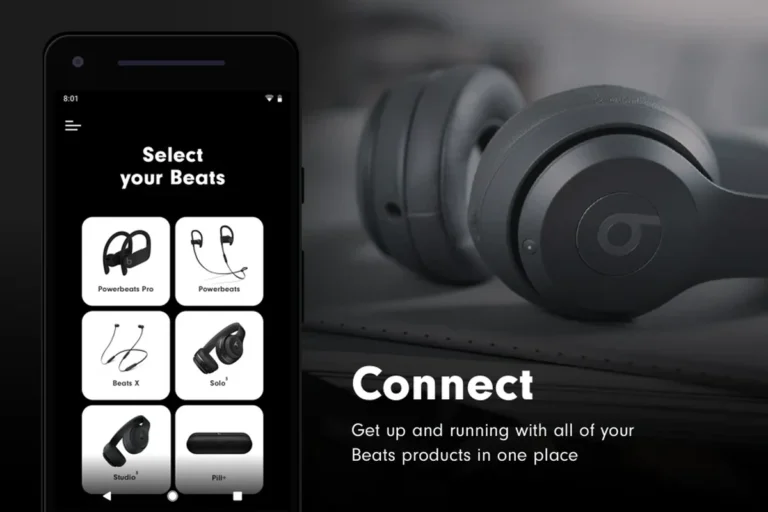
- Use the app: Bose Music or Bose Connect may show the connected product name.
- Don’t guess by color: Color and Bluetooth name alone do not prove the exact model.
- Use serial details: Serial numbers and support pages help with worn labels or refurbished units.
How to Know Which Bose Headphones I Have: Fast Identification by Model, Design, and Serial Details

Bose has released many similar-looking headphones over the years, so it’s easy to confuse one model with another. The good news is that the earcup shape, button layout, fold style, and model label usually give you enough information to narrow it down quickly.
Why Bose model identification matters for support, replacements, and accessories
Knowing the exact model helps you buy the right ear pads, charging cable, replacement case, or travel accessories. It also matters for software support, warranty claims, and troubleshooting because Bose apps and support pages often separate products by generation.
If you are comparing wireless features or checking whether your pair should still connect properly, model identification is the safest starting point. It can also help if you’re reading guides like how to connect Bluetooth headphones or trying to reset a pair that no longer pairs correctly.
What most people mean when they search “how to know which Bose headphones i have”
Most readers want to know the exact product name, such as QuietComfort 35 II, QuietComfort 45, Bose 700, or QuietComfort Ultra. Some only need to know whether they have headphones or earbuds, while others are trying to match a charging case or replacement part.
In practice, the best answer usually comes from combining three checks: the physical design, the printed model name, and the connected device details in the Bose app or Bluetooth menu.
Check the Physical Design First: Earcup Shape, Buttons, Ports, and Fold Style

The outer design is often the quickest clue because Bose tends to reuse certain shapes within each product family. Even when two models look close, small differences in buttons, hinges, microphone placement, and case shape can help you tell them apart.
Over-ear vs. on-ear vs. true wireless Bose models
Bose sells over-ear headphones, on-ear headphones, and true wireless earbuds. Over-ear models fully surround your ears, on-ear models rest on top of them, and earbuds sit inside the ear without a headband.
If your Bose product has a headband and large earcups, you’re probably looking at an over-ear or on-ear headphone. If there’s no headband and the product comes with a charging case, it’s likely a true wireless earbud model.
Signature design clues on QuietComfort, SoundLink, and Sport series headphones
QuietComfort models usually focus on comfort and noise cancellation, so they often have soft ear cushions, a premium foldable frame, and a fairly clean button layout. SoundLink models are older or more casual wireless options, and Sport models are typically smaller, lighter, or more fitness-focused.
Look for details like whether the earcups fold flat, whether the cups rotate inward, whether there is a dedicated Bluetooth button, and whether the power switch is a slider or a multi-function button. Those details can narrow down the family even before you check the label.
Practical examples: spotting QC35 II, QC45, QC Ultra, and Bose 700 at a glance
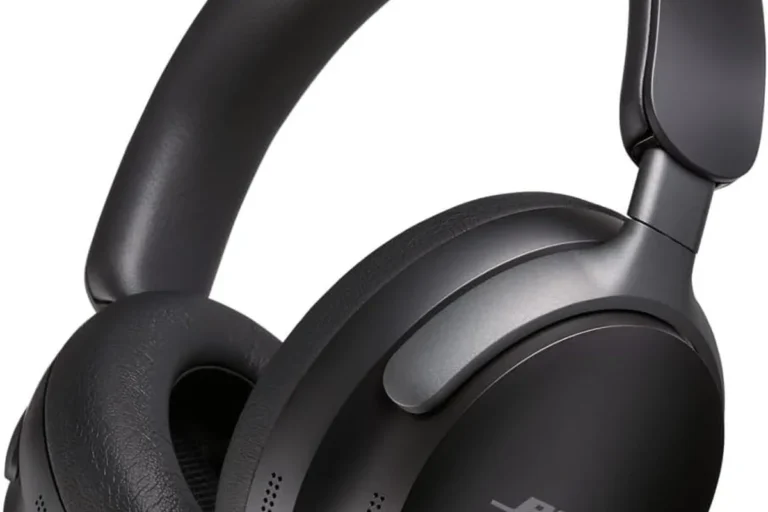
QuietComfort 35 II and QuietComfort 45 can look very similar at first glance, which is why many people mix them up. The Bose 700 has a more modern, minimalist design with a slimmer headband and a different touch-and-button control style, while QuietComfort Ultra has a newer premium look that may be easier to separate once you compare the frame and controls carefully.
Do not rely on one detail alone. A single button, color, or charging port can be shared across several Bose models, so it’s better to use the whole design rather than one feature.
Take a clear photo of the earcups, headband, and controls, then compare it with Bose product images. Side-by-side visual matching is often faster than guessing from memory.
Find the Model Name on the Headphones, Case, or Original Packaging
If the design does not give you a clear answer, the printed model name is usually the most reliable next step. Bose often places the product name on the inside of the headband, under the earcup, on the charging case, or on the original box.
Where Bose usually places the model number and product name
Check the inside of the headband, the underside of the earcup, and any small regulatory label near the charging port. On earbuds, the model information may appear on the case interior or on the bottom of the case rather than on the buds themselves.
If the text is faded, use a flashlight and zoom in with your phone camera. A quick photo often reveals tiny print that’s hard to read with the naked eye.
How to identify earbuds versus headphones when the label is faded or missing
Earbuds are easier to identify by their charging case style, ear tip shape, and whether they use touch controls or physical buttons. Headphones are easier to identify by headband shape, earcup size, and whether the frame folds for storage.
If the label is gone, compare the shape of the case or earcups with Bose’s product pages. For users who also want to understand broader device compatibility, our guide on wireless headphones on a plane can be useful once you know which model you own.
What to do if you only have the charging case or travel case
The case itself can still offer clues. Bose often designs the case to fit only one product family, so the size, interior shape, and charging port location may help you identify the model.
If you only have the case, compare it with official product photos and look for any printed codes inside the lid or on the bottom. That information can be enough to confirm the exact generation, especially for earbuds.
Use the Bose App, Bluetooth Menu, or Connected Device Name to Confirm the Model
Digital device information can help confirm what you have, especially if the physical label is missing or the headphones were bought secondhand. This is also helpful if the product still powers on and connects normally.
How the Bose Music app and Bose Connect app can reveal device details
Depending on the model, the Bose Music app or Bose Connect app may show the product name, firmware details, and connected device status. If your headphones appear in the app, that is often one of the easiest ways to confirm the model.
Note that older products may use different Bose apps, and not every Bose device is supported in the same way. If one app does not recognize your pair, try the other official Bose app before assuming the headphones are not genuine.
Why Bluetooth names can be misleading after renaming
Many people rename their headphones to something like “My Bose” or “Travel Headphones,” which makes Bluetooth menus less useful for exact identification. The visible Bluetooth name may not match the factory model name at all.
That is why you should treat the Bluetooth name as a clue, not proof. If possible, open the pairing details, app info, or device settings and look for the original product name or hardware identifier.
Best verification steps when multiple Bose devices are paired in 2026
If you own more than one Bose product, pair one device at a time and remove old connections that may be causing confusion. This makes it easier to see which model is actually active in your phone’s Bluetooth list.
In 2026, many users connect headphones to phones, tablets, laptops, and smart TVs, so the device list can get messy quickly. A clean pairing process is often the fastest way to confirm the correct model.
Bluetooth menus can show a generic device name even when the product is a different Bose generation. Always double-check with the app, label, or serial number before buying replacement parts.
Match Your Headphones to Bose’s Main Product Families and Generations
Once you know the family, it becomes much easier to identify the generation. Bose often keeps familiar naming patterns, but the exact controls, materials, and case style can change from one generation to the next.
QuietComfort lineup: older QC models versus current QC and Ultra versions
The QuietComfort family includes older favorites and newer versions that may look similar from a distance. If your pair is foldable, focused on comfort, and uses Bose noise cancellation, it likely belongs somewhere in the QuietComfort line.
Newer QC and Ultra models usually have more modern branding and updated controls, while older QC models may have a simpler physical layout. Comparing the earcup shape and button arrangement is often more useful than comparing color alone.
Bose 700 and Noise Cancelling Headphones 700 identification cues
The Bose 700 is one of the easiest models to separate once you know what to look for. It has a sleeker, more modern design than many older QuietComfort models, and the control scheme is different enough to stand out.
If your headphones have a slim, minimalist look and feel less boxy than older Bose models, the 700 family is worth checking first. It is still smart to verify through the app or label, because cosmetic similarities can be misleading.
Sport, SoundLink, and QuietComfort Earbuds series comparison
Sport models are usually built for movement and tend to be lighter or more secure-fitting. SoundLink models often represent older wireless headphone generations, while QuietComfort Earbuds are true wireless and come with a charging case instead of a headband.
If you are unsure whether you have earbuds or headphones, compare the product to broader headphone categories first. Our guide to headphones versus earphones can help if you’re still sorting out the basic form factor.
Simple comparison table ideas for price, release era, and feature differences
When you compare Bose models, focus on release era, noise cancelling, control style, and whether the product is over-ear or true wireless. Price can help as a rough clue, but it should not be used as proof because resale and discount pricing can vary widely.
| Model Family | Typical Clue | What to Verify |
|---|---|---|
| QuietComfort | Comfort-focused over-ear design | Exact generation and controls |
| Bose 700 | Slimmer, more modern look | Button and touch layout |
| SoundLink | Older wireless headphone styling | Label and app support |
| QuietComfort Earbuds | True wireless case and eartips | Case model and app name |
Common Mistakes That Lead to Misidentifying Bose Headphones
It is easy to make the wrong call if you focus on only one detail. Bose has several models that look similar enough to cause confusion, especially when the product is used or the labels have worn off.
Confusing QuietComfort 35 II with QuietComfort 45 or newer QC models
QuietComfort 35 II and QuietComfort 45 are a common mix-up because both are over-ear, wireless, and designed around comfort and noise cancellation. The safest approach is to compare the controls, charging port, and any printed model text instead of trusting appearance alone.
Newer QuietComfort models may also have updated branding or subtle design refinements, but those details can be easy to miss in photos. If you’re shopping for accessories, always confirm the generation first.
Mixing up Bose earbuds generations based on case design alone
Earbud cases can be very similar across generations, especially when Bose keeps the same overall shape. A charging case might tell you the product family, but it may not always reveal the exact version.
Check the earbuds themselves, the app, and any printed code on the case before you buy replacement tips or a charging case. That extra step can save time and money.
Assuming color or Bluetooth version proves the exact model
Color is not a reliable way to identify a Bose model because many versions come in similar black, white, or silver finishes. Bluetooth version is also not enough, since software updates and product revisions can blur those details.
Use color as a supporting clue only. The exact model should come from the label, app, serial number, or official Bose support page.
Do not assume a seller’s listing is correct if you are buying used Bose headphones. Counterfeit or mislabeled products can look convincing, so verify the model before paying for accessories or warranty service.
Expert Advice: When to Use Serial Numbers, Support Pages, or Purchase Records
If the model name is missing, the serial number and purchase history can help you identify the product with more confidence. This is especially useful for refurbished, secondhand, or heavily worn headphones.
How serial numbers help when the label is gone or the headphones are refurbished
Serial numbers are often the most dependable fallback when printed model text is worn away. They can help Bose support or a retailer identify the product family, production details, or warranty status.
Keep in mind that serial number formats can vary by product, so you may need to enter the number on an official support page or share it directly with customer support.
Warning signs that a pair may be counterfeit or not the model claimed
If the build quality feels off, the labeling looks sloppy, or the app refuses to recognize the device, the pair may not be authentic. Missing serial details, strange packaging, and inconsistent controls are also warning signs.
When in doubt, compare the product carefully with official Bose images and documentation. If the seller cannot provide a clear model name or proof of purchase, be cautious.
What Bose support can confirm if you need repair, warranty, or replacement parts
Bose support can often help confirm the model if you provide the serial number, photos, or purchase information. That matters if you need ear cushions, a charging cable, a case, or repair service.
For hearing-related concerns, remember that safe listening matters just as much as model identification. If you have tinnitus, discomfort, or questions about long listening sessions, follow safe volume habits or speak with an audiologist.
If you are unsure whether a pair is genuine, refurbished, or correctly identified, contact Bose support with clear photos and the serial number. For hearing comfort or pain during use, an audiologist can give more personalized guidance than a product guide can.
Final Recap: The Easiest Way to Identify Your Bose Headphones in 2026
The easiest answer to how to know which Bose headphones i have is to check the design, then confirm the printed model name, then verify the app or serial number if needed. Using all three together is the most reliable way to avoid mistakes.
Quick step-by-step summary for readers who want the answer fast
First, identify whether you have over-ear headphones, on-ear headphones, or true wireless earbuds. Next, look for the model name on the headband, earcup, charging case, or original box, and then confirm it in the Bose app or Bluetooth settings.
If the label is missing, compare the product family with official Bose photos and use the serial number or purchase record as backup. That process usually gets you to the exact model without guesswork.
Best next action after identifying the exact Bose model
Once you know the model, you can buy the correct accessories, check support resources, or troubleshoot pairing and charging issues with more confidence. If you’re still comparing headphone options, it may also help to read about noise cancelling headphones so you can better understand the features your Bose pair offers.
For most readers, the next best step is simple: save the model name somewhere safe. That makes future replacement, repair, and resale decisions much easier.
Frequently Asked Questions
Check for a charging port, Bluetooth pairing, and whether the headphones work without a cable. If they pair over Bluetooth and charge by cable, they are wireless.
Over-ear headphones surround your ears, on-ear models sit on top of them, and in-ear models are earbuds. The fit style is usually the easiest first clue.
Look for QuietComfort or Noise Cancelling Headphones naming, or check the Bose app and product label. If you’re unsure, match the exact model on Bose’s support page.
Most Bose consumer headphones are closed-back, which helps with isolation and noise cancellation. Open-back designs are less common in Bose’s mainstream wireless lineup.
Confirm the exact model name, generation, and fit type before ordering ear pads, cables, or cases. Small differences between models can affect compatibility.
Choose the correct ear pad fit, take breaks during long sessions, and keep volume at safe levels. If you feel pain or ringing, reduce volume and consider speaking with an audiologist.