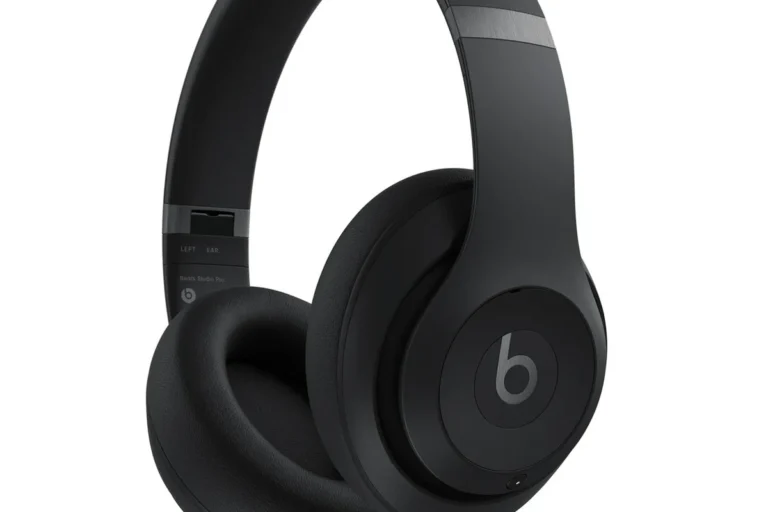
How to Beats Headphones Work A Simple Guide

Beats headphones work by receiving audio from your device, processing it, and using internal drivers to turn that signal into sound. Their main appeal is a bass-forward tuning, wireless convenience, and easy everyday features.
Beats headphones work by converting digital audio from your phone, tablet, or computer into sound that is tuned for easy listening, strong bass, and wireless convenience. In simple terms, they receive the music signal, process it, amplify it, and send it to the drivers that move air and create the sound you hear.
That basic idea sounds simple, but a lot happens behind the scenes. Wireless connection quality, driver design, battery power, microphone tuning, and noise control all shape how Beats perform in daily use. If you want a broader primer on wireless audio, our Bluetooth headphones explained guide is a helpful place to start.
- Core function: Audio is decoded, amplified, and played through the drivers.
- Sound profile: Beats usually favor punchy bass over flat studio neutrality.
- Main factors: Bluetooth, fit, battery, and ANC all affect performance.
- Best use: Great for casual listening, commuting, and workouts.
How Beats Headphones Work: The Core Idea Behind the Sound

At the most basic level, Beats headphones work like other modern headphones: they take an audio signal and turn it into vibrations your ears interpret as music, speech, or game sound. The difference is that Beats products are usually tuned for a more energetic, consumer-friendly presentation rather than a flat studio reference sound.
In wireless models, the audio usually travels over Bluetooth from your device to the headphones. The headphones then decode that signal, run it through internal processing, and send it to the drivers. That chain is what gives Beats their familiar mix of convenience, punchy bass, and easy pairing.
What Makes Beats Different From Other Headphones in 2026
Beats has changed over the years, but its products still tend to focus on simple setup, bold sound, and lifestyle-friendly features. That makes them appealing to casual listeners, gym users, commuters, and people who want headphones that connect quickly and work with minimal fuss.
Compared with more neutral or studio-oriented brands, Beats often emphasizes bass and a polished, ready-to-listen sound. Some models also lean into ecosystem features, especially for Apple users, though exact behavior can vary by model and software version.
Signature tuning and bass-heavy sound profile
The “Beats sound” is usually described as bass-forward. That means low frequencies like kick drums, synth bass, and sub-bass effects are often given extra weight so music feels fuller and more energetic.
This tuning can be great for pop, hip-hop, EDM, and workout playlists. But if you prefer a flatter response with more obvious midrange detail, Beats may sound less natural than headphones designed for critical listening. For a broader breakdown of sound signatures, see our types of headphones explained guide.
Wireless chipsets, Bluetooth, and quick pairing behavior
Most Beats headphones rely on Bluetooth chipsets to receive audio wirelessly. Once paired, they reconnect automatically when you turn them on near a previously used device, which is part of the convenience many buyers want.
On supported devices, pairing can feel especially fast and smooth. Still, wireless performance depends on the model, your source device, and the environment around you. Walls, interference, distance, and codec support can all affect stability and delay.
Built-in microphones, controls, and smart features
Beats headphones often include microphones for calls, voice assistants, and sometimes noise control functions. Physical buttons, touch controls, or a combination of both let you change volume, skip tracks, answer calls, and switch listening modes.
Some models also include features like automatic device switching, battery status integration, or voice assistant access. These additions do not directly improve sound quality, but they make the headphones easier to use every day.
How the Main Components Inside Beats Headphones Work Together
Inside any Beats headphone, several parts work as a system. The driver creates sound, the amplifier gives it enough power, the battery keeps the electronics running, and the control chip manages Bluetooth and other features.
When all of those parts are balanced well, the result feels seamless. When one part is weak, you may notice distortion, short battery life, lag, or weak call quality.
Drivers and how they turn electrical signals into sound
Drivers are the tiny speakers inside the ear cups or earbuds. They move back and forth in response to electrical signals, creating air pressure changes that your ears hear as sound.
Driver size is only one piece of the puzzle. Tuning, enclosure design, fit, and DSP processing also affect the final result. A well-tuned smaller driver can sound better than a poorly tuned larger one.
Battery, amplifier, and power management in wireless models
Wireless Beats headphones need battery power for Bluetooth, signal processing, microphones, and any active noise cancellation features. The internal amplifier boosts the signal enough for the drivers to play at a usable volume.
Power management matters because it affects battery life, charging speed, and how the headphones behave as the battery gets low. If you want more background on when extra amplification matters, our headphones amp complete guide explains that topic in plain language.
Noise isolation versus active noise cancellation
Noise isolation is the passive effect of a good seal around or inside your ears. It blocks some outside sound simply because the ear pads or ear tips form a barrier.
Active noise cancellation, or ANC, uses microphones and processing to reduce steady background noise like engine rumble or air conditioner hum. If you want the deeper version, our noise cancelling headphones article covers the basics in more detail.
ANC usually works best on low, constant noise. Human voices, sudden sounds, and sharp noises are often harder to reduce completely.
Step-by-Step: What Happens When You Press Play on Beats
Pressing play starts a short chain reaction. Your device sends audio, the headphones receive and process it, the drivers move, and the sound reaches your ears.
The process happens very quickly, but each stage affects clarity, volume, latency, and overall listening quality.
Phone or device sends audio to the headphones
First, your phone or computer converts the audio file into a wireless signal or a wired electrical signal, depending on the model. In most modern Beats headphones, that signal goes through Bluetooth.
If the connection is stable, the headphones receive a clean stream of audio data. If the connection is weak, you may notice dropouts, delay, or lower reliability during calls and videos.
Processing, amplification, and sound delivery to your ears
Once the signal arrives, the headphones process it internally. That processing may include EQ tuning, noise cancellation, volume control, and other digital adjustments before the signal reaches the drivers.
The amplifier then sends enough power to move the drivers, and the drivers create sound waves. The ear pads or ear tips help shape the final sound by improving seal and reducing outside noise.
If your Beats sound thin or weak, check the fit first. A poor seal can reduce bass more than many people expect.
How voice calls and microphone pickup work
When you take a call, the microphones capture your voice and send it back through the headphones to your phone or computer. Some models use multiple microphones to help focus on speech and reduce background noise.
Call quality can still vary depending on wind, traffic, and where the microphones sit on the headset. Even good microphones cannot fully remove every noisy environment.
Practical Examples of Beats Headphones in Real-World Use
Beats headphones are often chosen for convenience and everyday listening rather than strict studio accuracy. That makes them a good fit for many casual and active use cases.
Here is how they usually make sense in real life.
Music listening for bass-driven genres
If you listen to hip-hop, pop, dance, or workout music, Beats can make tracks feel lively and immediate. The stronger low-end can add impact to drums and bass lines without needing much adjustment.
That same tuning may hide some subtle detail in acoustic, classical, or vocal-focused recordings. In other words, they can be fun first and analytical second.
Workout, commuting, and travel scenarios
For workouts, the wireless design and secure fit on some models are major advantages. For commuting and travel, ANC and passive isolation can make noisy environments easier to handle.
If you are comparing how headphones behave in different designs, our open back vs closed back headphones guide can help you understand why isolation matters so much outside the house.
Gaming, streaming, and everyday calls
Beats can work well for casual gaming, streaming, and everyday video calls, especially when you want simple wireless convenience. For competitive gaming, though, latency and microphone behavior may matter more than style or bass.
That is why it helps to think about your main use case before buying. A headphone that sounds exciting for music is not always the best choice for low-lag gaming or long office calls.
Common Mistakes People Make When Using Beats Headphones
Many complaints about Beats come from mismatched expectations rather than bad hardware. If you understand what the headphones are designed to do, they usually make a lot more sense.
Expecting studio-neutral sound from consumer-tuned headphones
Beats are usually tuned for enjoyment, not strict accuracy. If you expect a completely flat, reference-style sound, you may think they are “too bassy” even when they are working as intended.
That is not a flaw for every listener. It simply means the target audience is different.
Ignoring fit, seal, and ear tip or cushion selection
Fit affects sound more than many buyers realize. On in-ear models, the wrong ear tip can reduce bass and comfort at the same time. On over-ear models, worn cushions can weaken seal and make the sound feel less full.
If your headphones sound muffled or inconsistent, the problem may be fit rather than the drivers themselves. For more troubleshooting, our why do headphones sound muffled guide is worth a look.
Misunderstanding battery limits and charging habits
Wireless Beats depend on regular charging, and battery performance changes over time. If you leave them unused for long periods, store them poorly, or drain them constantly to zero, battery health can suffer.
Charging habits matter because battery wear is normal in all wireless headphones. Keeping the battery in a healthy range and using the right cable and charger can help extend usable life.
Listening at high volumes for long periods can cause hearing damage. Keep volume at 60% or below for extended sessions.
Expert Advice: How to Get the Best Sound and Performance from Beats
You do not need advanced audio knowledge to improve your Beats experience. A few simple settings and habits can make a noticeable difference in sound quality and comfort.
When to use noise cancellation and when to turn it off
Use ANC when you are in a noisy place like a plane, bus, or busy office. It can make listening easier at lower volume levels, which is better for long sessions.
Turn it off when you want maximum battery life, a more natural sense of surroundings, or less pressure sensation. If ANC ever feels uncomfortable, review our noise cancelling ear pressure guide for context.
How to adjust EQ settings for better balance
If the bass feels too strong, try lowering low frequencies slightly in your EQ app or device settings. If vocals feel buried, a small midrange boost can help clarity without making the sound harsh.
The best EQ is usually subtle. Big changes can make the sound less natural or introduce distortion.
Warning signs of fake, damaged, or poorly maintained Beats headphones
Be careful with unusually cheap listings, poor packaging, missing accessories, weak battery life, or unreliable pairing. Those can be signs of a fake or damaged product.
Also watch for cracked pads, loose hinges, distorted sound, or microphones that cut out. If the headphones sound very different from what you expect, inspect the condition before assuming it is just a tuning issue.
If you have persistent hearing discomfort, ringing in the ears, or trouble understanding speech at normal volume, consult an audiologist or hearing professional.
Price, Value, and Model Comparison: Are Beats Worth It in 2026?
Whether Beats are worth it depends on what you value most. If you want bold sound, easy pairing, and a lifestyle-friendly design, they can be a good fit. If you want the most neutral sound or the deepest feature set for a lower price, other brands may be a better match.
How Beats compares with Sony, Bose, and Apple options
Sony and Bose are often chosen for strong noise cancellation and broader tuning options. Apple-branded or Apple-focused headphones can be attractive for people already using the Apple ecosystem.
Beats sits somewhere in the middle: more style and punch than some competitors, with ecosystem convenience that can be especially appealing to Apple users. For a connection-focused comparison, our wired vs wireless headphones guide can also help you decide what matters most.
What you typically pay for entry-level, midrange, and premium models
Pricing varies by model, retailer, sales, and region, so it is better to think in ranges than fixed numbers. Entry-level Beats models usually cost less, while premium ANC models sit higher because of extra features and stronger hardware.
As a general rule, you pay more for better noise cancellation, longer battery life, stronger build quality, and tighter integration with your device ecosystem. Still, the best value is not always the most expensive option.
Best value factors: sound, battery life, comfort, and ecosystem features
The best Beats model for you is the one that balances sound, comfort, battery life, and features you will actually use. A great-sounding headphone that hurts after an hour is not a good value.
Comfort, clamp force, pad quality, and app support can matter as much as raw audio quality. If you want a broader buying framework, our over ear vs on ear vs in ear guide can help narrow the right style before you buy.
Final Recap: The Simple Truth About How Beats Headphones Work
Beats headphones work by receiving audio wirelessly or through a cable, processing that signal, amplifying it, and sending it to drivers that create sound. Their appeal comes from a mix of punchy tuning, easy pairing, useful controls, and everyday convenience.
The simplest way to think about Beats is this: they are designed to make listening easy, energetic, and portable. If that matches your needs, they can be a strong choice; if you want a flatter or more studio-like sound, you may prefer a different headphone style.
Frequently Asked Questions
It depends on your use case. Wireless is more convenient for most people, while wired can reduce latency and avoid battery limits if your model supports it.
Some Beats models do, and some do not. Active noise cancellation helps reduce steady background noise, but fit and seal still matter a lot.
Most Beats headphones are closed-back or use a sealed design for better bass and outside-noise reduction. Open-back headphones are less common in the Beats lineup.
Driver type can vary by model, but the main idea is the same: the driver converts electrical signals into sound. Sound quality depends on tuning, fit, and processing as much as driver size.
Start with a good fit, then try small EQ adjustments if the bass or treble feels off. Also check your source device settings, because Bluetooth quality and volume limits can affect the result.
Look at battery life, comfort, noise cancellation, microphone quality, and latency. For gaming, low lag matters more, while commuters usually benefit more from ANC and a secure fit.