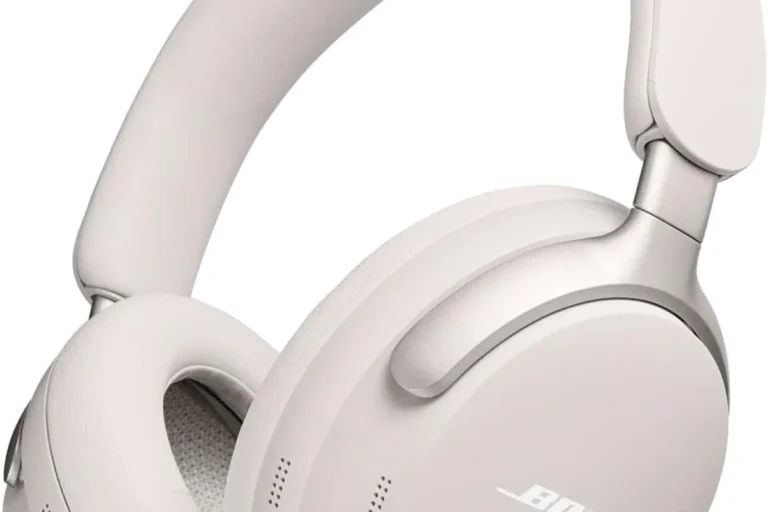
How to Change Bose Headphone Pads Easily and Fast

To change Bose headphone pads, match the exact model, remove the old cushions gently, clean the mounting area, and snap or twist the new pads into place evenly. A careful fit helps preserve comfort, isolation, and the sound profile you expect.
If your Bose headphones have cracked, flattened, or peeling ear cushions, replacing the pads is one of the fastest ways to restore comfort and keep the headset feeling fresh. The good news is that learning how to change Bose headphone pads is usually a simple DIY job if you match the right model and install the new cushions carefully.
For most Bose over-ear headphones, the process takes only a few minutes per side. The key is choosing the correct replacement pads, removing the old ones without stressing the ear cup frame, and making sure the new seal sits evenly so comfort and sound stay close to what you expect.
- Match first: Bose pad fit depends on the exact model and mounting style.
- Go gently: Remove old pads slowly to avoid cracking the ear cup lip.
- Clean well: Dust and residue can weaken the seal and comfort.
- Check the fit: Even alignment helps maintain sound quality and noise isolation.
How to Change Bose Headphone Pads: What Readers Need to Know First

Before you start, it helps to understand that Bose ear cushions are not all built the same. Some models use a twist-on or snap-in style, while others rely on a mounting ring or lip that locks into the ear cup.
Why Bose ear cushions wear out and when replacement makes sense
Ear pads wear out from heat, sweat, skin oils, storage pressure, and repeated use. Over time, the outer material may peel or the foam may flatten, which can make the headphones feel less comfortable and may weaken the seal around your ears.
Replacement makes sense when the pads no longer feel soft, the surface is cracking, or the headset sounds thinner because the seal is no longer tight. If you notice more outside noise leaking in, that is another common sign the cushions are ready to be changed.
What users usually search for: quick replacement, fit, and sound comfort
Most people want a fast replacement that does not damage the headphones and still feels close to the original fit. That is why model compatibility matters so much with Bose pads.
Readers also want to know whether new pads will affect sound quality, noise cancellation, or long-wear comfort. In practice, the answer depends on pad thickness, material, and how closely the replacement matches the original design.
Compatible Bose Models and Pad Types You Should Match Before Buying

Buying the wrong pad is the most common mistake. Bose has several popular over-ear lines, and even similar-looking cushions may not fit the same way.
Common Bose over-ear models: QuietComfort, QC 35, QC 45, NC 700, and SoundLink
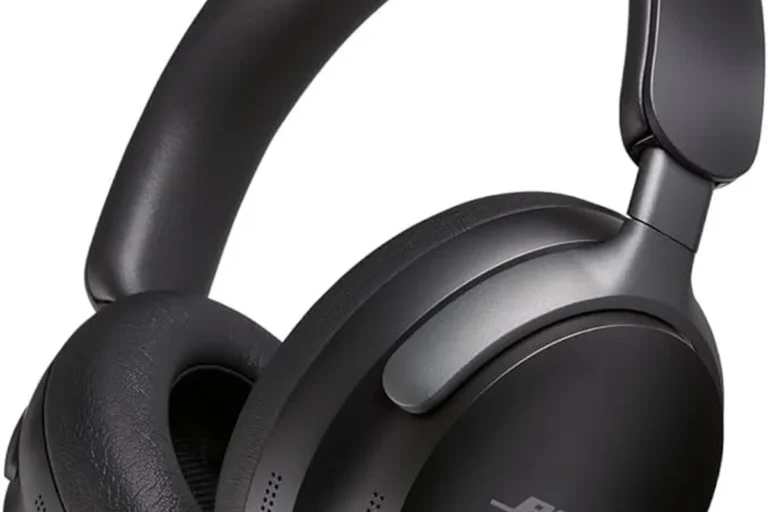
Popular Bose models such as QuietComfort, QC 35, QC 45, Noise Cancelling Headphones 700, and some SoundLink over-ear versions often use different pad shapes or attachment methods. Always check the exact model name on the headset or in the product settings before ordering.
If you are unsure, compare the replacement listing with your headphone’s generation and ear cup shape. A few millimeters can matter when you are dealing with Bose replacement cushions.
How to identify the correct pad shape, mounting style, and material
Look at the old pad from the side and back. Some pads have a visible mounting ring, while others tuck into a groove or twist into place.
Also note the material. Many replacements use protein leather, synthetic leather, or memory-foam-based constructions. The shape should match the cup opening, and the inner opening should leave enough clearance so the driver area is not blocked.
Pad fit can affect both comfort and noise isolation, so a close-looking replacement is not always a true match. If the listing does not name your exact Bose model, double-check compatibility before buying.
OEM vs third-party pads: what changes in comfort, seal, and durability
Original Bose pads are usually the safest choice if you want the closest factory feel, but they may cost more. Third-party pads can be a good value, especially if you want a softer feel or a different surface texture.
The tradeoff is consistency. Some aftermarket pads feel excellent, while others may be thinner, less durable, or slightly change the sound profile. For readers comparing options, our types of headphones explained guide is a helpful starting point for understanding how design affects fit and comfort.
Tools, Replacement Pads, and Preparation Before You Start
You do not need a full repair kit for most Bose ear pad swaps. A clean workspace and a gentle touch matter more than special tools.
What you need: replacement pads, a soft pry tool, microfiber cloth, and clean hands
At minimum, gather the correct replacement pads, a microfiber cloth, and clean hands. A soft pry tool can help lift stubborn pads without scratching the cup frame.
Work on a table with good light so you can see the mounting edge clearly. If the old pads are very worn, try not to pull too hard, since brittle material can snap and leave pieces behind.
Optional extras for a smoother install: adhesive remover and inspection light
Some Bose pads leave light adhesive residue or a thin dust layer around the mounting area. A small amount of adhesive remover can help, but use it carefully and keep it away from the driver opening.
An inspection light is also useful because it helps you confirm that the pad ring is seated evenly all the way around. This is especially helpful on darker headphone shells where the edge is hard to see.
Estimated cost of Bose ear pad replacement in 2026
Replacement costs can vary by model, seller, and whether you choose OEM or third-party pads. In 2026, budget options are often lower cost, while official or premium replacement pads usually cost more.
If you are comparing prices, remember that a cheaper pad is not always the best value if it wears out quickly or changes the seal. For readers who also want to understand headphone sound changes after repairs, our best EQ settings for headphone guide can help you fine-tune the sound afterward.
Step-by-Step Guide on How to Change Bose Headphone Pads
Once you have the right pads, the swap itself is straightforward. Go slowly, especially the first time, so you do not bend the mounting lip or tear the old ring.
Removing the old pads without damaging the ear cup frame
Start by gripping the pad near the edge and lifting gently. On many Bose models, the pad will pop free after you work around the perimeter with your fingers or a soft pry tool.
Do not yank from one point only. Instead, loosen the pad a little at a time so the mounting ring releases evenly. If the pad feels stuck, pause and check whether it twists, snaps, or tucks into a groove before pulling harder.
Use your fingers or a soft tool to start loosening the pad from the ear cup.
Release the pad gradually instead of pulling from a single point.
Cleaning the mounting surface before installing the new cushions
After the old pad is removed, wipe the mounting area with a microfiber cloth. Remove dust, skin oil, and any loose foam pieces so the new cushion sits flat.
If there is residue, use a small amount of adhesive remover only where needed. Let the area dry fully before installing the new pad, because trapped moisture can weaken the fit and attract debris.
A clean mounting surface helps the new pad seal more evenly, which can improve comfort and preserve the bass response you expect from Bose headphones.
Aligning and snapping or twisting the new Bose pads into place
Check the new pad’s orientation before you attach it. Some replacements are marked left and right, while others have a natural shape that sits better in one direction.
Line up the pad ring with the ear cup lip, then press or twist it into place based on the model’s design. You should feel it lock in without needing excessive force. If it resists, stop and realign it rather than pushing harder.
Checking for a secure seal, even fit, and left-right symmetry
Once installed, inspect both sides from the front and back. The pads should sit evenly, with no bulges, gaps, or tilted edges.
Wear the headphones for a minute and listen at a moderate volume. If one side feels tighter or leaks more sound, remove and reseat the pad before assuming the fit is correct.
Common Mistakes People Make When Replacing Bose Ear Cushions
Most replacement problems come from rushing the process. A careful installation usually prevents the need to buy a second set of pads.
Forcing the pad ring and cracking the mounting lip
One of the easiest ways to damage Bose headphones is to force the pad ring into place. The mounting lip can crack if you bend it too far or push at the wrong angle.
If the pad does not fit smoothly, stop and check the model match. A little resistance is normal, but hard pressure is a sign something is off.
Buying the wrong model size or incompatible third-party replacement
Some Bose pads look similar across models but are not interchangeable. A replacement made for one QuietComfort version may not fit a different generation or the Noise Cancelling Headphones 700.
Always compare the listing with your exact model number, not just the product family name. This is especially important when you shop online and cannot test the fit first.
Skipping cleaning and trapping dust, oil, or old adhesive underneath
If you install new pads over dirt or leftover adhesive, the cushion may sit unevenly. That can create pressure points and reduce the seal around the ear.
Cleaning also helps the pads last longer because grime can break down the material over time. This small prep step is worth it.
Installing unevenly and causing comfort issues or sound leakage
An uneven pad can make one ear feel more compressed than the other. It may also change the way the headphones isolate outside noise.
If the sound seems thinner on one side, or the headset feels lopsided, reseat the pad before using it for long sessions. Small alignment issues are common and usually easy to fix.
Listening at high volumes for long periods can cause hearing damage. Keep volume at 60% or below for extended sessions.
Expert Advice: How to Protect Sound Quality and Comfort After Replacement
New ear pads can make a big difference in how Bose headphones feel and sound. Even if the driver is unchanged, the cushion can alter the seal around your ears.
Why pad thickness and material can affect bass response and noise isolation
Thicker pads may create a slightly different ear-to-driver distance, which can affect bass and clarity. Softer pads may feel more comfortable, but they can also compress more easily during long listening sessions.
Better isolation usually comes from a pad that seals evenly around the ear. If the seal is weak, bass may sound lighter and outside noise may become more noticeable.
When to choose soft protein leather, memory foam, or factory-style cushions
Protein leather is a common choice because it can feel soft and is easy to wipe clean. Memory foam can improve comfort and help the pad conform to the shape of your head, especially for long sessions.
If you want the closest original experience, factory-style cushions are usually the safest bet. If comfort is your priority, a well-reviewed third-party pad may be worth considering as long as the fit is correct.
If you notice persistent discomfort, pressure on one ear, or ringing after listening, stop using the headphones and consider speaking with an audiologist. Comfort problems can sometimes mask a fit issue, but hearing symptoms should always be taken seriously.
Warning signs that a replacement pad is poor quality or installed incorrectly
Watch for peeling material, a loose edge, uneven thickness, or a chemical smell that does not fade. Those are common signs of lower-quality pads.
If the sound becomes noticeably more hollow, the seal is weak, or the pads keep popping out, the replacement may be incompatible or installed incorrectly. Recheck the alignment before deciding the product itself is bad.
On noise-cancelling headphones, a worn ear pad can reduce isolation enough to make the ANC feel less effective, even when the electronics are still working properly.
How Long Bose Headphone Pads Last and When to Replace Them Again
Pad lifespan depends on how often you use the headphones and how you store them. Daily commuters, gamers, and long-listening users usually wear pads out faster than occasional listeners.
Typical lifespan based on daily use, sweat, storage, and climate
Heavy use, warm weather, and frequent sweating can shorten pad life. Storing headphones in a hot car, near sunlight, or in a tight case for long periods can also speed up wear.
If your climate is humid, the outer material may break down sooner. In dry climates, foam may harden or crack over time. The exact lifespan varies, so use the pad’s condition as your main guide.
Practical care tips to extend pad life in 2026
Wipe the pads after use with a dry microfiber cloth to remove sweat and oil. Let the headphones air out before storing them in a case.
Avoid harsh cleaners, and do not soak the cushions. If you rotate between headphones, that can also reduce daily wear on a single pair and help the pads last longer.
Final recap: the fastest way to replace Bose pads with a clean fit
The fastest way to change Bose headphone pads is to match the exact model, remove the old cushions gently, clean the mounting surface, and press or twist the new pads into place evenly. That simple process usually restores comfort and helps maintain the sound seal Bose headphones are known for.
If you want to keep the best fit over time, inspect the pads regularly and replace them as soon as they start peeling, flattening, or loosening. For readers who also use their headphones with a computer, our wired headphones work on MacBook guide may also be useful when setting up your listening routine.
Frequently Asked Questions
Check the exact Bose model name and compare the pad shape, mounting style, and seller compatibility notes. Even similar-looking Bose pads may not fit across different generations.
They can, because thickness and material affect the seal around your ears. A good-fit replacement usually keeps the sound close to the original, while a poor fit may reduce bass or isolation.
OEM pads usually offer the closest factory fit and feel, while third-party pads can be cheaper or softer. The best choice depends on your budget, comfort preference, and how closely the replacement matches your model.
Lifespan varies with daily use, sweat, storage, and climate. Heavy use can wear pads out faster, so inspect them regularly for peeling, flattening, or loss of seal.
Check model compatibility, pad shape, mounting style, material, and inner opening size. If the listing does not clearly match your Bose model, it is safer to keep searching.
Use pads that seal evenly, feel soft, and do not create too much pressure on the ear. If you notice pain, ringing, or strong discomfort, lower the volume and consider speaking with an audiologist.