What Model Bose Headphones Do I Have Easy Ways to Find Out

Check the label, Bluetooth name, Bose app, and serial number to confirm your exact Bose headphone model. If those clues do not match, use official Bose support to verify it before buying parts or listing it for sale.
If you’re asking “what model Bose headphones do I have,” the fastest answer usually comes from a mix of model labels, Bluetooth device names, and a quick look at the physical design. Bose often reuses similar styling across generations, so checking more than one clue helps you avoid guessing.
- Start with labels: Model text inside the headband or ear cup is the fastest clue.
- Confirm digitally: Bluetooth names and the Bose app can help, but they are not always definitive.
- Use the serial number: It is the most reliable way to verify the exact model.
- Watch for lookalikes: QuietComfort and 700 models are easy to confuse at a glance.
- Verify before buying parts: Exact model matching matters for pads, cables, and firmware support.
What Model Bose Headphones Do I Have? Search Intent and Why It Matters
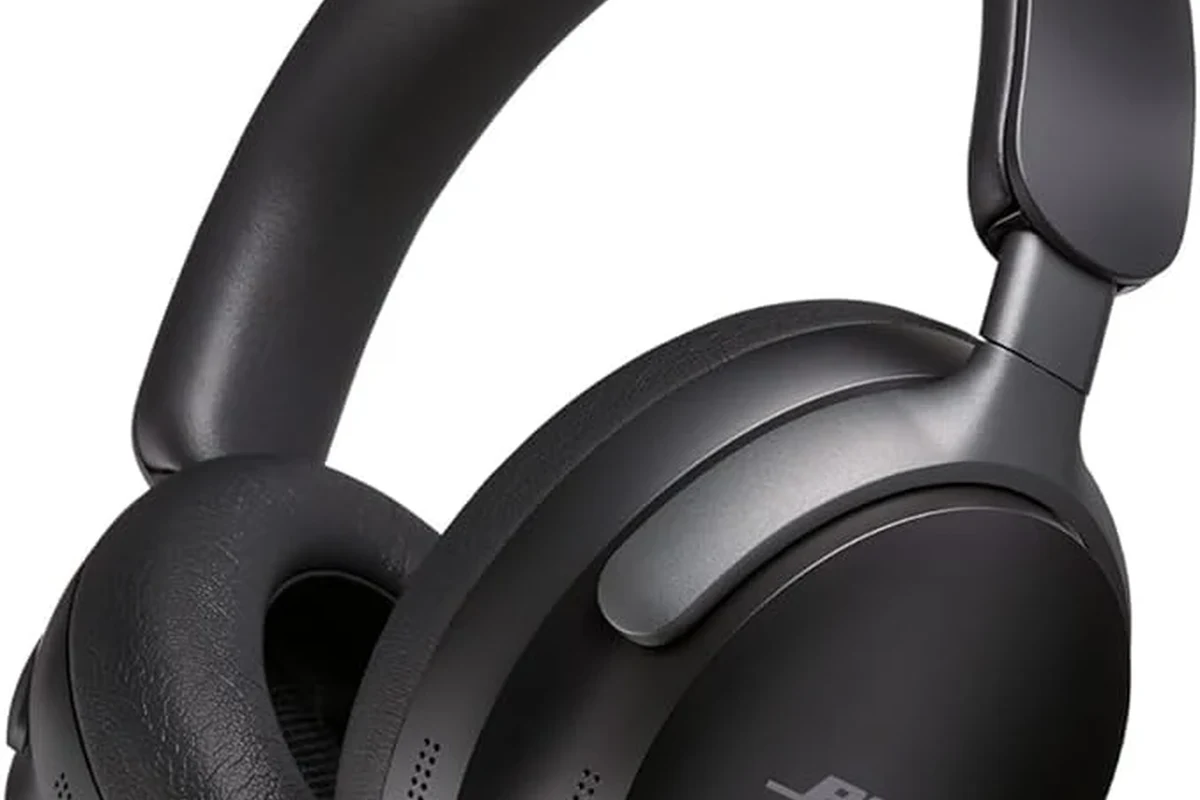
People usually search this when they need replacement ear pads, a charging cable, firmware support, or help selling the headphones. It also matters because Bose model names can look close to each other even when the features, fit, and accessories are different.
Knowing the exact model makes it easier to find the right manual, confirm compatibility, and compare it against newer options. If you’re still learning the basics of headphone categories, our guide to types of headphones explained can help you understand how over-ear, on-ear, and in-ear designs differ.
Quick Ways to Identify Your Bose Headphones by Model Name, Serial Number, and Design Details
The best approach is to check the name printed on the headphones, then confirm it through the app or serial number. If one clue is missing, another usually fills the gap.
Check the Headband, Ear Cup, and Inside Label for Model Clues
Start with the obvious places: the inside of the headband, the ear cup hinge area, or the inner shell near the cushions. Many Bose headphones have a small printed model name, regulatory text, or product code in one of those spots.
Look for wording such as QuietComfort, Noise Cancelling Headphones 700, SoundSport, or Sport. Even if the full model number is not visible, the product line name often narrows it down quickly.
Use your phone’s flashlight and inspect the inside of each ear cup. Small labels are easier to read when you gently rotate the ear pads and check the hinge area.
Use the Bose App, Bluetooth Menu, or Connected Device Name
If your headphones are wireless, open the Bose app or your phone’s Bluetooth settings and check the connected device name. In many cases, the model name appears there, or at least close enough to identify the product family.
Be careful, though: the Bluetooth name can sometimes be customized by a previous owner. If the name looks generic, treat it as a clue rather than proof.
App names and Bluetooth labels can be edited or shortened on some devices, so they are helpful but not always definitive.
Find the Serial Number and Match It to Bose Support Records
The serial number is one of the most reliable ways to confirm what model Bose headphones you have. It may be printed on the product, the charging case, the box, or the paperwork that came with it.
Once you have it, compare it with Bose support resources or product registration information. If you no longer have the original packaging, the serial number can still be the best route for official verification.
- Serial number on the headset or case
- Printed model text inside the headband or ear cup
- Bluetooth device name on your phone
- Bose app product listing, if available
Common Bose Headphone Models and How to Tell Them Apart at a Glance
Bose has several popular product families, and many of them share a similar premium look. Still, a few visual and feature-based clues can help you separate them fast.
Bose QuietComfort Series: QC 35, QC 45, and QuietComfort Ultra
The QuietComfort line is one of the easiest places to start because it is so common. QC 35 and QC 45 models are both over-ear wireless headphones with a familiar folded travel-friendly shape, while the QuietComfort Ultra has a newer premium look and updated branding.
If your headphones are clearly part of the QuietComfort family, compare the headband shape, button layout, and app features. Newer models may also support updated noise control or spatial audio-style features, depending on the generation.
Bose Noise Cancelling Headphones 700 vs. QuietComfort Models
The Bose 700 series is often confused with QuietComfort models because both are over-ear wireless noise-cancelling headphones. The 700 usually has a more modern, streamlined look, a different headband structure, and a distinct button/control layout.
If the headphones feel more angular or minimalist than older QuietComfort models, the 700 line is worth checking first. For a deeper look at how Bose-style ANC differs from passive isolation, see our guide on what is noise cancelling headphones.
Bose Sport, SoundSport, and Older On-Ear or Around-Ear Versions
Smaller Bose models like Sport or SoundSport are usually earbuds rather than full-size headphones, so the fit is a big clue. If your device sits in or around the ear without a headband, it is probably not part of the QuietComfort or 700 family.
Older Bose on-ear and around-ear models may have simpler controls and less app integration. Their age can also show up in the charging port, cable style, or the way the ear cups fold.
Two Bose headphones can look almost identical on the outside but still use different cushions, chargers, or firmware support depending on the generation.
Practical Examples: Identifying Your Bose Headphones in Real-World Situations
Real-life identification is not always neat. Labels wear off, gifts come without boxes, and secondhand purchases can be missing the original paperwork.
If the Physical Label Is Worn Off
When the printed label is gone, rely on the shape, button placement, charging port, and app recognition. Small differences in the ear cup design or the fold mechanism can still point you to the right model family.
You can also compare photos of your headphones with official Bose product images. Try to match the headband padding, the hinge style, and the microphone openings rather than only the color.
If You Bought Them Secondhand or Received Them as a Gift
Secondhand Bose headphones often come with a custom Bluetooth name or no packaging at all. In that case, the serial number and the physical design are your best clues.
If the seller included a receipt or order email, check that first. It may list the exact product name, which is often faster than trying to identify it from memory.
Be cautious with used headphones that have missing labels, unusual packaging, or mismatched accessories. Those can be signs of repairs, replacements, or non-original parts.
If the Model Name Looks Similar but the Features Feel Different
It is common to confuse models that share the same product family but behave differently in use. For example, one version may support a newer app feature, a different charging standard, or a more advanced noise control mode.
If the name seems close but the experience feels off, check the exact generation rather than the family name alone. That can help explain why the battery life, buttons, or sound tuning do not match what you expected.
Why do two Bose headphones with similar names behave differently?
Because Bose often updates a product line across multiple generations. The family name may stay familiar, but the controls, app support, charging, and tuning can change from one model to the next.
Common Mistakes People Make When Trying to Identify Bose Headphones
Most identification mistakes happen when people stop after one clue. A Bluetooth name or color alone is rarely enough to confirm the exact model.
Confusing Product Line Names with Exact Model Numbers
QuietComfort, SoundSport, and Noise Cancelling Headphones are product line names, not always the full answer. Within those families, there may be multiple generations that look nearly the same.
Always check whether you have the line name only or the specific generation. That distinction matters when buying replacement parts or looking for the right support page.
Assuming Color, Case Style, or App Display Is Enough
Color can be helpful, but it is not a reliable identifier because Bose often offers multiple finishes across different models. Case style is useful too, yet it can be replaced or lost.
The app display is also not perfect if the device name was changed by a previous owner. Use it as one piece of evidence, not the only one.
Mixing Up Genuine Bose Headphones with Counterfeits or Replacements
Counterfeit or heavily modified headphones can imitate the look of real Bose products. That is why serial number checks and official support verification are so important.
If the build quality feels off, the logo placement is strange, or the app cannot recognize the product, do not assume it is a genuine Bose model. Compare it carefully with official product photos and support documentation.
Expert Advice: When to Use Bose Support, Warranty Tools, or Product Registration
If you still cannot confirm the model, Bose support tools are worth using. They can be especially helpful when you need repairs, firmware help, or replacement accessories.
Why Matching the Model Matters for Repairs, Ear Pads, and Firmware Updates
The exact model determines which ear pads, charging cables, and firmware updates are compatible. Even within the same Bose family, parts may not fit every generation.
That is why model matching is more than a naming exercise. It directly affects comfort, sound performance, and how easily you can keep the headphones in good shape.
If your headphones are causing ear pain, pressure, or unusual sound changes, contact Bose support or a professional audio specialist. If you have hearing discomfort or tinnitus concerns, follow safe listening guidelines and consider speaking with an audiologist.
Warning Signs That You Need Official Verification
If the label is missing, the Bluetooth name looks edited, and the serial number does not match any obvious product record, official verification becomes important. The same is true if you are trying to claim warranty service or order exact replacement parts.
For wireless setup and troubleshooting after identification, you may also find our guides on how to connect Bluetooth headphones and how to reset Bluetooth headphones useful.
Price, Value, and Comparison Notes: Why Knowing the Exact Bose Model Helps You Spend Smarter
The exact Bose model affects more than support. It also affects resale value, repair decisions, and whether upgrading actually gives you something better for your money.
How Older and Newer Bose Models Differ in Features and Replacement Part Costs
Older models may still sound good, but their replacement parts can be harder to find or more expensive than newer ones, depending on availability. Newer models may offer better app support, updated noise control, or more convenient charging, though performance still depends on your needs and preferences.
If you are comparing a used pair to a newer purchase, factor in accessory costs as well as the headphone price itself. Sometimes the cheaper pair is not the better value once you add pads, cables, or a new case.
Choosing Between Keeping, Repairing, Upgrading, or Reselling Your Headphones
If the model is confirmed and the headphones still fit your needs, repairing them may be the smartest choice. If parts are unavailable or the feature set feels outdated, upgrading could make more sense.
Knowing the exact model also helps you write a better resale listing. Buyers are more likely to trust a listing that names the specific Bose model, not just “Bose headphones.”
- Exact model names matter for parts, support, and resale.
- Check labels, app names, and serial numbers together.
- QuietComfort and 700 models are commonly confused.
- Official verification is best when labels are missing or altered.
Final Recap: The Fastest Way to Answer “What Model Bose Headphones Do I Have?”
The quickest answer is usually found by checking the physical label first, then confirming the Bluetooth name or Bose app listing, and finally matching the serial number if needed. That three-step approach is the most reliable way to identify your Bose headphones without guessing.
If you only remember one thing, remember this: product family names are helpful, but the exact generation is what really tells you what model Bose headphones you have. Once you know that, it becomes much easier to find the right accessories, support, and upgrade path.
Frequently Asked Questions
It depends on how you listen. Wireless is more convenient for commuting and daily use, while wired can be useful for low-latency listening and devices without Bluetooth.
Over-ear models usually block more outside sound because they cover the ear and can use stronger ANC systems. In-ear models can still work well, but fit and seal matter a lot.
Most Bose consumer headphones are closed-back, which helps with isolation and noise cancellation. Open-back designs are more common in home audio headphones than in portable Bose models.
Driver type, tuning, comfort, and EQ options matter more than a single spec sheet number. Frequency response can help, but real-world sound also depends on fit and your personal preference.
For commuting, look for strong ANC, comfort, and battery life. For gaming or studio work, check latency, wired support, microphone quality, and whether the sound profile fits your needs.
Look at ear cushion material, headband padding, weight, hinge strength, and replacement part availability. Long listening sessions are easier when the fit is secure but not too tight.