Headsets with Microphone

Headsets with microphone are best for clear calls, gaming, classes, and work because they combine listening and speaking in one device. Choose based on comfort, mic clarity, and compatibility first, then decide whether wired or wireless fits your routine better.
Headsets with microphone are the simplest all-in-one choice when you need clear voice pickup and private listening for calls, gaming, classes, or travel. The best model for you in 2026 depends on comfort, connectivity, and how much mic clarity matters in your daily routine.
- Best use: Great for meetings, online classes, voice chat, and travel calls.
- Top priority: Comfort and mic clarity matter more than flashy extras.
- Connection choice: Wired is simpler; wireless adds freedom but needs charging.
- Smart check: Verify platform compatibility before buying for PC, phone, or console.
What Are Headsets with Microphone, and Which Users Need Them Most?

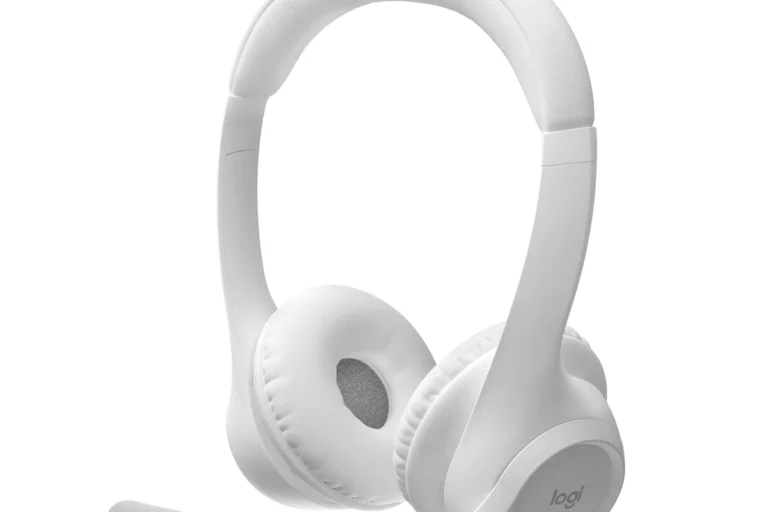
A headset with microphone combines headphones and a built-in mic in one device, usually with an inline mic, boom mic, or wireless mic array. That makes it easier to hear and be heard without adding a separate desk microphone or relying on a phone’s built-in mic.
Answering the main question: the best use cases at a glance
These headsets are especially useful when communication matters as much as audio. They are a strong fit for remote work, online classes, multiplayer gaming, customer support, and frequent voice calls because the microphone is positioned closer to your mouth than a phone or laptop mic usually is.
If you want one device that handles listening and speaking well, a headset is often more practical than buying separate headphones and a mic.
Who should buy one in 2026: work, gaming, calls, study, and travel
In 2026, headsets with microphone remain a smart buy for hybrid workers, students in online classes, and gamers who want voice chat without extra desk clutter. Travelers also benefit from the privacy and convenience, especially on flights, trains, or shared spaces where a headset can reduce the need to speak loudly.
They are not only for “serious” users. If you take calls often, join video meetings, or want a cleaner setup for a laptop or console, the convenience can matter more than chasing the most expensive audio gear.
How to Choose the Right Headset with Microphone
The right choice starts with your main use case. A headset that sounds great for music may still be a poor call headset if the mic is weak, uncomfortable, or hard to mute quickly.
Sound quality, mic clarity, and noise handling
For voice-first use, prioritize microphone clarity and consistent speech pickup over bass-heavy tuning. For mixed use, look for balanced sound that keeps voices natural and avoids harsh treble, because that makes meetings, classes, and long gaming sessions less tiring.
Noise handling matters in two different ways: how much outside sound reaches your ears, and how much background noise your microphone picks up. Some models use passive isolation from the ear cups, while others add active noise cancellation, or ANC, which uses electronics to reduce steady background noise like fans or engines.
Comfort and fit: ear cups, headband pressure, and long-session wear
Comfort is one of the biggest reasons people return a headset. Check ear cup size, padding material, headband pressure, and whether the design traps heat, because a headset that feels fine for 10 minutes may become distracting after a long workday or gaming session.
If you wear glasses, look for softer ear pads and moderate clamping force, since too much pressure can create hotspots around the temples and jaw.
Connectivity choices: wired, USB, Bluetooth, and dongle-based wireless
Wired headsets are usually the easiest for simple plug-and-play use and often avoid battery concerns. USB headsets can be ideal for laptops and desktops because they offer stable digital audio and may include easy mute or volume controls.
Bluetooth headsets are convenient for phones and tablets, but mic quality, latency, and compatibility can vary by device. Dongle-based wireless models often strike a better balance for gaming and office use because they can offer lower delay and more stable connections than standard Bluetooth, though behavior still varies by model and platform.
Budget tiers and what you can realistically expect at each price point
At lower price tiers, expect basic comfort, workable mic quality, and fewer extras. Midrange models often improve padding, voice clarity, and build quality, while premium options may add stronger ANC, better app control, and more refined wireless performance.
Do not assume a higher price automatically means a better headset for your needs. A modest wired model can be a better value than a premium wireless one if you mainly take office calls from a laptop.
Best Features to Compare Before You Buy
Feature lists can look impressive, but only a few details really affect daily use. Focus on the controls, battery behavior, build quality, and software support that you will actually rely on.
Microphone type, mute controls, and voice pickup quality
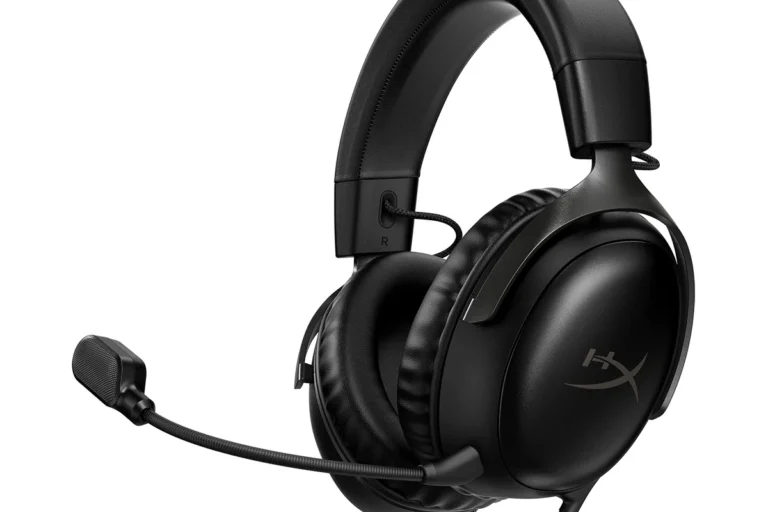
Boom microphones usually give clearer speech than tiny built-in mics because they sit closer to your mouth. If privacy and convenience matter, check whether the mute control is easy to reach and whether the headset gives a clear mute indicator.
Some wireless headsets use multiple microphones and software processing to reduce room noise. That can help in busy homes or offices, but the result still depends on the model, the app, and the surrounding environment.
Battery life, charging speed, and standby performance for wireless models
For wireless headsets, battery life is only part of the story. Standby drain, quick charging support, and how the headset behaves after days without use can matter just as much, especially for travelers and occasional users.
Battery claims, fast-charge behavior, and standby performance can vary by firmware, volume level, and feature use such as ANC or multipoint.
Build materials, durability, and overall ease of use
Look for sturdy hinges, replaceable ear pads if available, and controls that are easy to find without looking. A headset should feel simple to use quickly, especially when you need to join a meeting or mute yourself in a hurry.
- Check the microphone placement and how easy it is to mute
- Confirm whether the headset supports your phone, PC, console, or tablet
- Review warranty, return policy, and replacement-parts availability
ANC, sidetone, multipoint, and app support: which extras matter
ANC is helpful if you work around steady noise, but it is less important if you mainly use the headset in a quiet room. Sidetone, which lets you hear your own voice in the headset, can make speaking feel more natural during long calls.
Multipoint support allows a headset to connect to two devices at once, such as a laptop and phone. App support can be valuable for EQ, firmware updates, and button customization, but only if you are comfortable managing software.
- Prioritize a clear mic and comfortable fit before extras
- Use app features only if they solve a real daily problem
- Confirm device compatibility before relying on multipoint or USB features
Headsets with Microphone: Real-World Benefits and Limitations
Headsets with microphone solve a practical problem: they make it easier to communicate clearly without carrying separate gear. That is why they remain popular for office work, gaming, and study setups.
Clearer communication for meetings, classes, and gaming
A headset places the microphone closer to your mouth than most laptop or phone microphones, which usually improves voice pickup. That can make you easier to understand in meetings, help classmates hear you more clearly, and reduce the need to repeat yourself in voice chat.
Where headsets outperform earbuds and standalone mics
Compared with earbuds, a full headset often offers better comfort for long sessions, stronger passive isolation, and a more stable mic position. Compared with standalone mics, a headset is more compact and portable, and it keeps your setup simpler when you move between rooms or devices.
Choose a headset with a boom mic, easy mute control, and comfortable ear pads if you spend hours in calls or online lessons.
A wireless model with low-latency dongle support may be worth it if you move between a desk, console, and mobile device.
Common drawbacks: bulk, heat buildup, latency, and compatibility issues
Headsets can feel bulkier than earbuds and may trap more heat around the ears. Wireless models can also introduce latency or pairing quirks, and some features work differently across Windows, macOS, iPhone, Android, PlayStation, and Xbox.
If you need help with console compatibility, it is worth checking platform-specific guidance such as how to use headphones with PS5 for the best audio setup or Bluetooth headphones with Xbox Series X before buying.
Evidence limits: why specs do not always tell the full story
Manufacturer specs can tell you a lot, but they do not always reveal how a headset behaves in a noisy room, with glasses, or during a long workday. Real comfort, mic tone, and software stability can vary by head shape, hair style, firmware, and the apps you use.
That is why it is smart to compare return policies, warranty terms, and user reports from the exact platform you plan to use. Specs are useful, but they are only one part of the decision.
Wired vs Wireless Headsets with Microphone: Which Is Better for You?
There is no universal winner. The better option depends on whether you value simplicity, mobility, low latency, or freedom from cables.
When wired is the smarter choice
Wired is often best if you want dependable plug-and-play use, minimal charging concerns, and the lowest possible delay for voice or game audio. It is also a strong choice for budget shoppers and office users who stay near one device most of the day.
When wireless is worth the trade-offs
Wireless makes sense if you stand up often, move around your home office, or dislike cable clutter. It can also be more convenient for commuting and hybrid work, as long as you are comfortable managing charging and occasional pairing steps.
Best fit by scenario: office, home, commute, and console/PC use
| Option | Best For | Key Consideration |
|---|---|---|
| Wired USB or 3.5 mm | Office, study, desktop use | Simple, reliable, and usually easier to set up |
| Bluetooth wireless | Phone calls, commuting, tablets | Convenient, but mic and latency can vary |
| Dongle-based wireless | Gaming, mixed PC use | Often better for low delay, but check platform support |
If you plan to pair a headset with a TV or console, setup details matter. Related guides like how to use headphones with TV and how to use headphones with Xbox can help you avoid compatibility surprises.
Safety, Care, and Cleaning Tips for Long-Term Use
Good care extends the life of a headset and helps it stay comfortable. It also supports safer listening habits, which matter whether you are on calls, gaming, or listening to music.
Safe listening habits and volume awareness
Keep volume at a moderate level and take breaks during long sessions. Public health guidance from organizations such as the World Health Organization emphasizes reducing exposure to loud sound over time, especially when listening for extended periods.
Avoid listening at high volume for long stretches, and pay attention to ringing, muffled hearing, or discomfort. If you have hearing concerns, speak with a hearing specialist.
Cleaning ear pads, boom mics, and headbands without damaging materials
Use manufacturer guidance whenever possible, especially for leatherette, fabric, memory foam, or removable pads. In general, a soft dry cloth works for most surfaces, while light cleaning should be done carefully so moisture does not reach internal electronics or microphone ports.
- Wipe pads and headbands gently after use
- Let the headset dry fully before storing it
- Follow brand instructions for removable cushions
- Soaking the headset or using harsh cleaners
- Forcing debris into the mic opening
- Storing it while damp or sweaty
Storage, cable care, battery care, and hygiene best practices
Store the headset in a case or on a clean stand when possible, and avoid sharp bends in cables. For wireless models, follow the manufacturer’s charging guidance, avoid damaged chargers, and keep batteries away from extreme heat.
Stop using any charging cable, battery, or unit that is frayed, swollen, cracked, or overheating, and follow the manufacturer’s safety guidance.
Common Mistakes to Avoid When Buying or Using a Headset with Microphone
Many buyers focus on one feature and overlook the details that affect daily comfort and compatibility. A few simple checks can prevent most regrets.
Ignoring comfort, clamp force, and microphone placement
A headset can have excellent specs and still be unpleasant if it squeezes too tightly or places the mic awkwardly. Comfort and positioning matter because they affect how often you will actually want to wear it.
Overpaying for features you will not use
Do not buy ANC, app control, or premium wireless features unless you genuinely need them. If your environment is quiet and you mostly take short calls, a simpler model may be the better value.
Skipping compatibility checks for phone, PC, console, or tablet
Always confirm whether the headset works the way you expect on your main device. Some headsets support audio but not full mic functions on every platform, and some console features require specific connection types.
Forgetting setup steps, firmware updates, and audio settings
New headsets sometimes need the correct input device selected, a mic unmuted in software, or a firmware update before they work properly. If the sound seems wrong, check system settings before assuming the headset is defective.
When a headset sounds quiet or the mic is too low, check the operating system’s input and output levels before changing hardware.
Final Recommendation: How to Pick the Best Headset with Microphone for Your Needs
The best headset is the one that fits your main routine, not the one with the longest feature list. Start with comfort, mic clarity, and compatibility, then decide whether wired simplicity or wireless convenience matters more.
Best choice by budget and use case
If you are on a tight budget, a simple wired headset is often the safest value choice for calls and study. If you work across multiple devices, a midrange wireless model with a good boom mic and reliable controls may be worth the extra cost.
Value-focused verdict for 2026 shoppers
For 2026 shoppers, the best value usually comes from a headset that does a few things well: clear voice pickup, all-day comfort, and dependable compatibility. Extra features are useful only when they solve a real problem in your setup.
What Ryan Mitchell recommends prioritizing first
Ryan Mitchell’s editorial advice is simple: choose the headset you can wear comfortably for your longest session, then verify that the microphone and connection type match your devices. If you are unsure, compare official manufacturer specs, warranty details, and platform compatibility notes before you buy.
Headsets with microphone are the most practical choice for anyone who splits time between listening and speaking, especially for work, school, gaming, and travel. Pick wired for simplicity and value, or wireless for freedom and convenience, but always prioritize comfort, mic clarity, and compatibility over flashy extras.
Common Questions
Yes, especially if you want clearer voice pickup than a laptop or phone mic. They are also easier to use for long calls because everything is built into one device.
Not always, but quality can vary more by model and device. A good wireless headset can sound very clear, especially if it uses a boom mic or strong noise processing.
It helps most in steady noise like offices, fans, or transit. If you mostly use the headset in a quiet room, ANC is less important.
Ignoring comfort and compatibility. A headset that sounds fine on paper can still be frustrating if it pinches, runs hot, or does not work well with your device.
Keep it in a dry place, avoid tight cable bends, and charge wireless models according to the manufacturer’s guidance. Do not use damaged cables or store a damp headset in a closed case.
Frequently Asked Questions
A headset usually places the microphone closer to your mouth, which can improve voice pickup and reduce background noise. It also tends to be more comfortable for long sessions if the ear cups fit you well.
Check the connection type first, then confirm compatibility with your phone, PC, tablet, or console on the manufacturer’s page. Some headsets support audio on one device but have limited mic features on another.
Focus on comfort, easy mute controls, and clear microphone pickup. If your room is noisy, ANC or stronger passive isolation may also help.
Not necessarily. Higher-priced models often add better materials, ANC, or software features, but a simpler headset can be the better value if you only need calls and light listening.
Use a soft dry cloth and avoid pushing debris into the mic opening. If the headset has removable parts, follow the manufacturer’s cleaning instructions for those materials.
Keep volume moderate, take breaks during long listening sessions, and stop using any cable or battery that looks damaged or overheats. Follow the manufacturer’s charging guidance and store the headset in a cool, dry place.