Does PS Portal Support Bluetooth Headphones Explained

No, the PS Portal does not support standard Bluetooth headphones directly. For the most reliable audio, use PlayStation Link or a wired headset instead.
If you’re asking does ps portal support bluetooth headphones, the short answer is no, not in the normal direct-pairing way most people expect. The PS Portal is designed around Sony’s own wireless audio system, so you’ll need a different approach if you want to listen privately while playing.
- Direct Bluetooth: Not natively supported on PS Portal.
- Best wireless option: PlayStation Link headset.
- Best budget option: Wired 3.5mm headset.
- Bluetooth workaround: Possible with a transmitter, but not ideal.
Does PS Portal Support Bluetooth Headphones? The Short Answer and Why It Matters
The PS Portal does not natively support standard Bluetooth headphones for direct audio playback. That means you cannot simply put your earbuds or headset into pairing mode and connect them like you would with a phone, tablet, or laptop.
This matters because many buyers assume a handheld gaming device will work like a regular Bluetooth screen. In reality, Sony prioritized low-latency gaming audio and a more controlled connection, which is why the PS Portal behaves differently.
How PS Portal Audio Works in 2025: Wireless PlayStation Link vs Bluetooth

In 2025, the PS Portal’s audio setup is centered on PlayStation Link, Sony’s wireless audio technology for compatible headsets and earbuds. This system is meant to keep game sound tight, responsive, and more stable than typical Bluetooth for gaming.
If you want a broader look at wireless audio basics, our guide to Bluetooth headphones explained breaks down why Bluetooth is convenient but not always ideal for fast-paced gaming.
What Sony built into the PS Portal for audio connectivity
Sony built the PS Portal to work with compatible PlayStation Link devices rather than acting like a universal Bluetooth host. That design helps reduce delay and keeps the audio experience more consistent during remote play sessions.
For gaming, consistency often matters more than raw convenience. A headset that sounds fine on a phone may still feel behind the action when used for fast shooters, rhythm games, or competitive play.
Compatibility can vary by headset model, firmware version, and system updates, so always check the latest Sony support information before buying.
Why standard Bluetooth headphones are not supported natively
Standard Bluetooth headphones are not supported natively because Bluetooth can introduce more latency and connection variability than Sony wants for game audio. Even a small delay can make footsteps, gunfire, and dialogue feel slightly out of sync.
There is also the practical side: Sony is steering PS Portal users toward its own audio ecosystem. That can be frustrating if you already own a good Bluetooth headset, but it does help explain the product’s design choices.
Do not assume every wireless headset will work just because it is Bluetooth. Many users buy the wrong accessory by expecting direct pairing that the PS Portal does not offer.
Best Ways to Use Headphones with PS Portal Without Bluetooth
Even though direct Bluetooth isn’t supported, you still have several practical headphone options. The best choice depends on whether you care most about latency, comfort, price, or convenience.
For readers comparing connection types, our article on Bluetooth vs wired headphones sound quality is a useful starting point when deciding what matters most for gaming audio.
Using PlayStation Link headsets for low-latency gaming audio
PlayStation Link headsets are the cleanest wireless option for PS Portal owners who want low-latency audio. They are built for gaming first, so they usually make more sense than generic Bluetooth models for this device.
This is the route to choose if you want fewer delays and a simpler setup once everything is compatible. It is especially appealing for players who care about timing, directional cues, and a more console-like experience.
If you plan to game often with the PS Portal, prioritize headset compatibility and latency over extra features you may never use.
Wired headphone options through the 3.5mm audio jack
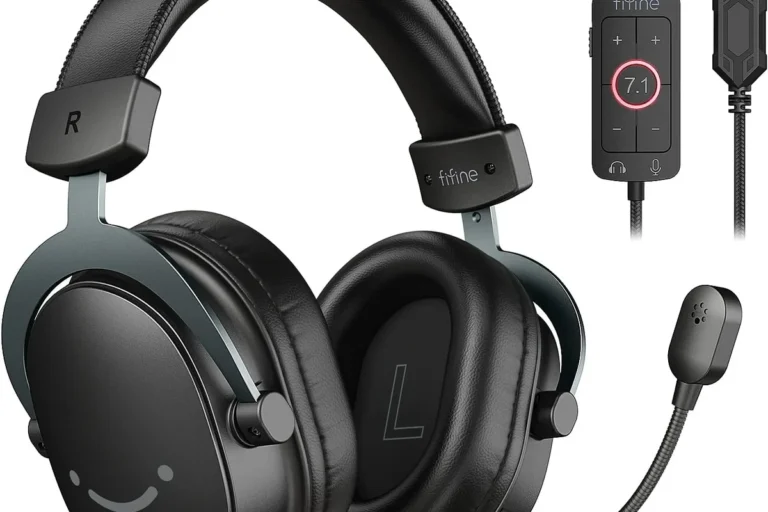
Wired headphones are still one of the easiest and most reliable ways to listen on the PS Portal. If your headset has a 3.5mm plug, you avoid wireless pairing issues and keep the setup simple.
This is often the smartest budget choice too. A good wired headset can deliver clear game audio without needing batteries, dongles, or app setup, and that simplicity is a real advantage for everyday use.
If you are also comparing device compatibility habits, our guide on do wired headphones work on MacBook shows why wired audio still remains useful across many devices.
Bluetooth workarounds with a transmitter: what actually works
Some users try a Bluetooth transmitter to add wireless headphone support, and in some setups that can work. The transmitter usually connects through a compatible audio output, then sends sound to your Bluetooth headphones separately.
That said, this workaround is not perfect. You may still notice latency, reduced mic support, or awkward cable management, depending on the transmitter and headphone pair you choose.
If you rely on voice chat or sensitive timing, consult a gaming audio specialist or check Sony’s current compatibility guidance before buying a transmitter.
Real-World Use Cases: Which Headphone Setup Fits Your Gaming Style?
The best PS Portal audio setup is not the same for every player. A casual remote play user, a competitive gamer, and a traveler all have different needs.
Casual remote play at home
If you mainly use the PS Portal around the house, comfort and convenience may matter more than absolute latency. In that case, a simple wired headset or a compatible wireless option can be enough.
Casual players usually care most about easy setup, decent sound, and not disturbing other people in the room. That makes the PS Portal more flexible than it first appears, even without direct Bluetooth support.
Competitive gaming and latency-sensitive play
For competitive gaming, low latency should be your top priority. PlayStation Link or a well-matched wired headset is usually the safer choice because audio timing stays closer to the action.
Bluetooth can be fine for music and videos, but gaming exposes delay more easily. If you play shooters, fighters, or any title where sound cues matter, avoid adding unnecessary wireless steps.
Even a small audio delay can make a game feel less responsive, especially when footsteps or reload sounds help you react.
Travel, shared spaces, and late-night sessions
For travel or shared spaces, portability and isolation become more important. A comfortable in-ear or over-ear wired headset can be easier to pack and less stressful to manage than a transmitter setup.
If you game late at night, closed-back headphones can also help keep sound from leaking out. For readers who want to compare fit styles, our guide to types of headphones explained can help you choose between over-ear, on-ear, and in-ear designs.
Common Mistakes PS Portal Owners Make When Trying to Use Bluetooth Headphones
Most PS Portal headphone problems come from expectations, not from the headset itself. Buyers often assume the device works like a phone, then get stuck when pairing fails.
Buying the wrong adapter or expecting direct pairing
The biggest mistake is buying Bluetooth headphones and expecting them to connect directly. Another common error is purchasing an adapter without checking whether it actually works with the PS Portal’s audio path.
Before spending money, confirm what the accessory is supposed to do and where it connects. A product that works on a TV or laptop may not be the right solution for the PS Portal.
Ignoring latency, audio delay, and mic limitations
Latency is the main reason gaming devices avoid standard Bluetooth for primary audio. If you ignore it, you may end up with sound that feels slightly behind the gameplay.
Mic support is another issue. Some workarounds may handle listening but not voice chat well, so a headset that seems “wireless compatible” on paper can still be disappointing in real play.
Listening at high volumes for long periods can cause hearing damage. Keep volume at 60% or below for extended sessions.
Overlooking battery life and comfort for long sessions
Long gaming sessions expose weak battery life and poor comfort quickly. A headset that feels fine for 20 minutes may become annoying after an hour or two.
Look for soft ear cushions, manageable weight, and a fit that does not clamp too hard. If you are unsure about comfort and long-term wear, our article on how noise cancelling headphones work can also help you think about isolation versus comfort trade-offs.
Expert Advice: What Top Headphone Reviews Recommends in 2025
For most PS Portal owners, the smartest choice is the one that matches how you actually play. The “best” option on paper is not always the best option in your living room, bedroom, or travel bag.
When to choose PlayStation Link over Bluetooth
Choose PlayStation Link if you want a wireless gaming-first setup and care about lower delay. It is the better fit when you want the PS Portal to feel as responsive as possible without using a cable.
This is also the cleaner option if you hate troubleshooting. Once compatible gear is in place, it tends to be easier to live with than a patchwork of adapters and extra dongles.
When a wired headset is the smarter budget pick
A wired headset makes sense when you want the simplest path to good sound without paying extra for wireless features. It is often the best budget answer for PS Portal owners who just want to play.
Wired also avoids charging anxiety. If you game for long stretches, not having to monitor another battery can be a real quality-of-life win.
What to look for in a transmitter if you need wireless flexibility
If you need wireless flexibility, look for a transmitter that clearly supports your device path, headphone type, and expected latency level. You should also check whether it affects mic use, passthrough, or overall audio quality.
Be cautious with vague product listings. If the description is unclear, it is usually safer to choose a wired headset or a confirmed PlayStation Link option instead.
- PS Portal does not support standard Bluetooth headphones directly.
- PlayStation Link and wired headsets are the most reliable options.
- Bluetooth transmitters can work, but they may add delay and reduce convenience.
- Choose your setup based on latency, comfort, and whether you need voice chat.
Price Comparison: Bluetooth Headphones vs PS Portal-Compatible Audio Options
Price matters, but it should not be the only factor. A cheaper headset can still be the better buy if it matches the PS Portal more reliably.
Budget wired headset options
Budget wired headsets are usually the lowest-risk choice because they skip pairing issues and extra accessories. They are ideal if you want straightforward game audio without paying for wireless features you may not need.
Prices vary widely by brand, materials, and microphone quality, so it is better to compare value than chase the lowest number.
Mid-range PlayStation Link headsets
Mid-range PlayStation Link headsets usually cost more than basic wired models, but they can deliver a more polished wireless experience for the PS Portal. If you play often, that convenience may be worth it.
The trade-off is that you are paying for compatibility and gaming-focused design rather than universal device support.
Cost of Bluetooth transmitter add-ons and hidden trade-offs
A Bluetooth transmitter may look inexpensive at first, but hidden costs can add up. You may need extra cables, adapters, or even a different headset if the first pairing attempt is unreliable.
That is why “cheap wireless” is not always the cheapest path in practice. A clean wired setup can sometimes save money and frustration at the same time.
Final Verdict: Should You Buy Bluetooth Headphones for PS Portal in 2025?
If you want a direct answer, no, Bluetooth headphones are not the right native choice for PS Portal in 2025. Sony built the device around PlayStation Link and wired audio, so that is where you will get the most reliable results.
For most people, the best decision is simple: choose PlayStation Link if you want wireless gaming convenience, or choose wired if you want the most affordable and dependable setup. If you are unsure about hearing comfort or volume habits, consider speaking with an audiologist or audio professional, especially if you already notice ringing, sensitivity, or fatigue after long sessions.
Frequently Asked Questions
Wired headphones usually offer the most reliable low-latency audio for gaming. Wireless is more convenient, but it can add delay depending on the connection type.
Noise cancelling headphones can help block distractions and make game audio easier to hear. They are especially useful in noisy rooms, but comfort and latency still matter.
Open-back headphones can sound spacious and natural, but they leak sound and isolate less. For shared spaces or travel, closed-back models are usually the better fit.
Over-ear headphones are often the most comfortable for long sessions, while in-ear models are more portable. On-ear designs can be lighter, but fit and pressure vary by person.
Look at driver type, comfort, fit, and how the headset handles bass, clarity, and soundstage. Frequency response numbers can help, but real-world tuning matters more than a spec sheet alone.
Focus on comfort, microphone quality, and whether the headset works reliably with your device. A simple wired headset is often the best value when you do not need extra wireless features.