How To Charge Sennheiser Headphones: Easy Guide

Charging Sennheiser headphones in the United States is usually simple: connect the correct USB cable to the charging port, plug the other end into a safe USB power source, and wait for the status light or app to show a full charge. The exact port, light pattern, and charge time depend on the model.
This guide covers Sennheiser wireless headphones, true wireless earbuds, charging cases, and older models that use Micro-USB. It also explains what to do if the headphones will not charge, how to check charging status, and how to avoid common battery mistakes.

Quick answer: How do you charge Sennheiser headphones?
To charge most Sennheiser headphones:
- Find the charging port on the earcup or charging case.
- Connect the supplied USB cable or a compatible replacement cable.
- Plug the cable into a computer, USB wall charger, or power bank.
- Check the LED indicator or Sennheiser Smart Control app.
- Leave the headphones connected until the indicator shows a full charge.
- Unplug them when charging is complete.
Most newer Sennheiser models use USB-C. Some older headphones use Micro-USB. Sennheiser Momentum True Wireless and other true wireless earbuds charge through their case, not through the earbuds themselves.
A 3.5 mm audio cable does not charge Sennheiser headphones. It only carries sound.

Identify the Sennheiser charging method
The correct charging method depends on the type of Sennheiser product you own. Check the label inside the headband, on the charging case, or in the model name shown in the Sennheiser Smart Control app.
| Sennheiser product type | Where you charge it | Common charging connector |
|---|---|---|
| Over-ear wireless headphones | Port on one earcup | USB-C or Micro-USB |
| On-ear wireless headphones | Port on the headphone body | USB-C or Micro-USB |
| True wireless earbuds | Charging case | USB-C or, on some older cases, Micro-USB |
| Wireless gaming headset | Headset charging port or dock | Usually USB-C or Micro-USB |
| Wired-only headphones | No battery to charge | Not applicable |
USB-C models
USB-C is a small, oval port. The plug can be inserted in either direction. Many current Sennheiser headphones, including newer Momentum and Accentum models, use USB-C, but the exact function can vary by model.
Micro-USB models
Micro-USB has a smaller, tapered shape and only fits in one direction. Do not force a USB-C plug into a Micro-USB port. A damaged connector can prevent charging or damage the port.
True wireless earbuds
The earbuds normally charge through metal contacts inside the case. The case itself must have enough power to charge the earbuds. Charge the case through its USB port before troubleshooting the earbuds.
Use the model-specific Sennheiser support page or the manual for the exact connector and indicator behavior.

How to charge Sennheiser wireless headphones
Follow these steps for over-ear, on-ear, and wireless gaming models with a built-in battery.
1. Turn the headphones off if possible
Many Sennheiser headphones can charge while powered on, but turning them off can make the process easier to confirm. It also prevents playback from draining the battery during charging.
If the headphones do not respond, connect the cable anyway. A deeply discharged battery may need several minutes before the LED turns on.
2. Find the charging port
Look along the lower edge of either earcup or on the control panel. The port may be covered by a small rubber flap.
Remove dust or lint carefully. Do not insert metal objects into the port.
3. Connect the USB cable
Use the cable supplied with the headphones when possible. If the original cable is missing, use a clean, undamaged cable that matches the port.
Connect the smaller end to the headphones. Connect the larger USB end to one of these power sources:
- A USB wall charger
- A computer USB port
- A USB power bank
- A powered USB hub
For home use in the United States, a standard USB wall adapter is usually the most convenient option. The wall outlet powers the adapter; the headphones receive power through USB.
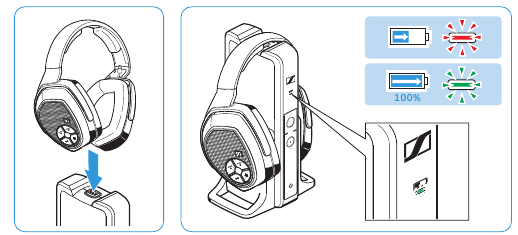
4. Watch the status indicator
The LED may blink, glow steadily, change color, or turn off when charging is complete. Sennheiser uses different light patterns across product lines, so do not assume that one color means the same thing on every model.
The Sennheiser Smart Control app may also display the battery level for compatible headphones.
5. Wait for a full charge
Charge time differs by model, battery condition, charger, and cable. Use the manual for the stated charge time. If the manual gives no exact time, check the app or LED instead of relying on a fixed number.
When the battery is full, disconnect the cable. The headphones have charging controls, but unplugging them avoids unnecessary heat and keeps the cable from being bent or pulled.

How to charge Sennheiser Momentum True Wireless earbuds
Sennheiser true wireless earbuds charge inside their case. The earbuds do not usually connect directly to a USB cable.
- Place the left and right earbuds into the correct sides of the case.
- Confirm that each earbud sits on its charging contacts.
- Close the lid if the model requires it.
- Connect a USB cable to the case.
- Plug the cable into a USB power source.
- Check the case LED or the Smart Control app.
- Leave the case connected until it reaches the desired charge level.
Clean charging contacts can make a large difference. If an earbud does not charge, remove it and inspect the small metal contacts on both the earbud and case. Wipe them with a dry, soft cloth. Do not use water or spray cleaner inside the case.
Some Sennheiser cases may support wireless charging, while others do not. Use wireless charging only if the product manual specifically lists that feature.

How to check whether Sennheiser headphones are charging
The most reliable sign is a charging indicator that changes when the cable is connected. Depending on the model, you may see:
- A blinking LED
- A steady LED
- A battery icon in the Sennheiser app
- A voice prompt
- A change in the case indicator
- A higher battery percentage after several minutes
A light that turns on briefly does not always prove that the battery is charging. To confirm it, leave the headphones connected for 10 to 15 minutes, then check the battery level again.
If the LED does not turn on, try a different USB power source and cable before assuming the battery has failed. Some headphones show little or no light when the battery is completely empty.
The manual is the final reference for color codes. Sennheiser LED patterns are not identical across Momentum, Accentum, HD, PXC, and true wireless product families.
What to do if Sennheiser headphones will not charge
Check the simplest causes first. This order reduces the risk of damaging the port or battery.
Try another cable
A broken cable is a common cause of charging failure. Test the cable with another device, or use a known-good cable that fits the headphone port correctly.
Do not continue using a cable with a loose plug, exposed wire, bent connector, or heat damage.
Try another USB power source
Connect the headphones to a different wall adapter, computer, or power bank. A damaged adapter or inactive USB port can look like a headphone problem.
Avoid unknown or damaged chargers. Use a reputable USB power source that matches the product instructions.
Inspect and clean the port
Look for lint, dirt, bent contacts, or a loose port. Turn the headphones off before cleaning. Use a dry, soft brush or gentle air. Never push a pin, knife, or other metal tool into the port.
Check the charging contacts
For true wireless earbuds, confirm that both earbuds sit correctly in the case. Remove protective film if the product is new. Clean the contacts with a dry cotton swab or soft cloth.
Allow time for a deeply discharged battery
A battery that has been empty for a long time may not show an immediate response. Leave the headphones connected to a reliable power source for at least 30 minutes, then check again.
Reset only when appropriate
A reset can resolve a software or control problem, but it will not repair a broken cable, damaged port, or worn battery. Follow the reset method in the manual for your exact Sennheiser model. Resetting may erase Bluetooth pairings.
Stop if the battery becomes hot or swollen
Disconnect the headphones if they become unusually hot, smell strange, smoke, leak, or show swelling. Do not puncture, open, or continue charging a damaged lithium-ion battery. Contact Sennheiser support or an authorized repair service.

Safe charging practices for Sennheiser headphones
Use the charger and cable as directed in the product manual. A standard USB power source is generally suitable, but the headphones—not the wall outlet—determine how much power they draw.
Keep these practices in mind:
- Charge on a hard, open surface.
- Keep the headphones away from direct sunlight and high heat.
- Do not cover the headphones with clothing or bedding while charging.
- Keep moisture away from the USB port.
- Do not charge a wet headset.
- Avoid forcing the plug into the port.
- Replace damaged cables.
- Store the headphones with some charge if you will not use them for a long time.
- Check the battery occasionally during long-term storage.
Do not confuse water resistance with safe charging. Even a water-resistant product should be dry before connecting a cable.
Lithium-ion batteries naturally lose capacity over time. A shorter battery life after years of use does not always indicate a charging fault. If the headphones shut off soon after charging or the battery level changes sharply, professional service may be needed.

How long does it take to charge Sennheiser headphones?
The time varies by model. The manual or Sennheiser app provides the most accurate information.
Charging time can change because of:
- Battery size
- Battery age
- Temperature
- Cable quality
- USB power source
- Whether the headphones are playing audio
- Whether the headphones are connected to a computer
- The condition of the charging port
Do not use a universal estimate as proof that a battery is defective. For example, a headset that needs more time than expected may be operating normally if it is being used while charging or connected to a low-power USB port.
A quick-charge feature, when available, is also model-specific. Check the official specifications before relying on a short charging period for a certain amount of playback.

Can you use Sennheiser headphones while they charge?
Some Sennheiser wireless headphones can play audio while connected to USB power. Others may disable Bluetooth audio, change modes, or behave differently while charging.
If you need sound while the battery charges, check the manual for your model. A wired audio connection may work on some headphones, but a 3.5 mm cable does not charge the battery.
Charging during use can also take longer because the headphones are using power at the same time. If the battery does not seem to increase, turn the headphones off and charge them without playback.
Can you charge Sennheiser headphones with a phone charger?
Usually, you can use a reputable USB phone charger if the connector fits and the headphone manual does not state otherwise. USB charging devices are designed to provide power through compatible charging standards.
Use the original cable when possible. Avoid damaged, counterfeit, or unusually modified chargers. If a charger or cable becomes hot, disconnect it and use another approved power source.
Why do my Sennheiser earbuds charge unevenly?
Uneven charging usually means one earbud is not making good contact with the case. Remove both earbuds, inspect the contacts, and place them back carefully.
Also check for:
- Dirt or earwax on the contacts
- A protective film on a new earbud
- An earbud that is not seated fully
- A case with low battery
- A software or pairing issue
If one earbud still does not charge after cleaning and testing the case, use the model-specific Sennheiser support instructions.
Should I leave Sennheiser headphones charging overnight?
Sennheiser headphones include charging controls, but overnight charging is not required. For regular use, disconnect them after the battery is full when convenient.
More important than the clock is the charging environment. Do not charge under bedding, in a hot car, near water, or with a damaged cable.
Can I charge Sennheiser headphones without the original cable?
Yes, if the replacement cable has the correct connector and is undamaged. A USB-C cable is needed for USB-C models, while Micro-USB models require a Micro-USB cable.
The cable must carry power, not only data. If the headphones do not charge, test another cable and power source.
When should I contact Sennheiser support?
Contact Sennheiser support or an authorized service provider if the headphones:
- Do not charge with more than one known-good cable and power source
- Have a loose or damaged port
- Become unusually hot
- Show swelling, leakage, smoke, or a burning smell
- Charge fully but shut off quickly
- Have one earbud that remains dead after contact cleaning
- Are still under warranty
Use the exact model name and serial information when requesting help. The model determines the correct reset, LED meaning, battery procedure, and service options.
Key takeaways
- Most newer Sennheiser headphones charge through USB-C.
- Older models may use Micro-USB.
- True wireless earbuds charge through their case.
- A 3.5 mm audio cable does not charge the headphones.
- Check the LED or Smart Control app to confirm charging.
- Try a different cable and USB power source before assuming the battery is defective.
- Keep the headphones dry and cool while charging.
- Stop charging immediately if the battery becomes swollen, very hot, or damaged.
Conclusion
To charge Sennheiser headphones, connect the correct USB cable to the headphone or charging-case port and use a safe USB power source. Confirm the charge with the model’s LED or Sennheiser Smart Control app.
If charging fails, test the cable, power source, port, and charging contacts in that order. For unusual heat, swelling, physical damage, or a battery that will not hold a charge, stop using the device and contact Sennheiser support.