How to Use Headphones with PS5 for Best Audio Setup

Use a wired 3.5mm headset for the easiest PS5 setup, or choose a USB wireless gaming headset for better convenience and lower delay. Standard Bluetooth headphones usually need an adapter or TV workaround, and PS5 audio settings help fine-tune game sound, chat, and 3D Audio.
If you want to know how to use headphones with PS5, the short version is this: wired headsets are the easiest option, USB wireless headsets are the most convenient for many players, and Bluetooth usually needs an adapter or TV workaround. The best setup depends on whether you care most about low latency, chat quality, comfort, or simple plug-and-play use.
- Fastest setup: Plug a wired headset into the DualSense controller.
- Best wireless choice: Use a USB dongle headset made for gaming.
- Bluetooth caveat: Standard Bluetooth often needs extra hardware on PS5.
- Sound tuning: Check output, chat balance, and 3D Audio settings.
- Buying tip: Prioritize latency, comfort, and mic quality over brand hype.
How to Use Headphones with PS5: What Gamers Need to Know in 2025
The PS5 is flexible, but it does not treat every headphone type the same way. Some headsets connect directly and work right away, while others need adapters, TV audio routing, or a USB dongle to function properly.
For most gamers, the main goal is to get clean game audio with minimal delay and a mic that works well in party chat. That is why it helps to understand the PS5’s audio paths before buying or connecting anything.
Headphone compatibility can vary by brand, model, firmware version, and whether the headset is designed for console gaming, general Bluetooth use, or TV audio.
PS5 Audio Output Options: USB, 3.5mm, Bluetooth, and TV-Connected Headphones
The PS5 can send audio through the DualSense controller’s 3.5mm jack, through USB audio devices, or through your TV or monitor if that display supports headphone output. Bluetooth is the least straightforward option because the PS5 does not offer broad native support for standard Bluetooth headphones.
Each route has trade-offs. Wired connections are simple and stable, USB wireless headsets are convenient, and TV-connected headphones can work well if your display has a good audio output section.
When a wired headset is the simplest plug-and-play choice
If you want the least hassle, a wired headset with a 3.5mm plug is usually the easiest answer. You just connect it to the DualSense controller and select the correct output in the PS5 settings if needed.
Wired headsets are especially good for casual gaming, split-second competitive play, and anyone who does not want to worry about battery life. They also tend to avoid the latency issues that can bother wireless setups.
If your headset sounds too quiet from the controller, check both the headset volume and the PS5 output volume settings before assuming the headset is weak.
Why Bluetooth headphones need a workaround on PS5
Many gamers expect any Bluetooth headphones to pair directly with the console, but that is usually not the case. The PS5 is selective about Bluetooth audio, so standard wireless headphones often need a USB Bluetooth adapter or another workaround.
That does not mean Bluetooth is impossible. It just means you should plan for extra steps and understand that latency, mic support, and sound quality may vary more than with a dedicated gaming headset.
Not all Bluetooth adapters are equal. Some add noticeable delay or limit microphone features, which can be frustrating in fast-paced games or voice chat.
Using your TV or monitor as the audio source
If your TV or monitor has a headphone jack or supports audio output through a connected sound system, you can route PS5 audio through the display instead of the controller. This can be useful for players who sit farther from the console or want headphones connected at the screen.
It is a practical option, but it depends heavily on the display’s audio quality. Some TVs handle this well, while others introduce delay or weaker sound than a direct connection.
Best Ways to Connect Headphones to PS5 for Different Gaming Setups
The best connection method depends on how you play. A couch gamer watching movies and single-player adventures may prefer comfort and convenience, while a competitive player may care more about latency and chat clarity.
Before choosing, think about where you sit, whether you use voice chat, and whether you want one headset for gaming and everyday listening.
Direct connection to the DualSense controller
This is the simplest setup for wired headphones. Plug the headset into the controller’s 3.5mm port, then go to PS5 sound settings if you need to confirm the output device or adjust chat/game balance.
For many users, this is the most reliable choice because it avoids battery issues and keeps the system easy to use. It is also a smart option if you already own a good wired headset and do not want to buy anything extra.
Insert the 3.5mm cable into the DualSense controller until it clicks into place.
Open Sound settings and confirm the controller headset is selected as the output device.
USB dongle and wireless gaming headset setup
Many gaming headsets use a USB wireless dongle, which often gives better console compatibility than standard Bluetooth. You plug the dongle into the PS5, power on the headset, and let the two devices pair automatically.
This is a strong middle ground for players who want wireless freedom without giving up too much responsiveness. It is also often easier to manage than pairing through a TV or external adapter.
Optical audio alternatives through a TV, soundbar, or extractor
Some older audio setups rely on optical audio, but the PS5 itself does not provide a standard optical output. If you use this route, it usually involves a TV, soundbar, or HDMI audio extractor that converts the signal for your headphones or DAC.
This can work well for certain home theater or desk setups, but it adds complexity. If you are not already using external audio gear, a direct controller connection or USB headset is usually simpler.
Many “gaming” headsets are really just tuned for convenience features like low-latency wireless and easy mic support, not necessarily better sound quality than a good wired pair.
How to Adjust PS5 Audio Settings for Clearer Game Sound and Chat
Getting headphones connected is only half the job. The PS5 sound menu lets you control output device selection, chat balance, and 3D audio features that can change how games feel in practice.
Small adjustments can make a big difference, especially if voices sound muddy, game effects are too loud, or the headset mic is not behaving the way you want.
Setting output device and switching between game and chat audio
In the PS5 sound settings, confirm that your connected headset is selected as the output device. If your headset supports a mic, also check whether the console is using the headset mic instead of the controller or another source.
Some headsets let you adjust game and chat balance on the headset itself or through companion software. If voices are too quiet during party chat, that balance is often the first thing to change.
- Output device is set to the correct headset or controller
- Microphone input matches the headset you are using
- Game/chat balance is not skewed too far in one direction
Enabling 3D Audio and choosing the right profile
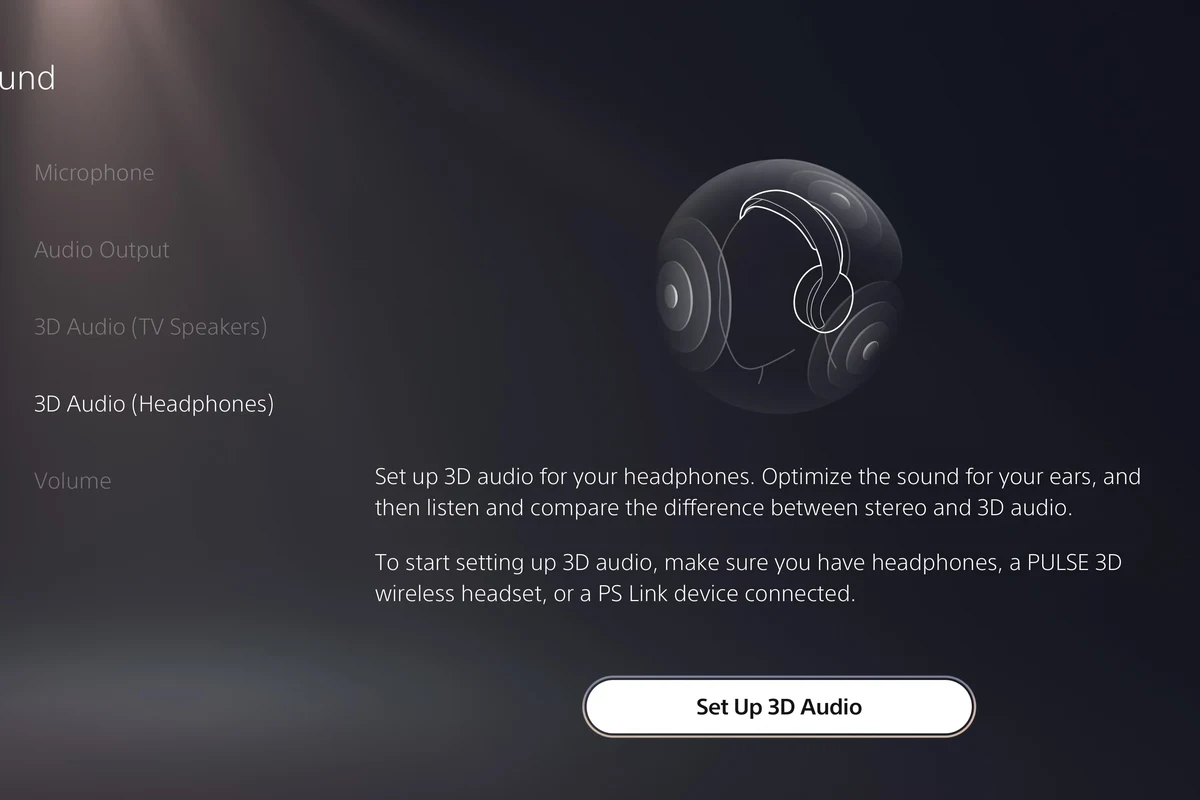
PS5 3D Audio can improve positional cues in supported games, which may help you hear footsteps, direction changes, and environmental detail more clearly. It is worth testing if you play shooters or immersive single-player titles.
That said, not everyone prefers the same profile. Some players like a wider, more open sound, while others prefer a more focused presentation, so take time to compare options with your own ears.
Balancing volume, sidetone, and microphone monitoring
Sidetone, or mic monitoring, lets you hear your own voice in the headset while talking. This can make chat feel more natural, especially with closed-back headsets that seal around the ear.
Keep volume moderate and avoid turning everything up just to “hear more detail.” If you need better clarity, a better-fitting headset or a cleaner EQ adjustment is usually safer than simply increasing loudness.
If you notice ringing, discomfort, or persistent muffled hearing after gaming, reduce volume and consider speaking with an audiologist. Hearing concerns are worth taking seriously, especially for frequent long sessions.
Choosing the Right Headphones for PS5: Budget, Mid-Range, and Premium Picks
The best PS5 headphones are not always the most expensive. A good fit, clear chat audio, and low latency matter more than flashy marketing terms.
If you are shopping now, choose based on your main use case: casual play, competitive gaming, or cinematic single-player immersion.
Best low-cost wired options for casual players
Budget wired headphones can be a smart PS5 choice if you mainly want dependable sound and easy setup. Look for a comfortable fit, a durable cable, and a microphone that is clear enough for party chat.
For casual players, the main priority is value, not feature overload. A simple wired headset may outperform a cheap wireless model if the wireless option has lag, weak battery life, or poor mic pickup.
Wireless headsets with low-latency performance for competitive gaming
If you play shooters, sports games, or anything timing-sensitive, low-latency wireless is more important than generic Bluetooth convenience. A dedicated USB wireless headset is usually the safer bet for PS5 than a standard Bluetooth pair.
Look for stable connection quality, decent mic clarity, and enough battery life for your longest sessions. Comfort also matters because a heavy headset can become distracting during ranked play.
Premium models for immersive single-player and cinematic audio
Premium headsets can be worth it if you care about richer detail, better imaging, and more comfortable long-session wear. They are often a stronger fit for story-driven games, open-world titles, and players who use their headset for both gaming and media.
Still, premium does not automatically mean perfect. Sound signature, clamp force, ear cushion materials, and software support all affect real-world comfort and enjoyment.
| Model | Best For | Price Range |
|---|---|---|
| Wired 3.5mm headset | Simple plug-and-play gaming | Varies |
| USB wireless gaming headset | Low-latency convenience | Varies by brand |
| Premium over-ear headset | Immersive sound and comfort | Varies by brand |
Common Mistakes When Using Headphones with PS5 and How to Avoid Them
Most PS5 headphone problems come from small setup mistakes, not broken hardware. A few checks can save you a lot of frustration.
If your audio sounds delayed, too quiet, or missing mic input, start with the basics before replacing the headset.
Assuming all Bluetooth headphones work natively
This is one of the most common mistakes. Many people buy standard Bluetooth headphones expecting direct PS5 pairing, then discover the console does not support them the way a phone or laptop would.
If you want wireless freedom, make sure the headset is designed for console use or that you are comfortable using a compatible adapter or TV audio route.
Overlooking headset firmware and PS5 system updates
Wireless headsets and dongles sometimes need firmware updates to improve stability or fix pairing issues. The PS5 system software also matters, since updates can affect device recognition and audio behavior.
Before troubleshooting too deeply, check that both the console and the headset are updated. It is a simple step that solves more problems than many people expect.
Using the wrong cable, adapter, or audio output setting
A headset can seem “bad” when the real issue is a mismatched cable, a loose adapter, or an incorrect output setting in the PS5 menu. This is especially common with third-party adapters and older audio gear.
If sound is missing or distorted, test the headset on another device and then confirm the PS5 output source one step at a time. That method is usually faster than guessing.
Listening at high volumes for long periods can cause hearing damage. Keep volume at 60% or below for extended sessions.
Expert Advice: Audio Quality, Latency, and Compatibility Warnings from Top Headphone Reviews
For PS5 gaming, the best headset is usually the one that matches your setup instead of the one with the biggest feature list. Low latency, stable compatibility, and a comfortable fit matter more than brand hype alone.
That is especially true in 2025, when many headphones are built for multiple devices and not all of them behave equally well on consoles.
Why low-latency matters more than brand name
Latency is the delay between what happens on screen and what you hear. In fast games, even a small delay can make sound feel disconnected from the action.
That is why a well-designed wired headset or a console-focused USB wireless headset often makes more sense than a stylish Bluetooth model with unknown delay.
When adapters can reduce sound quality or add delay
Adapters can be useful, but they are not magic. Some introduce extra delay, limit microphone support, or lower audio quality compared with a direct connection.
If you need an adapter, choose one that is known to work with PS5-style audio use and avoid stacking multiple converters unless you truly need them.
- Can add wireless convenience
- May solve compatibility gaps
- Useful for TV-based setups
- May add delay
- Can reduce audio clarity
- Sometimes weak for mic chat
What to check before buying in 2025: codec support, battery life, and mic quality
Before you buy, look for the connection type first, not just the driver size or marketing language. Codec support, battery life, and microphone quality can matter more than raw specs if you use the headset daily.
If you split time between gaming and calls, a clear mic and stable wireless connection may be more valuable than extra bass or a flashy design.
- Wired 3.5mm headsets are the easiest PS5 option.
- USB wireless headsets usually beat standard Bluetooth for gaming.
- TV audio can work, but quality depends on the display.
- PS5 settings matter for 3D Audio, chat balance, and output selection.
Final Recap: The Best PS5 Headphone Setup for Your Gaming Style
If you want the simplest answer for how to use headphones with PS5, start with a wired headset or a USB wireless gaming headset made for console use. Those two options cover most players because they are easy, reliable, and less likely to create delay or pairing problems.
If you already own Bluetooth headphones, you may still be able to use them through a TV, monitor, or adapter, but that setup is less predictable. For the best overall experience, match the connection method to your gaming habits, your budget, and how much you care about latency, chat quality, and comfort.
Frequently Asked Questions
Wired headphones are usually the simplest and most reliable option on PS5. Wireless can be great too, but low-latency USB gaming headsets often work better than standard Bluetooth for play and chat.
Yes, many noise cancelling headphones can work with PS5 if they connect through a supported cable, USB dongle, or TV audio output. The noise cancelling feature itself is separate from the console connection.
Closed-back headphones are usually better for gaming if you want stronger isolation and less sound leakage. Open-back models can feel more spacious, but they are less private and let in more outside noise.
Connection type, latency, mic quality, comfort, and battery life matter more than most marketing specs. Driver type and frequency response can affect sound, but real-world tuning and fit are often more important.
Start with the PS5 audio settings and any headset EQ options before changing hardware. Small EQ adjustments, a better seal, and the right volume level often improve clarity more than boosting bass too much.
Over-ear headphones are usually the most comfortable for long sessions because they spread pressure around the ear. Cushion material, weight, and clamp force matter a lot, so comfort can vary by brand and model.