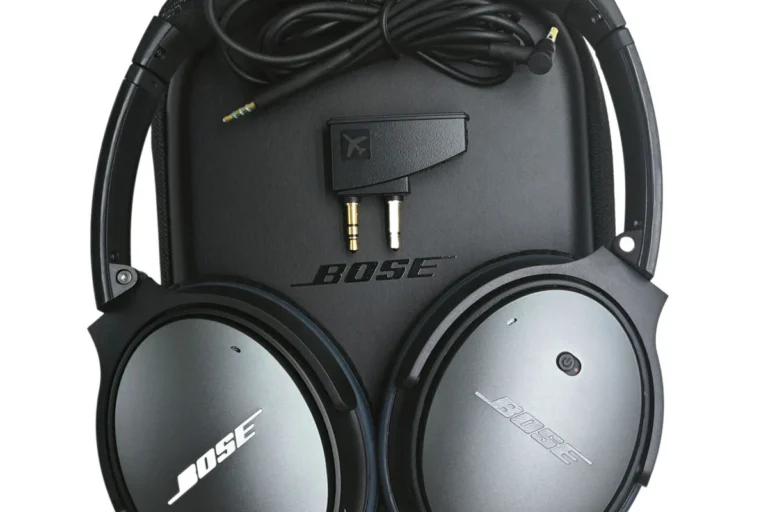
Can Bose Headphones Be Tracked Find Out How It Works

Bose headphones usually cannot be tracked with GPS, but they may be found through Bluetooth history, app connection status, and last-used device clues. If they are missing, your fastest option is to check your phone, the Bose app, and nearby places where they were last connected.
If you are asking can Bose headphones be tracked, the short answer is: sometimes, but not in the same way a phone or AirTag can be tracked. In most real-world cases, Bose headphones can only be located through app history, Bluetooth connection clues, or your phone’s own device list—not true GPS tracking.
- No GPS: Bose headphones usually do not offer true live location tracking.
- App clues: Bose apps and Bluetooth lists can show recent connection history.
- Battery matters: Dead headphones are much harder to locate.
- Best fix: Use Bluetooth range, retrace steps, and check common lost spots first.
Can Bose Headphones Be Tracked? What Users Need to Know in 2026

Bose headphones do not usually include built-in GPS, cellular service, or a live map-based tracker. That means you cannot expect them to show a precise location the way a smartwatch or dedicated tracker might.
What Bose users can often do is check whether the headphones were recently connected, see the last paired device, and use Bluetooth range as a clue. If the headphones were left nearby and still have battery, that can be enough to find them fast.
Tracking support depends on the Bose model, the app you use, and whether the headphones are still powered on and within Bluetooth range.
How Bose Headphones Tracking Works: App, Bluetooth, and Device History

Bose tracking is really more about connection history than location tracking. The headphones communicate with your phone over Bluetooth, and that connection can leave behind useful clues in the Bose app or your device settings.
For readers comparing wireless audio features, this is similar to how some Bluetooth headphones keep a record of paired devices. It helps with reconnecting, but it does not create a live map of where the headphones are.
Bose Music vs. Bose Connect vs. Bluetooth Device Lists
Bose uses different apps depending on the product generation. Newer models often work with Bose Music, while older models may rely on Bose Connect or simple Bluetooth pairing menus on your phone.
The app can sometimes show whether a headset is connected, previously paired, or ready to reconnect. Your phone’s Bluetooth list can also show the last known device name, which is useful when you are trying to confirm whether the headphones are nearby or already out of range.
What tracking can and cannot reveal in real-world use
In practice, Bose tracking can tell you things like “this headset was connected recently” or “this device is saved in your paired list.” It cannot usually tell you the exact room, address, or moving location of the headphones.
That difference matters. A lost headset history is helpful, but it is not the same as a dedicated tracker that updates location on a map.
Which Bose Headphones Support Tracking Features?
Not every Bose headphone model offers the same app support. Some newer wireless models have stronger device management tools, while older models may only offer basic pairing and connection controls.
Models with stronger app support and device management
Generally, newer Bose wireless headphones and earbuds are more likely to work smoothly with the Bose app and show useful connection status. That can make it easier to identify the last device used and reconnect quickly.
If your model supports app-based management, you may also get easier firmware updates, device switching, and connection controls. Those features do not equal GPS tracking, but they can make recovery easier.
Older Bose headphones and what limitations to expect
Older Bose headphones may still sound great, but they often have fewer tracking-related tools. In some cases, all you get is a Bluetooth pairing record on your phone and no meaningful app history at all.
If you use an older pair and want more reliable location recovery, a dedicated tracker may be a better solution than relying on the headphones themselves.
Step-by-Step: How to Check If Your Bose Headphones Can Be Located
If you think your Bose headphones are missing, start with the easiest checks first. In many cases, the fastest answer comes from your phone, not the headphones.
Using your phone’s Bluetooth settings and paired devices
Check your phone’s paired device list and look for the Bose model name. If it still appears, the headphones may be nearby or recently used.
Tap the device name and see whether the phone connects. A successful connection usually means the headphones are powered on and in range.
If the connection drops and returns, move around your home, office, or car to narrow the search zone.
Checking the Bose app for connected devices and last-used status
Open the Bose app that matches your model and look for connected devices, saved headphones, or recent use information. If the app shows the headphones as available, you may be able to reconnect and confirm they are still active.
This is especially useful if you are trying to find a headset before leaving for work or travel. If you also want to understand how headphones pair with computers, our guide on selecting headphones in Windows 11 can help with device menus and connection checks.
Using Find My Device or Find My iPhone with Bose headphones
Apple and Android device-finding tools can sometimes help indirectly, but they do not usually track Bose headphones like they track supported accessories. What they may show is a nearby Bluetooth device connection history or a last-seen location for your phone when the headphones were used.
That can still be useful. If your headphones were last connected while you were at the office, in the car, or at a hotel, that clue can dramatically shorten the search.
Common Mistakes That Make Bose Headphones Harder to Track
People often assume a missing headset should be easy to locate, but a few common mistakes make the search much harder. Understanding these limits can save time and frustration.
Assuming Bose has built-in GPS tracking
Bose headphones are audio devices first, not tracking devices. Unless a specific model or accessory solution is involved, you should not expect satellite-based or cellular location tracking.
If you want true item tracking, a dedicated tracker is usually the better tool.
Confusing lost-device history with real-time location tracking
Many users see a saved Bluetooth connection and assume it means the headphones can be found instantly. In reality, that history only shows that the device was paired or connected at some point.
It may help you retrace your steps, but it does not provide a live location feed.
Letting the headphones fully power off or lose battery
Once the battery dies, Bluetooth-based tracking becomes much less useful. The headphones can no longer broadcast a signal, which makes them harder to detect through your phone or app.
If your Bose headphones are out of battery, focus on recent locations and likely storage spots instead of expecting the app to locate them.
Best Practical Ways to Find Lost Bose Headphones Fast
If your goal is speed, use simple search logic before you start resetting devices. Most lost headphones are found in predictable places, especially when they were last used at home or during travel.
Using Bluetooth range checks and recent location clues
Bluetooth range is often the best clue for wireless headphones. If your phone connects when you are in one room but not another, you can use that behavior to narrow down the search area.
Also think about the last place you remember taking them off. A couch, backpack pocket, desk drawer, or car seat is often more likely than a random room.
Checking home, office, car, and travel bag scenarios
Start with the places you used the headphones most recently. Check under cushions, between car seats, inside laptop bags, and around charging cables or cases.
If you travel often, inspect carry-on pockets, jacket hoods, hotel nightstands, and gym bags. Small wireless headphones and over-ear models can both disappear into the same clutter.
When to reset, reconnect, or retrace your last sync point
If the headphones are not showing up, try reconnecting them after a short wait. If that fails, retrace the last time they were paired with your phone, tablet, or laptop.
Resetting should usually be a later step, not the first one, because it can remove useful connection clues. If you need help with recovery after reconnecting, our guide on how to reset Bluetooth headphones explains when that step makes sense.
Expert Advice: Security, Privacy, and When Tracking Won’t Work
It is smart to think about privacy before relying on any app-based device history. Audio apps can help with convenience, but they are not designed to replace a full security or tracking system.
Why Bose headphones are not a substitute for a dedicated tracker
A dedicated tracker is built to help you find objects. Bose headphones are built to play audio, manage Bluetooth pairing, and sometimes support app controls.
That is why tracking features are limited. If you regularly misplace expensive headphones, adding a separate tracker may be more reliable than expecting the headset itself to solve the problem.
Privacy and data limits users should understand before relying on apps
App-based device history can be helpful, but it may also be limited by account settings, Bluetooth permissions, and operating system rules. Depending on the phone and app version, some location-related clues may not be available at all.
If you have hearing concerns, tinnitus, or need help choosing safe listening levels, consult an audiologist or hearing professional. For app permissions and device-finding features, check your phone’s privacy settings and manufacturer support pages.
Cost, Alternatives, and Final Verdict on Bose Headphone Tracking
There is usually no extra “tracking fee” for Bose headphones themselves, but the real cost question is whether app support is enough for your needs. If you want stronger recovery tools, a separate tracker may be worth the added expense.
Comparing Bose tracking options with Apple AirTag, Tile, and Samsung SmartTag
Compared with Bose’s built-in app history, products like Apple AirTag, Tile, and Samsung SmartTag are designed specifically for finding lost items. They are generally better choices if your main goal is location tracking rather than audio performance.
Bose still wins on headphone quality, comfort, and noise cancellation in many use cases, but those strengths are different from tracking support. If you are comparing brands and features, our article on how noise cancelling headphones work can help explain what Bose is really designed to do.
Final recap: what is possible, what is not, and the best next step
So, can Bose headphones be tracked? Sometimes they can be located through Bluetooth history, app connection status, and last-used clues, but they usually cannot be tracked in real time with GPS-style precision.
If your headphones are missing, check your phone’s Bluetooth list, open the Bose app, retrace your last connection point, and search the most likely places first. If you want dependable item tracking in the future, add a dedicated tracker and treat Bose’s app tools as a helpful backup, not the main solution.
Frequently Asked Questions
Wireless Bose headphones are more convenient, but wired headphones can sometimes offer more stable audio with no Bluetooth compression. Sound quality depends on the model, source device, and your listening preferences.
Yes, Bose noise cancelling models are often a strong fit for commuting because they help reduce background noise. Comfort, battery life, and how much isolation you want will also matter.
Look for low-latency connection options, comfort for long sessions, and a microphone that works well with your device. If you play competitively, wired support can also be useful.
Many over-ear Bose models are designed for long wear, but comfort still depends on head shape, clamp force, and ear cushion material. If possible, try them on or check return policies before buying.
EQ can help you adjust bass, mids, and treble to match your taste or fix a sound signature that feels too bright or too heavy. Small changes are usually better than large boosts.
Focus on fit, battery life, noise cancelling, Bluetooth stability, and app support rather than just driver size or marketing claims. The best choice depends on how you plan to use the headphones.