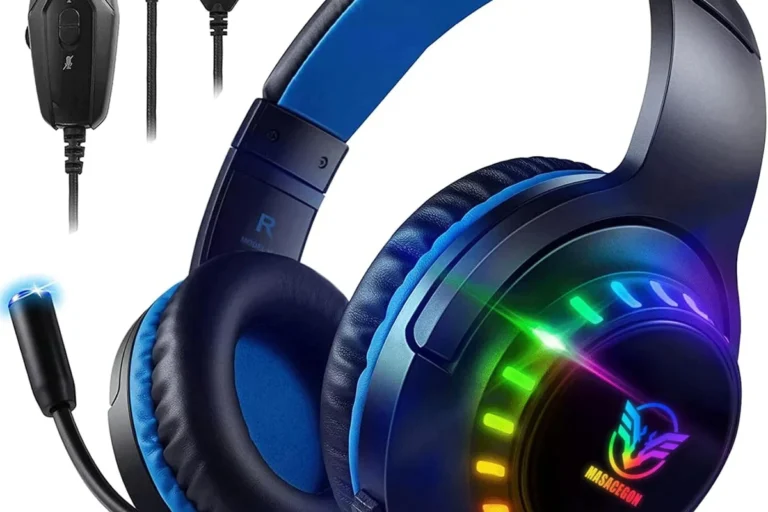
Good Xbox Gaming Headset

A good Xbox gaming headset is one that is explicitly compatible with Xbox, comfortable for long sessions, and clear in team chat. For most players, a simple wired model or an Xbox Wireless headset is the safest value choice.
A good Xbox gaming headset in 2026 is one that connects cleanly to your console, keeps voice chat clear, and stays comfortable long enough for real gaming sessions. For most players, the best choice is a headset made specifically for Xbox wireless or a reliable wired model with a strong mic, simple controls, and a fit you can wear for hours.
- Xbox compatibility first: Confirm the connection method before you buy, especially if you want wireless.
- Comfort matters most over time: A headset that feels fine for 15 minutes may fail after a long session.
- Mic clarity is essential: Clear voice pickup usually matters more than flashy gaming features.
- Buy for your play style: Competitive players, story gamers, and chat-heavy users need different priorities.
What Makes a Good Xbox Gaming Headset in 2026?
Xbox headset shopping is less about flashy features and more about getting the basics right. The best models make it easy to hear footsteps, dialogue, and teammate callouts without forcing you to fight with pairing, lag, or a muddy microphone.
In 2026, that usually means checking three things first: Xbox compatibility, comfort, and communication quality. A headset can sound impressive on paper, but if it is awkward to wear, difficult to connect, or inconsistent in chat, it will not feel like a good buy.
For Xbox buyers, the real goal is not “the most features.” It is the headset that fits your console, your play style, and your session length with the fewest compromises.
Quick Answer: The Best Type of Headset for Most Xbox Players
For most people, a good Xbox gaming headset is an Xbox Wireless model or a quality wired headset with a detachable or flip-to-mute microphone. Those options usually offer the simplest setup, dependable chat performance, and fewer compatibility surprises.
If you play competitive games, prioritize low-latency connection and mic clarity. If you mostly play single-player titles, comfort and sound quality matter more than extra chat features.
How We Judge a Good Xbox Gaming Headset
Because this is an informational guide rather than a hands-on lab review, the best way to judge a headset is by the criteria that matter in everyday use. That includes how it sounds, how it feels after a few hours, how well it works on Xbox, and how easy it is to live with day to day.
Sound Quality and Spatial Audio Support
Good sound on Xbox is not just about loud bass. You want enough detail to hear game cues, clear mids for dialogue, and treble that does not become sharp or tiring.
Spatial audio support can help with directionality in supported games. In plain English, spatial audio is software-based processing that makes sounds feel like they come from different directions, which can be useful in shooters and open-world games. It is not magic, though, and it works best when the headset itself is tuned well.
Microphone Clarity for Team Chat
A strong gaming headset should make your voice easy to understand without constant adjustment. A clear mic matters in party chat, ranked matches, and stream commentary, where background noise and muffled speech can quickly become frustrating.
Look for models with a boom mic, noise reduction, or sidetone support. Sidetone lets you hear a little of your own voice in the headset so you do not shout without realizing it.
Comfort, Clamp Force, and Long Session Fit
Comfort is one of the biggest differences between a headset you keep using and one that ends up in a drawer. Clamp force is the pressure the headband applies to the sides of your head, and it should feel secure without causing soreness.
Soft ear cushions, sensible weight, and a headband that distributes pressure well are more important than many buyers realize. If you game for long stretches, comfort can matter more than a small sound-quality upgrade.
If you are between two models, choose the one with the better fit and lighter pressure unless you already know you prefer a tighter seal. Comfort is what keeps a headset usable after the novelty wears off.
Wired vs. Wireless Connectivity on Xbox
Wired headsets are simple, usually lower maintenance, and do not need charging. They are also a safe choice if you want to avoid pairing issues or battery anxiety.
Wireless headsets feel cleaner and more flexible, but on Xbox you should be careful about compatibility. Not every Bluetooth headset works the way people expect on an Xbox console, so it is smart to verify the connection method before buying. If you need setup help, our guide on how to connect wireless headphones to Xbox Series X explains the basics clearly.
Battery Life, Build Quality, and Materials
Battery life matters most if you play often, travel with your headset, or forget to charge regularly. Build quality matters because hinges, sliders, and earcup joints are common failure points over time.
Materials also affect comfort and durability. Softer pads feel better, but they may wear faster. Metal reinforcement can improve sturdiness, though it sometimes adds weight. The right balance depends on whether you value portability, longevity, or all-day wear.
Best Use Cases: Which Xbox Player Needs What?
The best headset for you depends on how you actually play. A competitive shooter player, a story-mode gamer, and someone who jumps between console and phone calls will all value different things.
Competitive Multiplayer and FPS Players
For fast-paced games, prioritize low-latency audio, clean imaging, and a microphone that cuts through noise. Imaging is the headset’s ability to place sounds in the right direction, which helps with footsteps, reloads, and environmental cues.
These players often prefer a more controlled sound signature rather than exaggerated bass. Too much bass can blur details that matter in competitive play.
Casual Story-Driven Gamers
If you mostly play narrative games, single-player adventures, or open-world titles, comfort and immersion may matter most. You may enjoy richer bass and a wider, more relaxed sound without needing every competitive feature.
For this group, a good headset is one that disappears on your head and lets the game world do the work.
Party Chat, Streaming, and Cross-Platform Use
If you use voice chat often, stream occasionally, or switch between Xbox, PC, and mobile devices, focus on microphone quality and flexible controls. A headset that is easy to mute, adjust, and re-pair will save time every week.
Cross-platform users should also verify what works natively and what requires an adapter or separate cable. If you are unsure about Bluetooth limitations, see can you use Bluetooth headphones on Xbox Series X and can you connect wireless headphones to Xbox easily for more context.
Top Features to Look for Before You Buy
Feature lists can get noisy fast, so it helps to focus on the few that genuinely improve the Xbox experience. The best headset features make setup easier, communication clearer, and long sessions less tiring.
Xbox Wireless Compatibility and Low-Latency Performance
Xbox Wireless is designed for direct console pairing on supported headsets, which can simplify setup and reduce delay. Low latency means the sound arrives quickly enough to match what is happening on screen, which is especially important in shooters and rhythm-heavy games.
Do not assume every wireless headset supports Xbox in the same way. Some are made for Bluetooth devices first, while others need a USB dongle or are limited by platform. Always confirm the manufacturer’s compatibility page before buying.
Mic Monitoring, Sidetone, and Chat/Game Balance
Mic monitoring helps you hear your own voice, which can make chat feel more natural and prevent over-projecting. Chat/game balance controls let you shift attention toward teammates or the game audio without digging through menus.
These features are especially useful if you play with friends often or move between loud and quiet rooms. They can make a headset feel much easier to live with than a model that only offers volume control.
Many “gaming headset” problems come from poor mic placement or bad fit, not from the drivers themselves. A well-positioned microphone often improves chat quality more than a spec sheet upgrade.
ANC, Passive Isolation, and Noise Control
ANC stands for active noise cancellation. It uses microphones and processing to reduce steady background noise, such as fans or air conditioning. Passive isolation is different: it comes from the earcups physically blocking outside sound.
ANC can be useful, but it is not essential for every gamer. If you play in a quiet room, good passive isolation may be enough. If your space is noisy, ANC can help, though it may add cost and sometimes affect battery life.
Controls, App Support, and Ease of Use
Simple controls matter more than many buyers expect. Dedicated dials or buttons for volume, mute, and game/chat balance are often easier than app-only controls.
App support can be helpful for EQ tuning, firmware updates, and mic settings, but it should not be required for basic use. If the headset is hard to operate on day one, it will probably stay annoying later too.
Common Mistakes Buyers Make With Xbox Headsets
Most headset regret comes from buying too quickly or focusing on the wrong feature. A few simple checks can prevent a lot of frustration.
Assuming Every Wireless Headset Works on Xbox
This is one of the most common mistakes. Xbox does not handle every wireless standard the same way, and many Bluetooth headsets are not a direct plug-and-play solution.
Before you buy, confirm the headset lists Xbox compatibility explicitly. If you need a refresher on the connection side, our guide to how to connect headphones to Xbox Series X easily is a useful starting point.
Ignoring Comfort for Multi-Hour Gaming Sessions
A headset that feels fine for ten minutes can become uncomfortable after two or three hours. Pressure on the temples, hot earcups, or a stiff headband can turn a good-sounding headset into a bad daily choice.
Read comfort comments carefully and look for design cues like adjustable headbands, breathable pads, and moderate weight. Those details matter more than marketing language about “premium fit.”
Overpaying for Features You May Not Need
It is easy to pay extra for ANC, app tuning, RGB lighting, or multi-device tricks you will barely use. That does not make those features bad; it just means they are not always worth the price for every player.
If you mostly play at home in a quiet room, a simpler wired headset may be the smarter value. If you split time between gaming, calls, and travel, extra convenience features can make more sense.
Safe Use, Care, and Maintenance Tips
Even a good Xbox gaming headset lasts longer when you treat it properly. A little care also helps keep sound and mic performance consistent over time.
Cleaning Ear Cushions and Microphone Boom
Wipe ear cushions gently with a soft, dry or slightly damp cloth, following the manufacturer’s guidance for the material. For removable pads, check whether the brand recommends cleaning them separately.
The microphone boom can collect dust and oils too. Keep cleaning light and avoid soaking any openings, since moisture can damage internal parts.
- Clean after heavy use, especially if you play in warm rooms.
- Let cushions dry fully before storing the headset.
- Use only manufacturer-approved cleaning methods for leatherette or fabric pads.
Storing the Headset and Protecting the Cable or Battery
Store the headset in a cool, dry place and avoid twisting the cable tightly around the frame. If your model is wireless, keep it charged according to the manufacturer’s instructions rather than leaving it in extreme heat or on questionable chargers.
If any cable is frayed, a battery swells, or a unit overheats, stop using it and follow the brand’s safety guidance. For charging and battery care, manufacturer documentation is the safest reference.
Use moderate listening levels, take breaks during long sessions, and follow recognized safe-listening guidance from health authorities. If you have hearing concerns, speak with a doctor or hearing specialist.
Avoiding Heat, Moisture, and Charging Mistakes
Heat and moisture are common headset enemies. Do not leave the headset in a hot car, near a vent, or in a damp bag after use.
Also avoid incompatible chargers or damaged cables. Safe charging is not about squeezing in extra speed; it is about using the right equipment and following the brand’s instructions.
Stop using any charging cable, battery, or unit that is frayed, swollen, cracked, or overheating, and follow the manufacturer’s safety guidance.
Final Verdict: What Ryan Mitchell Recommends for Value in 2026
Ryan Mitchell’s practical recommendation is simple: for most Xbox players, a good headset is one that is explicitly Xbox-compatible, comfortable for long sessions, and clear enough in chat that teammates never have to ask you to repeat yourself. If you want the safest all-around value, look first at straightforward wired models or Xbox Wireless headsets with strong mic controls and simple setup.
Choose wireless only if convenience matters enough to justify charging and compatibility checks. If you want to go deeper on connection options, pairing, or Bluetooth workarounds, confirm the latest manufacturer specs before you buy, since availability and features can vary by model and region.
Common Questions
An Xbox Wireless headset or a good wired headset is usually the best starting point. Both avoid many of the compatibility issues that can frustrate buyers.
Comfort determines whether you can keep wearing the headset through long matches or story sessions. Pressure, heat, and poor pad design become more noticeable over time.
Not always. ANC helps in noisy rooms, but many players will be fine with good passive isolation and a comfortable fit.
Check Xbox compatibility, battery expectations, and how the headset pairs. Not every wireless headset supports Xbox the same way.
Clean it gently, store it in a dry place, and avoid damaged cables or chargers. Follow the manufacturer’s care instructions for the safest results.
Frequently Asked Questions
It should connect reliably to Xbox, sound clear in games, and keep your voice understandable in chat. Comfort and easy controls matter too, especially if you play for long sessions.
Wired headsets are simpler and usually easier to trust for plug-and-play use. Wireless is better if you want freedom of movement and are willing to manage charging and compatibility checks.
Very important if you use party chat, play competitive matches, or stream. A clear mic reduces repetition and makes teamwork easier.
Many assume every wireless or Bluetooth headset will work the same way on Xbox. Another common mistake is choosing a model that sounds good but becomes uncomfortable after an hour or two.
Use a soft cloth, keep moisture away from openings, and let cushions dry fully before storing. Keep the headset in a cool, dry place and follow the brand’s charging guidance for wireless models.
Check Xbox compatibility, connection type, comfort details, warranty, and return policy. If specs or availability matter, confirm them on the manufacturer’s page before ordering.