How To Improve Noise Cancelling Headphones: Better Sound

Noise-canceling headphones work best when you combine strong settings with a good physical seal. For people in the United States, that means checking fit before a flight from a busy U.S. airport, setting the right mode for a train or office, and keeping the microphones and ear cushions clean.
The fastest improvements usually come from four steps: update the headphones, use the strongest noise-canceling mode, improve the ear seal, and reduce wind near the microphones. If noise still leaks through, the cause may be a poor fit, blocked microphones, low battery, worn cushions, or a hardware fault.

How Noise Cancellation Works
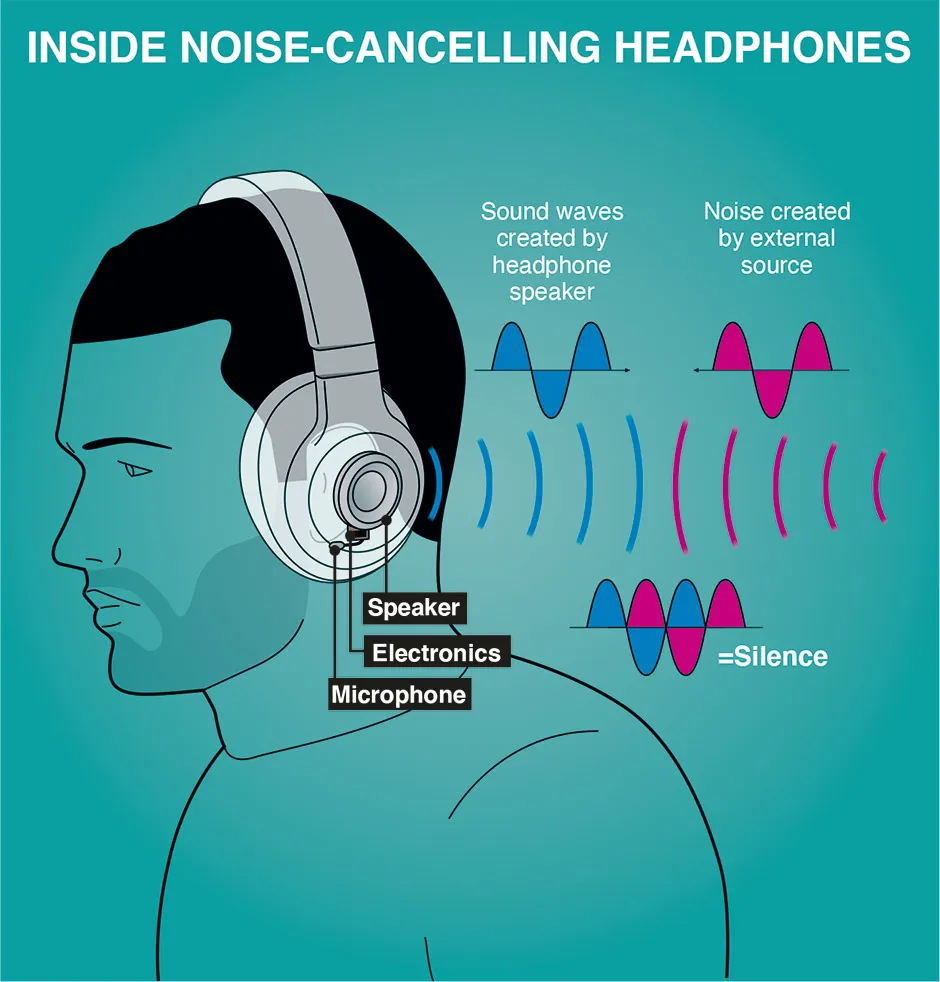
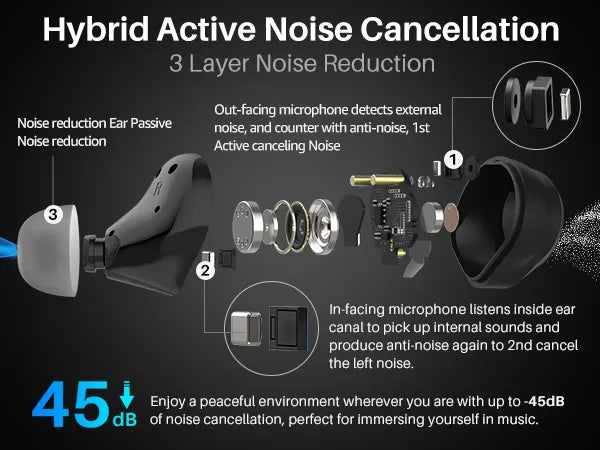
Active noise cancellation, or ANC, uses small microphones to detect outside sound. The headphones then create a matching sound wave that reduces part of that noise.
ANC works best against steady, low sounds. Examples include:
- Airplane engine rumble
- Bus and train noise
- Air-conditioning systems
- Office fans
- Road noise during a car ride
ANC is less effective against sudden or high-pitched sounds. A nearby voice, a dog bark, a door slam, or a phone alert may still be heard.
The ear seal also matters. Ear cups and ear tips block sound before ANC has to process it. This is called passive noise isolation. A strong seal helps with higher sounds, while ANC handles much of the low-frequency rumble.
ANC does not make all sound disappear
Noise cancellation reduces sound. It does not create silence.
Performance can change because of:
- Headphone design
- Ear shape
- Ear tip size
- Eyeglass frames
- Hair between the ear and cushion
- Wind
- Battery level
- App settings
- Microphone condition
- Firmware problems
This is why two people can use the same headphones and get different results.
1. Turn On the Correct Noise-Canceling Mode
Start with the headphone controls or companion app. Set the mode to Noise Cancellation, Max ANC, or a similar option.
Many headphones offer three main modes:
| Mode | What it does | Best use |
|---|---|---|
| Noise cancellation | Reduces outside sound | Flights, commutes, offices |
| Transparency or ambient | Lets outside sound in | Conversations and street awareness |
| Off | Disables ANC | Saving battery or natural sound |
Some headphones also use adaptive ANC. This mode changes the level of cancellation as the environment changes. It can be useful when moving between places, but a fixed high setting may work better against constant airplane or bus noise.
Check for options such as:
- Adaptive sound control
- Wind reduction
- Noise-canceling optimizer
- Conversation detection
- Automatic transparency
- Voice passthrough
- Personal noise control
Turn off automatic features that reduce ANC when you speak or when the headphones detect a conversation. These features can be useful, but they may make noise cancellation seem weak.
Use the app to check the mode
Open the official app for your headphones. The app may show the current mode more clearly than the buttons do.
Look for a slider or setting that controls the strength of ANC. If the app has a custom profile, save one profile for travel and another for work.
2. Improve the Fit and Ear Seal
A poor seal is one of the most common reasons noise-canceling headphones perform badly.
For over-ear headphones, the cushions should surround the ears. They should not press directly on the ears. For earbuds, the tip should sit firmly in the ear canal without causing pain.
For over-ear headphones
Try these adjustments:
- Move the headband up or down until the ear cups sit evenly.
- Center each ear inside the cushion.
- Check for gaps near the jaw and temples.
- Move hair away from the cushion.
- Remove thick glasses if possible.
- Make sure both ear cups apply similar pressure.
- Test the headphones while turning your head.
Eyeglass frames can create a small gap between the cushion and skin. That gap can let in more sound, especially in the low range. Thinner frames may reduce the problem, but do not wear uncomfortable glasses just to improve ANC.
For earbuds
Try each ear tip size. The largest tip is not always the best choice. Use the size that creates a seal without pressure or pain.
A good ear tip should:
- Stay in place when you walk
- Block outside sound when ANC is off
- Feel secure but not sharp or painful
- Produce stronger bass than a loose tip
- Stay sealed when you speak or move your jaw
Some earbuds include a fit test in their app. Run the test with the same tip size and position you use in daily life.
Test the seal without ANC
Turn ANC off. Play a steady sound, such as an air conditioner or fan. Then try different tips or cup positions.
If outside sound drops a lot after you improve the fit, the seal was a major issue. If the sound barely changes, check the settings, microphones, battery, and hardware.

3. Replace Worn Ear Pads or Ear Tips
Ear pads lose shape over time. Sweat, skin oil, heat, and daily pressure can flatten the foam. A flattened pad may leave gaps around the ears.
Replace the pads when you notice:
- Cracks or peeling material
- Flattened foam
- Uneven pressure
- A loose fit
- More outside noise than before
- A change in bass response
- Ear cups that no longer surround the ears
Use replacement parts made for the exact model. Pads with a different thickness, shape, or internal material can change sound and ANC performance.
For earbuds, replace damaged or stretched tips. Silicone tips should not feel loose. Foam tips may need more frequent replacement because they can lose their shape.
Do not wash electronic parts. If the manual allows washable tips, remove them before cleaning and let them dry fully before use.
4. Update the Headphones and App
Manufacturers sometimes improve ANC through firmware updates. An update may also fix connection errors, battery reporting, microphone behavior, or automatic mode changes.
Before updating:
- Charge the headphones.
- Install the official app.
- Connect the headphones to your phone.
- Check for a firmware update.
- Keep the headphones near the phone during the update.
- Do not power them off until the update is complete.
Also update the phone or computer when a compatibility problem is involved. Some settings may not appear until both the app and headphones use supported software.
An update cannot fix every problem. If the ear seal is poor or a microphone is damaged, new firmware may not improve noise reduction.

5. Clean the ANC Microphones Carefully
ANC microphones need a clear path to outside sound. Dust, skin oil, pocket lint, and moisture can cover the microphone openings.
Clean the headphones this way:
- Turn them off.
- Disconnect the charging cable.
- Remove detachable ear tips or pads if the manual permits.
- Wipe the outside with a soft, dry cloth.
- Use a dry, soft brush around microphone openings.
- Let moisture dry before turning the headphones on.
Avoid:
- Pouring liquid onto the headphones
- Using household cleaners
- Pushing dirt into microphone holes
- Using sharp tools
- Spraying compressed air into openings
- Cleaning while the headphones are charging
If the headphones were exposed to rain or sweat, let them dry according to the manufacturer’s instructions. Water resistance does not always cover every part of the headphone, especially charging ports and microphones.

6. Reduce Wind Around the Microphones
Wind can make ANC sound worse. It may cause rumbling, crackling, pumping, or sudden changes in volume.
Wind problems often occur when you:
- Walk quickly outdoors
- Ride a bicycle
- Stand on a subway platform
- Sit near an open car window
- Use earbuds with exposed microphones
Try these fixes:
- Turn on wind reduction in the app.
- Use a fixed ANC mode instead of adaptive mode.
- Cover the microphones slightly with a hat or hood.
- Turn your body away from strong wind.
- Avoid using earbuds while cycling in heavy wind.
- Check whether the sound improves indoors.
Do not cover the microphone openings with tape or thick material. That can block the microphones and reduce ANC performance.

7. Check Battery Level and Power Behavior
Some headphones reduce features when the battery is very low. Others may turn off ANC when powered down or when the battery reaches zero.
Charge the headphones fully, then test them again in the same location. If ANC works well after charging but becomes weak near the end of the battery cycle, review the manual and app settings.
A battery problem may be involved when:
- ANC changes after a short period
- One ear cup or earbud behaves differently
- The headphones shut down at random
- The app shows an incorrect battery level
- ANC works only while charging
- The headphones are several years old
Do not use damaged or swollen batteries. Stop using the device and contact the manufacturer if the housing becomes hot, bulges, smells unusual, or shows damage.
8. Reset the Headphones
A reset can fix incorrect settings, connection errors, and software glitches. The exact button combination differs by model.
Before resetting, note these details:
- Bluetooth device names
- Equalizer settings
- Custom ANC settings
- Saved multipoint connections
- Firmware version
- App preferences
Then follow the reset steps in the official manual. After the reset:
- Remove the headphones from your phone’s Bluetooth list.
- Restart the phone.
- Pair the headphones again.
- Set ANC to its strongest mode.
- Test the fit and sound.
- Rebuild custom settings one at a time.
If the problem returns after pairing with a different device, the headphones are more likely to be at fault. If they work normally with another phone, the first device or its settings may be causing the issue.

9. Test the Headphones in a Controlled Way
Change one factor at a time. This makes the cause easier to find.
Use this simple test:
- Choose a steady sound, such as a fan or HVAC system.
- Test the headphones with ANC off.
- Turn on the strongest ANC mode.
- Check both sides.
- Try a different ear tip or headband position.
- Test with another phone.
- Test with the app closed.
- Compare indoors and outdoors.
Use the same volume for each test. Do not increase volume to hide outside noise.
What the results may mean
| Symptom | Likely causes | First action |
|---|---|---|
| Both sides let in more noise | Poor seal, weak setting, worn pads | Check fit and ANC mode |
| One side is worse | Blocked microphone, poor tip fit, damage | Clean and refit that side |
| ANC pulses or crackles | Wind, software issue, microphone problem | Test indoors and reset |
| ANC works only after charging | Low battery or battery fault | Fully charge and check battery behavior |
| Noise changes when you touch the cup | Microphone or seal issue | Inspect openings and cushions |
| Voices remain clear | Normal ANC limit | Improve passive seal |
| Sound is worse with glasses | Cushion gap | Adjust cups or frame position |
| Music sounds thin with ANC on | Seal change or processing issue | Refit and compare ANC modes |
If one side remains weak after cleaning, resetting, and testing another device, contact the manufacturer. A faulty microphone or seal may need repair or replacement.

10. Use Equalizer Settings for Sound, Not ANC
An equalizer changes the music signal. It does not directly make the outside world quieter.
You can use an equalizer to make music easier to hear at a lower volume. For example, a small adjustment to speech-range frequencies may help with podcasts. Avoid extreme boosts because they can cause distortion and may encourage unsafe listening levels.
Do not confuse these settings:
- Noise cancellation: reduces outside sound
- Equalizer: changes music or speech tone
- Volume: changes listening level
- Transparency: adds outside sound
- Spatial audio: changes the sense of direction or space
If ANC seems weak, fix the ANC mode and seal first. An equalizer cannot repair a blocked microphone or a leaking ear cup.

Noise-Canceling Headphones Are Not Automatically Hearing Protection
Consumer headphones should not be treated as hearing protection unless they have the required rating and instructions for that use.
The National Institute for Occupational Safety and Health, or NIOSH, and the Occupational Safety and Health Administration, or OSHA, provide guidance on hazardous noise. A common workplace reference is an 85 dBA average exposure over an eight-hour workday, with shorter allowable exposure as sound levels rise. The exact rule depends on the workplace and the applicable standard.
Use properly rated hearing protection for:
- Construction sites
- Shooting ranges
- Industrial work
- Fireworks
- Loud machinery
- Emergency response work
- Any setting where hearing protection is required
ANC headphones may make a plane or train feel quieter, but that does not prove that they reduce sound to a safe occupational level. They also may not protect against sudden impact noise.
Keep the listening volume low enough that you do not need to shout to someone nearby. Give your ears breaks during long trips. If you notice ringing, muffled hearing, pain, dizziness, or a sudden change in hearing, stop using the headphones and seek medical advice.

Common Mistakes That Reduce Noise Cancellation
Wearing the wrong ear tip
A loose ear tip can make ANC seem weak and can reduce bass. Test every included size.
Covering the microphones
A hand, scarf, hood, or case may block the microphone openings. This can cause poor ANC or strange sound changes.
Using transparency mode by mistake
Transparency can sound like failed ANC. Check the app or button before troubleshooting the hardware.
Expecting ANC to remove voices
ANC is usually better at steady low noise than speech. Improve the seal, but expect some voices to remain audible.
Increasing volume instead of fixing the fit
High volume can hide outside sound, but it increases hearing risk. Fix the seal and settings first.
Using third-party ear pads without checking their design
Different pads can alter the distance between the speaker and ear. They can also create gaps or change microphone behavior.
Testing only outdoors
Wind can hide the real problem. Test in a quiet indoor space and near a steady fan before judging performance.
Cleaning with liquid or sharp tools
This can damage microphones, seals, and charging parts. Use a dry cloth and soft brush unless the manual says otherwise.

When Should You Replace Noise-Canceling Headphones?
Replacement makes sense when the headphones have several problems that simple maintenance cannot fix.
Consider replacement when:
- The battery no longer lasts long enough for normal use
- The ear pads are unavailable or badly worn
- ANC is weak on one side after troubleshooting
- The microphones produce constant crackling
- The headphones disconnect often
- The charging port is damaged
- Repairs cost close to a replacement
- The model no longer receives needed app support
Before replacing them, check the warranty and repair policy. Keep the exact model number and purchase record. A manufacturer may offer a pad, battery, or earbud replacement without requiring a full new purchase.

Frequently Asked Questions
Why are my noise-canceling headphones not blocking voices?
Voices contain many midrange and high-frequency sounds. ANC is often less effective against those sounds than against steady low-frequency rumble. A better ear seal may reduce voices, but it may not remove them.
Does turning up the volume improve noise cancellation?
No. Higher volume can cover outside noise, but it does not make the ANC system stronger. It can also increase the risk of hearing damage. Use the correct ANC mode and improve the fit instead.
Why does noise cancellation sound worse outside?
Wind can strike the external microphones and create rumbling or unstable ANC. Turn on wind reduction, use a fixed ANC mode, and compare the headphones indoors.
Can new ear pads improve ANC?
Yes, if the old pads are flattened, cracked, or leaking sound. Use pads made for the exact headphone model. A poor third-party replacement may make ANC worse.
Why does one earbud cancel more noise than the other?
The earbuds may have different seals, different tip sizes, blocked microphone openings, unequal battery levels, or a hardware fault. Refit both earbuds, clean them carefully, charge them, and test each side separately.
Sources and Evidence
This guide is based on manufacturer documentation principles for ANC headphones, established acoustics concepts, and U.S. workplace hearing guidance. For model-specific instructions, use the manual and support page for the exact product.
Useful U.S. sources include:
- National Institute for Occupational Safety and Health: Noise and Hearing Loss Prevention
- Occupational Safety and Health Administration: Occupational Noise Exposure
- National Institute on Deafness and Other Communication Disorders: Noise-Induced Hearing Loss
- The official support page and user manual for your headphone model
Conclusion
To improve noise-canceling headphones, begin with the fit. Then confirm the strongest ANC mode, update the firmware, clean the microphones, reduce wind, and test the headphones after a full charge.
If the problem affects only one side or remains after a reset, the headphones may have a blocked microphone, worn seal, battery issue, or hardware fault. Do not rely on consumer ANC headphones as a substitute for rated hearing protection, and avoid raising the volume to unsafe levels.