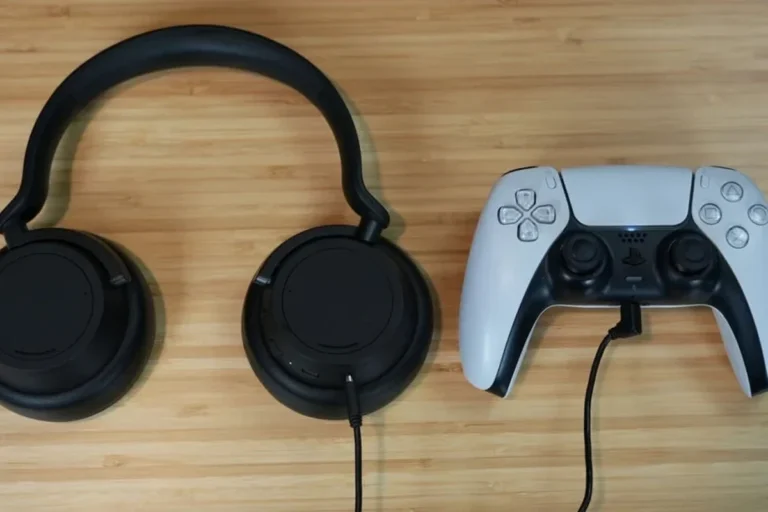
Does PS5 Bluetooth Headphones Work with Your Console

Yes, PS5 Bluetooth headphones can work, but usually not through direct standard pairing. For the best results, use a USB adapter or a gaming headset made for low-latency console audio.
If you’re asking whether does ps5 bluetooth headphones work with the console, the short answer is yes, but not always in the way most people expect. The PS5 has limited direct Bluetooth audio support, so many Bluetooth headphones need a workaround such as a USB adapter, a TV connection, or a different wireless headset setup.
That matters because gaming audio is more sensitive to delay and compatibility than casual music listening. If you want a smoother setup, it helps to understand how the PS5 handles wireless audio before you buy anything or start pairing devices.
- Direct pairing: Standard Bluetooth support on PS5 is limited.
- Best performance: USB wireless headsets usually offer lower latency.
- Mic support: Voice chat works better with console-focused headsets.
- Casual use: TV Bluetooth or adapters can be fine for relaxed play.
- Buy smart: Check compatibility, delay, and firmware before you purchase.
How PS5 Handles Bluetooth Audio in 2025

The PS5 is not designed to behave like a phone or laptop when it comes to Bluetooth audio. In practice, Sony keeps standard Bluetooth headphone support limited, which means many regular Bluetooth headphones will not connect directly the way you might expect.
This can be frustrating, but it is mostly about keeping game audio stable and minimizing lag. For gaming, even a small delay between the action on screen and the sound in your ears can make the experience feel off.
Why Sony limits standard Bluetooth headphone support
Sony’s main concern is latency and connection reliability. Standard Bluetooth can add enough delay to make fast games feel out of sync, especially in competitive titles where timing matters.
There is also the issue of bandwidth. The PS5 has to manage game audio, chat, controller communication, and wireless accessories without creating interference or unstable connections.
Some Bluetooth headphones may appear to pair with the PS5 through unofficial methods, but pairing success does not always mean good gaming performance.
What types of wireless audio the PS5 does support
The PS5 works best with wireless audio gear that is built for gaming, especially USB wireless headsets and accessories designed specifically for console use. These usually use a dedicated dongle rather than standard Bluetooth pairing.
You can also get audio through a TV or monitor that supports Bluetooth output, though that depends on the display and may introduce delay. For some users, that is fine for movies and single-player games, but it is less ideal for fast-paced play.
Many gaming headsets skip standard Bluetooth entirely and use a 2.4GHz wireless dongle because it usually offers lower latency than typical Bluetooth audio.
Best Ways to Connect Bluetooth Headphones to PS5
If you want to use Bluetooth headphones with a PS5, the best method depends on whether you care more about convenience, sound quality, or response time. Not every method is equally good for gaming, and some are better for watching media than playing online.
If you also want a broader explanation of wireless audio basics, our guide to Bluetooth headphones explained can help you understand why compatibility varies so much from one device to another.
Using a USB Bluetooth adapter for low-latency gaming
A USB Bluetooth adapter is one of the most practical ways to add wireless headphone support to a PS5. The adapter plugs into the console and acts as a bridge between the system and your headphones.
This can work well, but performance depends on the adapter’s quality, supported codecs, and how well it handles delay. A cheap adapter may connect, yet still produce noticeable lag or unstable audio during gameplay.
If you choose a USB adapter, look for one that is known for low-latency audio and simple PS5 compatibility rather than the cheapest option available.
Insert the Bluetooth dongle into an available USB port on the PS5.
Put the headphones into pairing mode and follow the adapter’s instructions.
Check for delay, crackling, or volume imbalance before starting a long session.
Connecting through a TV or monitor with Bluetooth audio
Some TVs and monitors let you send audio to Bluetooth headphones directly from the display. This can be convenient because the PS5 only needs to connect to the screen, while the screen handles the headphone link.
The downside is that TV Bluetooth often adds more delay than a dedicated gaming headset or dongle setup. That delay may be acceptable for casual play, but it can become distracting in shooters, racing games, or rhythm games.
If you are comparing wireless approaches, it may also help to review Bluetooth vs wired headphones sound quality so you know what trade-offs you are making before you settle on a setup.
Pairing via the DualSense controller for non-gaming listening
Some players wonder whether they can route Bluetooth headphones through the DualSense controller. In most cases, that is not the best solution for full wireless headphone use, and it is not a reliable path for proper PS5 audio support.
For casual listening or special scenarios, there may be workarounds, but they are usually not the first choice for everyday gaming. If your goal is stable sound and mic support, a USB wireless headset or a proper adapter is usually the safer route.
What to Expect: Sound Quality, Latency, and Mic Performance
Once your headphones are connected, the real question becomes how they actually perform. Sound quality, delay, and microphone behavior can change a lot depending on the connection method and the headset model.
Why audio delay matters in shooters, racing, and action games
Latency is the time between the game producing sound and you hearing it. In slow games or story-driven titles, a little delay may not bother you much.
In shooters, racing games, and action-heavy titles, delay can be much more noticeable. Footsteps, gunfire, engine noise, and timing cues can feel slightly behind the picture, which breaks immersion and can even affect performance.
Not all Bluetooth codecs or adapters deliver the same results. Even if two headphones are both “Bluetooth,” their gaming experience can be very different.
How microphone support changes with different connection methods
Microphone support is another area where wireless setups vary. Some Bluetooth headphones may play audio well but offer limited or awkward mic behavior on PS5.
Gaming headsets with a USB dongle often handle voice chat more smoothly because the headset and console are designed to work together. If voice chat matters to you, check compatibility carefully before buying.
Common Mistakes Players Make When Using Bluetooth Headphones on PS5
Most PS5 Bluetooth problems come from expectations, not broken hardware. Many players assume all wireless headphones should work the same way, but console audio is more specific than phone audio.
Assuming every Bluetooth headset will pair directly
This is the most common mistake. A headset may pair with your phone, tablet, or laptop and still fail to connect properly to a PS5.
Even when it does connect, the result may be unstable or limited. Always check console compatibility first instead of assuming Bluetooth means universal support.
Ignoring latency, codec, and compatibility issues
Bluetooth is not one single experience. Different codecs, adapter designs, and headset firmware can all affect how quickly audio reaches your ears.
If you are sensitive to delay, codec and compatibility details matter more than flashy marketing terms. This is especially true if you play competitive games or want clear sync during cutscenes and dialogue.
Overlooking power, range, and firmware updates
Wireless headphones depend on battery life, signal strength, and updated firmware to stay reliable. A headset that works well at first can become frustrating if the battery is weak or the software is outdated.
Range also matters. Walls, furniture, and other wireless devices can reduce stability, so a setup that works in one room may not behave the same way in another.
- PS5 compatibility before buying
- Latency performance for your game type
- Microphone support for chat
- Battery life and charging habits
- Firmware update availability
PS5 Bluetooth Headphones: Budget vs Premium Setup Options
There are two broad ways to approach PS5 Bluetooth headphones: a cheaper adapter-based setup or a more premium wireless headset built for gaming. Both can work, but they serve different kinds of players.
Cheap adapter-based solutions versus official wireless headsets
Budget adapters can be appealing because they let you reuse headphones you already own. That can be a smart way to save money if you mainly play casual games and do not mind a little compromise.
Premium gaming headsets usually cost more because they often include better wireless stability, lower latency, and more reliable mic support. They also tend to be easier to use, which matters if you want a simple plug-and-play experience.
When it makes sense to spend more for better performance
Spending more makes sense if you play often, care about voice chat, or want fewer connection headaches. A better headset can save time and reduce frustration over the long run.
If you only play occasionally, a lower-cost workaround may be enough. But if audio timing and comfort matter a lot, the extra investment can be worth it.
- More stable wireless performance
- Better chat support
- Less setup frustration
- Higher cost
- More product research
- Not every premium model fits every player
Expert Advice: What Top Headphone Reviews Recommends in 2025
Our editorial advice is simple: match the setup to the way you actually play. The best choice for a casual story gamer is not always the best choice for a ranked multiplayer player.
Best use cases for casual play, competitive gaming, and media
For casual play and streaming, a TV Bluetooth setup or a basic adapter may be enough if you can tolerate some delay. For competitive gaming, a low-latency USB wireless headset is usually the better move.
If you use your headphones for movies, music, and gaming, look for a balanced headset that handles both comfort and consistent wireless performance. For readers comparing broader headphone styles, our guide on types of headphones explained can help narrow down the best fit style for long sessions.
Warning signs that a setup will disappoint
Be cautious if a product description makes vague claims without explaining PS5 support, latency behavior, or microphone compatibility. That often means the setup may work only in limited situations.
Also be careful with very cheap adapters or unverified accessories. They may connect your headphones, but they can still deliver poor audio sync, dropped connections, or weak chat performance.
If you experience ringing, discomfort, or trouble understanding speech during long gaming sessions, consider lowering volume and speaking with an audiologist or hearing professional.
Listening at high volumes for long periods can cause hearing damage. Keep volume at 60% or below for extended sessions.
Final Verdict on Whether PS5 Bluetooth Headphones Work
Yes, PS5 Bluetooth headphones can work, but usually not through simple direct pairing the way many people expect. The best experience comes from using a USB Bluetooth adapter, a compatible TV or monitor, or a gaming headset designed for console use.
If you want the cleanest mix of sound quality, low latency, and mic support, a purpose-built wireless gaming headset is usually the safest choice. If you only need casual listening, a workaround may be enough, as long as you accept the limits.
Quick recap of the best connection choices for different users
Casual players can often get by with a TV Bluetooth output or a basic adapter. Competitive players should prioritize low-latency wireless gaming gear, while buyers who want the least hassle should choose a headset made for PS5 compatibility from the start.
- PS5 Bluetooth headphones can work, but direct pairing is limited.
- USB adapters and gaming headsets usually give better results than basic Bluetooth.
- Latency and mic support are the biggest factors for gaming.
- Casual users can accept more compromise than competitive players.
Frequently Asked Questions
Wired connections usually give the lowest delay and the most consistent audio. Wireless is more convenient, but performance depends on the headset, adapter, and game type.
Check PS5 compatibility, latency, microphone support, battery life, and comfort. It also helps to confirm whether the headset uses Bluetooth directly or a USB wireless dongle.
They can be useful for blocking room noise during long sessions. Just remember that active noise cancelling may affect how some people perceive sound balance or pressure.
Closed-back headphones usually isolate better and are better for shared spaces. Open-back headphones can feel more spacious, but they leak sound and are less private.
There is no single best driver type for everyone, because tuning matters as much as the driver itself. Look for clear mids, controlled bass, and enough detail to hear footsteps and dialogue.
Choose a lightweight headset with soft ear cushions and a secure but gentle clamp. If you game for hours, comfort and breathability matter as much as sound quality.