How to Turn Bose Headphones Off Easily and Quickly

Press and hold the correct power or Bluetooth control until Bose confirms shutdown, or place Bose earbuds back in their charging case. If they still will not turn off, check for a frozen button, Bluetooth connection issue, or battery problem.
If you want to know how to turn Bose headphones off, the quickest method is usually to press and hold the power or Bluetooth button until the status light changes or the voice prompt confirms shutdown. Some Bose models also shut off automatically after a period of inactivity, but the exact method depends on whether you are using over-ear headphones, on-ear headphones, or earbuds.
- Model matters: Bose shutdown steps differ between headphones and earbuds.
- Hold, don’t tap: Most Bose headphones need a long press to power off.
- Earbuds are different: Many turn off by returning to the charging case.
- Auto-off helps: It saves battery, but manual power-off is more reliable.
How to Turn Bose Headphones Off: What Most Users Need to Know First

Bose uses a few different power systems across its lineup, so there is no single shutdown method for every model. That is why the first step is identifying whether your headphones have a dedicated power slider, a multifunction button, touch controls, or an auto-off feature.
For most wireless Bose models, turning them off is simple once you know where the controls are. The challenge usually comes from mixing up pairing buttons, volume controls, and power controls, especially on newer noise-cancelling models.
Power behavior can vary by Bose model, app settings, firmware version, and how long the headphones have been idle.
Quick Ways to Turn Off Bose Headphones by Model

The fastest way to power down Bose headphones is to use the control your model was designed around. On many Bose headphones, a long press on the power button works, while other models rely on a switch or automatic sleep mode.
If you are in a hurry, look for the obvious power symbol first. If you do not see one, check whether the headset uses a combined Bluetooth/power control or a physical slider near the ear cup.
Power Button Methods for QuietComfort, Noise Cancelling, and Headband Models
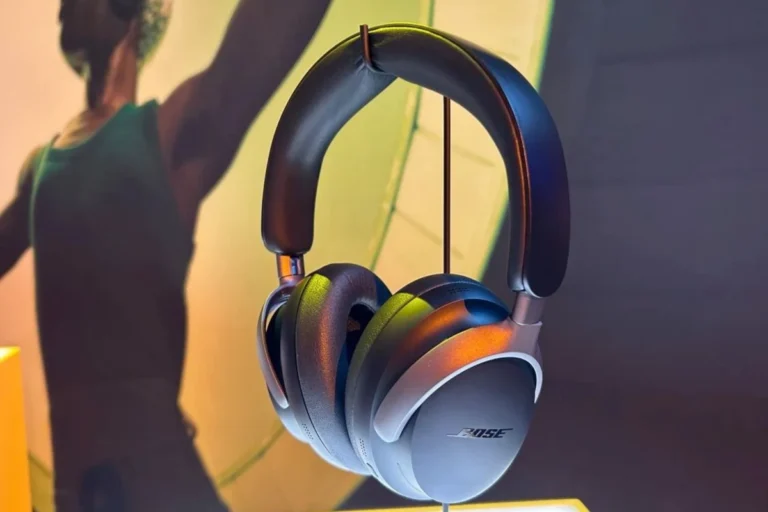
Many QuietComfort and other over-ear Bose headphones turn off by pressing and holding the power or Bluetooth button for a few seconds. You will usually hear a voice prompt or see the indicator light change when the headphones shut down.
On some models, a short press only changes connection or playback behavior, so a longer press is important. If the headphones stay on, release the button and try again more deliberately rather than repeatedly tapping it.
If your Bose headphones seem stuck on, disconnect them from Bluetooth first and then try the power button again. This can make shutdown behavior more predictable on some wireless models.
Automatic Shutoff on Bose Wireless Headphones and When It Applies
Many Bose wireless headphones include auto-off or standby behavior to save battery. This feature usually activates after a period of inactivity, such as when music stops and the headphones are not being used.
Auto-off is helpful, but it is not a substitute for manual shutdown in every situation. If you want to preserve battery before travel or storage, turning them off yourself is still the safer choice.
Some wireless headphones stay in a low-power state after use so they can reconnect faster the next time you wear them.
Turning Off Bose Earbuds vs. Over-Ear Headphones
Bose earbuds often power down differently from full-size headphones. In many cases, putting them back in the charging case is what turns them off or puts them into a low-power state.
Over-ear headphones usually rely on a button or switch, while earbuds depend more on case charging and automatic sleep behavior. That difference is easy to miss if you own both types.
Step-by-Step Instructions for the Most Common Bose Headphone Types
If you want the most practical answer, start with your exact Bose product family. The steps below cover the models most readers are trying to shut down, including QuietComfort headphones, Bose 700-style controls, and Bose earbuds.
How to Turn Off Bose QuietComfort Headphones
For many QuietComfort headphones, the shutdown process is straightforward. Locate the power or Bluetooth button on the ear cup and press and hold it until you hear the voice prompt or see the indicator light turn off.
If the headphones are connected to a phone or laptop, you may want to stop playback first. That does not always affect power-off, but it can help avoid confusion if the audio keeps playing through another connected device.
Check the ear cup for a power icon, Bluetooth button, or a small switch depending on the model.
Press and hold until the voice prompt or light confirms the headphones are turning off.
Wait a moment and check that the indicator is no longer active before storing the headphones.
How to Turn Off Bose 700 and Similar Touch/Power-Control Models
Bose 700-style headphones can feel a little different because the controls are more modern and sometimes less obvious. On many of these models, the power function is tied to a physical switch or a dedicated button rather than the touch surface.
If your headphones use touch controls for playback and calls, do not assume the touch area turns them off. Look for the actual power control on the ear cup or edge of the headset instead.
How to Turn Off Bose Sport Earbuds and QuietComfort Earbuds
For Bose Sport Earbuds and QuietComfort Earbuds, the charging case is often the easiest way to power down. Place the earbuds back in the case, close the lid, and let them settle into charging or standby mode.
If the earbuds are not responding, check whether they are seated correctly in the case. A poor fit can leave them connected longer than expected and may make it seem like they are still on.
Why Your Bose Headphones May Not Turn Off Properly
When Bose headphones refuse to power down, the issue is usually simple: a button was not held long enough, the headset is frozen, or Bluetooth is still actively connected to another device. Less often, a battery or firmware issue is involved.
Before assuming the headphones are broken, work through the basic causes first. That often solves the problem without needing a reset or service visit.
If a headphone battery is swelling, overheating, or behaving erratically, stop using it and contact Bose support or a qualified repair provider.
Battery Drain, Frozen Buttons, and Bluetooth Connection Issues
Low battery can sometimes make shutdown behavior unreliable. A frozen button or temporary software glitch can also stop the headset from responding the way it should.
Bluetooth connection problems may create the impression that the headphones are still on even after they shut down. If another device keeps reconnecting, it can look like the power-off failed when the real issue is connection management.
Common Mistakes Users Make When Trying to Power Down Bose Headphones
One common mistake is tapping the button instead of holding it. Another is pressing the wrong control, especially on models where the Bluetooth button and power function are easy to confuse.
Users also sometimes put earbuds in the case without fully seating them, which prevents proper standby behavior. If your model uses auto-off, leaving it on a desk and expecting immediate shutdown can also create confusion.
Expert Tips to Save Battery and Protect Your Bose Headphones
Good shutdown habits can extend battery life and reduce wear over time. They also help keep the headphones ready when you need them, which matters if you use them daily for commuting, work, or travel.
If you also use other wireless gear, such as a laptop or phone, it helps to understand how Bluetooth pairing and power states interact. That can make Bose headphones easier to manage alongside other devices, including when you are deciding whether to connect Bluetooth headphones again after use.
When to Use Manual Power-Off vs. Auto-Off Settings
Manual power-off is best when you are done listening for the day or packing the headphones away. It gives you a clear shutdown and usually preserves more battery than waiting for auto-off.
Auto-off is useful for short breaks, but it should not be your only battery-saving habit. If you leave headphones unused for long periods, a manual shutdown is the more reliable option.
Charging Habits That Help Extend Battery Life in 2026
Try not to store Bose headphones at empty battery for long stretches. Keeping them charged enough for regular use is generally better than letting them drain completely every time.
Use the correct cable and charger for the model, and avoid rough handling of ports, hinges, or case contacts. For readers comparing wireless and wired setups, our guide on Bluetooth headphones explained simply can help make sense of how wireless power use differs from traditional audio gear.
Listening at high volumes for long periods can cause hearing damage. Keep volume at 60% or below for extended sessions.
Warning Signs That Suggest a Reset May Be Needed
If your Bose headphones keep turning on by themselves, fail to shut off, or behave unpredictably after charging, a reset may help. Repeated Bluetooth dropouts, stuck controls, and delayed responses are also common clues.
Before resetting, make sure you know how to reconnect them afterward. If you need a refresher, our article on how to reset Bluetooth headphones may be useful once you have ruled out the simpler fixes.
If shutdown issues continue after a reset, or if you notice unusual battery heat, contact Bose support or an audio repair professional. Persistent battery problems should not be ignored.
Bose Power-Off Features Compared with Other Premium Headphone Brands
Bose is generally fairly easy to power down, but the experience depends on the model. Some brands lean heavily on physical switches, while others rely more on auto-off and app-based behavior.
If you are comparing premium wireless headphones, shutdown convenience is worth thinking about alongside noise cancellation, comfort, and battery life. It is one of those small daily-use details that becomes more important the longer you own the headphones.
How Bose Auto-Off Compares to Sony, Sennheiser, and Apple
Bose usually does a good job balancing quick power controls with battery-saving standby modes. Sony and Sennheiser also use smart power management on many models, though the exact shutdown feel can differ by product family.
Apple-style earbuds and headphones often depend more on case storage or ecosystem behavior, which can feel very different from Bose over-ear models. The best choice is the one that matches your routine, whether you want a simple switch or a more automatic system.
Is Bose Easier to Turn Off Than Other Wireless Headphones?
For many users, yes, especially once they learn the model-specific control layout. Bose usually keeps the process logical, but newer touch-heavy designs can feel less obvious than older switch-based headphones.
If you prefer a simple shutdown routine, look for models with clear physical controls and predictable auto-off behavior. That is often easier than relying on guesswork after every listening session.
Final Recap: The Fastest Way to Turn Bose Headphones Off Every Time
The fastest way to turn Bose headphones off is to identify the correct control for your model, then hold it long enough for the shutdown confirmation. For many over-ear models, that means a power or Bluetooth button; for earbuds, it often means placing them in the charging case.
If the headphones do not turn off right away, check for a frozen button, an active Bluetooth connection, or a battery issue before assuming something is wrong. Once you know your model’s shutdown method, powering down becomes quick, reliable, and easy to repeat.
Frequently Asked Questions
Not always. Wireless Bose headphones are convenient and often strong for noise cancellation, while wired headphones may offer a more direct connection depending on the device and model.
Noise cancelling can improve clarity by reducing outside noise, but it also uses battery power. Sound quality and battery life can vary by brand, model, and how you use the headphones.
Over-ear models usually feel best for long sessions because they spread pressure more evenly. Fit, ear cushion material, and weight matter a lot, so comfort depends on the specific model.
Check battery life, Bluetooth stability, microphone quality, comfort, and noise cancellation for commuting. For gaming, low latency, mic performance, and device compatibility are especially important.
Not always, but budget models may have less balanced tuning or weaker materials. EQ can help, though driver quality, fit, and seal also affect bass and clarity.
Choose a model with the right weight, cushion material, and clamping force for your head size. Store it carefully, avoid rough cable or hinge handling, and clean ear pads regularly.