How To Get Noise Cancellation On Any Headphones: Guide

If you use headphones in the United States and want less noise on a plane, at work, or at home, you have three options: use the headphones’ built-in active noise cancellation (ANC), improve their passive noise blocking, or use software that reduces noise in a call. You cannot turn ordinary headphones into full ANC headphones with an app alone, but you can often make them much quieter.
The best method depends on the type of noise, your device, and whether you need cleaner incoming sound or a quieter microphone for other people. This guide explains what works, what does not, and how to improve noise reduction with almost any headphones.
Active noise cancellation vs. passive noise blocking
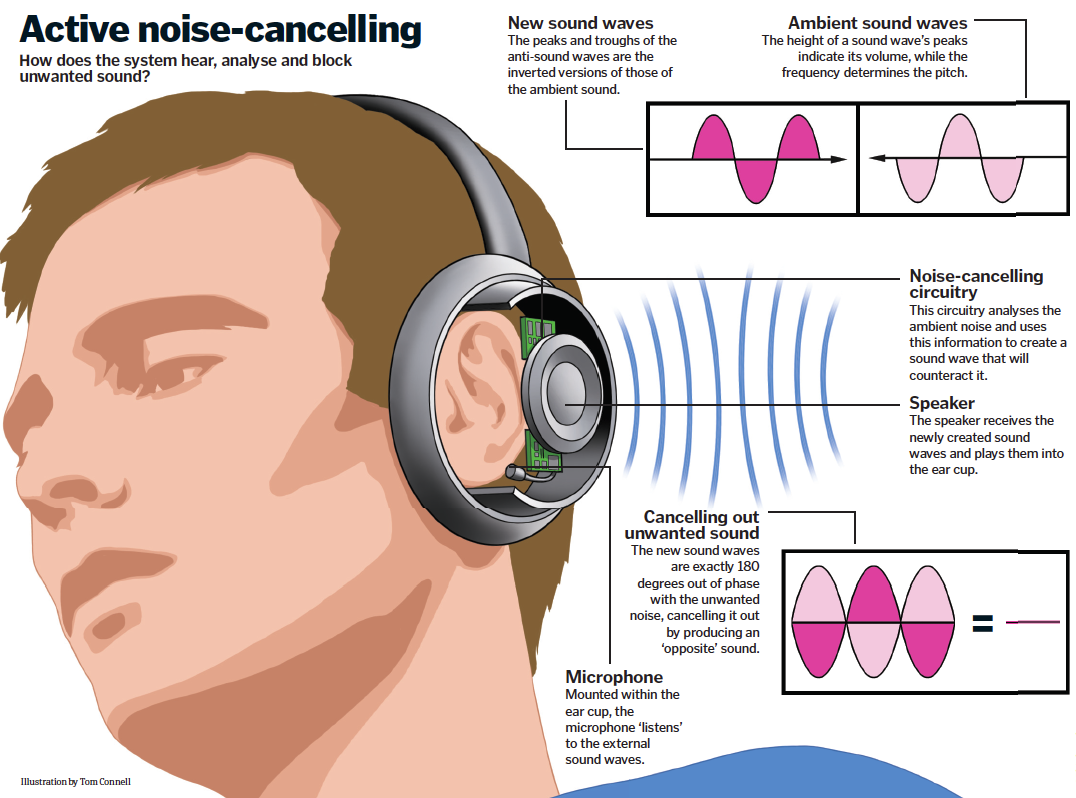
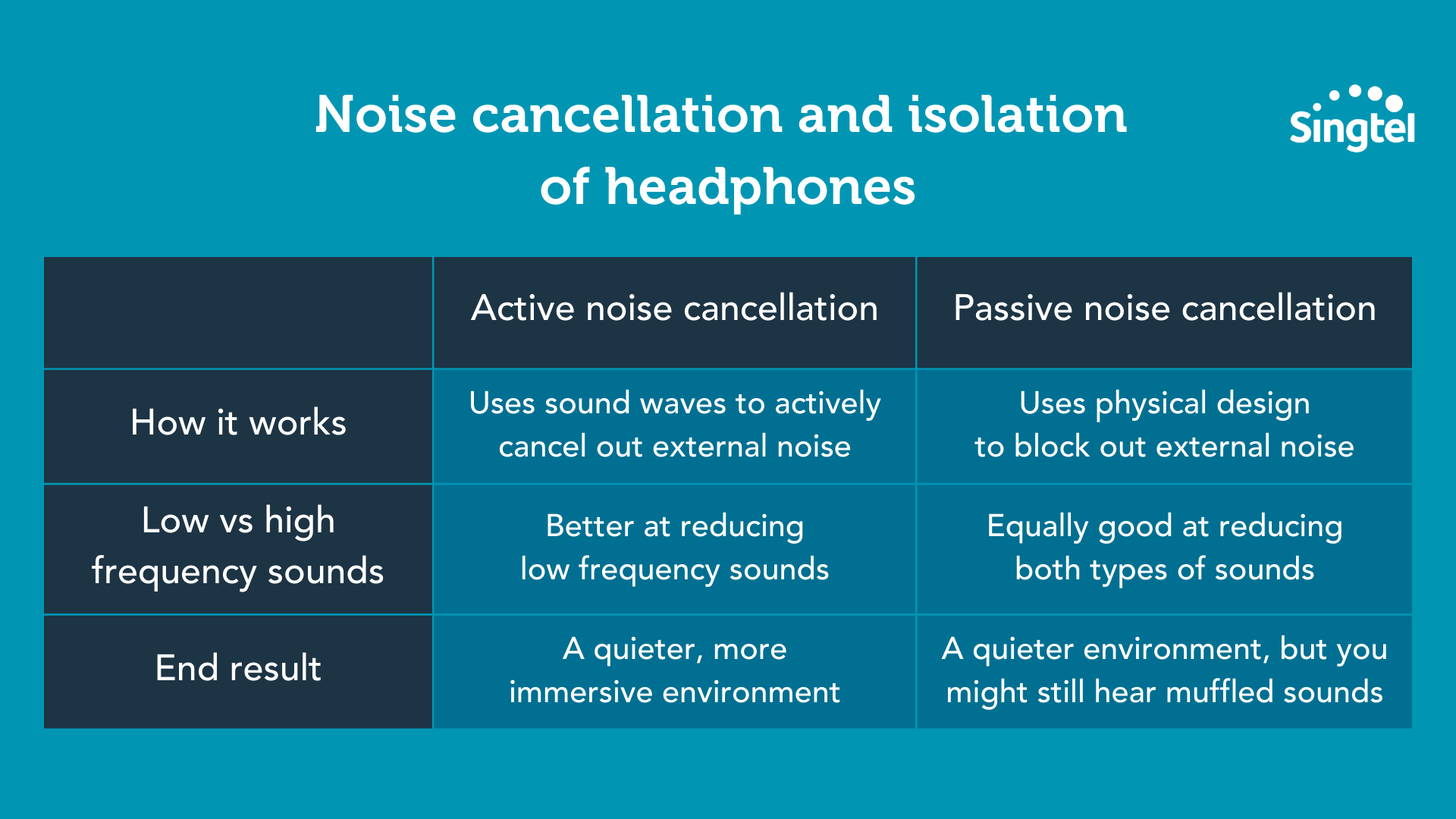
Active noise cancellation uses microphones, speakers, and signal processing to reduce outside sound. Passive isolation comes from the physical design of the headphones, such as ear cups, ear tips, padding, and a tight seal.
These two methods solve different problems:
| Method | How it works | Best for | Works with any headphones? |
|---|---|---|---|
| Passive isolation | Blocks sound with physical materials | Voices, high sounds, sudden noise | Partly |
| Active noise cancellation | Creates an opposite sound wave | Engine hum, fans, HVAC noise | No |
| Software noise reduction | Filters audio or microphone signals | Calls and recorded audio | Sometimes |
| Ear protection | Uses certified hearing protection materials | Loud work sites and machinery | Not always |
ANC works best against steady, low sounds. Examples include airplane engines, bus noise, air conditioners, and computer fans. It is less effective against speech, clapping, alarms, and sudden sounds.
Passive isolation is often better for higher sounds. A good seal around your ears or inside your ear canal can reduce voices and sharp noise before electronics do anything.
Why apps cannot add true ANC to every pair
True ANC needs at least three things:
- A microphone that hears outside sound.
- A processor that calculates an opposite signal.
- A speaker and control system that plays that signal with very low delay.
Most standard headphones do not have the required external microphones or ANC processor. A phone app cannot hear the sound at the correct place, calculate a perfect response for every angle, and send it through ordinary headphones without delay.
An app may still offer useful noise reduction. It can filter the audio signal you are listening to, or remove background noise from your microphone during a call. That is different from cancelling the sound in the room.
The quickest way to get more noise reduction
Start by checking whether your headphones already support ANC. If they do, turn it on in the headphones’ controls or companion app. If they do not, improve the physical seal before trying software.
Step 1: Check for an ANC control
Look for one of these controls:
- A button marked ANC, Noise Control, or NC
- A touch control that switches between Noise Cancellation, Transparency, and Off
- A setting in the manufacturer’s mobile app
- A toggle in the Bluetooth device settings
Some headphones use a long press to switch sound modes. Others require the companion app. Check the manual for the exact model, because the button layout and names differ.
If the headphones have ANC, use the “Noise Cancellation” mode rather than “Transparency,” “Ambient,” or “Hear-through.” Transparency mode intentionally sends outside sound into the headphones.
Step 2: Improve the fit
A poor fit can make any noise cancellation seem weak. For earbuds, try each included ear tip size. The best tip should feel secure without painful pressure.
A simple fit check:
- Play steady music at a low or medium level.
- Turn ANC on and off.
- Listen for a change in low sounds, such as a fan or air conditioner.
- Try a different ear tip or adjust the earbud position.
- Keep the option that gives the strongest seal without discomfort.
For over-ear headphones, the ear cups should fully surround your ears. Glasses, thick hair, hats, and worn padding can leave gaps. Those gaps let outside sound enter and may reduce both passive isolation and ANC performance.
Step 3: Reduce leaks and physical gaps
Check the ear pads for cracks, flattened foam, or loose covers. Replace damaged pads when the manufacturer sells compatible parts.
Do not cover microphones, vents, or pressure ports with tape or thick material. Those parts help the ANC system work. Blocking them may cause poor performance, feedback, or an uncomfortable pressure effect.
Step 4: Use a steady sound when silence is not possible
If your headphones lack ANC, a low-volume sound can help mask remaining noise. Options include:
- Brown noise
- Pink noise
- Rain sounds
- A fan recording
- Instrumental music with few sudden changes
This does not remove outside sound. It makes the remaining noise less noticeable. Keep the volume low enough that you can still hear nearby warnings when needed.

How to get noise cancellation on wired headphones
Wired headphones cannot gain full ANC through a basic phone or computer setting. You need headphones with built-in ANC or a separate device designed to process outside sound.
You can still improve their performance in practical ways:
- Use closed-back headphones instead of open-back models.
- Choose memory-foam ear tips for compatible earbuds.
- Wear hearing protection over the headphones only when it is safe and comfortable.
- Use low-volume masking audio.
- Move away from the noise source.
- Use a room divider, curtain, or soft furnishing to reduce reflected sound.
Open-back headphones are designed to let air and sound pass through the ear cups. They usually provide little passive isolation. Software cannot change that physical design.
For wired earbuds, the ear tip is often the main factor. A deeper seal may block more sound, but never force an ear tip into the ear canal. Stop if you feel pain, pressure, ringing, or reduced hearing.
How to reduce background noise during calls
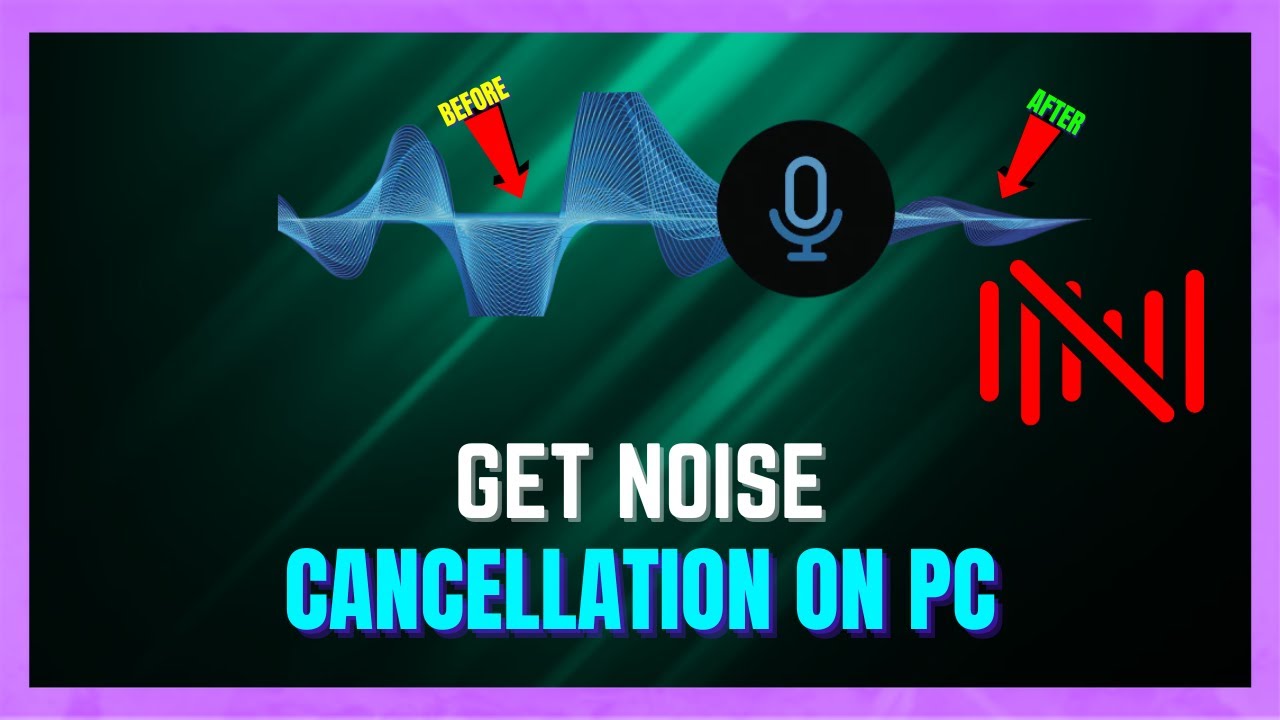
Many people asking about noise cancellation want other people to hear less background noise from their microphone. This is called microphone noise suppression, not headphone ANC.
Microphone noise suppression can reduce keyboard sounds, fans, traffic, and room noise before the audio reaches the call. The feature may be built into the meeting app, operating system, headset, or external microphone.
In Zoom
Zoom provides background noise removal settings that can reduce some steady and intermittent sounds. Open the audio settings before or during a meeting, then choose the background noise suppression level.
Higher settings may remove more noise, but they can also affect music, instruments, other voices, or parts of speech. Test the setting with the meeting’s microphone test before a live call.
In Microsoft Teams
Microsoft Teams includes noise suppression options in its device settings. Choose the setting that fits your environment, then make a test call.
Noise suppression is not the same as making your headphones quiet. It changes what your microphone sends to other people. You may still hear the room through your headphones.
On Windows
Windows may provide microphone enhancements through the sound settings or the driver supplied by the computer or headset maker. The exact choices depend on the Windows version, sound hardware, and driver.
To check:
- Open Settings.
- Select System, then Sound.
- Choose your input microphone.
- Look for audio enhancements, noise suppression, or signal processing.
- Test your voice and background noise.
If the option is missing, the computer or driver may not support it. A meeting app may still offer its own filter.
On Mac
macOS offers Voice Isolation for supported calls and apps. It is designed to make your voice clearer by reducing nearby background sound. The feature changes microphone input, not the sound reaching your ears.
If you need less noise in what you hear, use passive isolation, ANC headphones, or a low-volume masking sound instead.
With third-party software
Tools such as Krisp and similar voice-processing programs can reduce background noise from a microphone. They may be useful with ordinary wired or Bluetooth headphones.
Before using one, check:
- Whether it supports your operating system
- Whether it works with your calling app
- Whether it adds a subscription cost
- Whether it processes audio locally or sends it to a service
- Whether it changes music or speech quality
Do not install an app that claims to add full ANC to any headphones unless it clearly explains that it uses an external microphone and has suitable hardware. Software-only claims deserve caution.
How to use noise cancellation on Android
Android phones vary by manufacturer, so the exact menu names differ. The most reliable approach is to check both the headphones’ app and the phone’s accessibility or sound settings.
For listening:
- Pair the headphones.
- Open the manufacturer’s app, if one exists.
- Select the headphones.
- Choose Noise Cancellation or ANC.
- Turn off Transparency or Ambient Sound if you want less outside noise.
- Adjust the fit and ear tip size.
Some Android phones include accessibility tools such as sound amplification. These tools may make selected sounds easier to hear, but they do not create ANC for ordinary headphones. Google describes Sound Amplifier as an accessibility feature that adjusts and filters sound; it is not a replacement for ANC hardware.
Android may also show Bluetooth features such as spatial audio, HD audio, or a device-specific sound mode. These features can change sound quality, but they do not necessarily reduce outside noise.
How to use noise cancellation on iPhone and iPad
An iPhone or iPad can control ANC when the connected headphones support it. Open the Control Center, press and hold the volume control, and choose the available noise-control mode. The choices depend on the headphones.
For supported Apple headphones, the modes may include:
- Noise Cancellation
- Transparency
- Adaptive
- Off
If no noise-control option appears, the headphones may not support ANC, the wrong Bluetooth device may be connected, or the manufacturer may require its own app.
For calls, Apple devices may offer Voice Isolation in supported apps and call modes. This reduces background noise sent through the microphone. It does not make the room quieter for you.
How to get noise reduction on Windows and Mac computers
Computers can control ANC headphones through Bluetooth, USB, or a companion app. They cannot normally add true ANC to standard headphones.
Bluetooth headphones with ANC
Pair the headphones as usual, then use the physical control or the maker’s app to select ANC. Some models remember the last mode used. Others reset to a default mode each time they connect.
If the headphones show separate “headphone” and “headset” modes, the headset mode may reduce audio quality because it activates the microphone. This is a Bluetooth limitation on some devices, not a failure of ANC.
USB headphones
USB headsets may include their own digital signal processor and microphone filters. Install the maker’s official software only when needed, and download it from the manufacturer’s website.
Check for controls named:
- Noise cancellation
- Sidetone
- Ambient sound
- Mic monitoring
- Noise suppression
Sidetone sends your own voice back into the headphones. Turning it down may make a noisy room feel quieter, but it does not remove outside sound.
Wired analog headphones
A 3.5-millimeter headset usually relies on its physical design for isolation. Use closed-back headphones, a good ear seal, and low-volume masking audio. A computer’s equalizer can change the tone, but it cannot cancel room noise.

What to do when noise cancellation does not work
Use this order because it starts with simple and safe checks.
Symptom: ANC makes little difference
Possible causes include:
- A poor ear seal
- The wrong sound mode
- Low battery
- Blocked or dirty microphones
- Damaged ear pads
- A firmware or app issue
- Noise that changes too quickly for ANC to reduce well
Try a different ear tip, clean the outside of the headphones with a dry or slightly damp cloth, charge the device, and restart the connection. Do not push liquid into microphone openings.
Symptom: You hear a hiss
A faint hiss can occur when ANC electronics are active. It may be more noticeable during quiet sections or when no music is playing.
If the hiss is new, loud, or present only on one side, restart the headphones and check for a firmware update. If it continues, contact the manufacturer. Do not assume every sound is normal.
Symptom: Voices still come through
ANC is usually weaker against speech than against constant low-frequency noise. Improve the passive seal, move farther from the speaker, or use a steady masking sound at a safe level.
Symptom: The headphones sound worse with the microphone on
Some Bluetooth connections switch to a lower-quality call profile when the microphone is active. Try a USB connection, a separate microphone, or a wired mode if your setup supports it.
Symptom: You feel pressure or discomfort
ANC should not cause pain. Some users describe a pressure-like sensation even when air pressure has not changed. Turn ANC off, adjust the fit, and take a break.
Stop using the headphones if you have ear pain, ringing, dizziness, or a noticeable change in hearing. Seek medical advice if symptoms persist.
Safety limits for noise cancellation
Noise cancellation is not hearing protection unless the product is specifically rated and labeled for that purpose. ANC headphones may reduce some sounds, but they may not protect you from loud tools, firearms, industrial machinery, or other hazardous noise.
Do not use strong isolation when you must hear:
- Emergency alarms
- Vehicle traffic
- Cyclists or pedestrians nearby
- Workplace warnings
- A child or dependent person
- A coworker speaking to you in a safety-critical setting
The World Health Organization advises keeping personal listening levels moderate and taking breaks. A practical rule is to use the lowest volume that lets you follow the content clearly.
Common mistakes to avoid
Buying an app that promises universal ANC
An app cannot replace the microphones and processor required for reliable ANC. It may provide equalization, masking sound, or microphone noise suppression instead.
Confusing voice isolation with listening isolation
Voice isolation helps your microphone. It does not block the room from your ears.
Turning up the volume to overpower noise
This may make outside sound less noticeable, but it increases the risk of hearing damage. Improve the fit or use real ANC instead.
Covering ANC microphones
Tape, thick cases, dirt, or poorly fitted accessories can block the microphones. Clean and store the headphones according to the maker’s instructions.
Using earbuds that hurt
A tight seal should not require pain. Try another tip size or a different headphone style. Comfort affects how long and safely you can use the device.
FAQs
Can I add ANC to regular headphones?
Not in the same way as headphones designed with ANC hardware. You can add passive isolation, use masking audio, or use software noise suppression for calls. Full ANC normally requires microphones, a processor, and compatible speakers built into the headphones.
Does noise-canceling software work with any headphones?
Some software works with many headphones for microphone noise reduction. It cannot reliably cancel room noise from what you hear unless it has suitable microphones and processing hardware.
What is the best way to block voices?
Use headphones or earbuds with a strong physical seal, then add ANC if available. ANC alone is often less effective against speech than against engines or fans.
Can I sleep with noise-canceling headphones?
It depends on comfort, fit, heat, battery safety, and your surroundings. Do not use them if you need to hear alarms or other warnings. Avoid sleeping with hard earbuds if they cause pressure or pain.
Is ANC the same as hearing protection?
No. Consumer ANC headphones are not automatically rated hearing protectors. For hazardous noise, use hearing protection with an appropriate safety rating and follow workplace guidance.
Conclusion
To get noise cancellation on any headphones, first check whether the headphones already have ANC. If they do, enable the correct mode and improve the ear seal. If they do not, use closed-back headphones, well-fitted ear tips, and low-volume masking audio for better passive noise reduction.
For calls, use microphone noise suppression in Zoom, Teams, macOS, Windows, Android, or a trusted third-party tool. Remember the key limit: software may clean up what a microphone sends, but it cannot turn every ordinary pair of headphones into true ANC headphones.
Your next step is simple: test the fit, confirm the sound mode, and identify whether you need quieter audio for yourself or cleaner microphone sound for other people.