How To Charge Wired Headphones: Simple Guide

Introduction
Most wired headphones do not need to be charged. Standard headphones with a 3.5 mm plug receive an audio signal from a phone, laptop, tablet, or headphone amplifier. They do not use a built-in battery.
The main exception is a wired headset with active noise cancellation (ANC), Bluetooth, a USB audio processor, or another powered feature. These headphones may have a charging port even when you use a cable for audio. In that case, charge the headset through its USB port with the cable and power rating listed in its manual.
For users in the United States, the correct charger depends on the headphone design, not on the fact that the headphones use a wire. First, check the earcups, inline remote, cable, and manual for a battery symbol, USB-C port, micro-USB port, or charging instructions.

Do Wired Headphones Need to Be Charged?
Ordinary wired headphones do not need charging. They work through electrical power supplied by the connected device.
A basic wired headphone has speakers, a cable, and a plug. The phone or computer sends a small audio signal through the cable. That signal moves the speaker drivers and creates sound. There is no rechargeable battery to fill.
You may need to charge wired headphones if they include one or more of these features:
- Active noise cancellation
- Bluetooth wireless mode
- A built-in amplifier
- Digital USB audio processing
- A rechargeable battery for hearing protection
- Lighting or other electronic controls
- A microphone system that needs separate power
Quick identification guide
| Headphone type | Usually needs charging? | Why |
|---|---|---|
| 3.5 mm passive headphones | No | The connected device powers the speaker signal |
| Wired earbuds with an inline microphone | No | The phone supplies the small amount of required power |
| USB-C digital headphones | Usually no | The phone, tablet, or computer powers the digital electronics |
| Wired ANC headphones | Yes | Noise cancellation needs a battery or active power |
| Bluetooth headphones used with a cable | Yes | Wireless functions and battery-powered controls still need power |
| Gaming headset with USB controls | Sometimes | USB features may need power even when audio is wired |
| Headphones with a removable battery | Usually yes | The battery supports powered features |
A USB-C connector does not automatically mean that headphones can be charged. USB-C can carry audio, power, or both. The port’s purpose depends on the headphone model.
How to Tell Whether Your Wired Headphones Can Be Charged
Look for a charging port, a battery indicator, or a power switch. If none exists, the headphones are probably passive and do not require charging.
Check these areas:
- Ear cups: Look for USB-C, micro-USB, or a marked charging socket.
- Inline control: Some powered headphones place the battery and charging port in the cable module.
- Power button: A power button often indicates ANC, Bluetooth, amplification, or another active function.
- Status light: A red, orange, or white LED may show charging or battery status.
- Labels: Search for terms such as “charge,” “DC,” “5V,” “battery,” or “USB.”
- Manual or manufacturer page: Use the exact model number, not just the brand name.
Do not use the audio jack as a charging port. A 3.5 mm headphone socket carries audio, not USB charging power. Sending power into it can damage the headphones, phone, computer, or adapter.
The simplest test
If the headphones play sound with no power switch and only have a 3.5 mm plug, they are likely passive. You can use them as long as the source device has power.
If the headphones stop working when their battery is empty, they have an active feature. Connect the correct charging cable before trying to use ANC, Bluetooth, or other powered modes.

How to Charge Wired Headphones With a Battery
Use the charging port built into the headphones. Most current models use USB-C, while some older products use micro-USB.
Steps to charge them
- Turn off the headphones. This can reduce heat and may shorten charging time.
- Find the charging port. Look for a cover or label on the ear cup, control module, or cable.
- Use the supplied cable when possible. It is the safest way to match the connector and intended use.
- Connect the cable to a suitable USB power source. A computer USB port, USB wall adapter, or power bank may work if the manual allows it.
- Check the status light. The light may turn red, amber, or white during charging.
- Wait for the full-charge signal. The light may turn green, blue, white, or switch off.
- Disconnect the cable when charging is complete if the manual recommends doing so.
- Replace the port cover, if fitted. This helps keep dust and moisture away.
A common U.S. setup is a USB-C cable connected to a USB wall charger. The charger should meet the voltage and current requirements in the product manual. Do not guess if the product specifies a special adapter.
Can you use wired headphones while charging?
Sometimes. A headset may continue to play audio while connected to a charger, but the manual may forbid use during charging. Follow the manufacturer’s instructions.
Using the headphones while charging can:
- Increase heat
- Place stress on the cable and port
- Prevent some features from working
- Create noise or interruptions
- Keep the battery from charging quickly
If the product has a separate 3.5 mm audio cable, you may be able to listen in wired mode while the battery charges. This varies by model.
How long should charging take?
Use the time listed by the manufacturer. Charging time depends on battery size, battery age, charger output, temperature, and whether the headphones are in use.
Do not treat a fast phone charger as proof that the headphones will charge faster. Many small devices draw only the power they need. A higher-wattage charger does not necessarily reduce charging time.

How to Charge USB-C Wired Headphones
USB-C headphones fall into two different groups:
- USB-C audio headphones: They use the USB-C connection to receive digital audio from a phone, tablet, or computer. They may not have a battery.
- Battery-powered headphones with a USB-C charging port: They use USB-C for charging and may use a separate cable for audio.
If your USB-C headphones have no battery, there is nothing to charge. Plug them into a compatible device and use the device’s battery as the power source.
If the headphones have a separate USB-C port labeled “charge,” “DC,” or “power,” connect that port to a USB charger. Do not assume that every USB-C port has the same function.
USB-C checks before charging
- Confirm that the cable fits the charging port.
- Read the markings near each USB-C port.
- Check whether the headphones need a USB-A-to-USB-C or USB-C-to-USB-C cable.
- Use a charger that follows the manufacturer’s instructions.
- Keep moisture out of the port.
- Do not force the plug into the socket.
- Do not charge through an audio-only adapter.
Some USB-C headphones work only with certain phones, tablets, computers, or operating systems. Compatibility is separate from charging. A headset can charge correctly and still fail to play sound if the source device does not support its audio mode.
How to Charge Wired ANC Headphones
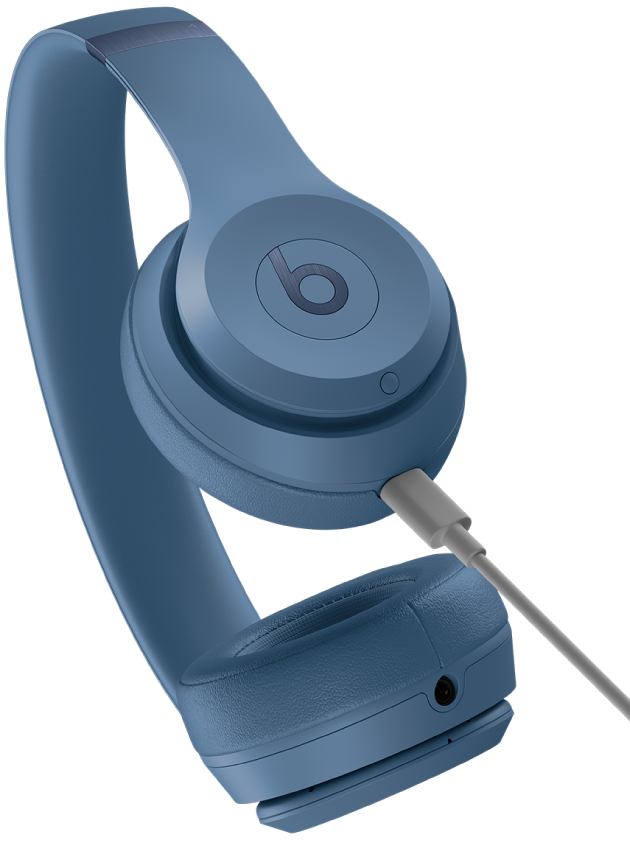
Wired ANC headphones need power for their microphones and electronic noise-control circuit. Plug the charging cable into the charging port on the headset, then connect it to a suitable USB power source.
When the battery is empty, many ANC headphones still play audio in passive wired mode. However, ANC, transparency mode, equalization, touch controls, or other features may stop working.
Follow this process:
- Turn off ANC if the headset allows it.
- Connect the charging cable to the headset.
- Connect the other end to a USB charger or computer.
- Watch for the charging indicator.
- Leave the headset connected for the time stated in the manual.
- Test both audio and ANC after charging.
If the headset has a “passive mode,” it may work without battery power when connected by 3.5 mm cable. If it has no passive mode, an empty battery can stop all audio even though the cable is connected.
How to Charge Wired Headphones Without the Original Cable
You may use a replacement cable if it has the correct connector and meets the manufacturer’s requirements.
For many USB-C and micro-USB headsets, a standard data or charging cable works. However, some products use a special cable, a proprietary connector, or a charging circuit with unusual requirements.
Before using a replacement cable:
- Confirm the port type.
- Inspect the manual for cable requirements.
- Avoid damaged, loose, frayed, or hot cables.
- Test with a known-good USB power source.
- Stop if the headset becomes unusually hot, smells burnt, swells, or makes a crackling sound.
Never cut a cable and connect bare wires to a headphone port or battery. Rechargeable lithium-ion batteries can overheat or catch fire if charged incorrectly.

What to Do if Wired Headphones Will Not Charge
Start with the safest and simplest checks. Do not open the earcups or battery compartment unless the manufacturer specifically provides a user-service procedure.
Symptom: The charging light does not turn on
Try these checks:
- Confirm that the cable is fully inserted.
- Try a different compatible USB cable.
- Try another USB port or wall adapter.
- Check whether the port contains lint, dirt, or moisture.
- Make sure you are using the charging port, not the audio port.
- Leave the headphones connected for several minutes if the battery is fully drained.
- Check the manual for the correct light behavior.
A missing light does not always mean that charging failed. Some models show a light only for a short time or use a phone app to display battery status.
Symptom: The headphones charge but shut off quickly
Possible causes include:
- An old or damaged battery
- High volume or ANC use
- A loose charging connection
- Extreme heat or cold
- A battery meter that needs to recalibrate
- A failed charging circuit
Fully charge the headset once, then test it with ANC and Bluetooth off. If battery life remains far below the manufacturer’s stated range under similar conditions, contact the manufacturer or an authorized repair center.
Battery-life figures are usually measured under stated test conditions. Continuous ANC, high volume, calls, cold weather, and wireless use can reduce real-world runtime.
Symptom: The headphones play no sound after charging
Charging and audio are separate functions. Check the following:
- Select the correct audio output on the phone or computer.
- Confirm that the plug is fully inserted.
- Test the headphones with another device.
- Try another compatible adapter.
- Turn off Bluetooth if the headset is switching to wireless mode.
- Check whether the headset requires power for wired use.
- Inspect the cable for cuts or bent contacts.
If the headphones work on another device, the first device or adapter may be the problem. If they fail everywhere, the cable, plug, charging circuit, or headphones may need service.

Charging Safety for Wired Headphones
Use only the charging method approved by the manufacturer. Small headphone batteries are not designed for improvised charging.
Follow these safety rules:
- Charge on a hard, stable surface.
- Keep the headset dry while charging.
- Do not cover it with bedding or clothing.
- Keep it away from strong heat and direct sunlight.
- Do not use a swollen, cracked, leaking, or very hot battery.
- Do not leave a damaged battery connected to power.
- Keep metal objects away from exposed charging contacts.
- Unplug the charger if you smell smoke or burning.
- Stop using the product if it becomes unusually hot.
If a lithium-ion battery swells, do not press it, puncture it, or place it in household trash. Disconnect power only if it is safe to do so, keep the device away from flammable materials, and follow local U.S. battery-recycling or hazardous-waste guidance.
Do not charge headphones with a random high-voltage adapter just because the connector fits. The connector shape does not prove electrical compatibility.

Wired Headphones vs. Wireless Headphones: Charging Differences
The word “wired” describes how audio travels. It does not always describe whether the device has a battery.
| Feature | Passive wired headphones | Wired headphones with active features | Wireless headphones |
|---|---|---|---|
| Audio connection | 3.5 mm or similar cable | Cable, USB, or both | Bluetooth or another wireless link |
| Battery | None | Often included | Included |
| Charging needed | No | Usually | Yes |
| Works with dead battery | Yes | Sometimes | Usually no |
| ANC possible | No | Yes | Yes |
| Main power source | Phone or computer | Internal battery or connected device | Internal battery |
The key distinction is passive versus active. Passive headphones convert the electrical audio signal directly into sound. Active headphones use electronic circuits that need power.

Common Mistakes to Avoid
Trying to charge a 3.5 mm plug
A 3.5 mm plug is for audio. It is not a charging connector. Use the USB charging port on the headset, if one exists.
Assuming every USB-C port charges the headphones
USB-C is a connector standard, not a guarantee that the port supports charging. Read the label and manual.
Using the wrong replacement cable
A cable can fit physically and still fail to charge. Use a cable approved for the model or a standard cable known to support the required connection.
Charging a passive headset
If the headphones have no battery, power switch, charging port, or active circuit, there is no charging step. Plug them into the audio source and use them.
Ignoring heat
Warmth can occur during charging, but strong heat is a warning sign. Unplug the headset and stop using it if it becomes unusually hot or shows battery damage.
Treating battery estimates as guarantees
A stated runtime is a test result under specific conditions. Your volume, ANC use, calls, temperature, and battery age can change the result.
Frequently Asked Questions
Can wired headphones charge from a phone?
Standard passive wired headphones do not charge from a phone. USB-C headphones with active electronics may draw a small amount of power from the phone while they play audio, but that is not the same as charging a battery. Battery-powered headphones should be connected to a charger unless the manufacturer says otherwise.
Can I charge wired headphones with a phone charger?
Usually, a compatible USB charger can charge battery-powered wired headphones. Use the cable and power source recommended in the manual. Do not connect a charger to a 3.5 mm audio port.
Do wired Apple EarPods need charging?
Apple EarPods with a 3.5 mm plug, Lightning connector, or USB-C connector generally do not have a rechargeable battery. They receive power from the connected Apple device. Check the exact model if it includes an unusual control module or active feature.
Can headphones work while they are charging?
Some battery-powered headsets support audio while charging, while others disable audio or wireless functions. Check the model’s manual. Do not use a headset during charging if it becomes hot or the manufacturer warns against it.
Why do my wired headphones say “low battery”?
The headphones likely include a battery-powered feature such as ANC, Bluetooth, a built-in amplifier, or digital controls. Charge the battery through the marked USB port. If the headset has passive wired mode, you may still hear sound after the battery runs out, but active features may stop.
Final Answer: Do You Need to Charge Your Wired Headphones?
You do not need to charge ordinary passive wired headphones. Connect them to a compatible phone, computer, tablet, or audio device and use them.
You do need to charge wired headphones that contain a battery for ANC, Bluetooth, amplification, digital processing, or other powered features. Find the marked USB charging port, use a compatible cable and power source, and follow the model’s manual.
The safest next step is simple: check the headphones for a battery, power button, status light, or charging port. If none is present, they likely do not need charging.