10 Best USB Headphones 2026

Best USB Headphones 2026 solve a simple problem: they connect straight to a computer’s USB port and start working without pairing screens, low battery warnings, or Bluetooth dropouts. That plug-and-play reliability makes them a common choice for video calls, online classes, and gaming sessions where a stable connection matters more than wireless freedom.
The category splits into two connector types. USB-A is the older rectangular port still found on many desktops and older laptops, while USB-C is the smaller oval connector now standard on newer MacBooks, Chromebooks, tablets, and phones. Some models also convert the digital USB signal into audio using a built-in sound chip, which can improve clarity compared with a basic analog headset.
Buyers should check port type first, since USB-A and USB-C are not interchangeable without an adapter. Comfort, microphone quality, and in-line controls matter just as much as sound quality for anyone using these headphones for calls or long work sessions. Weight, ear cushion material, and whether the mic has noise cancellation all affect daily comfort and call clarity.
Best for remote work calls: Logitech H390 Wired Headset
Best for MacBooks and USB-C phones: Apple EarPods with USB-C
Best for everyday music listening: JBL Tune 520C USB-C
Best for PC gaming: Razer Kraken V3 X
Best for USB-C laptops and Chromebooks: Logitech H391 Wired Headset
Best for classrooms: Cyber Acoustics AC-5008A
Best for AI-powered noise cancellation: Lenovo USB-A Wired Stereo Headset
Best for simple USB-C listening: ADOOPE Wired Over-Ear Headphones
Best for kids: Bywulanda USB-C Kids Headphones
Best for travel and compact storage: APETOO USB Earbuds
Logitech H390 Wired Headset

This is a solid pick for anyone who spends hours on video calls and wants a USB-A headset that just works without extra software.
Pros
- Noise-canceling mic with a boom that tucks away when not needed
- In-line volume and mute controls
- Works with Chromebook, no drivers required
Cons
- USB-A only, no USB-C version included
- On-ear fit may not suit users who prefer over-ear cushioning
- No active noise cancellation for the earcups themselves
The H390 pairs padded, swivel-mounted ear cushions with a straightforward plug-and-play USB-A connection. Its rotating microphone cuts background noise during calls, and the in-line controls make it easy to mute or adjust volume mid-conversation. At just over 7 ounces, it stays comfortable through long meetings without feeling bulky. Best USB Headphones 2026
Apple EarPods with USB-C

Anyone with a USB-C iPhone, iPad, or Mac who wants a compact, no-fuss earbud option should consider these EarPods.
Pros
- Ergonomic shape designed to fit ear geometry
- Built-in remote for volume, playback, and calls
- Lightweight at just over an ounce
Cons
- USB-C only, incompatible with USB-A ports
- No ear tip size options for a customized fit
- Minimal noise isolation compared with over-ear designs
Apple’s EarPods use a contoured shape instead of a rounded bud, which the company says fits more ear shapes comfortably. The built-in microphone picks up voice clearly for calls and Siri requests, and the inline remote handles playback without touching the device. They work with any USB-C port, making them a natural match for newer iPhones and iPads that dropped the Lightning connector.
JBL Tune 520C USB-C

Music listeners who want richer bass and adjustable EQ from a USB-C headset will find good value here.
Pros
- Hi-Res audio support at 96kHz/24bit
- Three EQ presets including Bass and Vocal modes
- Folds flat for storage in a bag
Cons
- USB-C connection only
- On-ear design may feel snug for extended wear
- Passive noise control only, no active cancellation
The JBL Tune 520C uses two 32mm drivers tuned for JBL’s signature bass-forward sound. A three-button remote handles calls, playback, and EQ switching, and the flat, tangle-resistant cable is a nice touch for anyone who tosses headphones in a backpack. It connects to phones, tablets, laptops, and gaming devices through USB-C.
Razer Kraken V3 X

PC gamers who want positional audio and RGB lighting without a heavy headset should look at the Kraken V3 X.
Pros
- Lightweight build at under 10 ounces
- 7.1 surround sound on Windows 10 64-bit
- Customizable Chroma RGB lighting
Cons
- PC only, not compatible with consoles or USB-C devices
- Requires Windows 10 for surround sound features
- Over-ear fit adds bulk compared with on-ear designs
Razer’s TriForce driver design splits audio into three tuned bands for clearer highs and stronger lows. The bendable cardioid microphone focuses on voice while reducing background pickup, which helps in shared gaming spaces. It plugs into a USB-A port and works only with Windows PCs, so console or Mac gamers should look elsewhere.
Logitech H391 Wired Headset
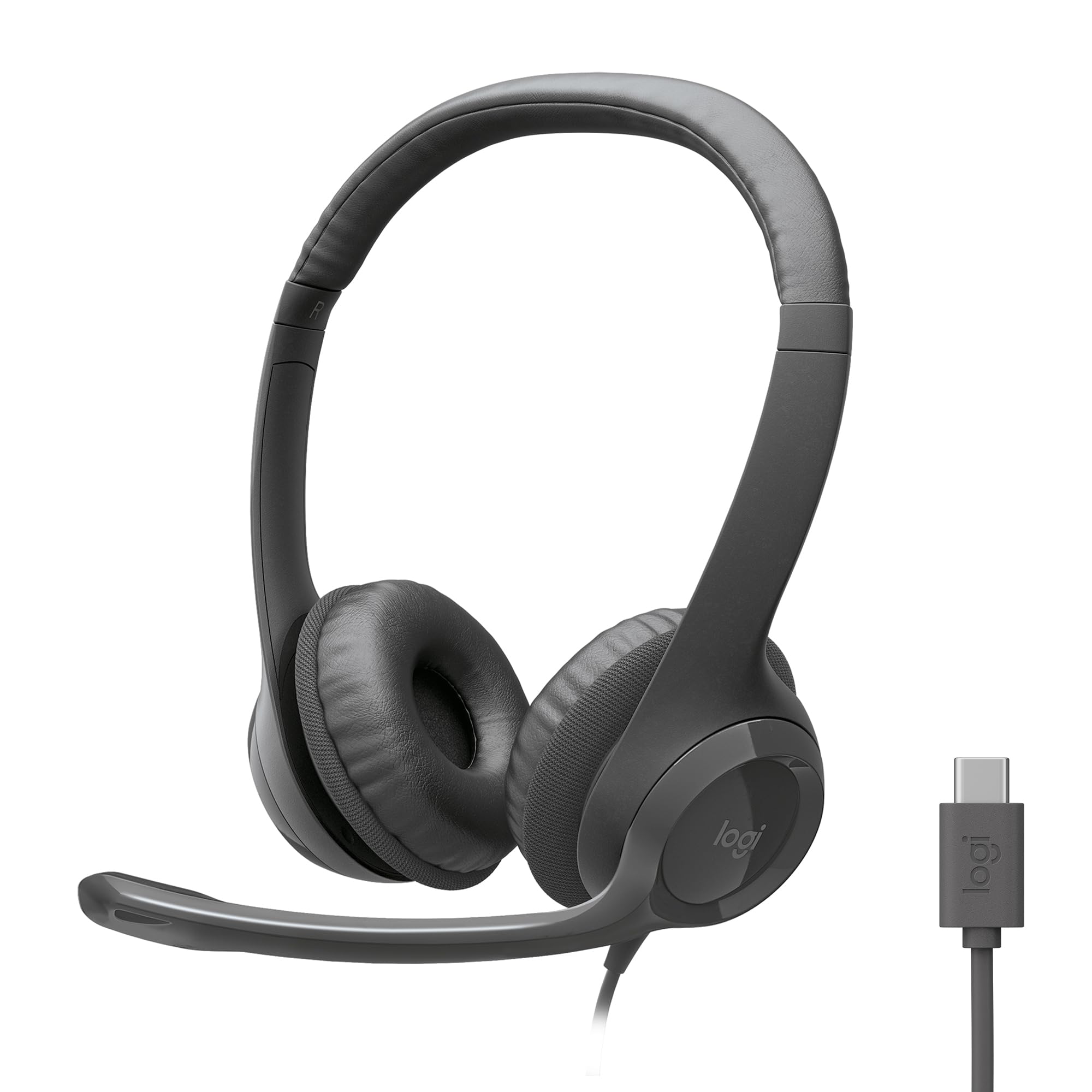
This is the USB-C counterpart to the H390, built for newer laptops and Chromebooks that lack a USB-A port.
Pros
- Uses recycled plastic in its construction
- In-line mute and volume controls
- Certified for Works With Chromebook
Cons
- USB-C only, no USB-A option in this listing
- On-ear cushions may feel warm during long sessions
- Boom mic adds visual bulk compared with earbud styles
The H391 carries over the rotating noise-canceling mic and padded headband from its USB-A sibling, but swaps the connector for USB-C. Logitech notes the plastic housing includes a notable share of post-consumer recycled material, a detail worth knowing for buyers who prioritize sustainable manufacturing. It works with common meeting apps out of the box.
Cyber Acoustics AC-5008A
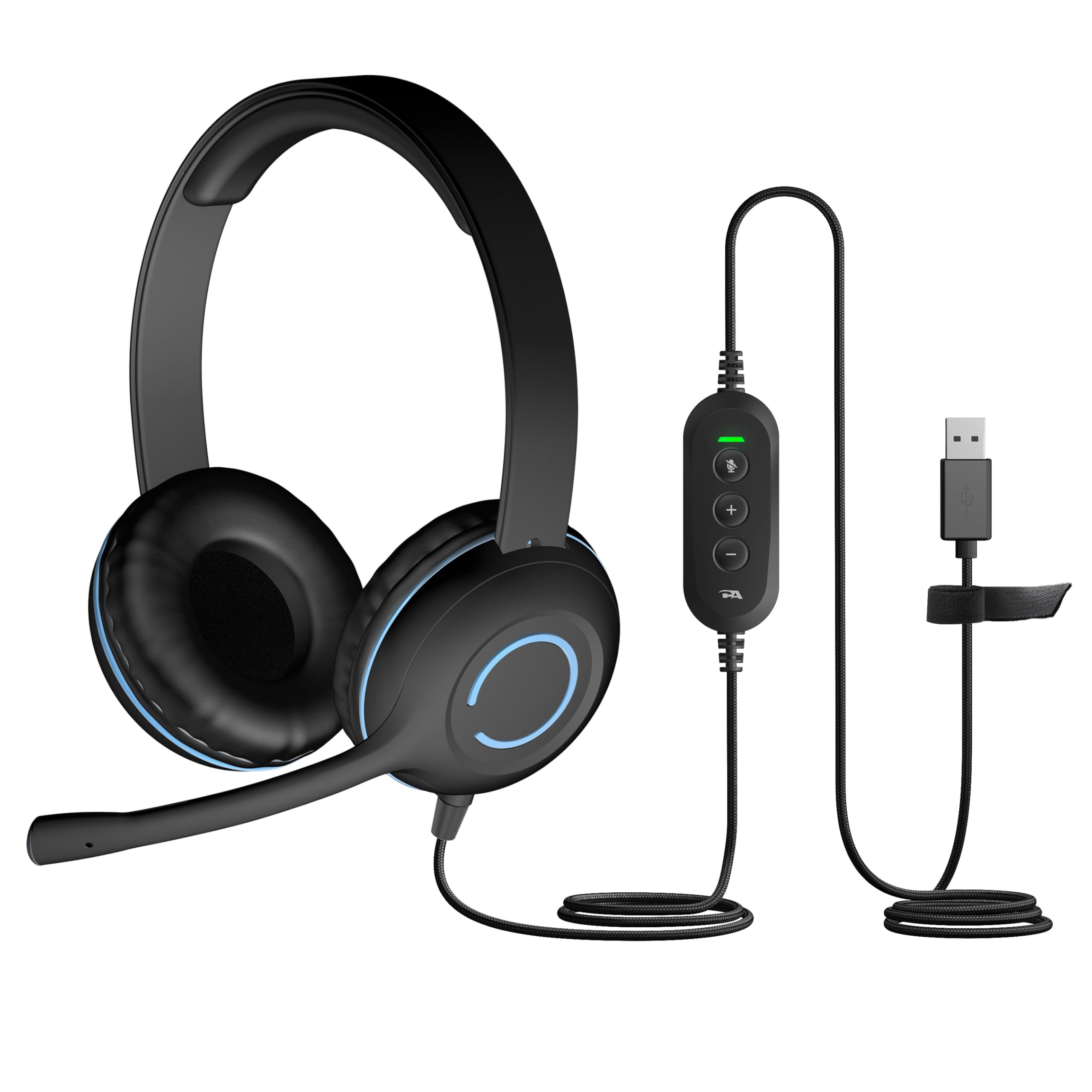
Schools and budget-conscious buyers looking for a durable, no-frills USB-A headset will find this a practical option.
Pros
- Braided cable resists tangling and wear
- Mic boom can be worn on either side
- Simple in-line volume control
Cons
- No active noise cancellation
- Basic design lacks premium padding
- USB-A only, no adapter included
Built with classroom and remote-learning use in mind, the AC-5008A pairs an adjustable headband with leatherette ear cushions for all-day wear. The unidirectional mic reduces background noise during lessons or calls, and the plug-and-play USB connection needs no software install. It works across PCs, Macs, and Chromebooks.
Lenovo USB-A Wired Stereo Headset

Professionals who want software-enhanced noise cancellation for calls should consider this Lenovo headset.
Pros
- AI noise cancellation through companion app
- Lightweight at 140 grams
- Compatible with Teams, Zoom, Slack, and more
Cons
- Requires software install for full noise-cancellation features
- USB-A only
- Replaceable earcups add a part to track over time
The Lenovo headset relies on its Accessories and Device Manager software to filter background noise beyond what the hardware alone handles. Its double-sided boom mic and replaceable earcups add flexibility for shared office equipment. The simple control box keeps mute and volume within easy reach during calls.
ADOOPE Wired Over-Ear Headphones
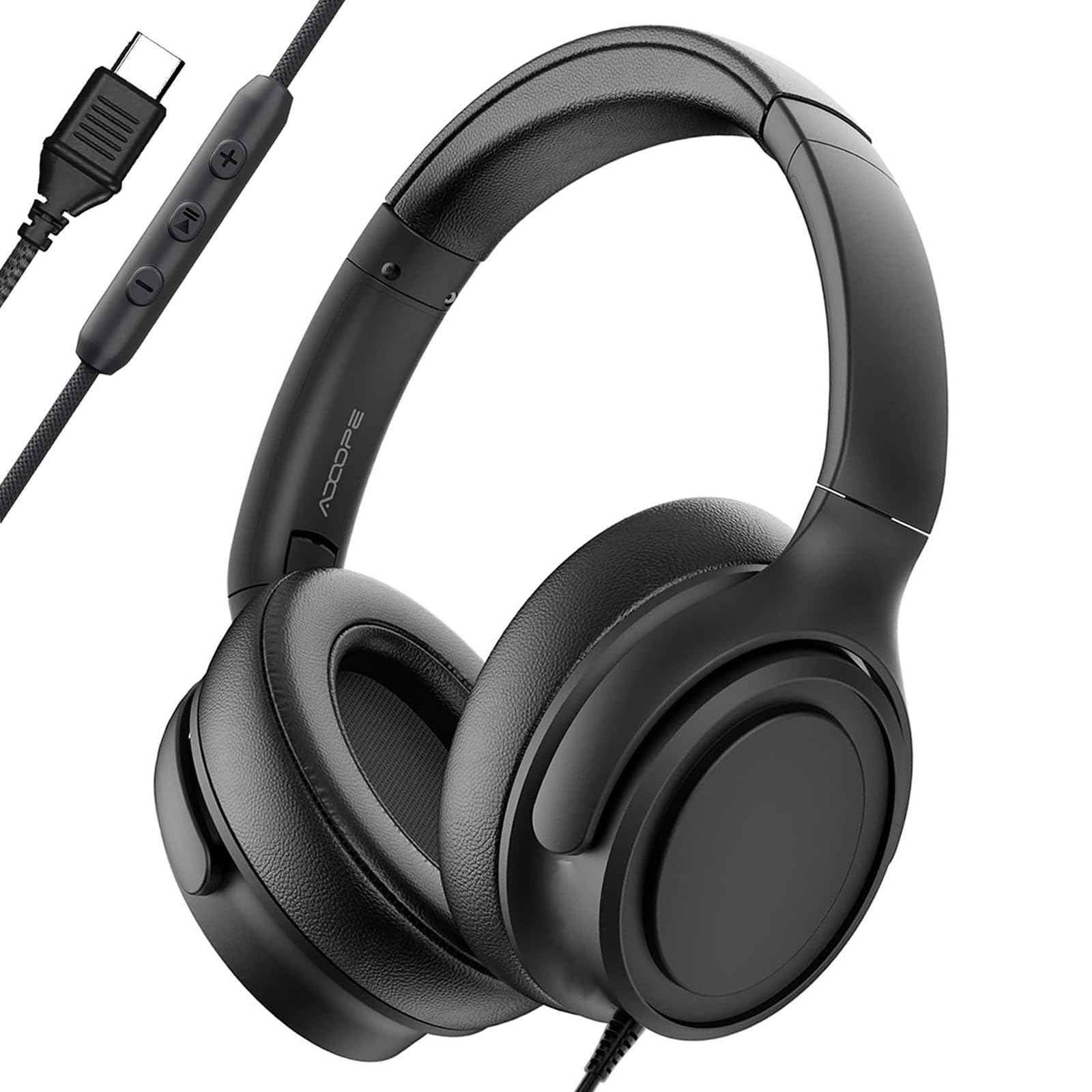
This is a straightforward option for anyone who wants over-ear comfort on a USB-C laptop or tablet without extra features to configure.
Pros
- Immediate plug-and-play USB-C setup
- Noise-isolating ear cups for passive sound blocking
- Compatible with a wide range of USB-C laptops and tablets
Cons
- Some older or entry-level USB-C ports may not support digital audio
- No in-line remote or microphone controls detailed
- Over-ear design is bulkier than earbuds for travel
ADOOPE’s headphones skip Bluetooth entirely in favor of a direct USB-C digital connection, which avoids pairing issues and battery concerns. The noise-isolating ear cups block outside sound passively rather than through active cancellation. Buyers should confirm their device supports USB-C digital audio before purchasing, since not all ports do.
Bywulanda USB-C Kids Headphones

Parents shopping for a school-safe headset should note this model’s built-in volume limit designed to protect young ears.
Pros
- Volume capped at 94 decibels for hearing protection
- Foldable design for backpacks and travel
- Adjustable headband for growing kids
Cons
- USB-C only, not compatible with USB-C charging ports
- Limited to devices with a USB-C headphone jack
- No microphone mentioned for calls
Bywulanda built this headset specifically for school-issued tablets and laptops with USB-C ports, using 40mm drivers for balanced sound. The volume limit is a meaningful safety feature for parents worried about listening habits. Soft earmuffs and a foldable frame make it easy for kids to carry between classes.
APETOO USB Earbuds

Travelers and commuters who prefer earbuds over headphones will appreciate this compact, magnetic USB-A option.
Pros
- Magnetic earbuds clip together when not in use
- Long 7.5-foot cable for flexible movement
- Includes multiple ear tip sizes and a carrying case
Cons
- USB-A only
- In-ear fit may not suit all users
- Cable length can be excessive for desktop use
APETOO’s earbuds use a digital DAC chip to process audio from a USB-A port, paired with silicone tips for passive noise isolation. The magnetic backs let the buds snap together around the neck when not in use, a small but useful convenience. An in-line remote handles mute and volume without reaching for the laptop.
Buying Guide
Match the Connector to the Device
USB-A and USB-C ports are not interchangeable without an adapter. Checking the exact port on a laptop, tablet, or desktop before buying prevents a frustrating return.
| Connector | Common Devices |
|---|---|
| USB-A | Older laptops, desktops, many office PCs |
| USB-C | Newer MacBooks, Chromebooks, tablets, some phones |
Consider Wearing Style
Over-ear designs cover the whole ear and tend to block more outside noise passively. On-ear models sit lighter on the head but may let in more ambient sound. Earbuds offer the smallest footprint for travel but fit varies by ear shape.
Check Microphone Features
A noise-canceling or cardioid microphone improves call clarity in noisy rooms. Boom mics that rotate or tuck away add flexibility for switching between calls and music.
Look for Practical Controls
In-line volume and mute buttons let users adjust settings without touching a keyboard or app. This matters most during video calls, where quick muting avoids awkward interruptions.
Match Features to the Use Case
| Use Case | Feature to Prioritize |
|---|---|
| Remote work calls | Noise-canceling mic, in-line mute |
| Gaming | Surround sound, lightweight build |
| Classroom or kids | Volume limiting, durable cable |
| Travel | Compact earbuds, long cable or case |
| Meeting app compatibility | Certified support for Zoom, Teams, or Meet |
Other Details Worth Checking
Weight affects comfort during long sessions; anything under 200 grams feels light for most users. Cable length matters for desktop setups where the computer sits farther from the chair. Some models include recycled materials or sustainable packaging, a detail worth noting for environmentally minded buyers.