How To Decrease Bass On Headphones: Easy EQ Fixes

If your headphones sound boomy, muddy, or too strong in the low end, you can usually reduce the bass with an equalizer (EQ). On a phone, open the audio or headphone settings and lower the bass band. On a Windows PC or Mac, use the built-in sound controls when available, or use a trusted EQ app. If the sound still feels too heavy, check the ear tips, headphone seal, audio source, and headphone design.
This guide explains how to decrease bass on headphones used with iPhones, Android phones, Windows PCs, Macs, TVs, and game consoles in the United States.
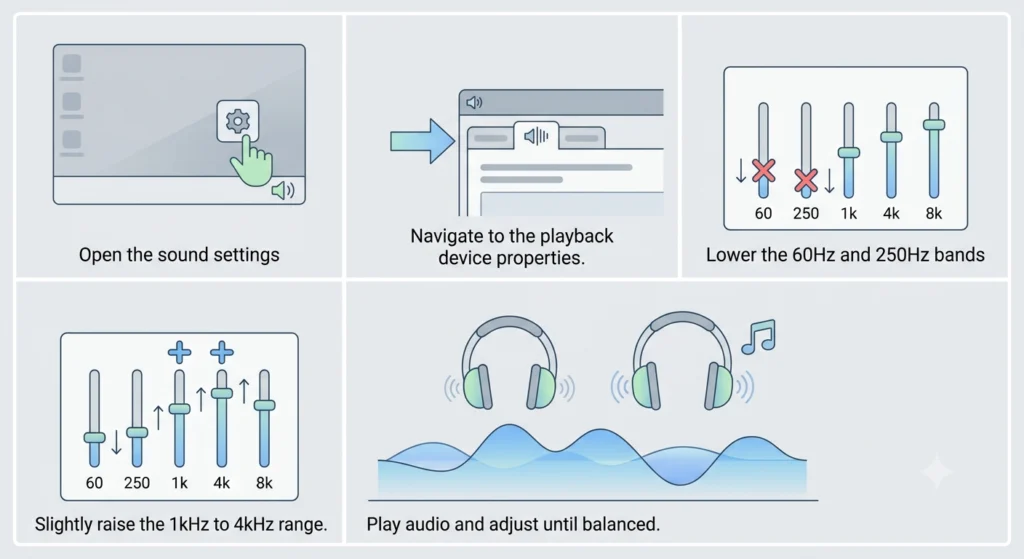
What “too much bass” sounds like
Bass is the low-frequency part of sound. It includes kick drums, bass guitars, deep voices, explosions, and low music tones. Excess bass does not always mean the headphones are defective. Some headphones are tuned with extra low-end energy by design.
Too much bass may sound:
- Boomy or swollen
- Muddy, with unclear vocals
- Rattly or distorted
- Heavy during movies or games
- Tiring after long listening
- Strong enough to cover guitars, speech, or high notes
The goal is not always to remove bass. The goal is to make the full mix easier to hear.
A small EQ change often works better than cutting the bass as far as possible. Start with a reduction of 2 to 4 decibels (dB), then listen again.
The fastest way to decrease bass with an equalizer
An equalizer changes the level of selected frequency ranges. To reduce bass, lower the bands between about 20 and 250 Hz.
Use this simple starting point:
| Frequency range | Main sound | Starting adjustment |
|---|---|---|
| 20–60 Hz | Deep rumble and sub-bass | -2 to -4 dB |
| 60–120 Hz | Kick drums and bass guitar | -2 to -4 dB |
| 120–250 Hz | Warmth and boom | -1 to -3 dB |
| 250–500 Hz | Lower mids and body | 0 to -2 dB |
These values are starting points, not universal rules. Headphones, music, hearing, and personal taste all differ.
How to use a graphic EQ
- Open the EQ in your music app, headphone app, phone settings, or computer sound settings.
- Find the sliders below 250 Hz.
- Lower the lowest one or two bands first.
- Play a familiar song with clear vocals.
- Stop when the vocals and instruments sound clearer.
- Save the setting with a name such as “Less Bass.”
Do not lower every slider. That reduces overall volume and can make the sound dull.
How to use a bass control
Some devices show a single Bass slider instead of several frequency bands. Move it slightly to the left or toward “Less.” Test the change with the same song at the same volume.
A single bass control is easy to use, but it gives you less control. It may reduce both deep bass and useful warmth.

How to decrease bass on iPhone and iPad
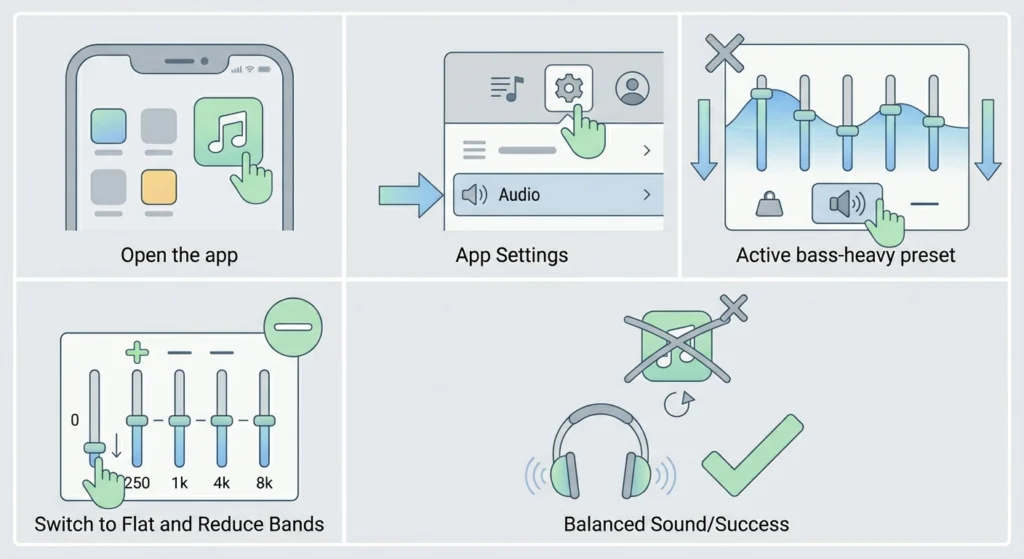
Apple devices may offer EQ settings through the Music settings, but the exact effect can depend on the app and audio source. Many third-party music apps also include their own EQ.
For Apple music
1. Open Settings.
2. Tap Apps and then Music on newer iOS versions. On some versions, tap Music directly.
3. Tap EQ.
4. Choose a profile with less low-end sound, if available.
5. Return to your music and test the result.
Apple’s built-in presets do not provide the same control as a full graphic EQ. If the available profiles do not solve the issue, check the settings inside your music or headphone app.
For Bluetooth headphones with a companion app
Many wireless headphones use a companion app. The app may include:
- A bass slider
- A five-band or ten-band EQ
- Custom sound profiles
- Presets such as “Speech” or “Podcast”
- Separate settings for noise cancellation or ambient sound
Set the lowest bands down by 2 or 3 dB. Keep the change modest at first. Some apps store EQ settings in the headphones, while others apply them only through the app. Test the headphones with more than one app to find out which type you have.
If the bass changes when you adjust the ear tips
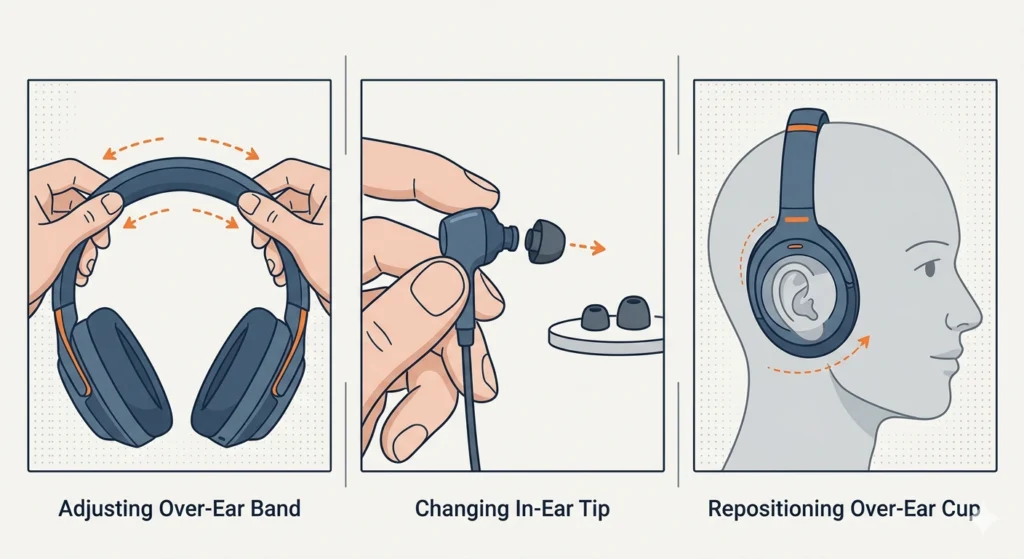
In-ear headphones depend on a seal inside the ear canal. A tight seal can increase the amount of bass you hear. Try a different tip size.
If the tips are too large, smaller tips may reduce the seal and lower the bass. If the tips are too small, they may not seal well and may sound thin or uneven. Choose the size that feels secure without pressure.

How to decrease bass on Android phones
Android settings vary by phone maker and Android version. Look under Sound, Audio, Sound quality and effects, Dolby Atmos, or Headphone effects.
General Android steps
- Open Settings.
- Search for equalizer, EQ, or sound quality.
- Open the sound or headphone control.
- Lower the bass bands below 250 Hz.
- Play a familiar track and adjust in small steps.
- Turn off extra bass modes, such as Bass Boost, if they are active.
Some Android phones include an equalizer only when headphones are connected. Others show different controls for wired headphones, Bluetooth headphones, speakers, or USB audio devices.
Use the headphone manufacturer’s app
If your headphones have an official Android app, use it before installing a separate EQ app. The official app may offer model-specific controls and firmware support.
Look for settings such as:
- Equalizer
- Bass
- Sound profile
- Clear voice
- Custom
- Bass boost
A custom EQ is usually the best option. Lower the 60 Hz and 125 Hz bands first. If voices still sound thick, lower 250 Hz by 1 or 2 dB.
When the EQ seems to do nothing
The app may not control all audio on the phone. Some EQ tools work only with music played inside that app. Bluetooth headphones may also apply their own sound profile after the phone sends the audio.
Test the following:
- Turn the headphone EQ off and on.
- Disconnect and reconnect the headphones.
- Check whether a bass preset is active.
- Test another music app.
- Disable sound effects that add bass.
- Check the headphone app for a separate saved profile.

How to decrease bass on Windows 11 and Windows 10
Windows may offer audio enhancements through the sound device properties. The available controls depend on the computer, driver, headset, and connection type.
Check Windows sound enhancements
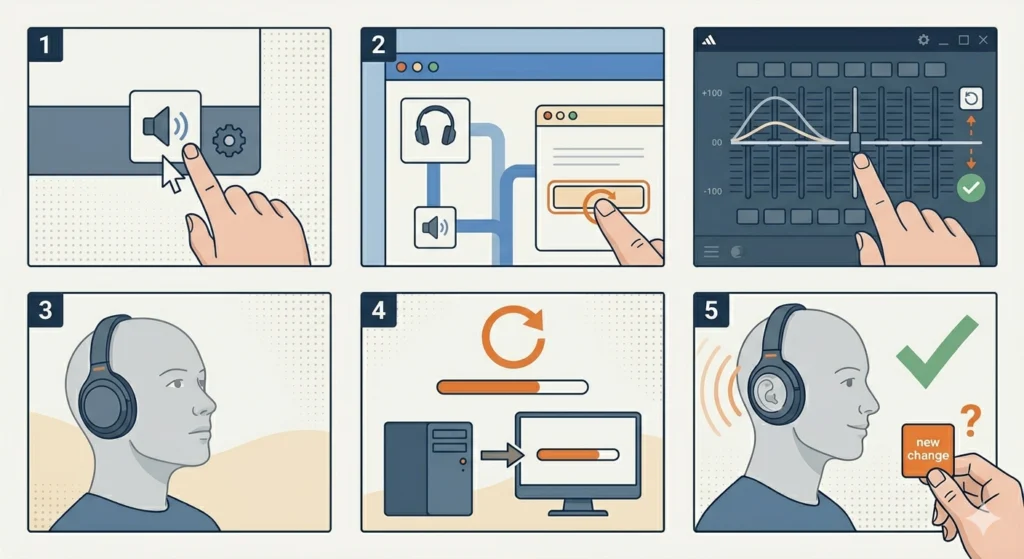
- Right-click the speaker icon on the taskbar.
- Open Sound settings.
- Select your headphones under the output device.
- Open the device properties.
- Look for Audio enhancements, Enhancements, or an equalizer.
- Turn off Bass Boost if it is enabled.
- Lower the bass bands if an EQ is available.
The names and locations can differ between Windows 10, Windows 11, and manufacturer drivers.
Use the headphone or sound-card software
Gaming headsets and USB audio devices may use software from the manufacturer. Open the control panel and look for an EQ or sound profile.
For a clear starting setting:
- 60 Hz: -3 dB
- 120 Hz: -3 dB
- 250 Hz: -1 dB
- 500 Hz and above: 0 dB
This example is not a measurement of any specific headset. It is a practical starting point for testing.
Use a system-wide EQ with care
A reputable system-wide EQ can affect more apps than a music app EQ. This may help if bass is too strong in games, videos, and streaming services.
Install software only from a trusted source. Check that it supports your version of Windows and your audio device. Avoid stacking several EQ programs, since multiple filters can make the result hard to predict.
How to decrease bass on a Mac
macOS does not provide one universal system-wide equalizer for every audio output. Some Apple apps and third-party audio tools provide their own EQ.
Reduce bass in a music app
Open the app’s playback settings and look for:
- Equalizer
- Audio effects
- Tone controls
- Bass and treble
- Sound profile
Lower the low-frequency sliders while playing a familiar track. If you use more than one music service, remember that an EQ setting in one app may not affect another.
Check headphone software
Some Bluetooth headphones have a Mac-compatible companion app. If the app supports macOS, use its custom EQ. If it supports only a phone, adjust the headphones through the mobile app and check whether the setting remains stored in the headphones.
Some models store EQ settings internally. Others apply the setting only while the companion app is active.
For podcasts and video calls
Speech usually benefits from less low-end energy. If voices sound muffled, look for a voice or speech mode. You can also reduce the 100–250 Hz area slightly, but avoid a large cut because it may make voices sound weak.
How to reduce bass on a TV, game console, or streaming device
Televisions and consoles often use simple sound modes rather than a full EQ.
Look in the audio menu for:
- Equalizer
- Sound mode
- Advanced sound
- Bass
- Dialogue enhancement
- Night mode
- Headphone audio
Turn off Bass Boost, Movie, or Music modes if they make the sound heavy. Try Standard, Speech, or Clear Voice instead.
If your headphones connect through a TV, the TV may control the sound. If they connect directly to a console or wireless transmitter, the console or transmitter may control it instead.
For gaming, lower bass can improve speech clarity. However, some low-end sound effects help you notice explosions, engines, and environmental details. Make a separate profile for games if your device allows it.
Reduce bass without an equalizer
You can often reduce perceived bass without changing the EQ.
Change the ear-tip size
With in-ear headphones, the seal has a large effect on bass. Try the next smaller tip if the sound is too heavy and the current tips feel tight.
Do not use a poor seal if it causes the earbuds to slip out. A loose earbud can reduce bass but may also reduce isolation and make you raise the volume.
Turn off bass-enhancing sound modes
Disable features named:
- Bass Boost
- Extra Bass
- Dynamic Bass
- Loudness
- Club
- Concert
- Movie
- V-shaped sound
Names differ by brand. These modes often raise both bass and treble, which can make the sound exciting at first but less balanced over time.
Change the headphone fit
Over-ear headphones can sound different when the ear cups move. A strong seal around the ears may increase low-end sound. Make sure the ear cups sit evenly and that the pads are not damaged or compressed.
Do not block vents or alter the headphone housing. Physical changes can damage the headphones and may create unsafe pressure or heat.
Lower the listening volume
Bass can feel more prominent at high volume, especially with music that already has strong low-end content. Lower the volume for a minute, then reassess the balance.
The World Health Organization advises keeping personal listening levels safe and taking breaks. If you notice ringing, pain, muffled hearing, or a blocked feeling after listening, stop and give your ears time to recover. Seek medical advice if symptoms continue.

What to do when lowering bass makes headphones sound thin
If the headphones lose too much body, raise the 120–250 Hz range slightly. Do not immediately raise the deepest bass.
Try this order:
- Restore the last EQ change.
- Raise 120 or 125 Hz by 1 dB.
- Keep 60 Hz lower if deep rumble was the main problem.
- Check vocals, drums, and acoustic instruments.
- Compare the sound at a lower volume.
This method separates deep bass from warmth. A large cut across all low frequencies can make voices and instruments sound hollow.
Use a preamp or overall gain control
Some EQ apps include a preamp or gain control. If you boost any frequency band, the total signal may become too loud and clip. Clipping sounds harsh, cracked, or distorted.
When making large EQ changes, lower the preamp by about 2 to 4 dB. If you only cut frequencies, this may not be necessary, but watch for distortion.
Bass reduction troubleshooting table
Use the symptom to choose the next check.
| Symptom | Likely cause | Best next step |
|---|---|---|
| Bass is heavy in one music app | App EQ or preset | Check that app’s sound settings |
| Bass is heavy everywhere | Headphone tuning or device effect | Disable bass modes and use a custom EQ |
| One ear sounds different | Fit, blocked opening, cable, or hardware issue | Refit, clean carefully, and test another device |
| Bass changes when earbuds move | Ear-tip seal | Try another tip size |
| Sound is distorted after EQ | Clipping or too much boost | Lower preamp or remove boosts |
| EQ works in music but not video | App-specific processing | Use device or system-wide controls |
| Headphones sound thin after a cut | Too much reduction in the low mids | Raise 120–250 Hz slightly |
| Bass suddenly changed | Preset, firmware, fit, or connection change | Recheck profiles and reconnect |
Do not insert sharp objects into earbud openings. Use the cleaning method recommended by the manufacturer. Moisture, wax, and debris can change sound, but cleaning incorrectly can push debris farther inside or damage the driver.
Common mistakes when reducing headphone bass
Cutting every low band too far
A deep cut can remove the foundation of music and make speech sound weak. Reduce one or two bands first.
Using several bass controls at once
Your phone, music app, headphone app, and computer may each apply an EQ. If all four reduce bass, the result may sound unnatural. Start with one control and add another only when you know what it does.
Comparing at different volumes
A louder setting often sounds more exciting. Match the volume before comparing “before” and “after” EQ.
Judging with one song
A song with heavy sub-bass may not reveal problems in the vocal range. Test several familiar tracks, including speech, acoustic music, and a recording with drums.
Assuming bass is always the hardware’s fault
The source, app preset, ear-tip seal, and listening volume can all change the result. Test the headphones with another device before deciding that they need repair or replacement.

When should you replace or repair the headphones?
Try EQ first when the headphones work normally but simply sound too warm or bass-heavy. Replacement may make more sense when:
- One side has much more bass than the other
- The sound changed suddenly without a setting change
- You hear rattling at normal volume
- The cable or connector cuts out
- Cleaning and refitting do not help
- The EQ requires an extreme cut to sound usable
If the headphones are under warranty, check the manufacturer’s support process before opening or modifying them. Physical repairs can affect warranty coverage.
A persistent imbalance in one ear may also come from fit, earwax, or hearing differences rather than the headphones. If the imbalance continues with several headphones and devices, consider speaking with a qualified hearing professional.

Frequently asked questions
Can I reduce bass without making music quieter?
Yes. An EQ can lower low-frequency bands while leaving the rest of the signal close to the same level. However, some EQ systems change overall gain, and a large boost in another band can cause clipping.
What EQ setting is best for less bass?
There is no single best setting for every headphone. Start by lowering 60 Hz and 125 Hz by 2 or 3 dB. If the sound is still muddy, lower 250 Hz by 1 or 2 dB.
Why do my earbuds have more bass with larger ear tips?
Larger tips may create a stronger seal in the ear canal. That seal can increase perceived bass. Try a smaller tip, but keep enough seal for comfort and stability.
Why does bass sound stronger on Bluetooth headphones?
The headphones may use a built-in bass profile, a companion-app preset, or a device sound effect. Bluetooth itself is not automatically a reason for excessive bass. Compare the same headphones with their EQ and sound effects turned off.
Can too much bass damage hearing?
Hearing risk is linked mainly to sound level and listening time, not bass alone. Loud bass can still contribute to unsafe exposure. Lower the volume, take breaks, and stop listening if you notice ringing, pain, or muffled hearing.
Conclusion
The simplest way to decrease bass on headphones is to lower the 60–125 Hz EQ bands by 2 to 4 dB, then test the sound with familiar music and speech. If the result is still too heavy, check bass-boost modes, ear-tip size, headphone fit, and app-specific settings.
Make one change at a time. A small cut often gives clearer vocals and a more balanced sound without removing the depth that makes music, movies, and games enjoyable.