How To Adjust Bass On Headphones: Easy EQ Guide

Introduction
To adjust bass on headphones, open your device’s sound settings or music app, find the equalizer (EQ), and raise the low-frequency bands. Start with a small boost, such as 2 to 4 decibels (dB), then listen at a safe volume. If the sound becomes muddy, lower the bass boost or reduce the overall volume.
This guide applies to headphones, earbuds, gaming headsets, and Bluetooth headphones used in the United States with phones, computers, tablets, televisions, and game consoles. You do not need special equipment for basic bass adjustment. Most devices use a software EQ, while some headphones use a companion app with built-in sound controls.
What Bass Means in Headphone Audio
Bass is the low part of the sound spectrum. It gives music its weight, warmth, and impact. Kick drums, bass guitars, deep voices, explosions, and movie sound effects all use bass.
Audio professionals often divide sound into three broad ranges:
| Range | Approximate frequency | What you hear |
|---|---|---|
| Bass | 20–250 Hz | Thump, depth, rumble |
| Midrange | 250 Hz–2 kHz | Voices, guitars, many instruments |
| Treble | 2–20 kHz | Detail, brightness, cymbals |
These ranges overlap. A bass control does not affect only one sound. A large boost can also reduce clarity by making voices and instruments seem covered by a thick layer of sound.
Bass boost vs. equalizer
A bass boost setting raises a preset range of low frequencies. It is quick and easy, but it gives you little control.
An equalizer, or EQ, lets you adjust several frequency bands. You may see sliders such as:
- 60 Hz for deep rumble
- 120 Hz for thump and fullness
- 250 Hz for warmth and body
- 500 Hz for some low-mid sound
A graphic EQ uses fixed sliders. A parametric EQ gives more control over frequency, gain, and bandwidth. Most listeners only need a basic graphic EQ.
What changes bass response?
The same EQ setting can sound different on different headphones. The result depends on:
- The headphone’s design and tuning
- The seal around your ears
- Earbud tip size and fit
- The music or video mix
- The source device
- Volume level
- Bluetooth codec and headphone processing
- Whether another EQ is already active
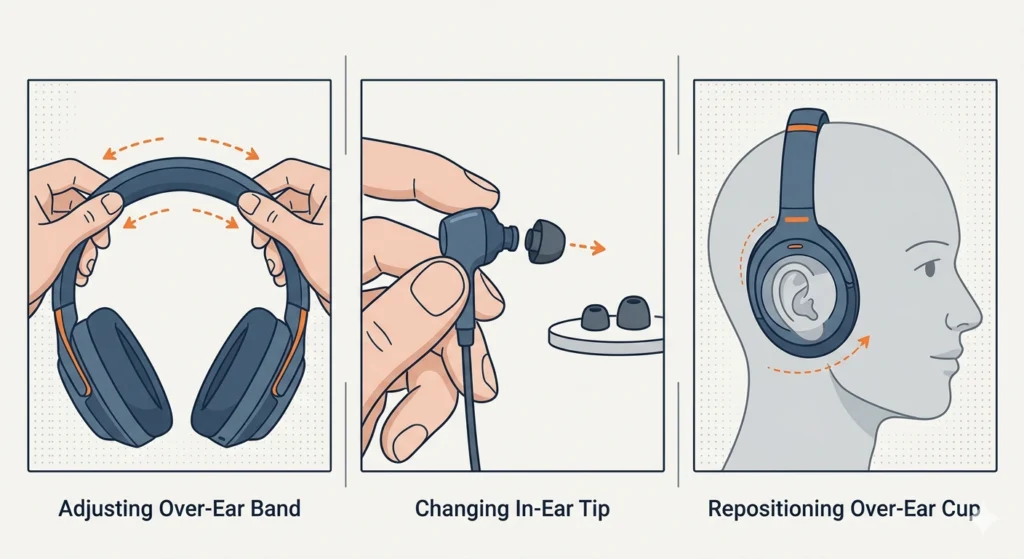
A poor seal is a common cause of weak bass on earbuds. Before changing settings, press the earbuds gently into place or try a different tip size. If bass improves, fit was the main issue.

How to Adjust Bass on a Phone
The fastest method is to use the equalizer in your music app or the headphone maker’s app. The exact menu name varies by phone, operating system, and app version.
On an iPhone or iPad
Apple devices may offer EQ controls inside supported music apps, but not every app uses the same setting.
Try these steps:
- Open the Settings app.
- Search for EQ, Equalizer, or Audio.
- Open the music app’s playback settings.
- Choose Bass Booster if you want a quick preset.
- For more control, use an EQ feature in the app or a compatible headphone app.
- Play a familiar song and compare the change with the EQ off.
If you use a headphone manufacturer’s app, check whether its EQ affects all audio or only audio played through that app. Some apps save the EQ inside the headphones. Others apply it only while the app is active.
On an Android phone
Android menus differ by brand. Samsung, Google, Motorola, OnePlus, and other phones may use different names for the same function.
Try this general path:
- Open Settings.
- Select Sound and vibration or a similar option.
- Look for Sound quality and effects, Equalizer, or Audio effects.
- Choose a bass preset or open the manual EQ.
- Raise the lowest one or two bands by a small amount.
- Test the change with music, speech, and video.
You can also check the music app’s settings. Some Android phones have a system EQ, while others leave EQ control to each app or to the headphone maker’s app.
If the phone has no EQ
Use one of these options:
- The EQ in your streaming or music app
- The headphone manufacturer’s app
- A reputable system-wide EQ app
- A wired DAC or headphone amplifier with tone controls
Check app permissions and privacy terms before installing an EQ app. Avoid apps that request access unrelated to audio control.

How to Adjust Bass on a Windows PC
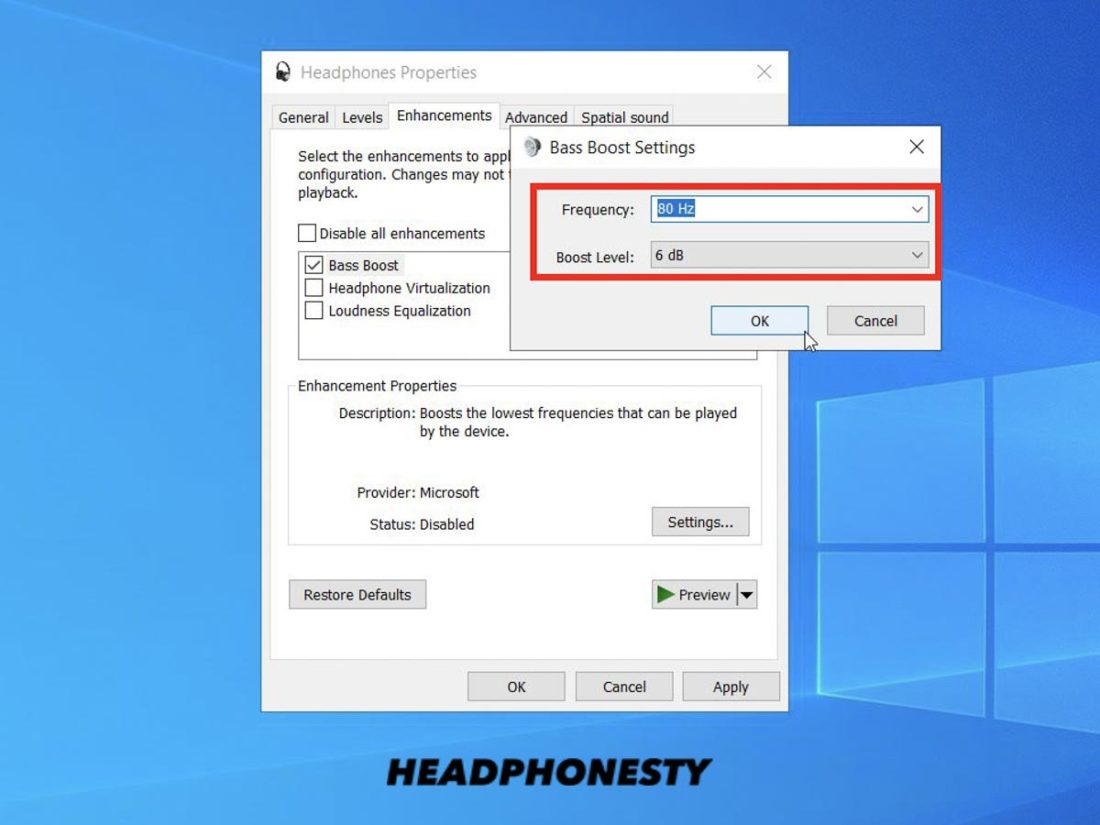
Windows may provide audio enhancements through the sound driver, headphones, or a separate app. The menu can differ between Windows versions and computer brands.
Try these steps:
- Right-click the speaker icon on the Windows taskbar.
- Open Sound settings.
- Select your headphones under the output device.
- Open Device properties or More sound settings.
- Look for Enhancements, Audio enhancements, or Equalizer.
- Turn on the available EQ or bass option.
- Raise the low bands in small steps.
- Test music, speech, and game audio.
Some Windows computers do not show an EQ. In that case, use the headphone maker’s software or a trusted audio EQ program. If you use more than one EQ, turn off all but one while testing. Multiple boosts can cause distortion.
Windows bass boost does not always work
A setting may have no effect when:
- The wrong output device is selected
- The headphones use their own app
- A game or music app bypasses system effects
- Exclusive audio mode is active
- The audio driver lacks enhancement controls
- Bluetooth audio is connected to a different device
Test the change with a basic audio file or a web video. If it works in one app but not another, the app may use its own audio path.

How to Adjust Bass on a Mac
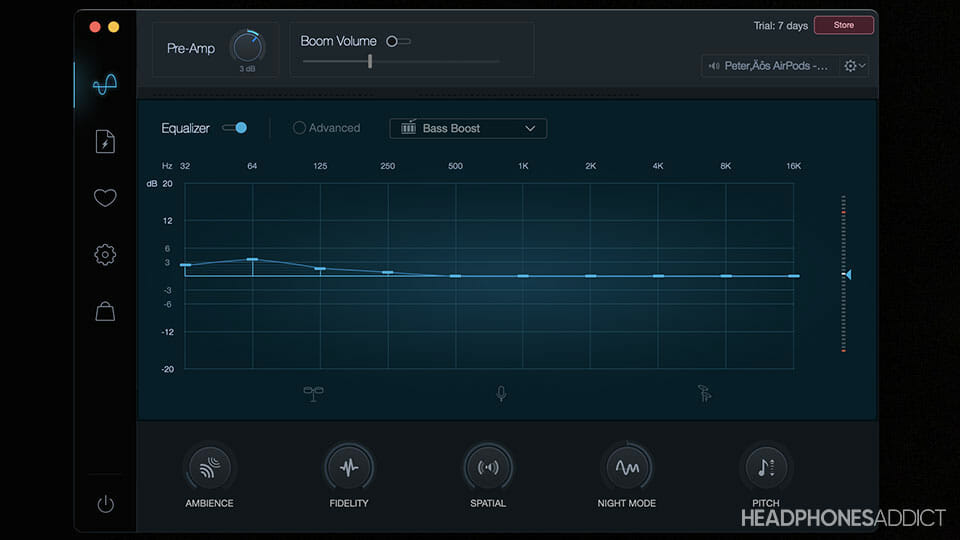
macOS does not always provide a full system-wide EQ in its standard sound settings. You may need to use the EQ in your music app or a compatible audio utility.
For Apple Music, try these steps:
- Open the Music app.
- Choose Window from the menu bar.
- Select Equalizer.
- Choose a bass preset or move the low-frequency sliders.
- Keep the preamp level lower if the sound clips.
- Compare the result with the EQ bypassed.
Other music apps may have their own equalizer. Headphone apps can also provide EQ, especially for Bluetooth models.
If you use an external USB audio device, check its control panel. Some interfaces and headphone amplifiers include bass and treble controls.

How to Adjust Bass on a TV or Game Console
Many televisions include sound modes rather than a full EQ. Look under:
- Settings
- Sound
- Audio
- Advanced sound
- Equalizer
- Digital sound output
Select a Bass, Movie, or Music mode. If the TV offers manual controls, raise bass in small steps.
Game consoles may send sound through the TV, controller, USB headset, or HDMI receiver. The EQ must be adjusted at the point where the sound is processed. For example, a console EQ may not change audio processed inside a headset app.
If headphones connect through a TV, check both devices. A TV’s bass setting may affect its speakers but not Bluetooth headphones. The headphone app may be the only place where the setting works.
The Best Way to Set Bass Without Distortion
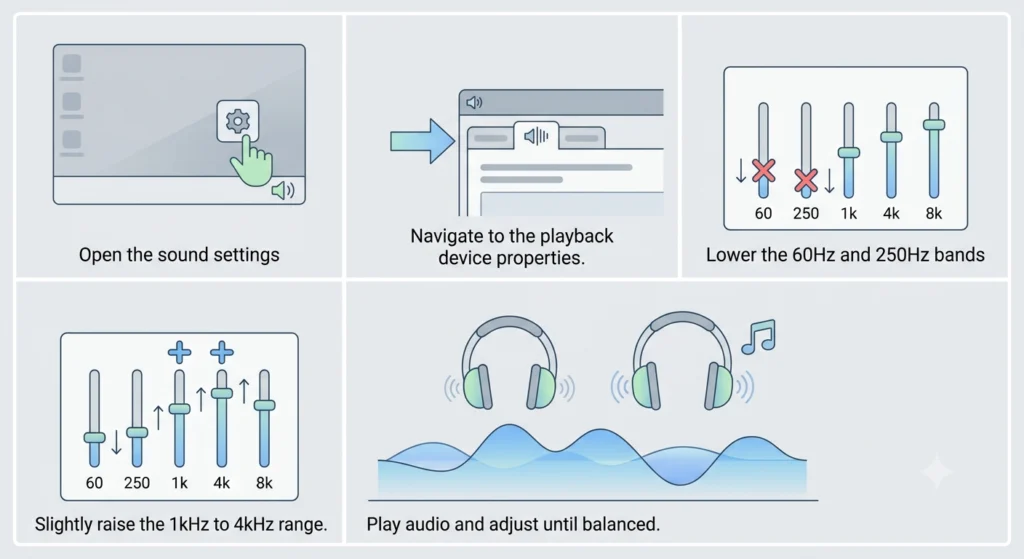
Use a gradual method rather than moving the bass control to its highest level.
- Turn off all sound effects and EQ presets.
- Set the volume to a comfortable level.
- Play a song you know well.
- Raise the lowest EQ band by 2 dB.
- Listen for about 20 seconds.
- Raise the next low band by 1 or 2 dB if needed.
- Stop when bass sounds full but voices remain clear.
- Lower the volume if the sound becomes harsh or tiring.
- Save the setting with a clear name.
A small boost often works better than a large one. If the headphones already have strong bass, a flat EQ may sound cleaner.
Use a cut instead of a boost when possible
Suppose the bass sounds too strong and the midrange seems hidden. Instead of boosting treble, try lowering the bass slightly. Cutting one area can preserve more headroom and reduce distortion.
Headroom is the space available before an audio signal reaches its limit. A large EQ boost can push the signal past that limit. The result may be clipping, crackle, or a rough sound.
If your EQ has a preamp slider, lower it when you apply a large boost. A setting of about -3 to -6 dB may help, but the right value depends on the recording and the size of the boost.
A practical starting EQ
This is a starting point, not a universal best setting:
| Frequency | Starting change | Likely effect |
|---|---|---|
| 60 Hz | +2 dB | More deep rumble |
| 120 Hz | +2 dB | More kick and warmth |
| 250 Hz | 0 to -1 dB | Less boom |
| 500 Hz | 0 dB | Keeps body and voice |
| Above 1 kHz | 0 dB | Preserves detail |
Listen before changing more bands. EQ numbers are not equal to perceived loudness on every headphone.

How to Make Bass Stronger Without Making It Muddy
Muddy bass sounds thick, slow, or unclear. It can make vocals hard to understand and separate instruments poorly.
Try these fixes:
- Reduce the 200–400 Hz range slightly.
- Avoid boosting every low band.
- Lower the preamp level.
- Use a better earbud seal.
- Check whether the headphone already has a bass-heavy tuning.
- Compare the EQ with the original sound.
- Clean earbud speaker openings if they are blocked.
The lowest band is not always the cause of muddy sound. Deep bass below about 80 Hz can add rumble, while higher bass and low mids can add warmth or boom. Adjust one band at a time so you know what changed.
If bass sounds weak
Check these causes in order:
- Poor seal: Try another ear tip or adjust the headphone position.
- Wrong output: Make sure the device is using the intended headphones.
- Low battery: Some wireless models change behavior at low charge.
- Mono or accessibility settings: Check audio balance and special sound modes.
- EQ conflict: Turn off other sound effects.
- Cable or connection issue: Try another cable or device.
- Headphone limitation: The driver may not produce deep bass at high volume.
Do not assume a stronger bass preset can fix a broken seal or damaged headphone.

Bass Adjustment for Music, Movies, and Gaming
Different content needs different bass choices.
Music
Use a modest boost for hip-hop, electronic music, pop, and some rock recordings. Keep the low-mid range under control so vocals remain clear.
For acoustic music, jazz, classical music, and podcasts, a flat or very small bass change may sound more natural.
Movies and television
A little low-frequency boost can add weight to soundtracks and effects. Too much bass may cover dialogue, especially when the headphones already have a warm sound.
If dialogue is hard to hear, use a voice, dialogue, or night mode if your TV or streaming device offers one. These modes may reduce loud peaks or change the midrange.
Gaming
More bass can make explosions and engine sounds feel stronger. It may also hide quiet footsteps, reload sounds, and spoken cues.
For competitive games, clarity and imaging often matter more than maximum bass. Try a small boost below 100 Hz while leaving the 200–500 Hz range unchanged.
Why Bass Boost Can Damage Hearing Comfort
Bass is not harmless just because it sounds soft. A large bass boost can make you raise the volume to compensate for changes in balance. High sound levels over time can cause hearing damage.
The National Institute for Occupational Safety and Health (NIOSH) uses 85 dBA over 8 hours as a recommended exposure limit for occupational noise, with allowable exposure time falling as sound level rises. Headphone volume is difficult to measure accurately without a suitable meter, so use practical warning signs:
- Ringing after listening
- A muffled feeling
- Ear pain or pressure
- Needing more volume over time
- Trouble hearing normal speech after use
If these signs occur, stop or reduce listening. Persistent ringing, pain, sudden hearing loss, or one-sided hearing changes need prompt medical care.
A safer routine is to keep the volume as low as needed, take breaks, and avoid using bass boost to overcome outside noise. Noise-canceling headphones may help you listen at a lower level in a loud place, but they do not make loud listening safe.

Common Bass EQ Mistakes
Raising every low-frequency slider
This often creates bloated sound and distortion. Start with one or two bands instead.
Using several bass boosts at once
A phone preset, music app EQ, headphone app, and amplifier may all change the same signal. Turn off extra effects while setting your main EQ.
Ignoring fit
In-ear headphones need a good seal. A loose fit can remove much of the bass, while an overly tight fit may feel uncomfortable.
Testing with one song
A setting that sounds good on one track may sound poor on another. Test at least one bass-heavy song, one vocal track, and one spoken recording.
Confusing volume with bass
More volume can make bass seem stronger. Compare EQ settings at the same volume. If the EQ has a bypass button, use it while keeping the volume fixed.
Expecting EQ to fix hardware damage
Crackling, channel loss, sudden imbalance, or bass that disappears after a drop may signal a hardware problem. EQ cannot repair a damaged driver or cable.
What to Do If the Bass Setting Does Not Work
Use this troubleshooting sequence:
- Confirm that the headphones are the active output device.
- Turn off other EQ presets and audio effects.
- Test the change with a different app.
- Disconnect and reconnect Bluetooth headphones.
- Restart the phone, computer, or headphones.
- Check for a firmware or app update.
- Try the headphones with another device.
- Reset the headphone EQ if the companion app has that option.
- Test with a wired connection, if available.
- Contact the manufacturer if the problem remains.
If the bass changes only in one app, the app likely controls the EQ. If it changes on every device, the headphone’s internal tuning or app may be responsible. If only one ear loses bass, inspect the fit, mesh, cable, and balance settings before increasing EQ.

Key Takeaways
- Use the EQ in your phone, computer, music app, TV, or headphone app.
- Start with a 2–4 dB bass boost.
- Raise one or two low bands, not every slider.
- Lower the preamp when a large boost causes clipping.
- Check earbud fit before changing EQ.
- Test music, voices, movies, and games.
- Reduce volume if listening feels tiring or causes ringing.
- EQ cannot fix damaged hardware.
FAQs
Can I increase bass without an equalizer?
Yes. Use a bass preset, headphone app, TV sound mode, or a device with tone controls. A proper earbud seal can also increase perceived bass without any software change.
Why does my bass boost sound distorted?
The boost may push the audio signal beyond its available headroom. Lower the preamp or overall volume, reduce the EQ boost, and turn off other sound effects.
What is the best bass setting for headphones?
There is no single setting that suits every headphone or listener. A small boost near 60–120 Hz is a reasonable starting point. Stop when bass sounds full and voices remain clear.
Does bass boost use more battery?
It can, but the effect varies by device. Digital EQ uses little power in many systems. Active noise cancellation, high volume, and the headphone amplifier often have a larger effect on battery life.
Why do my earbuds have no bass?
The most common causes are a poor seal, blocked speaker openings, an incorrect audio balance, a weak connection, or a damaged driver. Try a different ear tip and test the earbuds with another device before changing EQ.
Conclusion
Adjusting bass on headphones is usually a matter of finding the EQ, making a small change, and checking the result with several types of audio. Start with fit and connection, then use a modest boost around the lowest frequency bands. If the sound becomes muddy or distorted, reduce the boost rather than raising the volume.
The best setting is the one that adds depth without hiding voices, details, or warning signs from your ears. Save one profile for music and another for games or movies if your device supports custom EQ settings.