Does iPhone 8 Have Headphone Socket Find Out Now

No, the iPhone 8 does not have a 3.5mm headphone socket. You can still use headphones with a Lightning adapter, Lightning headphones, or Bluetooth earbuds.
If you’re asking does iPhone 8 have headphone socket, the short answer is no. The iPhone 8 does not include a traditional 3.5mm headphone jack, so wired headphones need an adapter or a Lightning connection.
- No headphone jack: The iPhone 8 does not include a 3.5mm socket.
- Best alternatives: Use Lightning audio, Bluetooth, or an adapter.
- Wireless is easiest: Bluetooth is usually the most convenient everyday option.
- Wired still works: A Lightning-to-3.5mm adapter supports older headphones.
Does iPhone 8 Have a Headphone Socket? The Straight Answer for 2026

The iPhone 8 was released without a standard headphone socket, and that has not changed in 2026. Instead, Apple designed the phone around the Lightning port and wireless audio, which means the familiar round headphone jack is not built into the device.
For most buyers, this is not a dealbreaker, but it does affect how you connect your headphones. If you still use older wired earbuds or over-ear headphones, you’ll need to plan for a Lightning adapter, Lightning headphones, or Bluetooth audio.
The iPhone 8 can still work with many wired headphones, but not directly through a 3.5mm plug. Compatibility depends on the accessory you choose.
What Apple Included on the iPhone 8: Ports, Buttons, and Audio Options
The iPhone 8 keeps Apple’s familiar layout: a Lightning charging port on the bottom, volume buttons, a ring/silent switch, and the Home button on the front. What it does not include is a separate headphone socket.
That means the Lightning port has to handle charging and audio accessories. For readers comparing phone designs, this is one of the biggest differences between older phones with a built-in jack and newer models that expect Bluetooth or Lightning-based audio.
Lightning Port vs. 3.5mm Headphone Jack
The Lightning port is a digital connector, while a 3.5mm headphone jack is the classic analog audio port. A 3.5mm jack lets you plug in standard headphones directly, but the iPhone 8 skips that option.
If you want to use a wired headset, you typically need an adapter that converts the Lightning connection to a 3.5mm port. In some cases, Lightning headphones connect directly without any adapter at all.
For a deeper look at the tradeoff between modern wireless listening and older wired setups, see our guide on wired vs wireless headphones.
Why Apple Removed the Traditional Headphone Socket
Apple moved away from the headphone jack to make room for other internal components and to push users toward wireless audio. The change also fits the broader shift in the headphone market, where Bluetooth earbuds and wireless headphones have become far more common.
That said, removing the jack is not always convenient for everyone. If you already own quality wired headphones, the missing socket adds an extra accessory and one more thing to keep track of.
Many phone users keep a small adapter in their bag or car so they can still use older wired headphones when needed.
How to Connect Headphones to an iPhone 8 Without a Headphone Jack
Even without a headphone socket, the iPhone 8 still offers several practical ways to listen. The best option depends on whether you care most about convenience, sound quality, battery life, or keeping your current headphones.
Wired Headphones Using a Lightning Adapter
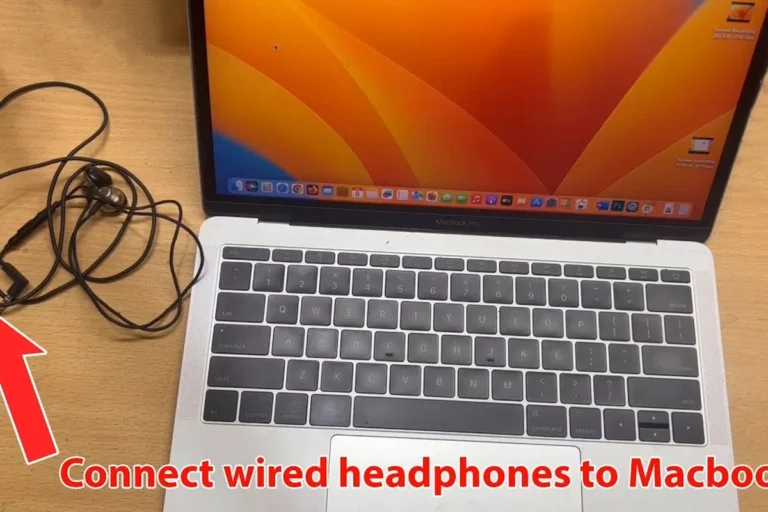
The most direct way to use traditional 3.5mm headphones is with a Lightning-to-3.5mm adapter. This is a simple solution for people who already own a favorite wired headset and do not want to switch to Bluetooth right away.
The main benefit is familiarity. You keep using the headphones you already know, and you avoid charging another device. The tradeoff is that the adapter can be easy to misplace, and the setup is slightly less streamlined than a built-in jack.
If your music sounds off after adding an adapter, it may help to check for cable damage, fit issues, or EQ settings. Our guide on how to fix muffled headphone sound can help you troubleshoot common audio problems.
Wireless Headphones and Bluetooth Earbuds
Bluetooth headphones are often the easiest long-term solution for iPhone 8 users. They remove cable clutter, work well for commuting and walking, and make it easier to move around while listening.
For calls, podcasts, and everyday music, wireless earbuds can be especially convenient. Battery life, microphone quality, and comfort vary a lot by brand and model, so it’s worth checking those details before you buy.
If you are new to wireless audio, our article on how to connect Bluetooth headphones explains the pairing process in a simple way.
Using Lightning Headphones for Direct Audio Playback
Lightning headphones plug straight into the iPhone 8’s charging port, so they do not need a separate adapter. This can be a neat option if you want a cleaner setup than carrying both a dongle and a wired headset.
However, Lightning headphones are less universal than standard 3.5mm models. If you switch between devices often, a standard Bluetooth pair or a classic wired headset with an adapter may be more flexible.
Listening at high volumes for long periods can cause hearing damage. Keep volume at 60% or below for extended sessions.
Real-World Examples: What Works Best for Music, Calls, and Travel
In real life, the “best” audio setup depends on how you use your phone. The iPhone 8 can handle music, calls, streaming, and travel listening well, but the right accessory changes the experience.
Everyday Listening with AirPods or Bluetooth Headphones
For daily use, Bluetooth earbuds or over-ear headphones are usually the most convenient choice. They are easy to carry, quick to connect, and better suited to a cable-free routine.
Many people prefer wireless headphones for commuting, workouts, or multitasking because they reduce tangles and make movement easier. If you like active noise cancellation, that can also be a major plus in noisy places like buses or offices.
To better understand the noise control side of the equation, you may want to read how noise cancelling headphones work.
Using an Adapter for Gaming, Podcasts, and Older Headphones
If you already own a good wired headset, an adapter can be a smart budget-friendly choice. It is especially practical for podcasts, long calls, or casual gaming where you want dependable audio without charging another battery.
That said, wired setups can feel less convenient when you are on the move. The adapter also creates a small extra connection point, which can be annoying if you unplug and reconnect often.
If you use wired headphones often, keep a spare adapter in your desk, bag, or car so you are not stuck without audio when the first one is lost.
Common Mistakes iPhone 8 Owners Make When Looking for Headphone Support
A lot of confusion around the iPhone 8 comes from assuming the charging port is also a headphone jack. It is not, and that misunderstanding leads to buying the wrong accessories.
Confusing the Charging Port with a Headphone Jack
The Lightning port looks simple, but it does not accept a standard 3.5mm plug. If you try to force the wrong connector, it will not fit and may damage the accessory.
Always check whether the product says Lightning, 3.5mm, or Bluetooth before buying. That small detail determines whether the accessory will work with your iPhone 8.
Buying the Wrong Adapter or Low-Quality Accessories
Not all adapters and third-party accessories are equally reliable. Some low-cost options may feel loose, break quickly, or create audio issues like crackling or one-sided sound.
It is usually safer to choose accessories from reputable brands and confirm iPhone compatibility before ordering. If your sound is uneven or distorted, the problem may be the accessory rather than the headphones themselves.
For readers who want to understand sound quality issues better, our guide to why headphones sound muffled is a useful next step.
Expert Advice: Best Audio Setup for iPhone 8 Users in 2026
The best setup depends on how often you listen and what kind of headphones you already own. For many iPhone 8 users, Bluetooth is the most convenient everyday solution, while an adapter still makes sense as a backup or budget option.
When a Wireless Upgrade Makes More Sense Than an Adapter
If you listen on the go, take a lot of calls, or dislike cable clutter, wireless headphones are usually the better long-term choice. They are also easier to use if you switch between walking, commuting, and desk work.
An adapter makes more sense if you already own high-quality wired headphones and do not want to replace them yet. In that case, the adapter is a low-cost bridge rather than a full upgrade.
If you have persistent listening discomfort, ringing in the ears, or trouble hearing speech clearly, consider speaking with an audiologist. A professional can help you choose safer volume habits and the right headphone style for your hearing needs.
What to Check Before Buying Headphones for iPhone 8
Before buying, check whether the headphones are Bluetooth, Lightning, or 3.5mm. Also look at comfort, battery life, microphone quality, and whether the design fits your daily routine.
For example, in-ear buds may be best for travel, while over-ear models can feel more comfortable for long listening sessions. If you want help comparing styles, our guide on types of headphones explained is a good starting point.
Cost Comparison: Adapter vs. Wired Lightning Headphones vs. Wireless Earbuds
Cost matters because the iPhone 8 audio setup can be as simple or as flexible as you want it to be. In general, adapters are the cheapest entry point, wired Lightning headphones sit in the middle, and wireless earbuds can range from affordable to premium depending on features.
Prices vary by brand, build quality, and features like noise cancellation or water resistance. A basic adapter may be enough for occasional use, while someone who listens every day may get better value from a durable wireless set.
If you are trying to decide between sound quality and convenience, it helps to compare your habits honestly. A wired setup may be fine at a desk, while wireless headphones are often easier for travel and daily movement. For more context, see Bluetooth vs wired headphones sound quality.
Final Recap: Does iPhone 8 Have a Headphone Socket and What Should You Use Instead?
No, the iPhone 8 does not have a headphone socket. If you want to use headphones with it, your main choices are a Lightning adapter, Lightning headphones, or Bluetooth earbuds and headphones.
For most people in 2026, wireless audio is the most convenient path. But if you already own good wired headphones, an adapter can still be a practical and affordable way to keep using them.
Frequently Asked Questions
Yes, but you need a Lightning-to-3.5mm adapter or Lightning headphones. Standard 3.5mm plugs do not connect directly to the iPhone 8.
Bluetooth headphones are usually more convenient for daily use and travel. Wired headphones can still be a good choice if you want simple setup and do not want to charge another device.
Yes, noise cancelling headphones work with the iPhone 8 as long as they connect by Bluetooth or Lightning adapter. Performance can vary by model, especially for voice clarity and low-frequency noise.
It depends on comfort and use case. In-ear models are compact for travel, while over-ear headphones are often better for long sessions and stronger passive isolation.
Check connection type, battery life, microphone quality, comfort, and build quality first. Sound preferences like bass, clarity, and EQ support also matter, but they vary by brand and model.
Look for lightweight designs, soft ear cushions, and a secure but gentle fit. If you feel pressure, pain, or fatigue, take breaks and lower the volume.