How Do I Know What Bose Headphones I Have Easily

Check the model name on the earcup, headband, charging case, or in the Bose app first. If it is missing, use the Bluetooth name, serial number, and design details to confirm the exact Bose model.
If you’re asking how do i know what bose headphones i have, the fastest answer is to check the model name on the earcup, headband, charging case, or in the Bose app. If that’s missing, the serial number, Bluetooth name, and a few visual clues usually narrow it down quickly.
- Fastest check: Look for the model name on the product or in the app.
- Best backup: Use the serial number when labels are faded or missing.
- Visual clues: Buttons, ports, hinges, and form factor help narrow it down.
- Why it matters: The exact model affects parts, support, and resale.
How Do I Know What Bose Headphones I Have? Start With the Fastest Identification Checks
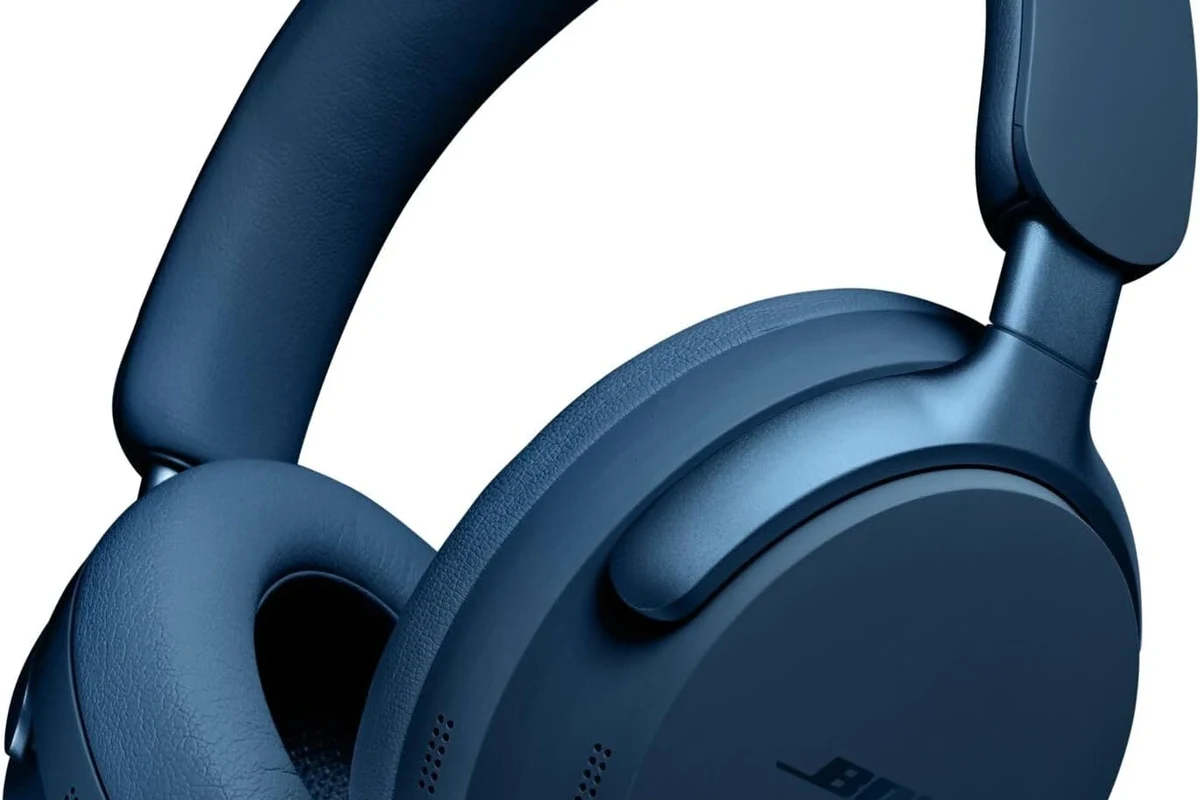
The easiest way to identify Bose headphones is to start with the places where Bose usually prints or stores the model name. On many pairs, the product name is visible without any tools, and that can save you a lot of time.
If the name is faded or missing, move to digital checks. Your phone, app, or paired-device list may already tell you which Bose model is connected.
Look for the model name on the earcup, inside the headband, or on the charging case
Begin with the physical product itself. Many Bose headphones have the model name printed on the inside of the headband, near the earcup hinge, or on the earcup surface.
For earbuds, check the charging case and the earbuds themselves. Small text can wear off over time, so use good light and inspect both sides carefully.
Use your phone’s flashlight and zoom camera to read tiny product labels. A quick photo can reveal text that is hard to see with the naked eye.
Check the Bose app, Bluetooth device name, or paired device history
If your headphones are wireless, your phone may already know the model name. Open the Bose app, Bose Music app, or your device’s Bluetooth settings to see the connected name.
Sometimes the Bluetooth name is the exact model, while other times it is a generic label. Even then, paired-device history can still help if you have connected the headphones before.
Use the serial number and product label when the model name is missing
If the model name is gone, look for the serial number on the product label, inside the headband, under a cushion, or on the charging case. That number can help Bose support or a product lookup page identify the exact version.
This is especially useful for older units, refurbished headphones, or pairs with worn markings. It is also the safest route when you need confirmation before buying replacement parts.
Bose model names and product labels can vary by region, bundle, or special edition. A close visual match is helpful, but serial-number confirmation is better when accuracy matters.
Why Identifying Your Bose Headphones Matters in 2026
Knowing the exact Bose model is more important than many people expect. Different Bose headphones may look similar, but they can use different cushions, cables, cases, app features, and firmware support.
That means the wrong guess can lead to wasted money or incompatible accessories. A few minutes of checking now can prevent a frustrating return later.
Find the right replacement parts, ear cushions, and charging cables
Replacement parts are not always interchangeable across Bose models. Ear cushions, charging cases, and cable types may differ even when the headphones look nearly identical.
If you order based on appearance alone, you may end up with parts that do not fit correctly. Matching the model first is the best way to avoid that problem.
Confirm compatibility with firmware updates, app features, and accessories
Some Bose features depend on the exact model and supported app. If you want firmware updates, app-based controls, or accessory support, you need the correct product name first.
This matters for users who rely on noise cancellation settings, multipoint pairing, or device customization. For a broader look at wireless setup basics, see our guide to Bluetooth headphones explained.
Match the exact model before selling, gifting, or buying used
If you are selling or gifting Bose headphones, the model name helps buyers know what they are getting. It also reduces confusion when comparing older and newer releases.
Used listings are especially risky when the seller only says “Bose headphones” without a model number. Exact identification helps you compare condition, features, and value more honestly.
Visual Clues That Separate Popular Bose Headphone Models
When labels are missing, visual design becomes your next best tool. Bose often keeps a consistent style across a product family, but small changes in shape, buttons, and hinges can reveal the model.
Focus on the overall build first, then look at the controls and ports. Those details usually narrow the options much faster than color alone.
Bose QuietComfort vs QuietComfort Ultra: design differences that stand out
QuietComfort models and QuietComfort Ultra models can look related, but the newer Ultra version may have a more refined finish and different control layout. The naming also matters, since “QuietComfort” by itself is not always the same as “QuietComfort Ultra.”
Check the earcup shape, button placement, and any visible markings. If you are comparing noise cancellation behavior too, our article on how noise cancelling headphones work can help explain why similar-looking models may behave differently.
Over-ear, on-ear, and earbuds: how the form factor narrows it down
Start by identifying the form factor. Bose over-ear headphones, on-ear headphones, and earbuds are easy to separate once you know what category you are holding.
Over-ear models usually have larger cups and a headband, while earbuds use a case and small stem or bud shapes. If you are unsure about the category itself, our guide to types of headphones explained can help.
Buttons, touch controls, ports, and hinge design as model identifiers
Buttons and ports are often more reliable than color. A USB-C port, a specific button placement, or a unique hinge can point to a certain Bose generation.
Touch controls versus physical buttons can also separate models. Take a close look at the earcup edges, since Bose often changes control layouts between product lines.
Model-by-Model Comparison: Common Bose Headphones You May Own
Many people own one of a few popular Bose families, so it helps to compare the most common names side by side. The goal is not to memorize every detail, but to rule out the obvious possibilities.
Use the model family, feature set, and physical design together. That combination is usually enough to identify the right product.
QuietComfort 35, 45, and Ultra: key differences in naming and features
The QuietComfort 35, QuietComfort 45, and QuietComfort Ultra names are easy to mix up because they share the same family identity. Still, each generation has its own feature set and design cues.
If your headphones are older, the QC 35 line is a common candidate. The QC 45 and Ultra models are newer, so they often show more modern control and app support.
| Model | Best For | Price Range |
|---|---|---|
| QuietComfort 35 | Older wireless Bose users | Varies |
| QuietComfort 45 | Everyday noise cancelling | Varies |
| QuietComfort Ultra | Newer premium Bose buyers | Varies by brand |
Noise Cancelling Headphones 700 and how they differ from QuietComfort models
The Bose Noise Cancelling Headphones 700 line is often confused with QuietComfort models because both focus on noise reduction and wireless convenience. The 700 series usually has a more modern-looking design and a different control feel.
If you are comparing noise control features, our guide to what is noise cancelling headphones gives a simple breakdown of what ANC can and cannot do.
Sport, SoundSport, and QuietComfort Earbuds: identifying Bose earbuds correctly
Bose earbuds are easy to confuse if you only remember the case color. The Sport, SoundSport, and QuietComfort Earbuds lines each use different naming and may have different shapes or case styles.
Look closely at the bud stem, the fit wing, and the charging case design. If the earbuds came with a specific app setup prompt, that can also help identify the family.
Many people identify Bose earbuds by the case alone, but the earbuds themselves often provide better clues because the case shape can change across generations.
Older Bose models that are often confused with newer releases
Older Bose headphones can look surprisingly similar to newer ones, especially after years of use. Worn cushions, faded logos, and replaced cables can make the model harder to spot.
That is why older units are best checked by serial number or support lookup. A visual guess is useful, but it should not be your only method.
How to Check the Bose App, Bluetooth Name, and Settings on Your Device
Digital checks are often the fastest path when the physical labels are unclear. If the headphones still connect to a phone, tablet, or computer, that device may already store the model name.
This is also a good way to confirm whether the headphones are truly Bose or whether a seller listing used a generic name.
Finding the connected model in the Bose Music or Bose app
Open the Bose Music app or the relevant Bose app and check the connected product screen. The app may show the model name directly, along with battery status and settings.
If the app recognizes the headphones, that is a strong clue. It can also help you confirm whether you are using the correct companion app for that model.
Checking Bluetooth device names on iPhone, Android, Windows, and Mac
On iPhone and Android, open Bluetooth settings and look at the paired device list. On Windows and Mac, check the Bluetooth menu or sound output settings for the connected name.
Sometimes the device name is shortened or customized, so it may not show the full model. Even so, it can still point you toward the correct Bose family.
If you need help choosing the right output device on a computer, our article on select headphones in Windows 11 may be useful.
What to do when the app shows only a generic device name
If the app or Bluetooth list only shows a generic name, do not assume the model is unknown forever. Try reconnecting, resetting the Bluetooth pairing, or checking the serial number next.
Generic names are common with older devices, factory-reset units, and refurbished products. In those cases, the serial label becomes the more reliable source.
Common Mistakes People Make When Trying to Identify Bose Headphones
It is easy to misread a Bose model when the product has been used for years. A few common mistakes can send you in the wrong direction quickly.
Knowing these pitfalls can save time and prevent incorrect accessory purchases.
Confusing the product line name with the exact model number
“QuietComfort” is a product line, not always the exact model. The same is true for “Noise Cancelling Headphones” and “SoundSport.”
For accurate identification, you need the full model name or number, not just the family label. That distinction matters when ordering parts or comparing features.
Assuming color or finish reveals the model
Color can help, but it should never be your only clue. Bose often releases multiple models in similar color options, so finish alone is not proof.
Accessories, region-specific versions, and refurbished units can make color even less reliable. Always pair color with shape, controls, and label checks.
Mixing up refurbished, regional, and special-edition versions
Refurbished and regional models can look different in small ways, even when the core product is the same. Special editions may also include unique packaging or markings that confuse buyers.
If the listing or box seems unusual, verify the serial number and compare the product photos carefully. Do not rely on the seller’s title alone.
Overlooking wear-and-tear that hides labels and markings
Headphones that have seen daily use often lose logos, printed text, and label clarity. Sweat, friction, and cleaning products can make the model name hard to read.
In that case, check under cushions, inside the headband, and on the charging case interior. A little disassembly of removable parts may reveal the information you need.
Expert Advice: When to Use Serial Numbers, Support Tools, or Price Clues
When the obvious checks fail, use a more systematic approach. Serial numbers, support pages, and careful comparison tools are your best backup methods.
Price can sometimes offer a clue, but it should never be treated as proof by itself.
If you have hearing concerns, discomfort from noise cancellation, or questions about safe listening habits, consult an audiologist. For product identification, Bose support and official product photos are the most reliable references.
How serial numbers help verify the exact Bose version
A serial number can confirm the exact unit when the model name is missing or unclear. It is especially useful for support requests, warranty checks, and resale listings.
Write the number down exactly as shown and compare it with Bose support resources. Small differences in formatting can matter.
Using Bose support pages and product photos to confirm a match
Official support pages and product photos are useful because they show the details that matter most. Compare the headband, earcup shape, port placement, and control layout.
If your headphones match the photo in several ways, you are probably close. Still, use the serial number for final confirmation when possible.
When price differences can hint at the model, and when they cannot
Price can hint at whether a pair is older, newer, or refurbished, but it does not identify the model by itself. Sales, bundles, and marketplace listings can distort the usual price pattern.
Use price only as a supporting clue. It is helpful for narrowing the field, but not for making a final call.
Warning signs that a seller listing may be inaccurate or misleading
Watch out for vague titles, missing serial numbers, blurry photos, and stock images that do not show the actual product. These are common signs that a listing may be incomplete or misleading.
If the seller cannot show the label, controls, and case clearly, ask for more photos before buying. That is especially important for used audio gear.
Listening at high volumes for long periods can cause hearing damage. Keep volume at 60% or below for extended sessions.
Final Recap: The Easiest Way to Know Which Bose Headphones You Have
The simplest answer is to check the model name first, then use the app, Bluetooth name, and serial number if needed. If the label is missing, visual clues like controls, ports, and form factor usually narrow it down fast.
Once you know the exact Bose model, it becomes much easier to buy the right accessories, confirm app support, and avoid mistakes when selling or replacing parts.
Quick decision path for identifying your Bose headphones in minutes
Start with the earcup, headband, or charging case. If that fails, check the Bose app or Bluetooth settings, then use the serial number and official product photos for confirmation.
That order works well for most people because it moves from the easiest check to the most reliable one.
Best next step after identifying the model: accessories, support, or resale
After you identify the model, decide what you need most: replacement parts, app support, troubleshooting, or resale prep. Each of those tasks is much easier when you have the exact Bose name.
If you are still unsure, take clear photos of the headphones and compare them against official product pages before making a purchase or listing them for sale.
Frequently Asked Questions
Wireless Bose headphones are more convenient for travel and daily use, while wired options can be simpler for low-latency listening. The better choice depends on comfort, battery needs, and how you plan to use them.
Yes, noise cancelling models may feel more isolated and can change how some frequencies are perceived. Sound quality and ANC behavior can vary by model, fit, and personal preference.
Over-ear models usually feel more immersive, on-ear models are smaller, and in-ear models are the most compact. Comfort and fit matter most, especially for long listening sessions.
Look at the driver type, comfort, tuning, and whether the headphones support EQ or app customization. Frequency response can help, but it does not tell the whole sound story.
For commuting, prioritize wireless convenience and noise cancelling. For gaming or studio work, check latency, wired support, microphone quality, and whether the sound profile matches your needs.
Check the weight, ear cushion material, headband padding, and hinge design. If possible, read user feedback about long-term comfort and build quality before buying.