What Bose Headphones Do I Have Find Out Fast

Check the printed label, the Bose app, and your Bluetooth device name to identify your Bose headphones quickly. If those clues are unclear, use the earcup shape, buttons, and folding design to match the model.
If you’re asking “what Bose headphones do I have,” the fastest answer is usually on the headphones themselves, in the Bose app, or in your device’s Bluetooth settings. A few quick checks can narrow it down in minutes, even if the model name is faded or the headphones were bought secondhand.
- Label first: The physical model text is usually the most reliable clue.
- App check: Wireless Bose models may show the name in the Bose app.
- Bluetooth name: Helpful, but it can be renamed and may not be exact.
- Design matters: Earcup shape and controls can separate similar Bose generations.
What Bose Headphones Do I Have? Quick Ways to Identify Your Model
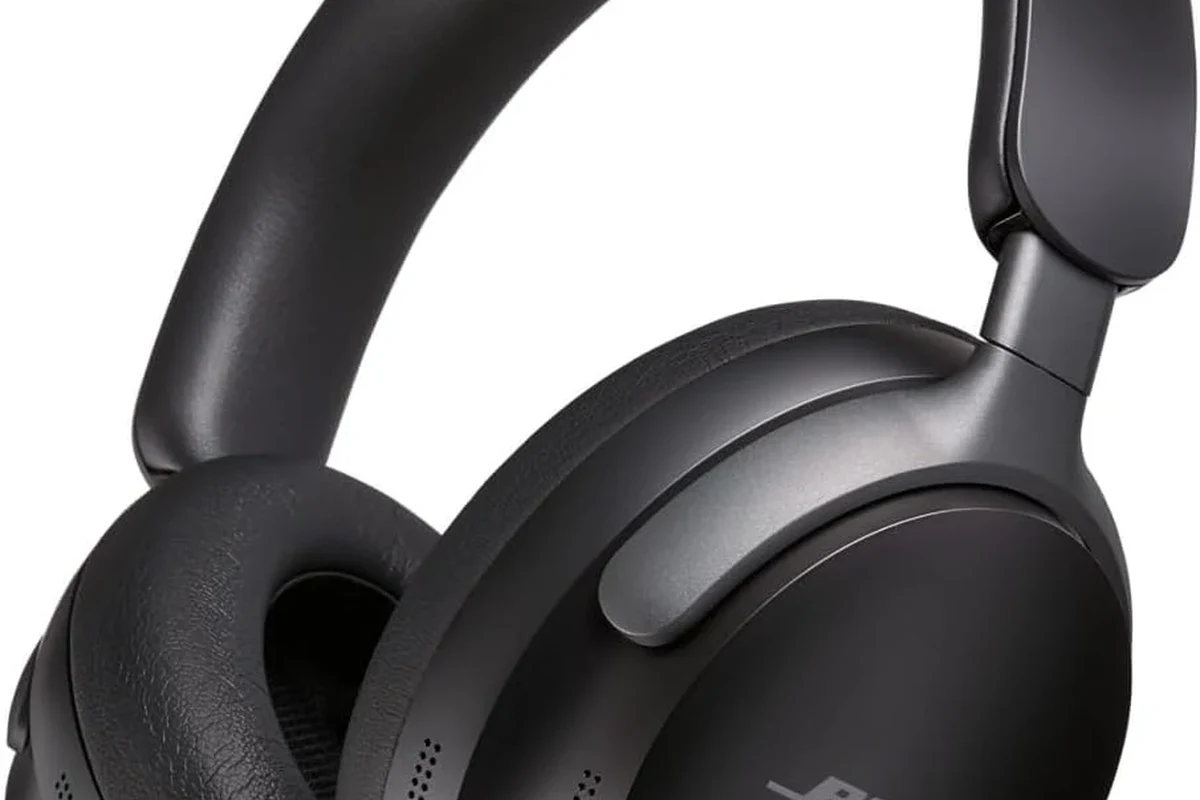
Start with the easiest clues first: the model name printed on the headphones, the Bluetooth name on your phone, and the Bose app if the headphones are wireless. If those don’t help, use the design, serial number, and button layout to match the headset to a specific Bose line.
For readers comparing Bose models with other wireless options, it can also help to understand basic Bluetooth headphones explained and how different wireless features show up in everyday use. That context makes it easier to tell whether you’re holding a QuietComfort model, a Bose 700, or an older SoundLink pair.
Why Knowing Your Bose Headphones Model Matters in 2026
Model identification is more than a curiosity. It affects app support, charging cable type, replacement pads, firmware access, and whether a case or accessory will fit correctly.
It also matters when you buy used headphones or sell your current pair. A correct model name helps you check compatibility, compare features, and avoid paying for parts that don’t fit.
Compatibility with apps, charging cables, and replacement parts
Different Bose generations can use different apps, different charging ports, and different ear cushion shapes. If you know the exact model, it becomes much easier to match the right cable, headband cover, or replacement ear pads.
This is especially useful if you are trying to connect Bluetooth headphones to a new phone or laptop and want to confirm the headset is still supported. A model check can save time before you troubleshoot pairing or accessories.
Firmware updates, warranty checks, and resale value
Some Bose headphones can still receive app-based updates, but support varies by model and generation. Knowing the exact product name helps you see whether the headphones are still current enough for software updates or service options.
It also helps with warranty claims and resale listings. Buyers usually trust a listing more when it includes the exact model instead of a vague “Bose wireless headphones” description.
Fastest Ways to Check the Model Name on the Headphones Themselves
The most reliable method is often the physical label. Bose usually places model information in a small printed area that can be found on the inside of an earcup, under the headband, or near the charging port.
If the headphones are worn or refurbished, the text may be small or partially faded. Use good light and, if needed, your phone camera zoom to read the label clearly.
Look inside the earcup, under the headband, or near the charging port
On many over-ear Bose models, the model name or product code appears inside the earcup or along the inner headband. Some wireless models place regulatory text near the charging port or on the inside edge of a cup.
Check both sides carefully. The label may be easier to see after you gently rotate the earcups or unfold the headset fully.
Use your phone’s flashlight and camera zoom together. A quick photo often reveals tiny model text that is hard to read with the naked eye.
How serial numbers and printed labels help narrow it down
Serial numbers do not always tell you the retail model by themselves, but they can help Bose support or a seller identify the unit more accurately. Printed labels may also include a product code, which is useful when the marketing name is missing.
Note
If the headphones are used or refurbished, a replacement earcup or shell may have different markings than the original unit. In that case, compare the serial label with the overall design before assuming the model.
Use the Bose App, Bluetooth Name, or Device Settings to Confirm the Model
For wireless Bose headphones, software can be one of the quickest ways to confirm the model. The app or your paired device may show the product name automatically once the headphones are connected.
Just remember that Bluetooth names are helpful, but they are not always exact. Some users rename their headphones, and some devices shorten the original model name.
What to look for in the Bose Music app and Bose app in 2026
In 2026, Bose app support and interface details can vary by product generation. If your headphones are compatible, the app may show the model name, firmware status, battery level, and feature settings in one place.
If you see options for noise cancellation, transparency features, or EQ-style adjustments, that can also hint at the product family. Still, the app should be treated as confirmation, not the only proof.
Some Bose headphones share very similar app screens across generations, so the app may confirm the family but not always the exact variant.
Checking paired device names on iPhone, Android, Windows, and Mac
On iPhone or Android, open Bluetooth settings and look at the paired device name. On Windows or Mac, the headphones may appear under Bluetooth devices or sound settings with the name they broadcast during pairing.
If you want a deeper guide for computer setups, see our article on select headphones in Windows 11. That can help when Bose headphones connect but do not appear as the default playback device.
Keep in mind that a Bluetooth name such as “Bose QC” or “Bose Headphones” may not reveal the full model. It is a starting point, not the final answer.
Visual Identification Guide: Common Bose Headphones by Design
When labels and apps are unclear, the physical design usually gives the best clue. Bose models often differ in earcup shape, folding style, button placement, and finish, even when they look similar at first glance.
Take a slow look at the headband, hinges, and earcup profile. Small differences can separate a newer QuietComfort model from an older SoundLink or a Bose 700.
QuietComfort, QuietComfort Ultra, Bose 700, and older SoundLink models
QuietComfort models often focus on a familiar over-ear design with cushioned cups and a travel-friendly build. QuietComfort Ultra models may look more refined and modern, while Bose 700 models are known for a sleeker, more minimal look.
Older SoundLink headphones can look simpler and may have a slightly different hinge or earcup shape. If the headset folds a certain way or uses a distinct control layout, that can be a strong clue.
Key differences in earcup shape, buttons, foldability, and finish
Look for the number and placement of buttons, whether the cups fold inward, and whether the finish is matte, glossy, or mixed. Bose often changes these details between generations, even when the overall style stays familiar.
For a broader comparison of styles, our guide to types of headphones explained can help you identify whether you have over-ear, on-ear, or another category before you narrow down the exact Bose model.
Common Mistakes People Make When Trying to Identify Bose Headphones
It’s easy to confuse one Bose generation with another, especially if the headphones are black and the branding is subtle. Refurbished units can make the process even trickier if parts were replaced.
The goal is not just to find a Bose logo. It is to match the exact model so you know what features, accessories, and support options you actually have.
Confusing similar generations or refurbished units
Two Bose models may share a similar shape but differ in controls, app support, or charging ports. Refurbished pairs can also have replacement earcups or headbands that make them look newer or older than they really are.
If the headphones came from a resale site, compare the design with the original product photos from trusted sources before you assume the model. A mismatched shell or swapped pad can throw off visual identification.
Assuming the model from the Bluetooth name alone
Bluetooth names are convenient, but they can be changed by the owner. A device called “Bose Headphones” may actually be a QuietComfort pair, a Bose 700, or something older.
Important
Do not rely on the Bluetooth name alone if you need the exact model for replacement parts, warranty support, or resale. Always confirm with the physical label or app when possible.
Expert Advice: When to Compare Specs, Prices, or Replacement Parts Before Buying or Selling
Once you know the model, compare specs only as far as your needs require. For most people, the important differences are comfort, battery life, noise cancellation style, app support, and whether the headset is still easy to service.
If you are buying or selling, the exact model can affect value more than the color or cosmetic condition. A clearly identified pair is easier to price and easier to trust.
How model identification affects accessory compatibility and repair costs
Ear pads, charging cables, and carrying cases are not always interchangeable across Bose generations. Even if two models look close, the fit can be different enough to cause problems.
If you are unsure about a replacement part, check the exact model before ordering. For repairs, a Bose service provider or a professional audio specialist can help you avoid buying the wrong accessory twice.
Price differences between older Bose models and current 2026 options
Older Bose headphones may cost less, but that does not automatically make them a bad buy. The real question is whether the model still fits your use case, supports the features you want, and has parts available.
Price Estimate
For shoppers comparing value across brands, it can also help to read about wired vs wireless headphones before deciding whether an older Bose wireless model still makes sense for your needs.
Final Recap: The Fastest Way to Figure Out What Bose Headphones You Have
The fastest answer usually comes from three places: the printed label, the Bose app, and the Bluetooth device name. If those do not fully identify the model, use the design details like earcup shape, button layout, and foldability to narrow it down.
Once you know the exact model, you can check compatibility, replacement parts, and support with much more confidence. That makes it easier to keep the headphones, repair them, or sell them without guesswork.
Listening at high volumes for long periods can cause hearing damage. Keep volume at 60% or below for extended sessions.
Frequently Asked Questions
Wireless Bose headphones are usually more convenient for commuting and travel. Wired headphones can be simpler for low-latency use, but the better choice depends on your device and listening habits.
Check the model name, app features, and buttons for noise control settings. If the headphones support active noise cancellation, Bose usually highlights it in the product family or app.
Open-back headphones let more sound in and out, which can make them feel more spacious. Closed-back headphones isolate better and are usually more practical for travel, offices, and public spaces.
Yes, fit and design can affect bass, comfort, and isolation. Over-ear models often feel more immersive, while in-ear models are more compact and portable.
Look at comfort, driver tuning, noise control, and how the headphones sound with your own music. EQ options, battery life, and codec support can also matter depending on your devices.
Comfort depends on clamp force, ear cushion material, weight, and headband padding. If you listen for long sessions, choose a fit that feels secure without pressure, and take breaks when needed.