10 Best Headphones With Mic for PC in 2026

A headphones with mic for PC into a workstation for calls, classes, and gaming without needing separate speakers and a desk mic. Whether the goal is clear audio on a Teams call, sharp callouts in a multiplayer match, or just listening to music without disturbing anyone nearby, the right headset depends on how the microphone performs and how the whole setup connects to a computer.
Connection type shapes almost everything about the experience. USB headsets plug in and work instantly, since the sound card lives inside the headset itself. A 3.5mm jack relies on the computer’s built-in audio hardware, which keeps things simple but ties the headset to devices with that port. Wireless 2.4GHz headsets add freedom of movement but bring battery life and charging into the equation.
The biggest factors to weigh are microphone quality, comfort for long sessions, and whether the headset needs extra software or adapters to work with a specific device. Ear cushion material affects comfort over hours of wear, while flip-to-mute or detachable mics matter for anyone who mutes often during calls or games. The list below breaks down ten options by how they perform for different everyday computer tasks.
Best for video calls and remote work: Logitech H390 Wired Headset
Best for competitive PC gaming: Razer BlackShark V2 X
Best for wireless freedom on PS5 and PC: Ozeino Wireless Gaming Headset
Best for surround sound gaming: Logitech G432
Best for budget console and PC gaming: Ozeino 7.1 Surround Gaming Headset
Best for marathon gaming sessions: Razer Kraken V3 X
Best for basic Zoom calls on a budget: Logitech H111
Best for AI-powered noise canceling: Lenovo USB-A Wired Stereo Headset
Best for multi-platform gaming: JBL Quantum 100M2
Best for lightweight, portable use: LUDOS FEROX Wired Earbuds
Logitech H390 Wired Headset
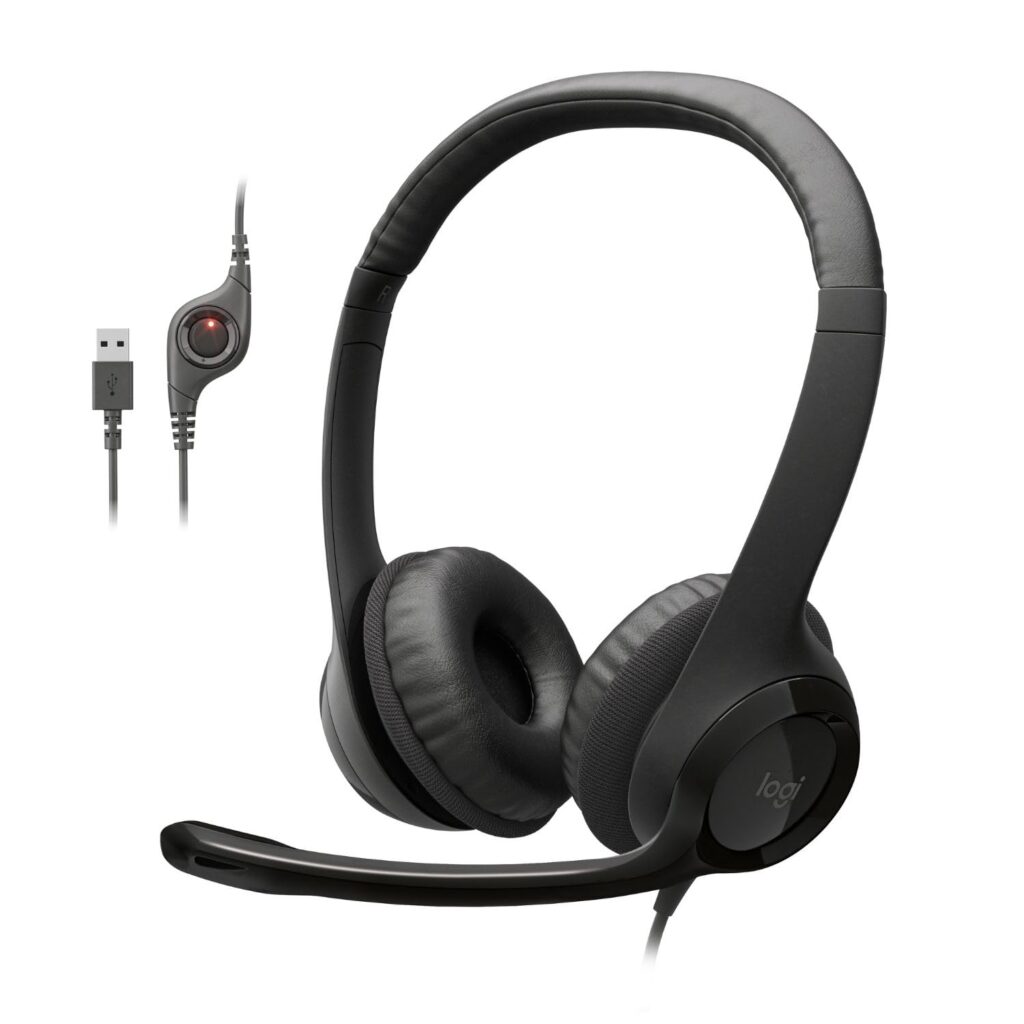
This is the headset to buy for video calls, online classes, and everyday computer use without any setup hassle.
Pros
- Plug-and-play USB with no software required
- Noise-canceling mic boom tucks away when not in use
- Works with Chromebooks and most operating systems
Cons
- No surround sound features for gaming
- On-ear fit may feel tight for some users
- Cable-only, no wireless option
The H390 solves a specific problem well: clear audio for calls without any configuration. Plugging in the USB connector gets the mic and speakers working immediately, which makes it a solid pick for remote workers, students, and teachers who need reliability over flash. The rotating mic boom cancels background noise and swings out of the way between calls.
In-line volume and mute controls sit on the cable, so adjusting audio during a meeting doesn’t mean fumbling with software. The leatherette ear cushions swivel for a better seal, and the padding holds up during multi-hour sessions. It won’t satisfy gamers chasing positional audio, but for meetings and classes, it does exactly what it needs to.
Razer BlackShark V2 X
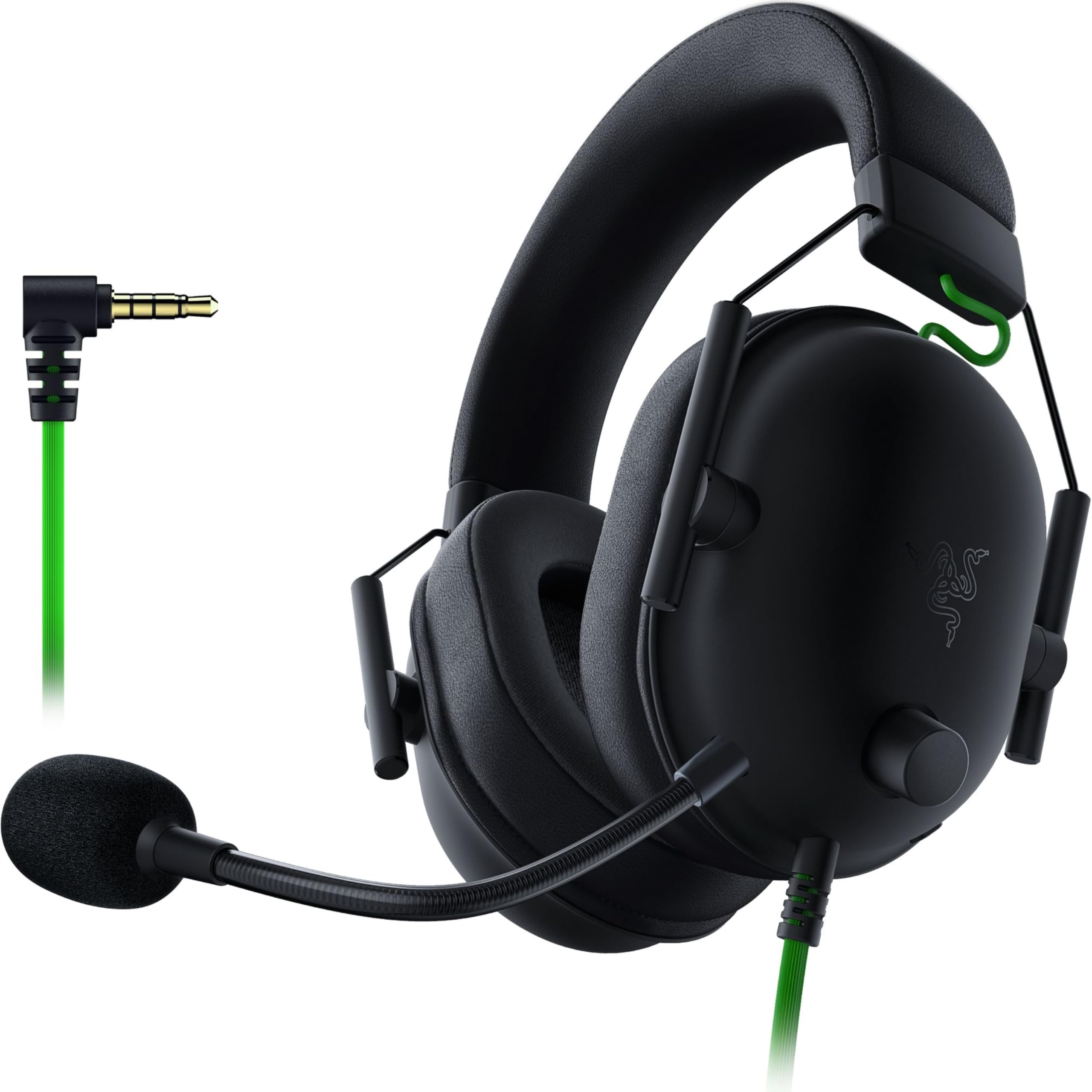
This is a strong pick for gamers who want accurate directional sound and a clear mic without paying for wireless features.
Pros
- Titanium-coated 50mm drivers for detailed audio
- Cardioid mic picks up voice while reducing background noise
- Lightweight design at 240 grams for long sessions
Cons
- 7.1 surround sound only works on Windows 10 64-bit
- Xbox One requires a separate stereo adapter
- Closed earcups can trap heat during long play
The BlackShark V2 X uses a 3.5mm jack, so it connects to PC, Mac, PS4, PS5, and Switch without drivers. The three-part driver tuning separates highs, mids, and lows for clearer distinction between footsteps, gunfire, and dialogue in games.
The HyperClear cardioid mic focuses on the user’s voice and tapers off background noise from the sides and rear, which helps in shared spaces or noisy rooms. Memory foam cushions keep the fit comfortable, though the closed-back design holds heat against the ears during longer sessions. For the price, the sound quality punches above its class.
Ozeino Wireless Gaming Headset
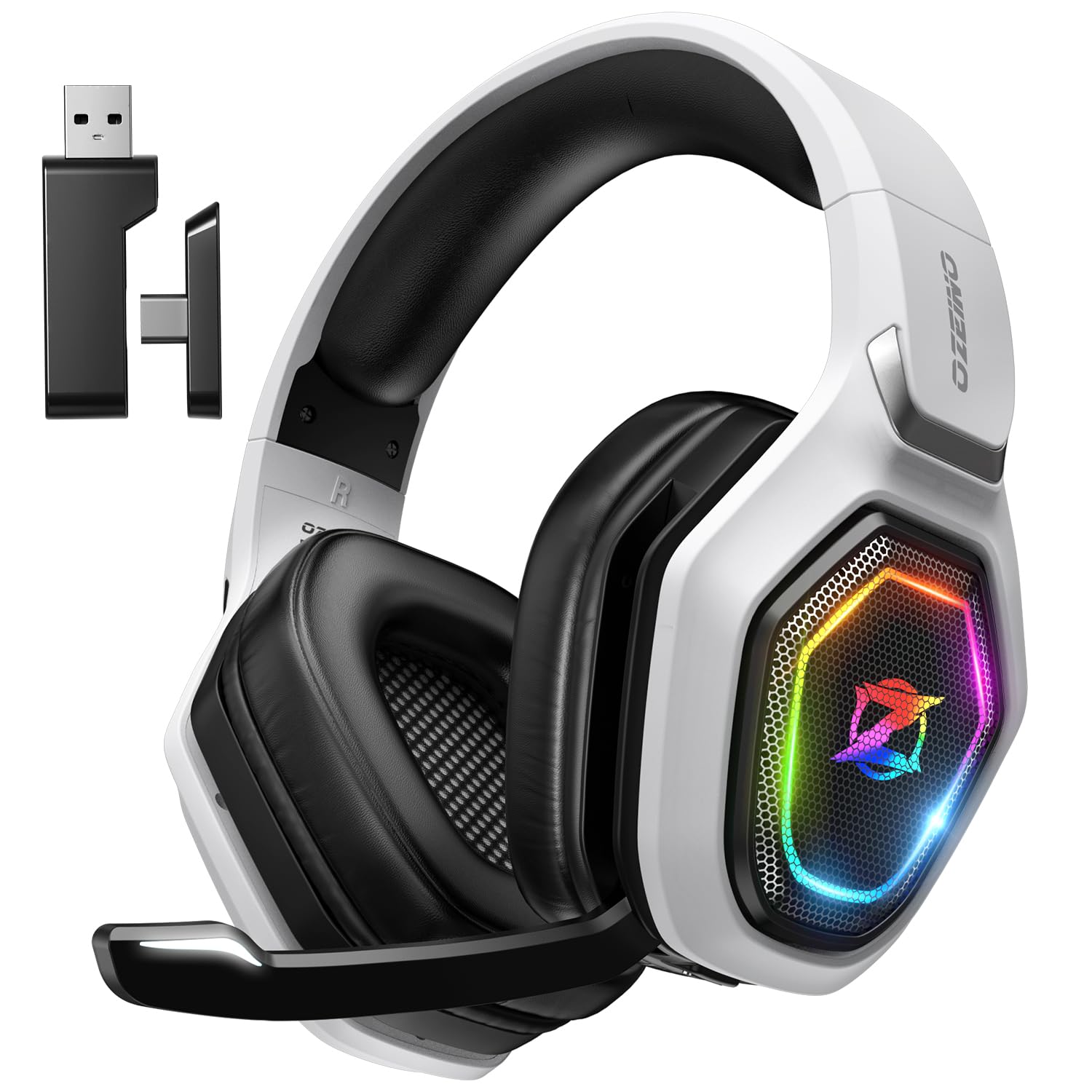
This headset fits gamers who want to cut the cord without giving up a reliable connection across PS5, PC, and Switch.
Pros
- 2.4GHz wireless connection with low latency
- Long battery life rated up to 40 hours
- Works while charging for uninterrupted sessions
Cons
- Bluetooth mode needs an extra adapter for PC or PlayStation
- Not compatible with Xbox consoles
- USB transmitter must stay assembled to function
The 2.4GHz USB and USB-C dongle gives this headset a stable wireless connection with minimal delay, which matters for fast-paced games where audio cues need to arrive on time. The 50mm drivers add bass depth that helps footsteps and explosions stand out.
Button controls on the earcup handle volume, mute, and calls without needing a phone or app. Battery life stretches through long gaming sessions, and the headset can keep working while plugged in to charge. Xbox owners should look elsewhere, since this model skips that platform entirely.
Logitech G432
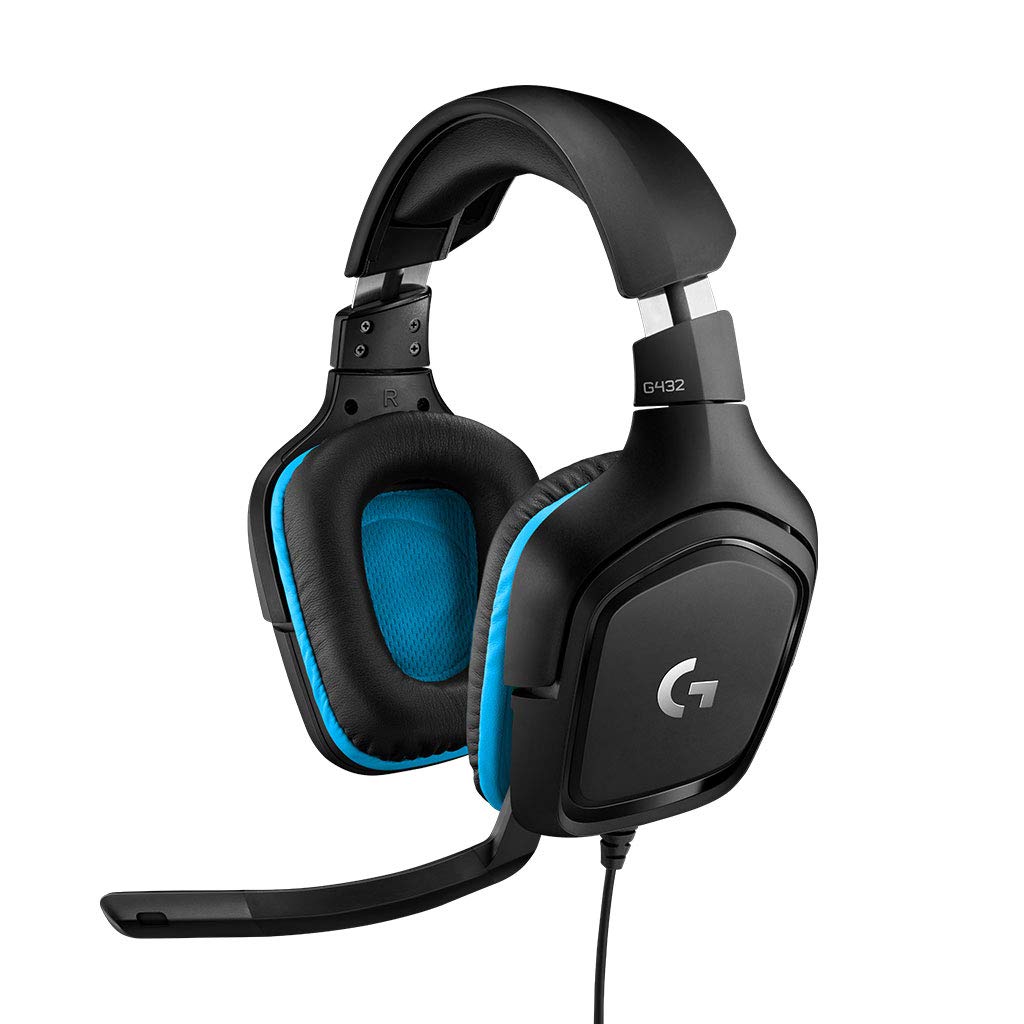
This headset suits PC gamers who want DTS surround sound and a flip-to-mute mic without spending on a wireless model.
Pros
- DTS Headphone 2.0 surround sound for positional audio
- Flip-to-mute boom mic for quick, hands-free muting
- Works across PC, Mac, PS4, PS5, and Switch
Cons
- Surround sound requires Logitech G HUB software
- Some users report the leatherette cushions wear out over time
- On console, only stereo sound is available, not full surround
Big 50mm drivers give the G432 a full sound that holds up for both gaming and casual music listening. The DTS surround feature adds a sense of direction to in-game audio, helping players hear footsteps or approaching threats before seeing them, though it only activates with Logitech’s free G HUB software on PC.
The 6mm boom mic flips up to mute instantly, a convenient shortcut during matches or breaks in a call. Ear cups rotate up to 90 degrees for a more natural fit around the neck between rounds. Comfort holds up well, though the leatherette padding may need replacing after a couple years of daily use.
Ozeino 7.1 Surround Gaming Headset

This is a budget-friendly option for gamers who want RGB lighting and surround sound across multiple consoles and PC.
Pros
- Wide compatibility with PC, PS4, PS5, Xbox, and Switch
- Rotatable noise-canceling mic for clearer voice pickup
- RGB lighting adds visual flair for streaming setups
Cons
- PC use requires a separate splitter cable, sold separately in some bundles
- Older Xbox One controllers may need an extra adapter
- Padding is less breathable than fabric alternatives
This headset connects through a standard 3.5mm jack, making it usable across nearly every gaming device with that port. The 50mm drivers deliver enough bass and clarity for casual and competitive play alike, and the 7.1 surround effect adds a layer of depth to directional audio.
The 360-degree rotating mic can be adjusted to sit exactly where it picks up voice best, cutting down on background noise during team calls. RGB lighting is a nice touch for anyone who streams or just likes the aesthetic, though it draws power through a separate USB connection. PC users need a splitter cable to separate mic and audio, which isn’t always included.
Razer Kraken V3 X

This headset works best for PC gamers who spend hours at a desk and want a light, comfortable fit above all else.
Pros
- Weighs under 10 ounces for extended comfort
- Bendable cardioid mic for accurate voice pickup
- Customizable Chroma RGB lighting
Cons
- PC-only; not compatible with Xbox, PlayStation, or Switch
- Narrower headband fit may not suit larger heads
- Passive noise isolation only, no active noise cancellation
The Kraken V3 X connects via USB and is built specifically for Windows PCs, which rules out console gaming but keeps setup simple for desktop and laptop users. Triforce 40mm drivers split audio into separate highs, mids, and lows for a clearer sound overall.
Fabric and memory foam ear cushions keep the headset comfortable through long sessions, and several users report years of daily use without issues. The bendable HyperClear mic can be positioned close to the mouth for better pickup. The narrower frame fits smaller heads better, so anyone with a larger head should check sizing carefully before buying.
Logitech H111

This is the simplest, most affordable option for anyone who needs a working mic and headphones for basic calls.
Pros
- Works with nearly any device with a 3.5mm jack
- Noise-canceling mic reduces room noise on calls
- Adjustable headband and rotating boom for left or right wear
Cons
- No in-line volume or mute controls
- Build quality feels less durable than pricier models
- Sound quality is basic compared to USB alternatives
The H111 keeps things simple with a 3.5mm plug that works across computers, phones, and tablets without drivers or apps. It’s a practical pick for students, remote workers, and anyone who just needs a dependable mic for calls.
The rotating boom mic can be worn on either side, and the adjustable headband fits a range of head sizes. Sound quality is functional rather than rich, and the plastic build feels less sturdy than some competitors, but for the price, it covers the basics reliably.
Lenovo USB-A Wired Stereo Headset

This headset suits remote workers who want AI-enhanced noise canceling for calls without spending on a premium brand.
Pros
- AI noise canceling through companion software
- Lightweight at 140 grams for all-day wear
- Double-sided boom mic for left or right positioning
Cons
- Noise-canceling features need Lenovo’s software installed
- Fewer third-party reviews compared to established brands
- Vinyl ear cushions may feel slippery to some users
This headset plugs in via USB-A and works instantly for calls in Teams, Zoom, Google Meet, and similar platforms. The standout feature is the AI noise-canceling software, which filters out background sound during calls for clearer conversations on both ends.
At 140 grams, it’s light enough to forget during long workdays, and the double-sided boom mic adjusts to either ear. In-line controls handle volume and mute without opening any app. It’s newer to the market than competing brands, but early feedback points to solid call quality and comfort for the price.
JBL Quantum 100M2

This headset works well for gamers who bounce between PC, console, and mobile and want one headset for all of them.
Pros
- Detachable mic for gaming or music-only use
- Works across PC, PlayStation, Xbox, Switch, and mobile
- Memory foam cushions for long-session comfort
Cons
- No surround sound support outside Windows Sonic compatibility
- Some users report durability concerns after months of use
- Cable is wired only, with no wireless option
The Quantum 100M2 uses a single 3.5mm jack across nearly every gaming device, which makes it a flexible pick for households with mixed platforms. The detachable directional mic can be removed entirely for music listening or reattached quickly for voice chat.
headphones with mic for PC
JBL’s QuantumSOUND tuning aims for balanced audio that picks up small details like footsteps alongside louder effects. Memory foam and breathable fabric cushions keep the fit comfortable over time. Build quality reviews are mixed, with some users noting wear after extended use, but for the price, it covers a wide range of devices well.
LUDOS FEROX Wired Earbuds

This is the pick for anyone who wants a mic and audio in a compact, portable earbud instead of full-size headphones.
Pros
- Compact and lightweight for portability
- In-line mic and call controls built into the cable
- Backed by a 5-year warranty
Cons
- Can fall out of ears for some users during movement
- Minimal noise isolation compared to over-ear designs
- Basic sound quality compared to full-size headsets
The FEROX earbuds connect through a standard 3.5mm jack and work with computers, phones, and tablets alike. For anyone who prefers earbuds over bulkier headphones, especially for travel or shared workspaces, this is a practical, low-cost option.
The in-line mic handles calls without needing a headset at all, and the tangle-resistant cable holds up to daily use. Sound isolation is light by design, letting users stay aware of their surroundings, which helps in office settings but reduces immersion for gaming or music. Fit varies by ear shape, so some users may need to adjust for a secure seal.
Buying Guide
Match the Connection Type to Your Setup
Connection type determines how a headset works with a computer and what else it can plug into.
| Connection | Best For | Trade-offs |
|---|---|---|
| USB | Plug-and-play calls, no drivers needed | Limited to devices with USB ports |
| 3.5mm jack | Cross-platform use (PC, console, mobile) | Relies on the device’s built-in sound card |
| 2.4GHz wireless | Freedom of movement, low latency gaming | Needs charging, dongle can be lost |
| Bluetooth | Phones, laptops, tablets | Often needs an adapter for PC or console |
Check the Microphone Type
A microphone’s design affects how well it picks up voice and blocks background noise.
- Noise-canceling mics reduce room echo and hums, useful for calls in shared spaces.
- Cardioid mics pick up sound mainly from the front, ideal for gaming callouts.
- Detachable or flip-to-mute mics offer quick muting or the option to remove the mic for music listening.
Consider Comfort and Fit
Weight and cushioning affect how a headset feels during long sessions.
Lighter headsets under 250 grams reduce fatigue for multi-hour gaming or workdays. Memory foam and fabric cushions breathe better than leatherette, which can trap heat. On-ear designs fit more snugly but may feel tighter on some heads, while over-ear designs wrap fully around the ear for better isolation.
Think About Software and Platform Needs
Some features only activate with extra software installed on a computer. Surround sound modes, like DTS or 7.1 virtual audio, often require a manufacturer’s app running on Windows. Console compatibility varies too. Some wireless headsets skip Xbox support entirely, and older console controllers sometimes need a separate adapter for a 3.5mm headset to work.
Decide Between Full-Size Headphones and Earbuds
Full-size headphones offer better sound isolation and often include more durable mic booms, while earbuds offer a lighter, more portable option for calls and casual listening. Anyone who splits time between a desk and mobile devices may find earbuds more practical for daily carry.