How Do RF Headphones Work: Complete Beginner’s Guide

Introduction
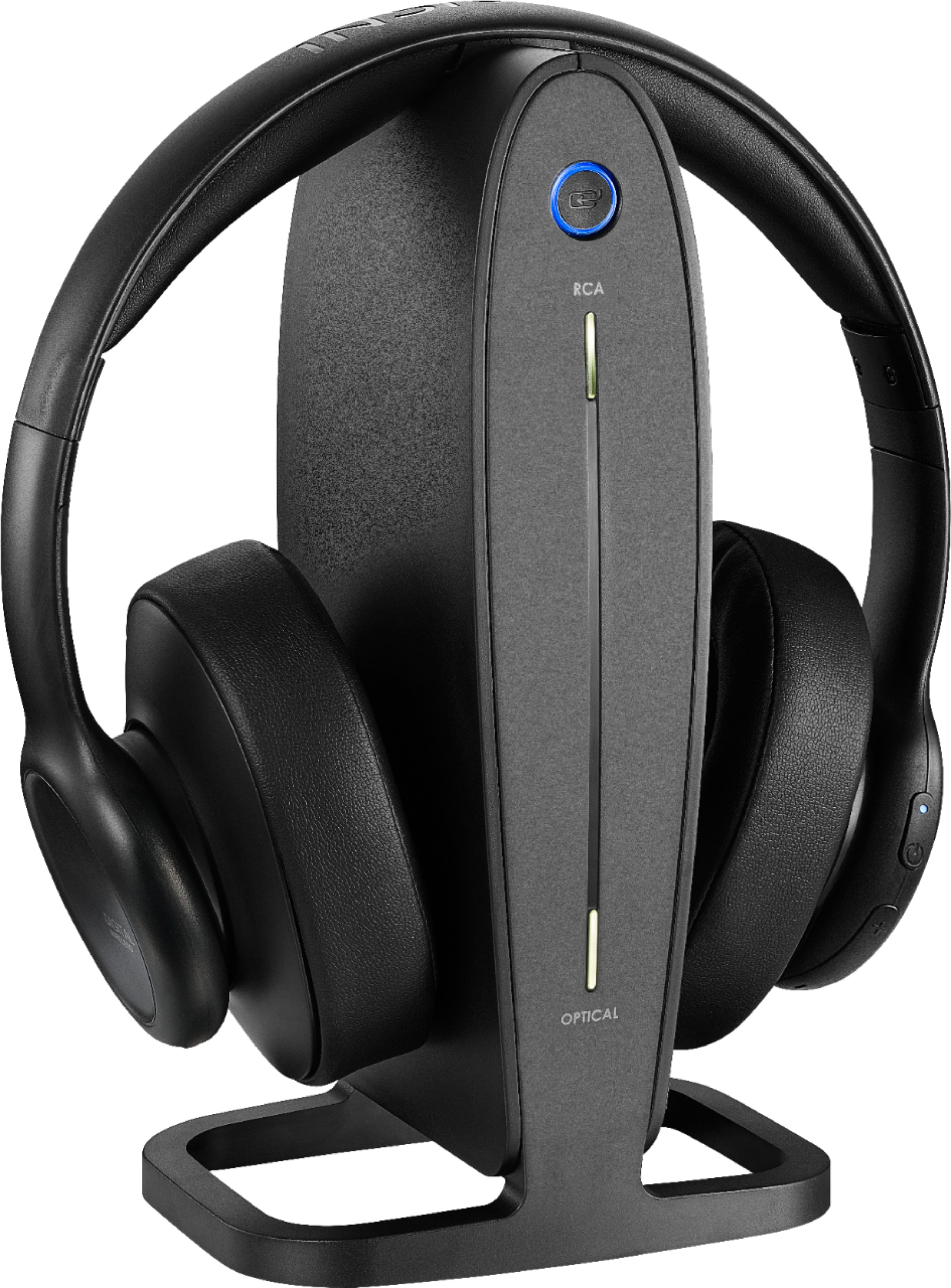
RF headphones use radio waves to send sound from an audio source to wireless headphones. In the United States, a transmitter connected to a TV, stereo, or game console converts the audio into a radio signal. A receiver inside the headphones captures that signal, changes it back into an audio signal, and sends it to the headphone drivers.
Most consumer RF headphones use a dedicated transmitter base. This differs from Bluetooth headphones, which connect directly to a device through Bluetooth. RF models are often made for watching television because they can offer low delay, long indoor range, and simple audio transmission without Bluetooth pairing.

What Are RF Headphones?
RF headphones are wireless headphones that use radio frequency communication instead of a cable. “RF” means radio frequency, a broad term for electromagnetic signals used to carry information through the air.
Many RF headphone systems include two parts:
- A transmitter base: Connects to the audio source and sends the wireless signal.
- A headphone receiver: Built into the headphones and tuned to receive the transmitter’s signal.
The audio source may be a television, stereo receiver, computer, or game console. The source sends sound to the base through an analog or digital cable. The base then prepares the sound for wireless transmission.
RF headphones are not one single technology. Different models may use:
- Analog FM transmission
- Digital RF transmission
- 2.4 GHz wireless communication
- Other manufacturer-specific radio systems
The exact method depends on the model. Check the product manual for the operating band, inputs, range, and supported audio formats.
RF headphones versus Bluetooth headphones
Both systems use radio waves, but they handle connections in different ways.
| Feature | RF headphones | Bluetooth headphones |
|---|---|---|
| Main connection | Dedicated transmitter | Bluetooth device |
| Common use | TV and home audio | Phones, tablets, laptops |
| Pairing | Often automatic with the base | Usually requires pairing |
| Audio delay | Often low, but model dependent | Can vary by codec and device |
| Multi-device use | Usually tied to its transmitter | Can work with many Bluetooth sources |
| Charging | Usually through a dock or cable | Usually through a cable or case |
| Range | Often strong across a room or home area | Depends on Bluetooth class, walls, and interference |
A key point is that RF does not automatically mean “better.” It means the headphones use a radio link other than a normal wired connection. Performance depends on design, antenna placement, power, signal processing, and the environment.

How Do RF Headphones Work Step by Step?
RF headphones work through a chain of signal conversion. The system starts with an electrical audio signal and ends with sound from the headphone drivers.
1. The audio source creates an audio signal
A television or other device produces an audio signal. This signal represents the changing pressure pattern of the original sound.
The source may provide audio through:
- RCA stereo outputs
- A 3.5 mm headphone or line-out jack
- Optical digital audio
- Another input listed in the headphone manual
Some TVs send sound through only one output at a time. For example, enabling a headphone output may mute the built-in speakers. This is a TV setting, not a failure in the RF headphones.
2. The transmitter receives the signal
The RF base connects to the audio source. Its job is to prepare the sound for radio transmission.
With an analog input, the transmitter may receive left and right electrical audio channels directly. With a digital input, it may first decode the digital audio into a usable audio stream.
The transmitter can also adjust the signal level. This helps prevent very quiet sound or distortion caused by an audio input that is too strong.
3. The transmitter places audio on a radio signal
Raw audio does not travel efficiently through the air by itself. The transmitter uses a higher-frequency radio carrier to carry the audio information.
This process is called modulation. The transmitter changes a property of the carrier, such as its frequency, phase, or digital symbol pattern, to represent the sound.
Analog RF systems may use frequency modulation, or FM. Digital RF systems convert the audio into data before transmission. Digital systems may add error correction, encryption, compression, or other processing.
4. The antenna sends the RF signal
The transmitter feeds the radio signal to an antenna. The antenna converts the electrical signal into electromagnetic energy that travels through the room.
The signal may pass through some walls and objects, but materials affect its strength. Metal, reinforced concrete, appliances, and crowded radio environments can reduce performance.
Distance also matters. A longer path usually means a weaker signal. The rated range on a box is often measured in open or favorable conditions, not through several rooms in a typical American home.
5. The headphone receiver detects the signal
An antenna inside the headphones receives the radio energy. The receiver selects the intended signal and rejects as much unwanted energy as its design allows.
The receiver then demodulates or decodes the transmission. In simple terms, it removes the radio carrier and reconstructs the audio information.
If the signal is weak or heavily blocked, the receiver may produce:
- Hiss
- Crackling
- Pops
- Dropouts
- Muffled sound
- A complete loss of audio
6. The headphones convert the signal into sound
After recovery, the audio passes through amplification circuitry. The amplifier supplies the power needed by the headphone drivers.
The drivers use that electrical signal to move a diaphragm. The moving diaphragm creates changes in air pressure that the ears hear as sound.
A simple signal path looks like this:
TV or stereo → cable → RF transmitter → antenna → headphone antenna → receiver → amplifier → drivers → ears
The headphones also contain a battery and charging circuit. The battery powers the receiver, amplifier, and other electronics.

What Happens When You Turn RF Headphones On?
When you turn on an RF headphone system, several events usually happen:
- The transmitter receives power.
- The base checks for an audio input.
- The transmitter begins sending a radio signal.
- The headphones power their receiver.
- The receiver searches for the matching signal.
- The headphones lock onto the signal.
- The audio amplifier drives the headphone speakers.
Many models pair or synchronize automatically because the headphones and base are designed to work together. Some digital systems use an identification code so that nearby systems do not connect by mistake.
A charging dock may also perform more than one job. It can charge the battery and hold the headphones in a position that makes storage easy. On some models, placing the headphones on the dock also turns them off or activates charging.
Why RF Headphones Are Popular for TV
RF headphones can solve a common home problem: one person wants clear TV sound while others want quiet.
A dedicated RF transmitter can send TV audio to the listener without a long headphone cable. The listener can move around the room while keeping the headphones connected.
RF headphones may also help when:
- The TV is across the room
- Bluetooth is not available on the TV
- The listener needs a private volume level
- The headphone cable would create a trip hazard
- A low-delay connection matters for speech and video
The benefit depends on the model and TV. Some systems add very little delay, while others may still create a small mismatch between a person’s lips and the sound. Digital processing, audio conversion, and TV settings can all add delay.
RF headphones do not automatically transmit TV sound to the built-in speakers. Whether both work at once depends on the TV’s audio output settings.

Do RF Headphones Need Wi-Fi or Bluetooth?
Most dedicated RF headphones do not need Wi-Fi or Bluetooth. They use their own transmitter and receiver.
This means they can work with a TV that has a compatible audio output but lacks Bluetooth. The transmitter creates the wireless link, so the TV does not need to manage a Bluetooth connection.
However, RF headphones still share the radio environment with other devices. Possible sources of interference include:
- Wi-Fi routers
- Bluetooth devices
- Cordless phones
- Wireless speakers
- Microwave ovens during operation
- Other RF headphone systems
The effect depends on the operating frequency and the design of each device. A system may work well even when other wireless products are nearby, but interference can occur.
How Far Can RF Headphones Reach?
The usable range depends on the transmitter, antenna, frequency, obstacles, and local interference.
Many home RF systems are designed to work across a room or several rooms. The real range can be less than the advertised maximum when the signal must pass through:
- Concrete walls
- Metal doors
- Appliances
- Multiple floors
- Dense furniture
- Large mirrors or metal structures
For the best result, place the transmitter in an open area with its antenna unobstructed. Avoid putting the base inside a closed cabinet, behind a television, or next to large metal objects.
If you walk too far away, the sound may become noisy before it cuts out. Moving a few feet closer to the transmitter often provides a quick test. If the sound improves, distance or obstruction is likely part of the problem.
Do RF Headphones Have Better Sound Quality?
RF headphones can sound clear, but sound quality is not determined by the word “RF” alone.
Important factors include:
- The headphone drivers
- The transmitter’s audio input
- Analog or digital transmission
- Audio compression
- Signal-to-noise performance
- Distortion
- The amplifier
- The fit around the ears
- The quality of the original recording
An analog RF system may introduce hiss or noise when the signal is weak. A digital system may sound clean until the connection becomes unstable. At that point, it may produce clicks, dropouts, or silence instead of gradual noise.
The source also sets a limit. If a TV sends compressed or low-quality audio, higher-end headphones cannot restore detail that was never present.
Some RF systems support stereo sound. Others may offer surround or virtual surround processing. These features depend on the transmitter, source format, and headphone electronics. Read the manual rather than assuming that every RF model supports multichannel TV audio.
How to Set Up RF Headphones
Use the connection listed in the manual. The basic setup is usually as follows.
Step 1: Check the TV or audio source
Look for an available output such as:
- Optical digital audio
- RCA left and right audio
- A 3.5 mm audio output
- A compatible analog or digital port
Do not assume that a port labeled “input” can send sound to the transmitter. The transmitter needs an audio output from the source.
Step 2: Connect the transmitter
Connect the cable to the TV and to the matching input on the RF base. If the transmitter has an input selector, choose the port you used.
Step 3: Charge the headphones
Charge the headphones fully before troubleshooting the connection. A low battery can cause shutdowns, weak audio, or unstable operation.
Step 4: Turn on the source and transmitter
Set the TV or audio source to the program you want to hear. Confirm that the transmitter shows power and receives an audio signal, if it has an indicator.
Step 5: Turn on the headphones
Adjust the headphone volume slowly. Keep the volume low at first, then raise it to a comfortable level.
Step 6: Test the range
Walk a short distance from the transmitter. Listen for noise or dropouts. If the system fails near the transmitter, check the cable, input selection, battery, and compatibility before testing range.
A successful setup produces stable sound with no repeated dropouts at the distance you plan to use.

RF Headphones Troubleshooting
Check the simplest and safest causes first. The steps below apply to many systems, but the product manual takes priority.
| Symptom | Likely causes | Useful checks |
|---|---|---|
| No sound | Wrong input, muted TV, low battery, loose cable | Select the correct input, raise source volume, charge headphones, reseat cables |
| Hiss or static | Weak signal, analog noise, interference | Move the base, reduce distance, remove obstructions, test another output |
| Sound cuts out | Range limit, blocked signal, low battery | Stay closer, place the base in the open, charge the battery |
| One side is quiet | Balance setting, cable issue, driver fault | Check source balance, inspect connectors, test another source |
| Audio is delayed | TV processing or digital conversion | Turn off TV audio effects, use a lower-delay output or mode if documented |
| TV speakers are silent | TV mutes speakers when another output is active | Review the TV’s audio-output settings |
| Headphones will not charge | Poor dock contact, damaged cable, battery issue | Clean contacts as directed, check the power adapter, follow the manual |
Do not open the headphones or transmitter while connected to power. Internal batteries and electronic parts can be damaged by improper repair. If a battery becomes swollen, very hot, cracked, or starts to leak, stop using the device and follow local battery disposal guidance.
How to reduce interference
Try these changes:
- Move the transmitter away from the router, TV power cable, and other wireless equipment.
- Keep the transmitter upright and in the open.
- Remove large metal objects between the transmitter and headphones.
- Test the headphones with the source nearby.
- Check whether another wireless device causes the problem.
- Replace or recharge the headphone battery if the manual permits it.
Do not change the transmitter frequency unless the manufacturer provides that control. Do not use an unapproved power adapter. In the United States, radio equipment must meet applicable Federal Communications Commission requirements, but compliance does not guarantee perfect performance in every home.

Are RF Headphones Safe?
RF headphones use low-power radio transmitters designed for consumer use. In the United States, covered radio devices are subject to FCC rules, including requirements related to intentional radio transmission and interference.
The FCC provides consumer information about radio frequency exposure and wireless devices. The manufacturer’s compliance information applies to the specific model, antenna, and operating conditions. It should not be assumed that one product’s limits apply to another product.
For practical safety:
- Follow the manufacturer’s charging instructions.
- Use the supplied or approved power adapter.
- Keep volume at a level that does not cause discomfort.
- Take breaks during long listening sessions.
- Stop using the product if the battery swells, leaks, or becomes unusually hot.
- Keep the transmitter and charger away from water.
- Do not modify the antenna or radio electronics.
Loud sound is a more direct hearing concern than the normal wireless link. The World Health Organization recommends protecting hearing by reducing volume, limiting exposure time, and using breaks. If you notice ringing, pain, muffled hearing, or reduced hearing after use, stop listening and seek advice from a qualified health professional.

What Are the Main Advantages and Limits?
RF headphones make the most sense when their strengths match the use case.
Advantages
- They can work with TVs that lack Bluetooth.
- A dedicated transmitter may provide a stable home connection.
- Setup can be automatic after the first connection.
- Many models are designed for low audio delay.
- The listener can move without a headphone cable.
- A charging base can simplify storage and charging.
Limitations
- The transmitter occupies an audio output and a power outlet.
- Compatibility depends on the TV’s available output.
- Walls and interference can reduce range.
- Some models produce hiss when the signal is weak.
- They are less convenient for phones and public travel.
- A proprietary transmitter may be difficult or costly to replace.
- Multiple RF systems may interfere with each other.
For phone use, Bluetooth is usually more convenient. For TV listening in a home, dedicated RF can be a better fit when the TV has a suitable output and the listener values range or low delay.

Key Takeaways
- RF headphones receive sound through a radio link rather than a headphone cable.
- A transmitter connects to the TV or audio source and sends the signal through an antenna.
- A receiver inside the headphones decodes the signal and drives the speakers.
- Most dedicated RF headphones do not need Wi-Fi or Bluetooth.
- Range depends on walls, distance, antenna placement, and interference.
- TV output settings can affect whether the built-in speakers keep working.
- RF does not guarantee better sound; the system design and audio source matter.
- Use safe listening levels and follow the product’s charging instructions.
Frequently Asked Questions
Can RF headphones work with any TV?
No. The TV must have an audio output that matches the transmitter’s input. Common options include optical, RCA, and 3.5 mm outputs. Some TVs also restrict which outputs work while using built-in speakers.
Can two people use RF headphones with one transmitter?
Sometimes. The headphones must be compatible with the same transmitter system. Some manufacturers sell additional compatible headsets, while others design the base for one pair only. Check the manual before buying a second pair.
Do RF headphones work through walls?
They often can, but wall materials and distance reduce signal strength. Wood or drywall may have less effect than concrete, brick, metal, or reinforced structures. Test the headphones in the rooms where you plan to use them.
Why do RF headphones make a buzzing sound?
Buzzing may come from a weak RF signal, analog audio noise, a poor cable connection, a grounding issue, or interference. Move the transmitter, reseat the cable, try another input, and test with the headphones closer to the base.
Can RF headphones connect directly to a phone?
Usually not. Most dedicated RF headphones need their matching transmitter. A phone can work only if it has the required physical output and the transmitter accepts that connection. Bluetooth headphones are normally the simpler choice for phones.
Conclusion
RF headphones work by converting audio into a radio transmission, sending it from a dedicated base, and converting it back into sound inside the headphones. Their main strengths are home range, simple TV use, and often low audio delay.
Before buying or setting up a pair, check the TV’s audio outputs, the transmitter’s input type, the expected range, and whether the TV will keep its speakers active. Place the base in the open, charge the headphones fully, and use a comfortable listening level.