How To Read A Headphone Frequency Response Graph: Easy Guide

For listeners in the United States, a headphone frequency response graph can help explain why one model sounds warm, bright, bass-heavy, or clear. The graph shows how loudly a headphone reproduces different sound frequencies, but it does not tell you everything about comfort, build quality, distortion, or personal preference.
To read one, check the horizontal frequency scale, study the vertical sound-level scale, compare the curve with the graph’s target or reference line, and focus on broad trends rather than tiny peaks. A graph can guide your choice, but it should not be treated as a complete score.
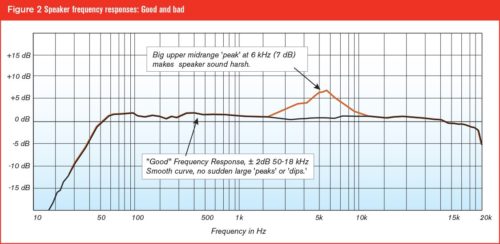
What does a headphone frequency response graph show?
A headphone frequency response graph shows the relative output level of a headphone across the audible frequency range. The left side usually represents bass, the center represents midrange, and the right side represents treble.
Most graphs use:
- X-axis: Frequency, measured in hertz (Hz)
- Y-axis: Sound level, usually measured in decibels (dB)
- Curve: The headphone’s measured response
- Target or reference line: A comparison standard used by the measurement site
A flat line would mean the headphone produces each tested frequency at the same measured level. However, a perfectly flat line would not normally sound perfectly balanced through headphones. Your ears receive sound differently from speakers in a room, so headphone graphs often use a target curve instead of a simple flat line.
The frequency range
Human hearing is often described as roughly 20 Hz to 20,000 Hz, or 20 kHz. Hearing limits vary by person, age, hearing health, and listening level.
The graph is often divided into these useful regions:
| Frequency range | Common label | What it affects |
|---|---|---|
| 20–60 Hz | Sub-bass | Deep rumble, low synths, cinematic impact |
| 60–250 Hz | Mid-bass | Kick drums, bass guitars, warmth, punch |
| 250 Hz–1 kHz | Lower and central mids | Body in voices, guitars, piano, many instruments |
| 1–4 kHz | Upper mids or presence | Speech clarity, vocal focus, attack |
| 4–8 kHz | Treble or brilliance | Detail, cymbal energy, bite, brightness |
| 8–20 kHz | Upper treble or air | Air, sparkle, ambience, perceived openness |
These boundaries are approximate. Different measurement systems and reviewers may divide the ranges in slightly different ways.
The decibel scale
The vertical axis shows changes in level. A rise of several decibels means that region is reproduced more strongly than another region. A dip means that region is reproduced more quietly.
Do not assume that a graph’s zero line means silence or an absolute loudness level. On many headphone graphs, the vertical scale is normalized to a reference. The curve may be shifted up or down so that different headphones can be compared more easily.
How to read the graph step by step
Read a headphone frequency response graph from left to right, then compare its broad shape with the target line. This method gives you a useful first impression without overreacting to small changes.
1. Check the axes and scale
First, confirm:
- The frequency range shown
- The dB range
- The size of each grid interval
– Whether the frequency axis is logarithmic - Whether the graph uses a target curve
- Whether the measurement uses one channel or an average
The frequency axis is often logarithmic rather than evenly spaced in raw hertz. This means the distance from 20 Hz to 40 Hz may look similar to the distance from 1 kHz to 2 kHz because both represent one octave.
A graph with a narrow vertical range can make small changes look dramatic. Always read the numbers, not just the visual shape.
2. Find the bass region
Start at the left side of the graph. A curve that rises toward the low frequencies usually indicates stronger bass.
Look for the difference between sub-bass and mid-bass:
- A rise below about 60 Hz suggests more deep rumble.
- A rise around 80–200 Hz suggests more punch and warmth.
- A dip in the 200–400 Hz area can make bass sound cleaner but may also reduce body.
- Excess energy across the bass region can make music sound thick or boomy.
A headphone with strong sub-bass but moderate mid-bass may sound deep without becoming overly warm. A headphone with a larger mid-bass rise may sound fuller, but it could also mask some lower-midrange detail.
3. Inspect the midrange
The midrange carries much of the information in voices, guitars, piano, strings, and many acoustic instruments.
The lower midrange, roughly 250 Hz to 1 kHz, affects body and fullness. If this area is reduced, vocals and instruments may sound lean. If it is elevated, the sound may feel thick or congested.
The upper midrange, roughly 1–4 kHz, affects presence and clarity. More energy here can bring voices forward. Too much can make vocals, guitars, or snare drums sound hard or shouty.
Use a target line when one is provided. A curve that appears low compared with a target in the upper mids may sound more relaxed, while a curve above the target may sound more forward.
4. Study the treble
Treble occupies the right side of the graph. It affects perceived detail, brightness, cymbal energy, and the sharpness of consonants such as “s” and “t.”
Broad treble trends are easier to interpret than narrow spikes. For example:
- A general rise from 4–8 kHz may produce a bright or energetic sound.
- A broad dip in that region may produce a smoother or darker presentation.
- A narrow peak may be caused partly by the measurement system or ear-coupler fit.
- Strong upper-treble output can add air, but it does not always mean more audible detail.
Treble graphs are especially sensitive to the measurement rig, headphone position, ear shape, pad seal, and small changes in placement. Treat narrow peaks and dips as clues, not final proof.
5. Compare the curve with the target
A target curve represents a preferred or research-based balance. It is not a legal limit, a universal rule, or a guarantee that the headphone will sound good to every listener.
When comparing a headphone to a target:
- Find the reference point used by the graph.
- Compare broad bass, midrange, and treble regions.
- Note where the headphone differs most.
- Translate each difference into a possible sound effect.
- Confirm the impression with listening or other measurements.
For example, a headphone may show:
- More energy than the target below 150 Hz: likely warmer or bassier
- Less energy around 2–4 kHz: possibly more relaxed or less forward
- More energy around 5–8 kHz: possibly brighter or more incisive
- A lower upper-treble region: possibly less airy, though hearing sensitivity varies
The target helps you compare. It does not replace your own preference.
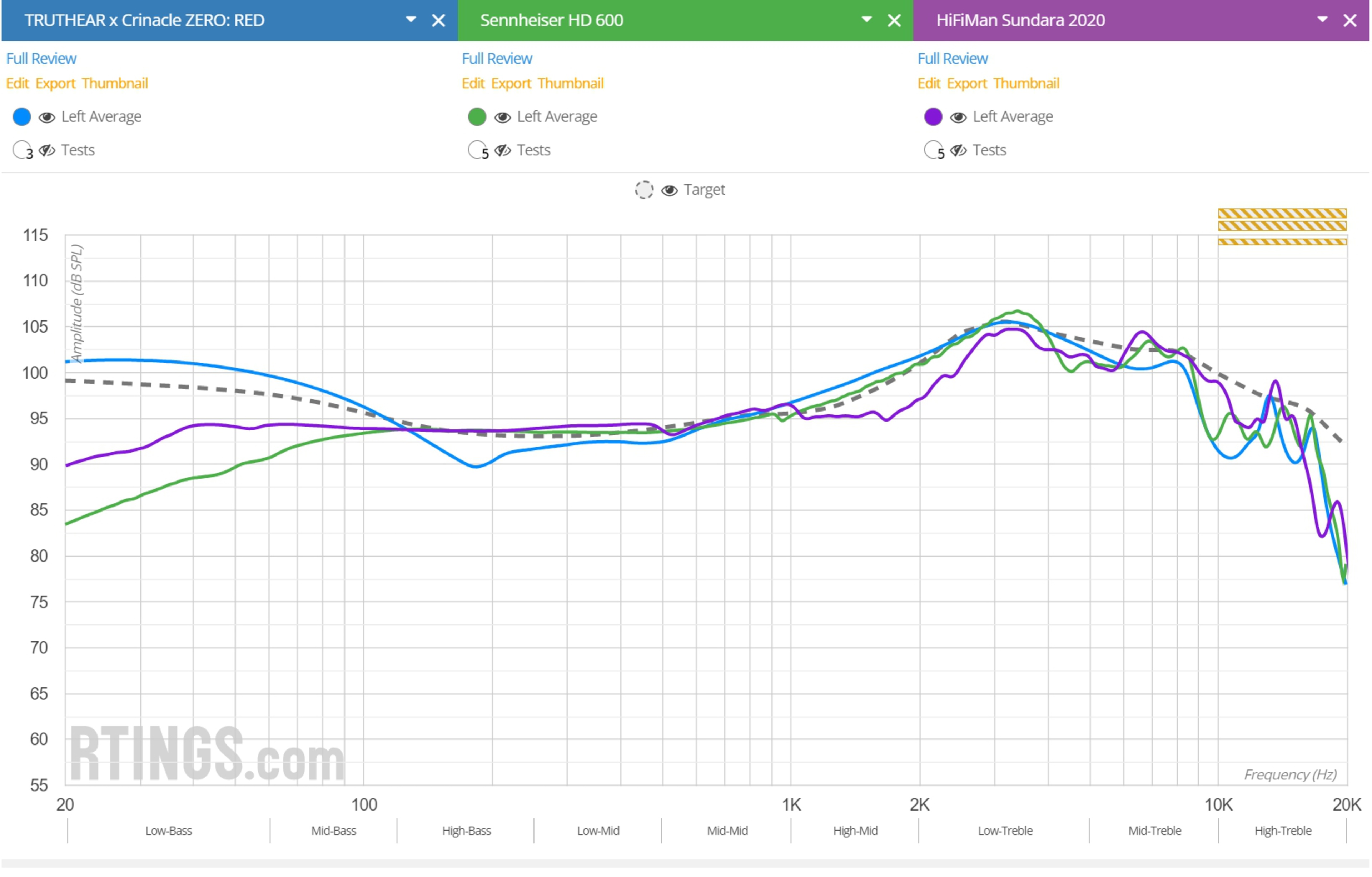
What do common frequency response shapes sound like?
A frequency response graph provides a map of tonal balance. The following descriptions are general patterns, not fixed rules for every headphone or listener.
Bass-heavy response
A bass-heavy response has a clear rise in the low-frequency region compared with the mids.
It may sound:
- Powerful
- Warm
- Full
- Fun with electronic music, hip-hop, and action films
- Less clear if the bass overlaps too strongly with the lower mids
Bass quantity is not the same as bass quality. A graph can show level, but it cannot fully show speed, distortion, texture, or how well the headphone controls bass notes.
Warm response
A warm headphone usually has extra bass and a gentle treble balance. It may make voices and instruments sound smooth and full.
Warmth can be useful for:
- Long listening sessions
- Poorly mastered recordings
- Thin-sounding recordings
- Listeners who dislike sharp treble
Too much warmth may reduce perceived separation or make complex music sound crowded.
Neutral or balanced response
A balanced response follows its target fairly closely across the main audible range. It does not need to be flat.
Balanced headphones often work well for listeners who want:
- Natural vocals
- Reliable tonal judgment
- A broad range of music
- Less emphasis on one frequency region
“Neutral” still depends on the target used. A headphone can look neutral on one graph and different on another if the measurement system or reference changes.
Bright response
A bright response has more treble relative to the bass and midrange.
It may sound:
- Detailed
- Crisp
- Open
- Energetic
- More likely to reveal hiss, harsh recordings, or sibilance
Brightness is not automatically higher resolution. A treble peak can make a headphone seem more detailed while also making it tiring.
Dark or relaxed response
A dark response has less treble relative to the bass and mids.
It may sound:
- Smooth
- Soft
- Relaxed
- Less fatiguing
- Less crisp with cymbals and vocal consonants
A dark balance can suit sensitive listeners, but some people may hear it as dull or lacking air.
How targets and measurement systems change the graph
A headphone frequency response graph is meaningful only when you understand how it was measured. Different systems can produce different-looking curves for the same headphone.
Why target curves differ
Common targets may be based on:
- A diffuse-field response
- A free-field response
- A room or speaker reference
- The Harman over-ear or in-ear research targets
- A reviewer’s preferred compensation curve
- An unnormalized measurement
The Harman research process used controlled listening tests to study preferred headphone tonal balance. The published work describes preference trends, not a command that every headphone must follow. You can review the research through the Audio Engineering Society, including Sean Olive and colleagues’ work on headphone preference.
A target curve is best viewed as a comparison tool. If two sites use different targets, do not compare their curve positions as if they were using the same baseline.
Why measurements from different sites may disagree
Differences can come from:
- Ear-coupler design
- Head-and-torso simulator design
- Ear shape and pinna model
- Pad compression
- Headphone placement
- Seal around the ear
- Measurement software
- Smoothing settings
- Unit variation
- Open-back or closed-back leakage
- Wired, wireless, or active-processing mode
A measurement from RTINGS, for example, should not be placed directly over a measurement from another site unless the methods and compensation are compatible. RTINGS explains its headphone testing methods on its methodology pages, including the limits of measurement-based comparisons.
Smoothing
Smoothing reduces small peaks and dips so that broad trends are easier to see. Common settings include 1/6-octave or 1/12-octave smoothing.
More smoothing can make a graph easier to read, but it may hide narrow features. Less smoothing shows more detail but can encourage overinterpretation.
When possible, use a smoothed graph to judge overall tonal balance and an unsmoothed graph to inspect possible narrow resonances. Do not treat either view as a complete description of sound.

How to use a graph to choose headphones
Use the graph to narrow your options, then check design, fit, comfort, and other measurements before buying. The best graph for you depends on the sound you want and the recordings you use.
Match the response to your preference
Think about your current headphones and what you want to change.
| If you want… | Look for… | Possible trade-off |
|---|---|---|
| More deep impact | More output below about 60 Hz | Can sound overpowering on some tracks |
| More warmth | A moderate rise through the bass | May reduce vocal separation |
| Clearer vocals | A balanced lower midrange and controlled upper mids | Too much presence can sound shouty |
| Smoother treble | No broad excess around 4–8 kHz | May sound less crisp |
| More sparkle | More controlled upper-treble energy | Can expose sibilance |
| A relaxed sound | Less upper-mid or treble energy than the target | May reduce perceived detail |
These are starting points. Your ear shape, hearing range, music, and fit can change the result.
Compare headphones at the same scale
If two graphs use the same measurement system and target, compare:
- Bass shelf size
- Midrange level
- Upper-midrange rise
- Treble peaks
- Overall slope
- Channel matching
Do not compare only one point. A 3 dB difference at 100 Hz does not tell you how the headphone behaves at 30 Hz, 300 Hz, or 3 kHz.
Consider headphone type
Open-back and closed-back headphones may have different response goals and fit behavior.
Closed-back headphones can create stronger seal-related bass differences. Glasses, hair, and poor pad contact may reduce bass in actual use. Open-back models avoid some enclosure effects but still depend on ear shape and placement.
In-ear monitors are even more sensitive to insertion depth and ear-tip seal. A shallow or loose fit can reduce bass and change treble, so an IEM graph may not match what you hear with a different ear tip.
Check the listening mode
Wireless headphones may have separate responses for:
- Bluetooth playback
- Wired passive mode
- Active noise cancellation
- Transparency mode
- A mobile app’s equalizer
- A manufacturer sound preset
Use the graph that matches the mode you plan to use. A headphone’s active electronics may change its response substantially.

What a frequency response graph cannot tell you
A frequency response graph mainly describes tonal balance. It cannot fully predict technical performance or personal enjoyment.
It usually does not show:
- Comfort
- Clamp force
- Weight
- Pad heat
- Build quality
- Battery life
- Microphone quality
- Noise isolation
- Noise cancellation performance
- Imaging accuracy
- Soundstage size
- Transient behavior
- Distortion at a chosen listening level
- Maximum clean output
- Reliability
- App stability
Some of these features require separate tests. Distortion measurements can show unwanted harmonics. Impedance and sensitivity data can help determine whether a source can drive the headphone properly. Isolation tests can show how much outside noise is reduced.
Do not call a headphone “high resolution” only because it has a treble peak. Extra treble can increase the impression of detail, but it can also add harshness.
Common mistakes when reading headphone graphs
Avoiding a few common errors will make your interpretation more accurate.
Mistake 1: Assuming flat always sounds best
A flat graph is not a universal ideal for headphones. The ear and head affect how sound reaches the eardrum, so a useful target often has a shaped response.
Better approach: Compare the curve with a known target and consider whether its deviations match your taste.
Mistake 2: Treating every peak as audible
Very narrow peaks may result from the measurement rig, placement, or ear-coupler resonance. They may not sound as strong in every listener’s ears.
Better approach: Focus first on broad trends. Treat isolated peaks as a reason to investigate further, not as proof of a defect.
Mistake 3: Comparing graphs from different sources directly
Different rigs and targets can produce different results. Even the same headphone may measure differently after a pad change or a new firmware version.
Better approach: Compare models measured by the same source whenever possible.
Mistake 4: Ignoring seal and fit
A loose seal can reduce bass, especially on closed-back headphones and IEMs. Glasses and hair can also affect over-ear pad contact.
Better approach: Read fit notes and consider whether your use will match the test condition.
Mistake 5: Confusing bass extension with bass quantity
A headphone can reach very low frequencies without having a large bass boost. Extension tells you how far down the response remains usable; quantity tells you how strong that region is relative to the rest.
Better approach: Inspect both the low-frequency reach and the level of the bass shelf.
Mistake 6: Using EQ to fix every issue
Equalization can change tonal balance, but it cannot repair poor comfort, a broken seal, high distortion, weak amplification, or bad physical design.
Better approach: Use EQ for moderate tonal changes after choosing a headphone that already fits and functions well.

How to use EQ with a frequency response graph
A frequency response graph can help you create a starting EQ profile, but the result depends on the measurement source and your fit.
A basic process is:
- Choose a graph measured on a compatible system.
- Pick a target that matches your preferred sound.
- Identify broad areas where the headphone differs.
- Apply small changes first.
- Use a preamp reduction if you add large boosts.
- Listen at a safe level.
- Adjust by ear and save the profile.
If you boost several regions, the total signal can exceed the available digital headroom and cause clipping. A negative preamp value can reduce that risk, although it also lowers maximum output.
For example, if you apply a +5 dB bass boost, a preamp near −5 dB may provide headroom. The exact setting depends on the full EQ curve and the software’s processing method.
EQ cannot perfectly correct every narrow feature. It also cannot account for the exact fit of your headphone on your head. Treat graph-based EQ as a useful starting point, not a guaranteed correction.
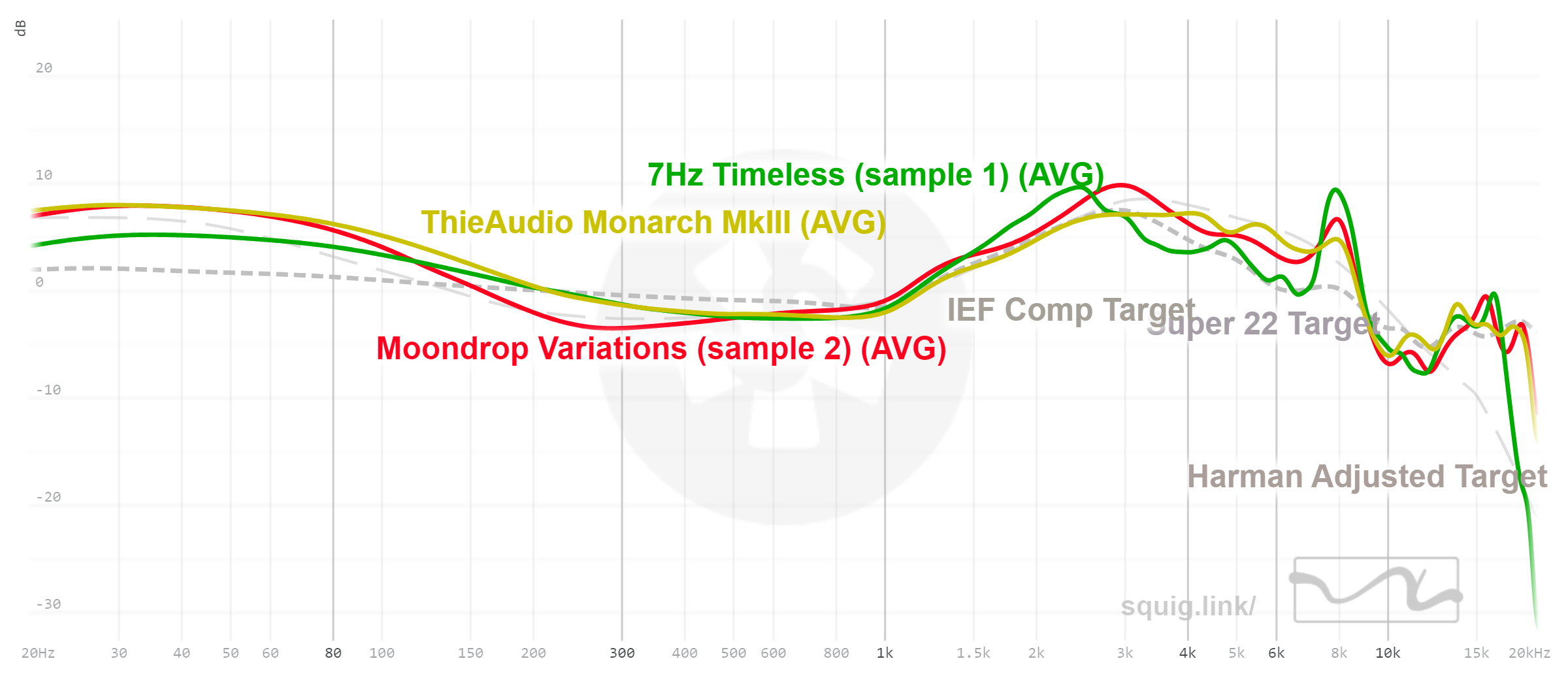
How to judge whether a graph is trustworthy
A useful graph should explain its measurement conditions. Look for the model version, test mode, compensation, smoothing, and channel information.
Before relying on a graph, check whether the page states:
- The exact headphone model
- Whether the measurement is left, right, or averaged
- The measurement rig or coupler
- The target or compensation used
- The smoothing setting
- Whether ANC or another mode was enabled
- Whether the pads or ear tips were stock
- Whether the graph is raw or normalized
A graph with clear methods is more useful than a graph with attractive colors but no test details. Still, clear methods do not make one measurement universally correct. They help you understand what the result does and does not establish.
The best evidence comes from several compatible measurements and careful listening. If sources disagree, first check the model, firmware, mode, fit, target, and measurement method before deciding that one source is wrong.
Key takeaways
- The horizontal axis shows frequency in Hz.
- The vertical axis shows relative level in dB.
- The left side represents bass; the center represents mids; the right side represents treble.
- A rise means more energy in that region; a dip means less.
- Compare broad patterns with the graph’s target line.
- Use the same measurement source when comparing headphones.
- Treat narrow treble peaks with caution.
- Fit, seal, pads, firmware, and listening mode can change the result.
- Frequency response does not measure comfort, distortion, isolation, or overall quality.
- Use the graph to narrow your choices, not to make the entire decision.
Frequently asked questions
Is a flat headphone frequency response graph good?
Not always. A flat line can be useful as a technical reference, but headphones often use a shaped target to account for how the human ear hears sound from a speaker-like source. A headphone that follows a suitable target may sound more balanced than one that looks flat on a raw graph.
What does a dip in a headphone frequency response graph mean?
A dip means the headphone produces less relative output in that frequency region. A dip around the upper mids may make vocals sound less forward. A dip in the treble may reduce brightness. The audible effect depends on the dip’s width, depth, location, and the graph’s measurement method.
What does a peak mean on a headphone graph?
A peak means the measured output is higher in that region than nearby frequencies. A broad peak may affect the headphone’s overall tonal character. A very narrow peak may be linked partly to measurement position or the test rig, so it should not be treated as a definite problem without supporting evidence.
Can a frequency response graph show soundstage?
No. Frequency response may influence perceived openness or tonal balance, but it does not directly measure soundstage width, imaging, or spatial accuracy. Those qualities depend on several factors, including channel matching, acoustic design, distortion, fit, and the recording.
Can I compare an IEM graph with an over-ear headphone graph?
Only with great caution. In-ear monitors and over-ear headphones use different acoustic paths, measurement couplers, and targets. Compare IEMs with other IEMs measured under the same method, and compare over-ear headphones with other over-ear headphones from the same source.
Why does my headphone sound different from its graph?
Fit is a common reason. Ear shape, pad seal, glasses, hair, insertion depth, ear tips, listening mode, and unit variation can all change the result. Your hearing and preferences also differ from the standardized test setup used to create the graph.
Conclusion: Use the graph as a map, not a verdict
To read a headphone frequency response graph, identify the axes, divide the curve into bass, mids, and treble, and compare its broad shape with the stated target. Then consider the measurement method, fit, listening mode, and other performance data.
The most useful graph answers a focused question: What tonal balance is this headphone likely to have compared with another model measured the same way? Use that answer to narrow your options, then confirm comfort, seal, features, distortion, and real-world suitability before you buy.