Can You Connect Any Bluetooth Headphones to PS5 Easily

Not every Bluetooth headphone connects directly to PS5, so you usually need a USB adapter, TV Bluetooth output, or a PS5-friendly wireless headset. For casual gaming it can work well enough, but competitive players usually get better results with wired or 2.4GHz wireless audio.
If you’re asking can you connect any bluetooth headphones to ps5, the short answer is no, not directly in the way most people expect. The PS5 has limited native Bluetooth audio support, so most Bluetooth headphones need a workaround such as a USB adapter, TV Bluetooth output, or a different wireless headset option.
- Direct support: PS5 does not reliably support all Bluetooth headphones natively.
- Best workaround: USB dongles and TV transmitters are the most common fixes.
- Main drawback: Bluetooth latency can affect gameplay and chat.
- Best for gaming: Wired or 2.4GHz wireless is usually smoother.
Can You Connect Any Bluetooth Headphones to PS5? What Works in 2025

In 2025, the PS5 is still picky about Bluetooth audio. Some headphones may appear to pair with the console, but many will not deliver game sound properly, and some will not connect at all without extra hardware.
That is why many players end up using a dongle, a TV-based connection, or a PlayStation-compatible wireless headset instead. If you want a broader background on pairing basics, our guide on how to connect Bluetooth headphones explains the general process before you get into PS5-specific limits.
Why the PS5 Limits Native Bluetooth Headphone Support

Sony’s restriction is not random. It is mainly about keeping gaming audio responsive and stable while avoiding interference with other wireless devices.
Latency, audio quality, and controller interference explained
Bluetooth can add noticeable delay between what happens on screen and what you hear. For gaming, even a small lag can make footsteps, gunfire, and dialogue feel out of sync.
There is also the issue of controller interference and bandwidth. The PS5 controller already uses wireless communication, so Sony keeps native Bluetooth audio support limited to reduce dropouts, stutter, and connection conflicts.
What Sony officially supports versus what players expect
Many gamers assume any Bluetooth headphone should work like it does with a phone or laptop. In reality, the PS5 is much more selective, and some Bluetooth audio devices are simply not supported in the console’s standard menu.
That means the official experience is narrower than most users expect. If your goal is plug-and-play convenience, you usually need a different connection method or a headset designed for consoles.
Best Ways to Use Bluetooth Headphones with PS5
There are still several practical ways to listen wirelessly on PS5. The best choice depends on whether you care most about convenience, chat support, low latency, or overall sound quality.
USB Bluetooth dongles and how they bypass PS5 restrictions
A USB Bluetooth adapter is one of the most common workarounds. It plugs into the PS5 and creates a separate wireless audio path, which can let compatible headphones connect even when the console itself will not pair with them directly.
Results vary by adapter and headphone model, so it is important to check compatibility before buying. Some dongles are better for audio-only use, while others may support voice chat more reliably than basic adapters.
Bluetooth transmitters for TV, monitor, or dock setups
If your PS5 is connected to a TV or monitor with audio output, a Bluetooth transmitter can be a smart option. The transmitter handles the wireless link, while the PS5 sends audio through the display or external audio path.
This setup can be especially useful for living-room gaming. It is also a good fit for people who already use their TV for streaming and want one wireless headphone setup for both games and movies.
Using wired, 2.4GHz wireless, or PlayStation-branded alternatives
Wired headphones remain the simplest and most reliable option for PS5. They avoid Bluetooth lag entirely and usually work with the controller’s audio jack or the console’s USB audio support.
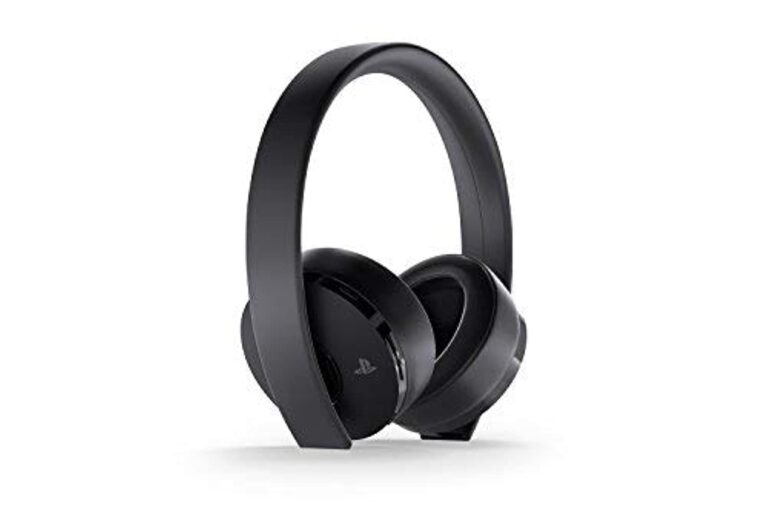
2.4GHz wireless headsets are often the better gaming choice if you want low latency without a cable. PlayStation-branded or PS5-compatible headsets can also be easier to set up because they are built with console audio in mind.
If you already own good Bluetooth headphones, test them through a transmitter or dongle before buying a new headset. That can save money if your current pair sounds fine for casual gaming.
Step-by-Step: How to Connect Bluetooth Headphones to PS5 the Right Way
The exact steps depend on the workaround you choose. The goal is to route audio in a way that avoids the PS5’s native Bluetooth limits while keeping sound usable for gaming.
Pairing through a USB adapter
Insert the USB Bluetooth dongle into an open USB port on the PS5.
Use the headphone’s pairing button or power sequence until the indicator light shows it is ready to connect.
Wait for the adapter to detect the headphones, then check PS5 audio output settings if sound does not start automatically.
Connecting through your TV’s Bluetooth audio output
If your TV supports Bluetooth audio, you can pair the headphones to the TV instead of the PS5. Then the console sends video to the TV, and the TV sends sound to the headphones.
This method is convenient, but it may introduce extra delay depending on the TV model. If you notice lag, look for a low-latency mode or audio sync setting in the TV menu.
Switching audio settings for game sound and chat
After connecting, go to the PS5 audio settings and verify that output is going to the right device. You may also need to choose whether sound should go to the controller, USB device, or TV output.
For party chat, check microphone input separately. Many Bluetooth headphones can play audio but do not handle mic input well through every adapter, so chat support may require a different solution.
Bluetooth headphone and adapter behavior can vary by brand, firmware, and TV model. A setup that works well for one player may still need extra audio sync adjustments for another.
Common Problems Gamers Run Into When Trying to Pair Bluetooth Headphones
Even when Bluetooth audio works on PS5, it is not always smooth. Most complaints come down to delay, weak chat support, or unstable connections.
Audio delay and lip-sync issues
Audio delay is the most common issue. You may hear dialogue a fraction of a second late, or notice that explosions and footsteps do not line up perfectly with the action on screen.
For story games and casual play, that may be acceptable. For rhythm games, shooters, and competitive titles, it can become annoying very quickly.
Mic not working for party chat
Some Bluetooth headphones only send playback audio and do not pass microphone input through the adapter or TV setup. That means you can hear the game, but your friends may not hear you in party chat.
If voice chat matters, check whether the adapter supports both audio and mic, or whether you need a separate microphone solution.
Connection drops, stuttering, and low volume
Wireless dropouts can happen if the adapter is too far from the headphones or if the room has a lot of wireless interference. Stuttering can also show up when the signal is weak or the codec is not ideal.
Low volume is another complaint, especially with some transmitters and budget adapters. If the sound seems too quiet, confirm both the PS5 and headphone volume levels before assuming the headset is the problem.
Listening at high volumes for long periods can cause hearing damage. Keep volume at 60% or below for extended sessions.
What to Look for in a Bluetooth Adapter or Headphone Setup
Not every Bluetooth accessory is worth using for PS5 gaming. A little checking up front can save you from lag, poor chat support, or a setup that never feels quite right.
Codec support, range, and low-latency features
Codec support matters because it affects how audio is transmitted and how much delay you hear. Low-latency features are especially useful if you play action games or notice lip-sync problems on your TV.
Range also matters more than many buyers think. A stronger connection can help reduce cutouts if you sit far from the console or move around the room while playing.
Budget vs premium options: what the price difference gets you
Budget adapters can be fine for simple audio playback, especially if you mostly play single-player games. More expensive options may offer better stability, broader compatibility, or stronger microphone support.
The higher price does not always mean better sound, though. Sometimes you are mainly paying for reliability, lower latency, and fewer connection headaches.
When a cheaper workaround is not worth it
If a low-cost adapter causes constant lag or disconnects, the savings may not be worth the frustration. That is especially true if you play online often or use voice chat regularly.
In those cases, a dedicated 2.4GHz wireless headset or a PS5-friendly headset can be the better long-term purchase.
Expert Advice: When Bluetooth Is Not the Best Choice for PS5 Gaming
Bluetooth is convenient, but convenience is not always the same as the best gaming experience. For some players, another connection type is the smarter choice.
Competitive gaming, multiplayer chat, and surround sound considerations
If you play competitive shooters or fast online games, low latency matters more than wireless convenience. A slight delay can affect reaction time and make positional audio feel less accurate.
Multiplayer chat is another factor. If you need a dependable mic and clear game audio at the same time, a gaming headset built for consoles is often easier to live with.
Warning signs that you should choose 2.4GHz wireless instead
If you are already worried about lag, mic compatibility, or dropouts, that is usually a sign to skip Bluetooth. 2.4GHz wireless headsets are often better for console gaming because they are designed for lower delay and simpler setup.
They are also a better fit if you want a headset that works well across long sessions without constant tweaking. For readers comparing headphone styles, our Bluetooth vs wired headphones sound quality guide can help frame the trade-offs more clearly.
If you experience ringing, discomfort, or pain after gaming sessions, reduce volume and take breaks. If symptoms continue, speak with an audiologist or hearing professional.
Final Verdict: Can You Connect Any Bluetooth Headphones to PS5 Easily?
So, can you connect any bluetooth headphones to ps5 easily? Not directly, and not always with the same results. The PS5 is limited with native Bluetooth audio, so most players need a USB dongle, TV transmitter, or a different wireless headset approach.
For casual players, Bluetooth can be workable if you already own the headphones and are okay with some compromise. For movie gaming, a TV-based setup may feel convenient, while competitive users will usually be happier with wired or 2.4GHz wireless options.
Best practical takeaway for casual players, movie gaming, and competitive users
If you mainly want relaxed single-player sound, Bluetooth can be fine through the right adapter or TV output. If you care about chat, lag-free audio, or the most reliable PS5 experience, a console-friendly wireless headset is usually the better buy.
For more general Bluetooth troubleshooting and setup guidance, you can also review our Bluetooth headphones explained simply article and our Bluetooth headphone lag fix guide.
Frequently Asked Questions
Bluetooth headphones usually feel more comfortable for casual gaming and movie sessions than for competitive play. Movies are less sensitive to small audio delays, while fast games benefit more from low-latency connections.
Wired headphones are the simplest option and usually give the most reliable audio with no Bluetooth lag. Wireless is more convenient, but 2.4GHz gaming headsets are often a better fit than standard Bluetooth for PS5.
Noise cancelling headphones can be great if you want to block room noise and focus on the game. Comfort, latency, and microphone support still matter more than noise cancelling alone for PS5 use.
Open-back headphones often create a wider, more natural soundstage, which can help with positional audio. Closed-back headphones usually isolate outside noise better and may feel more immersive in noisy rooms.
Check connection type, latency support, microphone compatibility, comfort, and whether the headphones work well with your TV or adapter. Driver type, tuning, and fit also affect bass, clarity, and long-session comfort.
Look for lightweight designs, soft ear cushions, and an adjustable headband. If your ears get hot or sore, take breaks and consider over-ear models with better padding and clamp balance.