Can You Connect Bluetooth Headphones to PS4 Easily

Yes, you can connect Bluetooth headphones to PS4, but direct pairing is often limited and unreliable. For the easiest results, use a USB Bluetooth adapter, transmitter, or a wired fallback.
If you’re wondering whether you can connect Bluetooth headphones to PS4, the short answer is yes—but not always directly. In practice, PS4 Bluetooth support is limited, so many headphones need a workaround such as a USB adapter, Bluetooth transmitter, or TV connection.
- Direct pairing: Works for some devices, but not most standard Bluetooth headphones.
- Best workaround: A USB adapter or transmitter usually improves compatibility.
- Chat support: Always check microphone support before buying.
- Latency: Low delay matters most for gaming and voice chat.
Can You Connect Bluetooth Headphones to PS4? What Most Players Need to Know in 2026
For most players in 2026, the real question is not whether Bluetooth headphones can work with PS4, but how reliably they will work. Sony’s console can detect some wireless audio devices, but many standard Bluetooth headphones and earbuds will not pair cleanly or may only support limited features.
This matters because gaming audio is more sensitive than casual music listening. You want stable sound, low delay, and, if possible, microphone support for party chat. If you are still comparing headphone styles, our guide to types of headphones explained can help you decide whether over-ear, on-ear, or in-ear wireless audio makes the most sense for your setup.
PS4 compatibility can vary by headphone model, firmware, and adapter type, so a device that works for one player may not work the same way for another.
Why PS4 Bluetooth Support Is Limited for Headphones
PS4 does not work like a phone or laptop where most Bluetooth headphones can pair instantly. The console has built-in restrictions that block many audio devices, especially if they are not designed for gaming or do not use a supported wireless profile.
How Sony’s Bluetooth restrictions affect audio devices
Sony’s Bluetooth implementation on PS4 is selective. That means the console may accept certain controllers, keyboards, or licensed accessories more easily than regular consumer headphones. Even when pairing succeeds, you may still run into missing game audio, no microphone input, or unstable connections.
That is why many users search for a workaround instead of relying on direct pairing. If you want a broader explanation of wireless pairing basics, our article on how to connect Bluetooth headphones covers the general process in a simple way.
Which Bluetooth headphones typically fail to pair with PS4
Most standard Bluetooth headphones can struggle on PS4, especially older models and budget earbuds that were built mainly for phones. Headsets that rely on advanced Bluetooth features, multipoint switching, or phone-focused voice assistants may also be less reliable.
Open-back wireless models are less common for gaming and not usually the best match for PS4 anyway, while many true wireless earbuds may connect only through a workaround. If you are deciding between wireless and wired audio for sound quality, our comparison of Bluetooth vs wired headphones sound quality is a useful next read.
Best Ways to Use Bluetooth Headphones with a PS4
There are a few practical ways to get wireless audio on PS4, and the best one depends on how much you care about latency, voice chat, and convenience. Some methods are simple but imperfect, while others cost a little more and usually perform better.
Direct pairing attempts and when they work
Direct pairing is the easiest option, but it is also the least dependable. A few headsets may connect through the PS4 Bluetooth menu, especially if they are gaming-focused or use a compatible dongle, but many common consumer headphones will not appear or will connect without full audio support.
Using a USB Bluetooth adapter for better compatibility
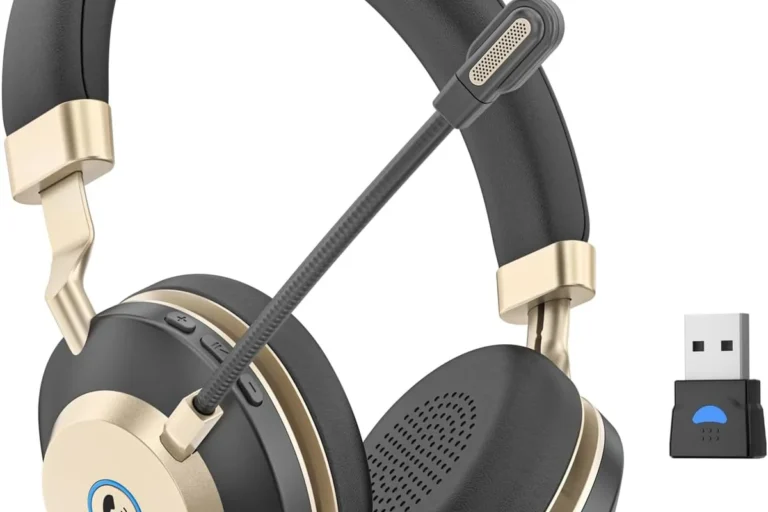
A USB Bluetooth adapter is often the most practical fix for players who want wireless audio on PS4. These adapters can improve compatibility because they handle the wireless connection outside the console’s limited native Bluetooth support.
For many users, this is the best balance of convenience and performance. Just keep in mind that adapter quality varies, and cheap models may introduce delay, weak range, or microphone problems. For readers who want to understand the difference between wireless connection types, our Bluetooth headphones explained guide can be helpful.
Connecting through the TV, monitor, or soundbar as a workaround
Another option is to connect your headphones to the TV, monitor, or soundbar instead of directly to the PS4. This can work well if your display supports Bluetooth audio or if the soundbar has a headphone output or wireless feature.
This workaround is convenient, but it is not always ideal for gaming. Some TVs add noticeable delay, and not every monitor supports audio output in a useful way. If you are sensitive to lag, this method may be better for single-player games than competitive titles.
Step-by-Step Setup Methods for Different PS4 Audio Scenarios
Once you know the limitations, the setup process becomes much easier. The goal is to choose the method that gives you the best mix of sound quality, microphone support, and low latency for your style of play.
Pairing via USB dongle for wireless audio
A USB dongle is often the cleanest route for players who want a more headset-like experience. Plug the dongle into the PS4, put your headphones into pairing mode, and follow the adapter’s instructions until the connection is confirmed.
Connect the USB adapter to the PS4 console or a powered USB port if your setup requires it.
Use the headset’s pairing button or power sequence, then wait for the adapter to detect it.
Go to sound and device settings to confirm output and input are routed correctly.
Using a Bluetooth transmitter on the PS4 controller or console
A Bluetooth transmitter can be attached to the controller, console, or sometimes the TV’s audio output. This method is useful when your headphones do not pair directly with the PS4 but can connect to a separate transmitter.
Not every transmitter supports both game audio and microphone input. Before buying, check whether the model is meant for stereo playback only or for full chat support too.
If you want to reduce sync issues, choose a transmitter designed for low-latency audio. That matters more in fast-paced games, where even a small delay can make footsteps, dialogue, and effects feel off.
Wired fallback options for chat and game audio
When wireless support is unreliable, a wired connection is still the simplest fallback. Many PS4 controllers include a 3.5mm jack, which can handle game audio and sometimes chat depending on the headset and settings.
Wired use may not feel as modern as Bluetooth, but it often gives the most stable result. For players who care about consistent sound and fewer setup problems, wired is still a smart option, especially if you already own a headset with a detachable cable.
Common Problems Players Run Into and How to Fix Them
Even when Bluetooth headphones do connect, PS4 users often run into small but frustrating issues. Most of them are fixable once you know whether the problem is the headset, the adapter, or the console settings.
Headphones connect but no sound plays
This usually means the PS4 recognized the device but did not route audio to it correctly. Check the sound output settings, confirm the adapter is selected, and make sure the headset volume is not muted or set too low.
It also helps to power-cycle both the headset and the adapter. If you still get no sound, the device may be paired only for limited use rather than full audio playback.
Audio lag, crackling, or desync in games
Lag and crackling are common when the adapter or transmitter is low quality, crowded by interference, or placed too far from the headset. Try moving the adapter closer, reducing wireless interference, or switching to a low-latency transmitter.
In some cases, the issue comes from the game or TV chain rather than the headphones. If you are troubleshooting wireless delay in general, our Bluetooth headphone lag fix guide may help you narrow down the cause.
Microphone not working for party chat
Mic support is one of the most common pain points on PS4 with Bluetooth headphones. Some adapters only send audio out, while others support both audio and microphone input only with specific headsets.
Check whether your headset uses a built-in boom mic, an inline mic, or no mic at all. If party chat is important to you, a gaming headset or a USB adapter with confirmed chat support is usually a safer choice.
Expert Advice: Mistakes to Avoid Before Buying or Connecting
The biggest mistake is assuming all Bluetooth headphones behave the same way on PS4. In reality, the connection method matters as much as the headset itself, and sometimes more.
Why cheap Bluetooth adapters often disappoint
Very cheap adapters can work for basic audio, but they often struggle with stability, range, and latency. Some also create confusing setup steps or fail to support microphones properly.
If you have ongoing hearing discomfort, ringing, or pain during gaming, stop and speak with an audiologist or hearing professional. A headset issue is one thing, but persistent symptoms deserve medical attention.
Latency concerns for competitive gaming and voice chat
Latency is the delay between the game and what you hear. For casual play, a small delay may be acceptable, but for shooters, rhythm games, and party chat, it can quickly become annoying.
That is why many players still prefer wired headsets or premium low-latency wireless solutions. If comfort and quiet are priorities too, it may be worth learning how noise cancelling headphones differ from standard wireless models before buying.
Compatibility checks for PS4, PS4 Pro, and headset models
PS4 and PS4 Pro both face similar Bluetooth limitations, so do not assume the Pro model will fix pairing issues. What matters most is whether the headset, transmitter, or adapter is designed for console use.
Before you buy, check the product description for PS4 support, microphone compatibility, and low-latency audio. A few minutes of research can save you from a headset that only works halfway.
Cost, Convenience, and Best Value Options for PS4 Wireless Audio
Choosing the right PS4 wireless setup is really a balance between price, convenience, and performance. The cheapest option is not always the best value if it creates lag or chat problems.
Comparing built-in Bluetooth, adapters, and wired alternatives
Built-in Bluetooth is the simplest on paper, but it is also the most limited in practice. USB adapters and transmitters usually offer better compatibility, while wired connections remain the most reliable and often the least frustrating.
If you are shopping with comfort in mind, look at ear cup size, clamp force, and cushion material too. Those details matter during long gaming sessions, especially if you plan to wear the headset for hours at a time.
When spending more actually improves sound and stability
Spending more can be worthwhile when it buys you better wireless stability, lower latency, and clearer microphone pickup. That does not automatically mean the most expensive model is best, but it often means the cheapest one is not enough for gaming.
- PS4 Bluetooth support is limited for many headphones.
- USB adapters and transmitters usually work better than direct pairing.
- Wired fallback options remain the most stable choice.
- Low-latency support matters most for gaming and chat.
Final Verdict: The Easiest Way to Connect Bluetooth Headphones to PS4
So, can you connect Bluetooth headphones to PS4 easily? Yes, but the easiest reliable method is usually not direct pairing. For most players, a good USB Bluetooth adapter or transmitter is the best balance of convenience, compatibility, and sound stability.
If you want the fewest problems, start by checking whether your headset or adapter explicitly supports PS4 audio and chat. If not, use a wired fallback for the cleanest result, especially for competitive gaming or long sessions.
Frequently Asked Questions
Wired headphones usually offer more stable audio and less delay on PS4. Wireless models can still sound very good, but performance depends on the headset and adapter.
Yes, noise cancelling headphones can help block background noise during gaming. Just remember that ANC quality, comfort, and latency can vary by model.
Closed-back headphones are usually better for PS4 because they isolate sound and keep game audio from leaking out. Open-back models can feel more spacious, but they are less practical in noisy rooms.
Look at latency, comfort, mic support, and overall tuning more than marketing terms alone. Frequency response, driver type, and EQ options can also affect bass, clarity, and soundstage.
Focus on PS4 compatibility, low-latency support, and a comfortable fit before extra features. A mid-range wired headset is often better value than a cheap wireless model with weak stability.
Check ear cushion material, headband padding, weight, and build quality for long sessions. If you get ear pain or ringing, lower volume and consider speaking with an audiologist.