Can You Connect Headphones to Xbox Easily Explained

Yes, you can connect headphones to Xbox, and the easiest method is usually a wired 3.5mm connection through the controller. Bluetooth headphones usually need a workaround, while Xbox-compatible wireless headsets are the best no-cable option.
If you’re asking can you connect headphones to Xbox, the short answer is yes, but the method depends on the type of headphones you own. Wired headphones are the easiest, while wireless and Bluetooth setups often need Xbox-compatible hardware or a workaround.
- Easiest method: Wired headphones through the controller are the most reliable.
- Bluetooth limit: Most Bluetooth headphones do not connect directly to Xbox.
- Best wireless option: Buy a headset made for Xbox compatibility.
- Common fix: Check audio settings, mic mute, and cable seating first.
Can You Connect Headphones to Xbox? What Works in 2025
Xbox supports several headphone setups, but not all of them work the same way. In 2025, the most reliable options are wired headphones through the controller, Xbox-compatible wireless headsets, and audio routed through a TV, monitor, or adapter.
The key thing to understand is that Xbox is stricter than some other devices about direct Bluetooth audio. That means many people who already own wireless headphones discover they need a different connection method for console gaming.
Headphone compatibility can vary by Xbox model, controller version, headset brand, and the audio output options on your TV or monitor.
Xbox Headphone Connection Options: Wired, Wireless, and Bluetooth Workarounds
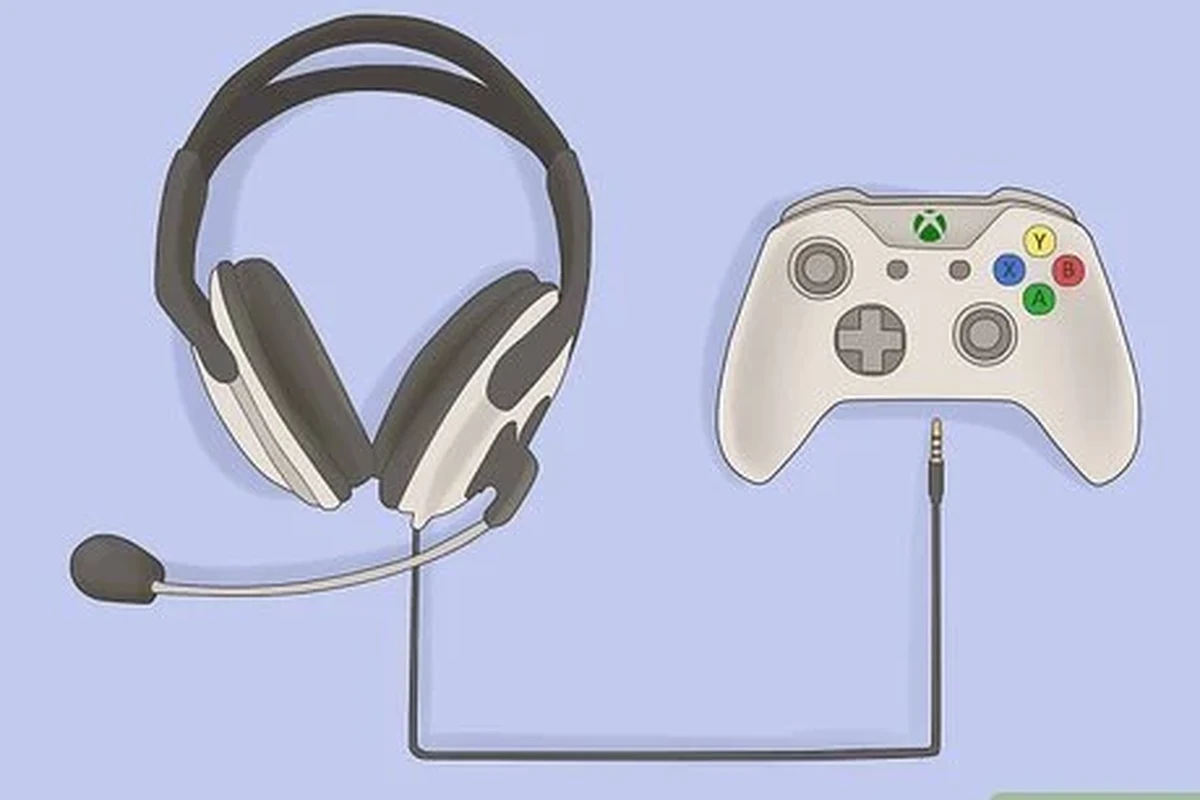
There are three main ways to listen on Xbox: plug headphones into the controller, use a headset designed for Xbox wireless, or send audio through another device. Which one is best depends on whether you care most about convenience, chat quality, or sound quality.
If you already own a good pair of headphones, the controller jack is usually the simplest route. If you want a cleaner gaming setup with fewer cables, a compatible wireless headset may be worth considering.
3.5mm Wired Headphones Through the Xbox Controller
This is the easiest and most universal option for most players. If your Xbox controller has a 3.5mm headphone jack, you can plug in standard wired headphones and hear game audio right away.
For many gamers, this is the most dependable choice because it avoids pairing issues, battery concerns, and wireless lag. It also works well for party chat if your headphones include a microphone or if you use a headset with an inline mic.
USB-C, USB, and Wireless Headsets: What Xbox Actually Supports
Xbox support for USB audio is more limited than many people expect. Some USB headsets work, but many generic USB-C or USB dongle headphones are not guaranteed to function on every console or controller setup.
The safest wireless choice is a headset made specifically for Xbox or one that clearly lists Xbox compatibility. These models usually connect through Xbox wireless protocols or a supported USB transmitter, depending on the brand.
Before buying a wireless headset, check whether it explicitly says Xbox compatible. “Wireless” alone does not always mean it will work with your console.
Bluetooth Headphones and Why They Don’t Connect Directly
Many users want to pair Bluetooth headphones directly to Xbox, but most Xbox consoles do not support standard Bluetooth audio in the same way phones and laptops do. That is why your headphones may pair with other devices but still refuse to connect to the console.
Some workarounds exist, such as using a TV with Bluetooth output, a Bluetooth transmitter, or a controller-based adapter. Even then, results can vary, and latency may be noticeable in fast-paced games.
Bluetooth workarounds can add delay, reduce chat reliability, or create audio quality issues. They are usually better for casual play than competitive gaming.
How to Connect Headphones to Xbox Step by Step
The exact process depends on your headphone type, but the setup is usually simple once you know which path to follow. Start by identifying whether your headphones are wired, Xbox wireless, or Bluetooth-only.
If you’re unsure, checking the connector type and the product packaging is a good first step. That can save you time and help you avoid buying an adapter you do not actually need.
Connecting Wired Headphones to an Xbox Controller
Insert the 3.5mm headphone plug into the controller jack until it clicks or sits firmly in place.
Open Xbox settings and confirm that headset audio or chat audio is enabled if needed.
Launch a game or party chat to make sure volume, microphone input, and balance are all working properly.
If the sound is too quiet, adjust both the headset volume and the Xbox audio mix. Some controllers and headsets also have inline volume controls, so it’s worth checking those too.
Pairing a Compatible Wireless Xbox Headset
For Xbox-certified wireless headsets, the process is usually straightforward. Turn on the headset, put it in pairing mode, and follow the console or adapter instructions for connection.
Once paired, test both game audio and voice chat. If the headset includes a companion app or EQ options, you can fine-tune the sound later for bass, clarity, or dialogue.
- Xbox compatibility before pairing
- Battery level before first use
- Microphone mute switch or boom mic position
Using TV, Monitor, or Adapter-Based Audio Output
Another option is to route Xbox audio through your TV or monitor, then connect headphones to the display or to an external adapter. This can be useful if your controller jack is damaged or if you want to listen privately without using a console headset.
Just remember that TV and monitor audio outputs vary a lot. Some setups support headphone jacks directly, while others need a separate transmitter or converter to make headphones work properly.
Some TVs add audio delay when Bluetooth headphones are connected, which can make footsteps and gunfire feel slightly out of sync in games.
Best Use Cases: Gaming, Party Chat, and TV Audio
The best headphone setup on Xbox depends on how you use the console. A single-player player, a party chat regular, and someone who streams movies will not all want the same thing.
Think about whether you care more about sound immersion, microphone clarity, or convenience. That makes it easier to choose the right connection method and avoid paying for features you won’t use.
Single-Player Gaming and Immersive Sound
For story games, open-world titles, and cinematic experiences, soundstage and detail matter more than chat features. A good wired headset or Xbox-compatible wireless model can make dialogue, music, and environmental effects feel more engaging.
Closed-back headphones usually block more outside noise, which helps if you play in a shared room. Open-back headphones can sound more spacious, but they leak sound and are less ideal if you need privacy.
Multiplayer Chat and Mic Quality
If you play team-based games, microphone clarity becomes a top priority. A headset with a decent boom mic, stable connection, and easy mute controls can improve party chat more than flashy extras.
Wired headsets often offer dependable voice chat with fewer dropouts. Wireless Xbox headsets can also work well, but the experience depends on the model, signal stability, and mic tuning.
If you notice muffled speech, ear fatigue, or ringing after long sessions, consider lowering volume and speaking with an audiologist if symptoms persist.
Watching Movies and Streaming on Xbox
For streaming apps and movie nights, comfort and balanced sound often matter more than ultra-fast latency. Many players prefer over-ear headphones because they can stay comfortable for longer sessions.
If you use Xbox mainly for TV audio, check whether your display or sound system already has a headphone output. That can be easier than buying a separate wireless transmitter.
Listening at high volumes for long periods can cause hearing damage. Keep volume at 60% or below for extended sessions.
Common Problems When Trying to Use Headphones on Xbox
Most headphone issues on Xbox come from compatibility, settings, or connection method mistakes. The good news is that many of them are easy to fix once you know where to look.
Before replacing your headphones, it’s worth checking the basics. A small settings change or a different cable can often solve the problem.
No Sound, Low Volume, or Only Chat Audio
If you get no sound, the first thing to check is whether the headphones are fully inserted and whether the controller volume is turned up. Also confirm that the Xbox audio output is set to the correct headset or speaker option.
Only hearing chat audio usually means the game audio mix is set too low or the headset is configured for voice only. In some cases, the issue is the headset itself rather than the console.
Mic Not Working in Party Chat
If other players cannot hear you, make sure the mic is not muted and the boom mic is positioned correctly. Some wired headsets also require a single combined headset plug rather than separate audio and microphone connectors.
For wireless models, low battery or pairing glitches can cause microphone problems. Reconnecting the headset or restarting the console often helps.
Latency, Interference, and Connection Drops
Wireless audio can introduce delay, especially with Bluetooth-based workarounds. That may not matter for movies, but it can feel distracting in shooters or rhythm games.
Interference can also happen if too many wireless devices are nearby. If your sound cuts out often, a wired connection or a true Xbox-compatible wireless headset is usually the more stable solution.
Expert Advice: Mistakes to Avoid Before Buying Headphones for Xbox
Buying for Xbox is a little different from buying headphones for a phone or PC. A model that works perfectly elsewhere may still be a poor fit for console use.
The best approach is to match the headphone type to your actual gaming habits, then check compatibility before you spend money.
Choosing Bluetooth-Only Headphones for Console Gaming
This is one of the most common mistakes. Bluetooth-only headphones often seem convenient, but they usually do not connect directly to Xbox without an extra device.
If you already own Bluetooth headphones, they may still be useful through a TV, adapter, or transmitter. Just do not assume they will behave like a normal Xbox headset.
Ignoring Controller, Adapter, and Headset Compatibility
Not every controller, adapter, or headset behaves the same way. Some older controllers may not include the same jack or accessory support as newer models, and some adapters can limit audio quality.
Always check the product listing and console compatibility notes before buying. That is especially important if you want microphone support for party chat.
Overpaying for Features Xbox Players May Not Need
It is easy to get distracted by big feature lists like active noise cancellation, app-based EQ, or multi-device switching. Those features can be useful, but they are not always necessary for Xbox gaming.
For many players, a comfortable wired headset with clear sound and a good mic is the better value. Extra features only matter if you will actually use them.
Headphone and Adapter Cost Comparison for Xbox Users in 2025
Prices can vary a lot by brand, build quality, and feature set, so it helps to think in categories rather than exact numbers. Budget wired options are usually the cheapest, while wireless Xbox headsets and adapter-based setups cost more.
The right choice depends on whether you want simplicity, flexibility, or a cleaner setup. In many cases, the least expensive option is also the easiest to live with.
Budget Wired Options vs Mid-Range Wireless Headsets
Budget wired headphones usually offer the best value if you only need basic gaming audio and chat. They are simple, dependable, and do not require charging or pairing.
Mid-range wireless headsets cost more, but they can improve convenience and reduce cable clutter. Just make sure the headset is truly designed for Xbox, not only for general Bluetooth use.
When an Audio Adapter or Transmitter Is Worth the Price
An adapter or transmitter can be worth buying if you already own good headphones and want to keep using them. This makes sense when your current headset sounds great but lacks Xbox-friendly connectivity.
Still, adapters are best for users who understand their setup and are comfortable troubleshooting. If you want the fewest possible headaches, a wired controller connection is usually simpler.
- Wired 3.5mm headphones are the easiest Xbox option.
- Bluetooth usually needs a workaround and may add delay.
- Xbox-compatible wireless headsets offer convenience, but compatibility matters.
- Adapters and TV outputs can work, but results vary by setup.
Final Verdict: The Easiest Way to Connect Headphones to Xbox
So, can you connect headphones to Xbox? Yes, absolutely, but the easiest method is usually a wired 3.5mm connection through the controller. That gives you the most reliable sound with the least setup.
If you want wireless freedom, choose a headset that explicitly supports Xbox. If you only have Bluetooth headphones, expect to use a workaround and accept that performance may not be as smooth as a native Xbox headset.
Note
For long gaming sessions, prioritize comfort, stable audio, and safe volume levels over extra features you may never use.
Frequently Asked Questions
Wired headphones can sound very consistent because they avoid wireless delay and pairing issues. Wireless can still sound great, but performance depends on the headset and connection method.
They can be helpful if you play in a noisy room because they reduce outside distractions. Just remember that noise cancelling does not guarantee Xbox compatibility or better mic quality.
Closed-back headphones are usually better for privacy and stronger isolation during gaming. Open-back models can sound more spacious, but they leak sound and are less ideal for shared spaces.
Look for clear mids, controlled bass, a comfortable fit, and a microphone that matches your chat needs. Frequency response and driver type can matter, but real-world comfort and tuning matter just as much.
A simple wired headset plugged into the controller is often the best budget choice. It keeps costs lower and usually avoids the compatibility problems that come with wireless or Bluetooth setups.
Look for lightweight builds, soft ear cushions, and a headband that does not clamp too tightly. Comfort depends on head shape and ear size, so fit can vary from person to person.