Can You Connect Bose Headphones to PS5 Easily

Yes, Bose headphones can connect to a PS5, but direct Bluetooth pairing usually is not the easiest method. A wired connection through the DualSense controller is the most reliable option, while a USB Bluetooth adapter is the main wireless workaround.
If you’re asking can you connect bose headphones to ps5, the short answer is yes, but usually not by pairing them directly through the PS5 Bluetooth menu. In most cases, Bose headphones work best with a wired connection, a USB Bluetooth adapter, or by routing audio through your TV or monitor.
- Best simple method: Use a 3.5mm cable through the DualSense controller.
- Wireless workaround: A quality USB Bluetooth adapter may work, but results vary.
- Chat caution: Mic support can be limited with some Bose-and-adapter setups.
- Gaming performance: Wired audio usually has less lag for competitive play.
- TV option: Connecting through your TV or monitor can be a practical alternative.
Can You Connect Bose Headphones to PS5? Quick Answer and What Actually Works in 2026
Contents
- 1 Can You Connect Bose Headphones to PS5? Quick Answer and What Actually Works in 2026
- 2 Why PS5 Bluetooth Support Is Limited and How That Affects Bose Headphones
- 3 The Best Ways to Use Bose Headphones with PS5
- 4 Step-by-Step Setup for Popular Bose Headphones on PS5
- 5 Sound Quality, Latency, and Mic Performance: What Gamers Should Expect
- 6 Common Mistakes When Trying to Pair Bose Headphones with PS5
- 7 Best Value Options: Cost Comparison of Adapters, Wired Cables, and Alternative Headsets
- 8 Final Verdict: The Easiest and Most Reliable Way to Use Bose Headphones on PS5
- 9 Frequently Asked Questions
- 10 Author
Most Bose headphones can be used with a PS5, but the console’s native Bluetooth support is limited, so the “easy” path is not always the direct one. If you want the most reliable experience, a wired connection from the DualSense controller is usually the simplest option, while wireless use often depends on an adapter or another audio source.
For readers comparing setup options across different devices, our guide on how to connect Bluetooth headphones explains the general pairing process, but PS5 is a little more restrictive than most phones, tablets, or PCs.
Why PS5 Bluetooth Support Is Limited and How That Affects Bose Headphones
PlayStation consoles do not behave like a phone or laptop when it comes to Bluetooth audio. That matters because many Bose models are Bluetooth-first headphones, which means they are designed for wireless listening but not always for direct console pairing.
What the PS5 allows natively
The PS5 is designed to work smoothly with approved accessories and wired audio through the controller. It can handle USB audio devices and certain headsets well, but it does not offer the same open Bluetooth headphone support you might expect from a mobile device.
That means some Bose headphones may not appear as a normal pairing option, or they may connect in a way that is unstable for gaming. If you are used to Bluetooth on a phone, this can feel confusing at first.
Why most Bose models need a workaround
Many Bose headphones are made for music, travel, and everyday use, so their wireless connection is optimized for convenience and sound quality rather than console compatibility. The PS5 often needs a dongle, cable, or alternate audio path to make the connection practical.
Key audio insight: Bose headphones can work with PS5, but the best method depends on whether you care more about convenience, latency, or microphone support.Wireless is possible, but wired is usually more dependable for gaming.
The Best Ways to Use Bose Headphones with PS5
There are three common ways to use Bose headphones with a PS5, and each one has trade-offs. The right choice depends on whether you want simple setup, low lag, or the best overall sound for games and TV audio.
USB Bluetooth adapter method
A USB Bluetooth adapter can let the PS5 send audio to Bluetooth headphones through a small dongle. This is the most common wireless workaround for Bose headphones, especially if you want to keep using the headphones without a cable.
Note
Adapter quality matters a lot here. A better dongle is more likely to give you stable audio, while cheaper models may introduce lag, dropouts, or limited microphone support.
If you use this route, check whether the adapter supports headset audio properly, not just music playback. Some adapters handle sound but not voice chat well, which can be frustrating in multiplayer games.
Wired 3.5mm connection through the DualSense controller
This is usually the easiest and most reliable setup. If your Bose headphones include a 3.5mm cable, plug them into the DualSense controller and select the controller audio output in PS5 settings if needed.
Wired audio avoids most Bluetooth delay and often gives you cleaner game audio for fast-paced titles. It is also the most beginner-friendly option because there is no pairing process to troubleshoot.
If your Bose headphones support both wired and wireless use, keep a 3.5mm cable nearby for gaming. It gives you a backup option when Bluetooth pairing is unreliable.
Using Bose headphones with a TV, monitor, or soundbar instead of the console
Another practical option is to connect the headphones to your TV or monitor if that display supports Bluetooth audio or headphone output. This can be useful when your screen already manages audio well and the PS5 is just the source.
Some gamers also route sound through a soundbar or audio system with a headphone output. This can work nicely for couch gaming, especially if you mainly play single-player games or watch streaming apps on the PS5.
Step-by-Step Setup for Popular Bose Headphones on PS5
Different Bose models behave similarly, but your setup steps may vary depending on whether the headphones are wired-capable or Bluetooth-only. Before you start, check the cable options, battery level, and whether your adapter or TV supports audio output the way you need.
Bose QuietComfort and QuietComfort Ultra models
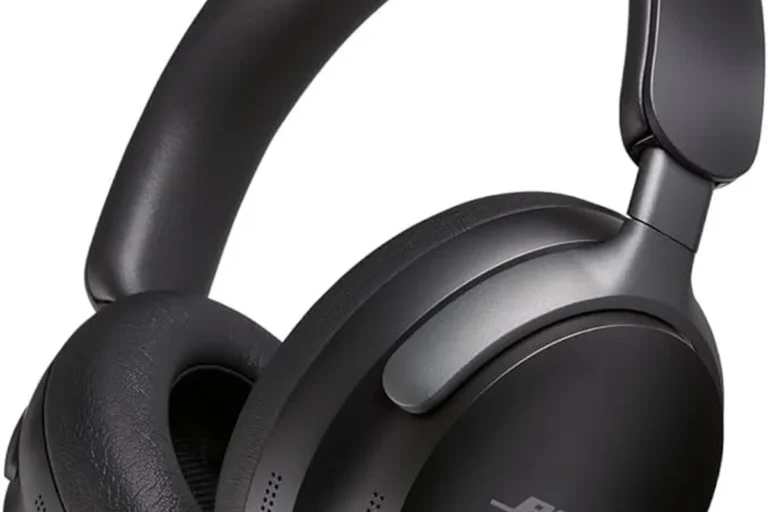
QuietComfort models are often the easiest Bose headphones to adapt for PS5 because many versions support both wireless listening and wired use. If you want a low-hassle setup, the controller’s 3.5mm jack is usually the fastest path.
Plug the 3.5mm cable into the DualSense controller, or insert your USB Bluetooth adapter into the PS5.
Go to the PS5 sound settings and choose the controller or USB audio device as the output source.
Open a game, join a party chat, and confirm that both sound and voice levels are comfortable.
Wired controller audio can sometimes feel more responsive than wireless audio, especially in games where footsteps and gunfire timing matter.
Bose 700 and other Bluetooth-only Bose headphones
Bluetooth-only Bose headphones usually need the most help on PS5. If they do not include a usable cable, your best bet is a compatible USB Bluetooth adapter or an alternate audio device that can pass the sound through.
Be careful with low-cost dongles that promise “instant PS5 Bluetooth.” Some may work for music but struggle with voice chat, stereo balance, or latency during gameplay. If you want a broader look at wireless behavior, our article on Bluetooth headphones explained simply is a good foundation.
When Bose app settings help and when they do not
The Bose app can help with things like EQ, noise cancellation behavior, and general headphone customization. That can improve comfort and tuning, especially if you want less bass or clearer dialogue.
However, the app usually cannot override PS5 Bluetooth restrictions. It may improve how the headphones sound, but it will not magically make the console accept every Bose model as a native Bluetooth device.
Sound Quality, Latency, and Mic Performance: What Gamers Should Expect
Sound quality with Bose headphones on PS5 is often very good, especially for single-player games, story titles, and streaming. The bigger challenge is not the sound itself, but how the audio reaches the headphones and whether the microphone works the way you expect.
Audio delay in shooters, racing games, and streaming
Latency is the delay between what happens on screen and what you hear. In fast games, even a small delay can make audio cues feel slightly off, which is why many players prefer wired audio for shooters and racing games.
For casual gaming, a little delay may be acceptable. For competitive play, it can be distracting, so a cable often gives the best result. If you have ever dealt with Bluetooth lag before, our guide to Bluetooth headphone lag fix may help you understand the problem better.
Microphone limitations for party chat and voice chat
Mic support is where many Bose-on-PS5 setups become less convenient. Some Bluetooth adapters do not handle microphone input well, and some Bose headphones are not designed with gaming chat as their main use case.
If you need reliable party chat, test the mic before a long session. You may find that using the DualSense controller microphone, a separate gaming headset, or a different voice solution is easier than forcing the Bose mic to do everything.
Why wired usually beats wireless for competitive play
Wired connections reduce lag, simplify setup, and often improve consistency. That is why many gamers still prefer a cable even if their headphones can work wirelessly.
Important
Listening at high volumes for long periods can cause hearing damage. Keep volume at 60% or below for extended sessions.
If you notice ear fatigue, ringing, or discomfort after gaming, consider reducing volume and speaking with an audiologist or hearing professional.
Common Mistakes When Trying to Pair Bose Headphones with PS5
Most connection problems come from expecting the PS5 to behave like a phone or laptop. Once you understand the console’s limits, setup becomes much easier and the frustration drops quickly.
Trying to pair directly through the PS5 Bluetooth menu
This is the most common mistake. Many Bose headphones will not pair cleanly through the PS5’s built-in Bluetooth options, even if they connect instantly to your phone.
If the headphones do not show up or the connection fails, that usually points to console compatibility, not a broken headphone. In that case, switch to a cable or use a supported adapter instead of repeatedly retrying the same pairing step.
Buying the wrong adapter or low-quality dongle
Not all USB Bluetooth adapters are equal. Some are built for basic audio, while others are better suited to gaming and voice chat.
Important
Cheap adapters may create delay, reduce sound quality, or fail to support chat properly. Check compatibility carefully before buying, especially if you want both game audio and microphone use.
Ignoring controller battery drain and cable quality
Wired audio through the DualSense controller is convenient, but it can drain the controller battery a bit faster during long sessions. That is not a dealbreaker, but it is worth planning for.
Cable quality also matters. A damaged or loose 3.5mm cable can cause crackling, cutouts, or one-sided audio, which people sometimes mistake for a PS5 problem.
Best Value Options: Cost Comparison of Adapters, Wired Cables, and Alternative Headsets
The best value setup depends on how often you game and how much convenience you want. If you already own Bose headphones, a simple cable may be the cheapest fix, while wireless adapters can cost more but preserve the cordless experience.
Budget-friendly setup versus premium wireless workaround
A wired cable is usually the lowest-cost solution if your Bose model supports it. A USB Bluetooth adapter is the next step up, but it can vary a lot in quality and feature support.
Quick Summary
- Wired is usually cheapest and most stable.
- Wireless adapters cost more and may vary in performance.
When it makes more sense to buy a gaming headset instead
If you play multiplayer games often, a gaming headset may be a better fit than adapting Bose headphones. Gaming headsets are usually designed with lower-latency wireless support, easier chat integration, and console-first compatibility.
That does not mean Bose headphones are a bad choice. It just means they are better when you want excellent all-around audio for music, movies, and casual gaming rather than a headset built only for PS5.
Final Verdict: The Easiest and Most Reliable Way to Use Bose Headphones on PS5
Yes, you can use Bose headphones with PS5, but the easiest path is usually not direct Bluetooth pairing. For most people, the controller’s 3.5mm jack is the most dependable option, while a USB Bluetooth adapter is the main wireless workaround.
Best method by use case: casual gaming, competitive gaming, and TV audio
For casual gaming, a Bluetooth adapter or TV-based audio setup can work well if you do not mind a little setup effort. For competitive gaming, wired audio through the controller is the safest choice because it is simpler and usually more responsive.
For TV audio and streaming, using Bose headphones through your television or monitor can be a smart middle ground. It keeps the PS5 setup clean and may be more comfortable for long movie or single-player sessions.
Editorial recap from Top Headphone Reviews
At Top Headphone Reviews, our advice is simple: start with the method that gives you the least trouble, not the most complicated wireless promise. If your Bose headphones support a cable, try that first; if you need wireless, choose a quality adapter and verify chat support before relying on it for gaming.
That approach saves time, reduces lag headaches, and helps you get the best experience from your Bose headphones without fighting the PS5’s Bluetooth limits.
Frequently Asked Questions
Wired usually works better for PS5 because it is more stable and has less delay. Bluetooth can work with an adapter, but performance may vary by model and setup.
Over-ear headphones are often more comfortable for long sessions and can offer better isolation. In-ear models may be lighter, but comfort and soundstage can vary by preference.
EQ can help if you want clearer dialogue or less bass, but it is optional. The right tuning depends on the game, your hearing preference, and whether you use wired or wireless audio.
Check PS5 compatibility, headset audio support, and whether the adapter handles microphone input. Build quality and latency support also matter for gaming.
Yes, noise cancelling can help block distractions during long sessions. Just make sure the fit feels comfortable and avoid turning the volume too high.
Choose Bose if you want versatile headphones for music, movies, and casual gaming. Choose a gaming headset if you want easier chat support, lower-latency wireless options, and console-first features.