What Is Talk Thru on JBL Headphones and How It Works

Talk Thru on JBL headphones is a mode that lowers your music and makes nearby speech easier to hear for quick conversations. It is useful for short interruptions, but it is not the same as full transparency mode or noise cancellation.
If you’ve ever seen “Talk Thru” on a JBL headphone or earbuds app and wondered what it does, the short answer is simple: it lowers your music and helps speech come through more clearly so you can talk without taking your headphones off. It’s a convenience feature made for quick conversations, not a full replacement for removing your headphones or using true transparency mode.
- Core function: Lowers playback so speech can come through more clearly.
- Best use: Quick conversations at work, home, or while traveling.
- Mode difference: Talk Thru is not the same as Ambient Aware or ANC.
- Main limit: It works less well in very loud environments.
- Safe use: Keep volume moderate and switch modes off when not needed.
What Is Talk Thru on JBL Headphones? Understanding the Feature and Its Purpose
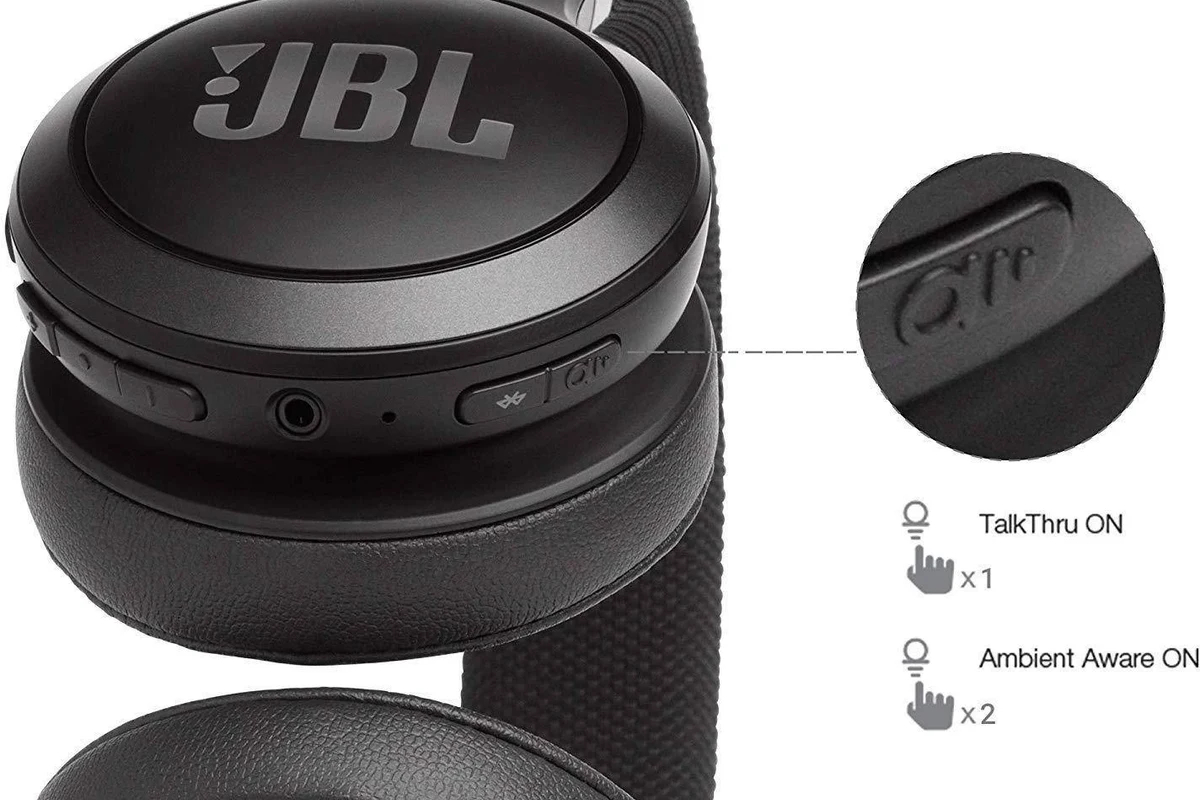
Talk Thru on JBL headphones is a listening mode designed to make short conversations easier. When you turn it on, the audio level drops and the headphones emphasize voices, so you can hear the person speaking to you with less interruption.
This is especially useful when you want to stay aware of what’s happening around you without fully stopping your listening session. It’s meant for brief, practical moments like answering a coworker, speaking to a cashier, or catching an announcement.
Talk Thru can behave a little differently depending on the JBL model, app version, and whether the headphones also support Ambient Aware or noise cancelling.
For readers comparing listening modes, it helps to think of Talk Thru as a “conversation helper.” It does not usually provide the same open, natural outside sound as full transparency features found on some other headphones, and it does not cancel noise the way ANC does. If you want a broader explanation of headphone awareness modes, our guide to transparency mode headphones is a useful companion read.
How Talk Thru Works on JBL Headphones: The Tech Behind the Lowered Volume Mode
Talk Thru usually works by reducing the playback volume and using the headphone’s microphones and processing to make speech easier to notice. The goal is not to recreate the room perfectly, but to make voices stand out enough for short interaction.
On many JBL models, this is handled through the companion app or the onboard controls. The exact behavior may vary by model, but the general idea is the same: music gets quieter, and your surroundings become easier to hear.
Talk Thru vs. Standard Playback
In normal playback, your headphones focus on delivering your music, podcasts, or calls at the volume you set. Outside sounds are less important, especially if the headphones also use passive isolation or active noise cancelling.
With Talk Thru, the headphones intentionally shift priorities. They reduce the audio you’re listening to so speech and nearby sounds are easier to pick up. That makes it easier to pause less often during everyday use.
How the Microphones and Voice Isolation Help You Hear Speech Clearly
Many JBL headphones use external microphones to pick up ambient sound, then process that input so voices are more noticeable. Some models may also use voice-focused tuning that makes speech stand out more than background noise.
This is helpful in quiet to moderately noisy places, where someone speaking nearby is the main thing you need to hear. In very loud environments, though, background noise can still overpower speech, so the feature may feel less effective.
Features like Talk Thru are often most useful when you only need a few seconds of awareness, not continuous all-day hearing of your surroundings.
Why People Use Talk Thru in Real Life: Practical Everyday Examples
Talk Thru is popular because it solves a common problem: you’re listening to something, but you don’t want to fully disconnect every time someone needs your attention. That makes it a small feature with a big convenience payoff.
Office conversations, quick questions, and coworker interactions
In an office, Talk Thru can be handy when a coworker stops by with a quick question or when you need to answer without removing your headphones. It keeps the flow of work going and avoids repeated pausing and unpausing.
It’s also useful in shared workspaces where you want to stay somewhat aware of your environment. For people who use headphones while focusing, this can be a simple productivity boost.
Travel, commuting, and airport announcements
During travel, Talk Thru can help you catch short announcements, gate changes, or a quick question from a seatmate. It’s not a full travel safety system, but it can reduce the annoyance of constantly taking your headphones off.
If you’re commuting, it can also help when you need to hear a station announcement or a driver’s instruction. For Bluetooth setup and general connection stability, our guide on how to connect Bluetooth headphones may help if your JBL headset is acting up.
Home use, family interruptions, and short check-ins
At home, Talk Thru is useful when family members ask a quick question or when someone needs to tell you something important. You can stay in your audio session without feeling completely cut off.
This makes it a good fit for casual listening around the house, especially if you’re moving between tasks and don’t want to fully remove your headphones each time. If your audio sounds off while switching modes, our article on why headphones sound muffled can help you troubleshoot the basics.
How to Turn On Talk Thru on JBL Headphones and Adjust It Correctly
Most JBL headphones that support Talk Thru let you switch it on through the JBL Headphones app or through a physical control on the headset. The exact method depends on the model, so it’s worth checking your user guide if the button layout feels different.
Using the JBL Headphones app or onboard controls
In the app, Talk Thru is usually found alongside other listening modes like Ambient Aware or noise cancelling. You tap the mode, and the headphones adjust their sound behavior immediately.
Some JBL models also let you cycle modes with a button or touch control. If you’re not sure which setting is active, a quick look in the app can save time and prevent confusion.
Check whether your headphones are connected, then look for the listening mode controls.
Activate the mode and test it in a quiet room before relying on it in public.
Keep the playback level low enough to hear speech comfortably without straining.
When to switch Talk Thru on and when to turn it off
Turn Talk Thru on when you expect short interruptions or need a little more awareness for a few minutes. It works best as a temporary mode, not as something you leave on all day.
Turn it off again once the conversation is over so you can return to your normal sound quality and battery efficiency. If you’re trying to fine-tune the sound after switching modes, our guide to best EQ settings for headphone may help you shape the audio more comfortably.
Talk Thru vs. Ambient Aware: Which JBL Listening Mode Should You Use?
JBL often includes both Talk Thru and Ambient Aware, and they are not the same thing. Talk Thru is about making speech easier to hear, while Ambient Aware is more about increasing general environmental awareness.
Key differences in sound behavior and awareness level
Talk Thru lowers your music more aggressively so conversation can come through clearly. Ambient Aware usually keeps more of your audio playing while letting in more outside sound.
That means Talk Thru is better when someone is speaking to you directly, while Ambient Aware is better when you want to stay aware of traffic, movement, or general surroundings without fully switching into conversation mode.
Which mode works better for walking, working, and indoor use
For indoor work, Talk Thru is usually the better pick because it helps with quick dialogue. For walking outside, Ambient Aware is often more practical because it keeps you aware of your environment without making your music feel too interrupted.
If you want a deeper look at how awareness features compare with ANC, our guide on how noise cancelling headphones work is a helpful next step.
Common Mistakes People Make With Talk Thru on JBL Headphones
Talk Thru is simple to use, but it’s easy to misunderstand what it can and cannot do. A few common mistakes can make the feature feel weaker than it really is.
Expecting full conversation clarity in loud environments
One of the biggest mistakes is expecting Talk Thru to cut through heavy noise like a train platform, construction site, or crowded street. In those places, speech can still be hard to hear because the background noise is too strong.
For best results, use Talk Thru in quieter or moderately noisy settings. If you regularly need to hear speech in loud places, you may want to compare headphone types and noise features more carefully before buying.
Leaving the feature on too long and draining battery faster
Another mistake is leaving Talk Thru enabled longer than needed. Because the headphones may keep microphones and processing active, battery life can be affected depending on the model.
That doesn’t mean the drain is huge on every pair, but it’s still smart to switch back to normal listening when you’re done. This is especially important on travel days or long work sessions.
Confusing Talk Thru with true transparency or noise cancellation settings
Some people expect Talk Thru to behave exactly like transparency mode on another brand, or they assume it works the same way as noise cancelling. In reality, these are different tools with different goals.
Talk Thru is mainly a quick conversation aid. If you’re comparing features across brands, it helps to understand the difference between noise cancelling headphones and awareness modes before deciding what you need.
Expert Advice: When Talk Thru Helps Most and When It Can Fall Short
From a practical headphone-use perspective, Talk Thru is most valuable when convenience matters more than perfect sound separation. It saves time, reduces interruptions, and makes everyday headphone use feel more natural.
Best use cases for productivity and convenience
Talk Thru is a strong fit for office work, studying at home, light multitasking, and situations where you need a quick back-and-forth conversation. It’s also useful if you listen to music or podcasts for long periods and want a low-friction way to stay reachable.
If you use headphones for both entertainment and communication, this kind of feature can make them feel more versatile without adding much complexity.
Limitations in noisy places and with older JBL models
Talk Thru can fall short in high-noise settings, and older JBL models may not process voice as cleanly as newer ones. Performance may vary depending on microphone quality, tuning, and firmware support.
That’s why it’s best to treat Talk Thru as a helpful extra, not a core reason to buy a headset by itself. If you’re shopping for a new pair, compare comfort, battery life, noise control, and fit alongside the awareness features.
If you notice ringing, discomfort, or difficulty hearing speech even at moderate levels, consider lowering volume and speaking with an audiologist or hearing professional.
Final Recap: Is Talk Thru on JBL Headphones Worth Using in 2026?
Yes, Talk Thru is still worth using in 2026 if you want a simple way to handle quick conversations without removing your JBL headphones. It’s especially useful for work, home, and travel situations where brief awareness matters more than full outside-sound passthrough.
Just remember its limits: it is not meant to replace true transparency, and it will not solve every noisy-environment problem. Used the right way, though, it’s one of those small features that can make JBL headphones feel much more practical day to day.
Listening at high volumes for long periods can cause hearing damage. Keep volume at 60% or below for extended sessions.
Frequently Asked Questions
It depends on the model and what you need. Talk Thru is usually best for short conversations, while transparency-style listening is better for more natural outside awareness.
Talk Thru is usually found on Bluetooth wireless JBL models with app support or onboard controls. Wired headphones generally do not need this kind of mode because they are not built around wireless processing features.
Yes, because the feature lowers playback and changes how outside sound is mixed in. Bass and overall clarity may feel different depending on the model, tuning, and your volume setting.
Check whether the model supports Talk Thru, Ambient Aware, and app controls. Also look at comfort, battery life, microphone quality, and whether the headphones fit your main use case like commuting or office work.
Over-ear models often feel more comfortable for longer sessions, while in-ear models can be more portable. The better choice depends on fit, isolation, and how often you need to switch between listening and talking.
EQ settings can change how clear voices and background sounds feel when Talk Thru is on. Driver type, tuning, and sound profile may also affect how natural the feature sounds, so results can vary by model.