Best Headphone For Laptop: Best Audio Choices

The best headphone for laptop balances clear sound, comfort, easy connection, and a useful microphone for daily work.
A laptop often handles classes, calls, music, games, and videos all in one day. Built-in speakers can sound thin, while the laptop microphone may pick up typing and room noise. The right headset makes voices easier to hear and helps others hear you clearly. I reviewed eight practical wired options for different needs, including office calls, gaming, school, music, and simple everyday use. Most picks plug in with USB, USB-C, or a 3.5mm audio jack, so you can avoid battery charging and Bluetooth pairing.
See the differences between my top picks at a glance.
| Product | Connection | Mic | Best For | Main Strength | Buy |
|---|---|---|---|---|---|
| Logitech H390 Black | USB-A | Noise-canceling | Office calls | Easy controls | View on Amazon |
| JIAMQISHI USB Headset | USB-A and 3.5mm | Noise-canceling | Work and school | Flexible connection | View on Amazon |
| Logitech H390 Rose | USB-A | Noise-canceling | Remote work | Simple call setup | View on Amazon |
| EKSA E1000 Gaming Headset | USB | Noise-canceling | Laptop gaming | 7.1 surround feature | View on Amazon |
| Sony MDR-ZX110 | 3.5mm | No built-in mic listed | Music and travel | Lightweight design | View on Amazon |
| Logitech H391 USB-C | USB-C | Built-in headset mic | USB-C laptops | Modern connection | View on Amazon |
| LUDOS FEROX Earbuds | 3.5mm | Inline mic | Students and music | Five-year warranty | View on Amazon |
| AIAUXAI USB Earbuds | USB | Built-in mic | Office and Zoom | Compact USB design | View on Amazon |
Logitech H390 USB Headset

The Logitech H390 remains one of the safest choices for a laptop user who wants a simple wired headset. It uses a USB-A connection, so the computer handles both sound and microphone input through one plug. The on-ear cups keep the design fairly light and practical for work or study. A padded headband also helps during longer calls.
Its noise-canceling microphone sits on a flexible boom. You can move the boom closer to your mouth or fold it away when you do not need it. In-line controls make it easy to adjust volume and mute the microphone without opening a meeting app. This is not a premium music headset, but it gives clear voice audio and dependable everyday sound.
Pros:
- USB-A setup is quick on compatible laptops
- Flexible boom microphone helps voice clarity
- In-line volume and mute controls
- Padded headband supports daily use
- Light design suits work and online classes
- Useful choice for video meetings and calls
Cons:
- USB-A may need an adapter on newer laptops
- Wired design limits movement
- On-ear pads may not block a busy room fully
What Amazon Buyers Are Saying
Buyer feedback commonly focuses on easy setup, useful mute control, and clear speech during calls. Many owners choose it for remote work, school, or basic computer use because it works without charging. Some reviews mention that the fit and comfort depend on head size and personal preference. Other comments point out that the cable and USB-A plug require care over time.
My Recommendation
I recommend the black H390 for office calls, school meetings, and anyone who wants a plug-and-play headset. It is worth buying when clear voice communication matters more than deep music bass or wireless freedom.
JIAMQISHI USB and 3.5mm Headset
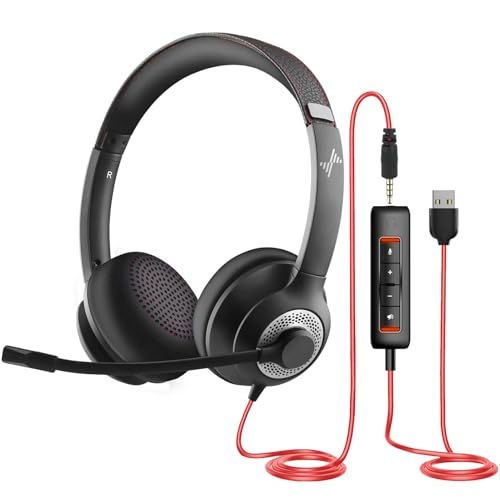
The JIAMQISHI headset stands out because it offers both USB and 3.5mm connection options. That flexibility helps if you use more than one laptop or switch between a computer and another device. The on-ear design keeps the headset easy to put on and remove. It also includes in-line controls for basic volume and call management.
The boom microphone targets online classes, Skype calls, Zoom meetings, and home office work. USB connection can provide a simple computer setup, while the 3.5mm plug may work with laptops that have a combined headset jack. Before buying, check which plug your laptop supports and how the controls work with your operating system. This model suits buyers who value connection choice over advanced audio tuning.
Pros:
- Supports USB and 3.5mm connections
- Useful for laptops with different port layouts
- Includes a noise-canceling microphone
- In-line control adds quick access to audio
- Good fit for classes and home office calls
- Wired design avoids battery charging
Cons:
- Two connection types can make setup less simple
- On-ear cups may feel less sealed than over-ear cups
- Sound quality may not satisfy serious music listeners
What Amazon Buyers Are Saying
Customer discussions often praise the flexible connection options and the low-effort setup for meetings. Buyers also tend to like having a microphone and controls in one affordable headset. Some users report that microphone performance can vary with the chosen connection and computer settings. As with many budget headsets, comfort and long-term durability receive mixed comments based on individual use.
My Recommendation
This is a sensible option for a student or remote worker who needs both USB and analog support. I would buy it for practical daily calls, but I would choose another model for high-end music listening or demanding gaming.
Logitech H390 Rose USB Headset

The rose version of the Logitech H390 offers the same practical headset format in a more distinctive color. It connects through USB-A and is designed for computer calls, music, and meetings. The headset includes a flexible microphone boom and on-cable controls. That makes it easy to mute yourself when a delivery, pet, or family member interrupts a call.
I see this model as a style-friendly office headset rather than a specialist audio product. It works best for people who want one simple device for video meetings, study sessions, and casual listening. The wired connection keeps audio ready without pairing or charging. However, you should confirm that your laptop has USB-A or keep a suitable adapter nearby.
Pros:
- Distinctive rose color suits personal workspaces
- USB connection reduces setup steps
- Flexible microphone boom can move out of the way
- In-line mute and volume controls
- Useful for calls, classes, and casual audio
- No battery care or wireless pairing required
Cons:
- USB-A limits use with some thin laptops
- Not designed for a fully wireless setup
- On-ear construction may not suit every listener
What Amazon Buyers Are Saying
Amazon buyers often mention the attractive color, simple installation, and useful microphone controls. The model receives attention from remote workers and students who need a basic headset without complex software. Some reviews discuss pressure from the on-ear fit during long sessions. Others note that wired cables can become a concern if the headset gets moved or stored roughly.
My Recommendation
I recommend the rose H390 when appearance matters and your laptop has a USB-A port. It delivers the same core value as the black version and earns a strong score for simple communication.
EKSA E1000 USB Gaming Headset

The EKSA E1000 is the gaming-focused choice in this review. It uses a USB connection and includes a boom microphone, RGB lighting, and a listed 7.1 surround sound feature. The over-ear style aims to create a more immersive fit than small on-ear models. It can work with a laptop for games, voice chat, calls, and general media.
Gaming headsets often use a stronger visual design, and this model follows that approach. The microphone helps team chat, while the surround feature may add a wider sense of direction in supported computer audio. Results can depend on the game, operating system, and software settings. I would pick it for gaming first, not for buyers who want the smallest or least noticeable headset for an office.
Pros:
- Gaming design suits laptop players
- USB setup carries sound and microphone input
- Listed 7.1 surround sound feature
- Boom mic supports in-game voice chat
- Over-ear style can improve sound focus
- RGB lighting adds a gaming look
Cons:
- Gaming design may look too large for office use
- USB connection may need an adapter on some laptops
- Surround results depend on software and game support
- May feel warmer than a light on-ear headset
What Amazon Buyers Are Saying
Buyer feedback commonly centers on gaming value, microphone use, and the visual effect of the lighting. Many customers look for an affordable headset for laptop or console play. Some users like the larger ear cups, while others prefer a lighter fit for long sessions. Reviews may also differ on surround sound results because games and computer settings handle virtual audio in different ways.
My Recommendation
I recommend the E1000 for budget-minded laptop gamers who want a headset with a microphone and gaming features. It is less suitable for a quiet office or for someone who wants a compact music headset.
Sony MDR-ZX110 Wired Headphones

The Sony MDR-ZX110 is the simplest headphone in this group. It uses a standard 3.5mm wired connection and focuses on basic stereo listening. Its on-ear design is light and easy to carry. This makes it a good match for music, videos, podcasts, and laptop use when you do not need a headset microphone.
The 3.5mm plug works with many laptops, tablets, and audio devices that still include a headphone jack. It does not offer USB controls or a listed boom microphone, so it cannot replace a dedicated meeting headset for every user. I like it for people who want low weight and a familiar analog connection. It also avoids software, charging, and pairing steps.
Pros:
- Simple 3.5mm connection
- Lightweight on-ear design
- Easy to carry in a laptop bag
- Works for music, video, and podcasts
- No charging or wireless pairing needed
- Simple choice for users without microphone needs
Cons:
- No dedicated boom microphone listed
- No USB volume or mute controls
- On-ear pads provide limited room isolation
- Analog plug needs a laptop headphone jack
What Amazon Buyers Are Saying
Amazon buyers often choose this model for its light weight, low-complexity design, and everyday listening. Many discussions focus on music and video use rather than business calls. Some customers like how easy it is to pack and use. Other reviews point to the limits of a small on-ear design, including fit, isolation, and long-term cable care.
My Recommendation
I recommend the Sony MDR-ZX110 as the best simple headphone here for music and video. Do not choose it as your main work headset if you need a strong built-in microphone.
Logitech H391 USB-C Headset

The Logitech H391 targets newer laptops with USB-C ports. It provides stereo sound through a wired USB-C connection and includes in-line controls. The graphite finish looks neutral, so it can fit a home office, classroom, or shared workspace. It is also listed as compatible with computers such as Chromebooks, though port and operating system support should always be checked.
USB-C can be a better fit than USB-A for many current laptops because it avoids a large adapter in the usual setup. The headset suits calls, online lessons, music, and casual video. It does not offer wireless freedom, but the wired design keeps it ready at any time. I consider it a strong choice for buyers who know their computer has a compatible USB-C audio connection.
Pros:
- USB-C connection fits many newer laptops
- Good match for compatible Chromebooks
- In-line controls support quick audio changes
- Wired design needs no battery
- Neutral graphite style suits work settings
- Useful for calls, lessons, and casual listening
Cons:
- USB-C port compatibility must be checked
- Not a wireless headset
- May not work with every USB-C audio setup
- Less useful for older laptops with only USB-A
What Amazon Buyers Are Saying
Customer feedback commonly highlights the benefit of a USB-C plug for modern computers and the simple wired setup. Buyers also discuss the usefulness of in-line controls for meetings and lessons. Some users remind shoppers to confirm that their USB-C port supports audio. A smaller group of comments may focus on comfort, cable movement, or differences between laptop operating systems.
My Recommendation
I recommend the H391 for a USB-C laptop owner who wants a clean, modern wired headset. It is one of the better choices in this list when port fit matters most.
LUDOS FEROX Wired Laptop Earbuds

The LUDOS FEROX takes a different approach from a full headset. These are wired in-ear earbuds with a microphone and a 3.5mm plug. The small shape works well for students, travelers, and laptop users who dislike headbands. The listing also highlights a five-year warranty, which adds confidence for buyers who want long-term support.
In-ear tips can provide more direct sound and some passive noise isolation than open on-ear headphones. Fit remains personal, so the best result depends on choosing the right ear tip size and wearing the earbuds correctly. The inline microphone can handle basic calls, but it sits closer to clothing than a boom mic. I would choose this model for portability and simple listening rather than professional voice work.
Pros:
- Compact design fits a laptop bag or pocket
- 3.5mm plug works with compatible laptop jacks
- Built-in microphone supports basic calls
- In-ear fit offers passive noise isolation
- Five-year warranty listed by the product
- Good choice for students and travel
Cons:
- Earbud comfort varies from person to person
- Inline mic can pick up cable or clothing noise
- Requires a laptop with a compatible 3.5mm jack
- Does not give the wide fit of over-ear headphones
What Amazon Buyers Are Saying
Buyer comments often praise the small size, easy plug-in use, and value of the long warranty. Students and casual listeners tend to like the simple design for schoolwork and travel. Some reviews note that ear tips and fit have a major effect on comfort. Other comments reflect the normal limits of an inline microphone when compared with a boom microphone.
My Recommendation
I recommend the LUDOS FEROX for anyone who wants the most portable wired option. It is worth considering for school, travel, and casual laptop calls, but not for users who need strong room-noise control.
AIAUXAI USB Earbuds With Mic

The AIAUXAI USB earbuds offer a compact alternative to larger computer headsets. They connect through USB and include an inline audio control with a built-in microphone. The earbud format can feel less bulky during work, calls, or online classes. It may also suit users who do not want a headband pressing on their hair.
The listing describes noise-isolating stereo audio for laptops and office calls. Passive isolation can reduce some nearby sound, but it does not equal active noise cancellation. USB compatibility is the key buying point, since these earbuds are not designed for a standard 3.5mm jack. I would choose them for a small desk setup and basic communication rather than for gaming or studio listening.
Pros:
- Small USB earbud design saves desk space
- Built-in microphone supports computer calls
- Inline audio control adds convenience
- Noise-isolating fit can reduce some room sound
- Good for office work and online meetings
- No charging or Bluetooth setup required
Cons:
- USB connection limits device compatibility
- Earbud fit may not suit every ear
- Inline microphone is less adjustable than a boom mic
- Passive isolation cannot remove all background noise
What Amazon Buyers Are Saying
Amazon feedback commonly covers the compact size, simple USB connection, and usefulness for work calls. Buyers who dislike bulky headsets often value the earbud shape. Some reviews note that fit, seal, and microphone position affect the experience. Shoppers also need to check their laptop ports because the USB plug will not connect directly to a traditional headphone jack.
My Recommendation
I recommend the AIAUXAI earbuds for office users who want a small USB headset. They offer practical value for calls and classes, but a larger headset may provide a more stable fit and stronger microphone position.
How to Choose the Best Headphone for Laptop
Choosing the best headphone for laptop use starts with your daily tasks. A headset for Zoom calls has different needs from one for music or gaming. I suggest checking the laptop ports first, then matching the microphone, fit, and sound style to your routine. The points below can help you avoid a poor fit.
1. Match the Plug to Your Laptop
Start by checking the ports on your computer. USB-A headsets work well with older laptops and many desktop computers. USB-C models suit newer thin laptops, but the port must support audio input and output. A 3.5mm headset works with a combined headphone and microphone jack when the laptop includes one.
Do not assume that every USB-C port works in the same way. Some ports handle charging and data but may need a compatible audio device. If you use a laptop with only USB-C ports, a USB-C headset can reduce adapter clutter. If you move between many devices, a model with USB and 3.5mm options offers more flexibility.
2. Choose the Right Microphone and Fit
For meetings, classes, and calls, the microphone matters as much as the speakers. A flexible boom mic usually stays closer to your mouth than an inline mic. That can help your voice sound more direct. Noise-canceling microphone features may reduce some steady background noise, but they do not make a loud room silent.
Fit also changes sound quality. On-ear headphones rest on the ears and often feel light. Over-ear cups can offer more space and sound focus, but they may feel warm. Earbuds are easy to carry, yet their comfort depends on ear shape and tip size. For long laptop sessions, look for a gentle clamp, soft contact points, and a headband that does not create pressure.
3. Compare Sound, Controls, and Long-Term Value
Think about what you listen to most. Stereo headphones can handle music, podcasts, films, and calls without extra software. Gaming headsets may add surround features, lighting, and a larger microphone. These extras can help players, but they may add size and visual bulk to an office setup.
Physical controls can save time during a meeting. A mute button is useful when you need to cough, type, or speak to someone nearby. A volume wheel or buttons help when laptop controls are hard to reach. Also consider cable quality, warranty coverage, and return terms. A low-cost headset has better value when it solves your main problem and remains comfortable after regular use.
Final Verdict: Which Should You Buy?
For most laptop users, I recommend the Logitech H390 because it combines a clear call focus, simple USB setup, and useful controls. Choose the H391 instead when your laptop uses USB-C, or the EKSA E1000 for gaming.
The best headphone for laptop depends on your ports and routine. Check compatibility before ordering, then choose comfort and microphone quality over flashy extras.
FAQs Of best headphone for laptop
What is the best headphone for laptop calls?
The Logitech H390 is a strong choice for laptop calls because it has a USB connection, a boom microphone, and in-line mute and volume controls.
Are USB-C headphones good for newer laptops?
Yes, USB-C headphones can work well with newer laptops. Check that the laptop USB-C port supports audio and that the headset matches your computer.
Is a 3.5mm headset better than a USB headset?
Neither is always better. A 3.5mm headset offers wide device support, while USB models often provide a simple computer setup and digital controls.
Can I use a gaming headset for Zoom meetings?
Yes. A gaming headset with a microphone can work for Zoom, but its larger design and lighting may feel less suitable in a formal office.
Should I choose earbuds or over-ear headphones for a laptop?
Choose earbuds for portability and a light feel. Choose over-ear headphones for a more stable fit, larger ear space, and stronger sound focus.