Best Compact Gaming Keyboards 2026: Top 10 Picks

A compact Best Compact Gaming Keyboards 2026 trades the number pad and extra keys for desk space, shorter mouse reach, and often a lighter build for travel. Shrinking the layout does not mean giving up performance. Many of today’s smaller boards use the same switches, hot-swap sockets, and rapid trigger tech found in full-size flagships.
Choosing the right size comes down to how someone plays and works. A 60% board maximizes mouse room for FPS gaming but drops arrow keys and function row shortcuts. A 75% or TKL layout keeps those keys while still trimming the number pad, which suits people who game and type spreadsheets in the same session. The best compact keyboard matches the reader’s specific mix of gaming genre, typing needs, and available desk space, rather than just picking the smallest option available.
Switch type, connectivity, and build quality matter as much as size. Linear switches suit fast gaming inputs, tactile switches help with typing accuracy, and magnetic Hall effect switches allow adjustable actuation points for competitive shooters. Wireless tri-mode boards add flexibility for switching between a PC, console, and tablet, while wired boards keep latency to a minimum for ranked play.
Best for competitive esports: HyperX Alloy Origins 60
Best for customization and hot-swapping: AULA F75 Pro Wireless
Best for quiet, cushioned typing: Redragon K673 PRO
Best for shared spaces and dorms: SteelSeries Apex 3 TKL
Best value mechanical keyboard: Redragon K552
Best for rapid trigger FPS play: Aula WIN60 HE
Best for professional desks: Logitech G413 TKL SE
Best budget travel keyboard: GEODMAER 65%
Best ultra-compact for students: Snpurdiri 60%
Best one-handed gaming keypad: Redragon K585
HyperX Alloy Origins 60
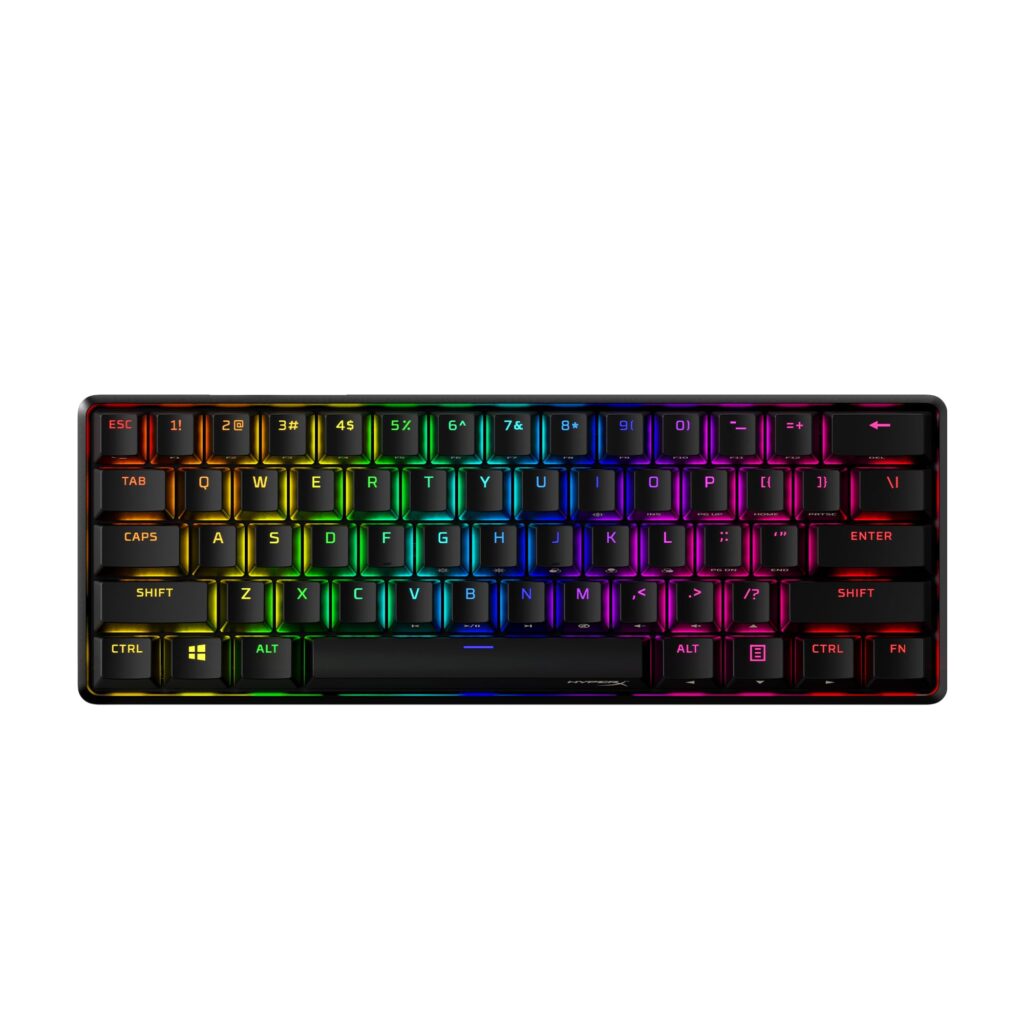
This is the pick for competitive players who want a rock-solid 60% board with tactile HyperX switches and a full aluminum body.
Pros
- Full aluminum housing feels rigid and stable during fast movements
- Tactile Aqua switches balance speed with accurate feedback
- Detachable USB-C cable and three tilt angles improve portability
Cons
- No wireless connectivity
- 60% layout removes arrow keys and function row
- NGENUITY software is Windows-only
The Alloy Origins 60 earns its spot through build quality. The aluminum frame does not flex under fast keypresses, which matters during intense sessions. Side-printed legends on the PBT keycaps help locate secondary functions without memorizing a chart.
Tactile Aqua switches strike a middle ground between the soft bump of typing switches and the fast reset gamers want. Typing feels accurate, though the 60% layout demands an adjustment period for anyone used to a full board. The extra Esc key and alternate spacebar are a thoughtful touch for personalizing the look.
AULA F75 Pro Wireless

This 75% board suits anyone who wants to build a custom keyboard experience without soldering, plus the convenience of tri-mode wireless.
Pros
- Hot-swappable sockets accept 3-pin or 5-pin switches
- Tri-mode connectivity covers Bluetooth, 2.4GHz, and USB-C
- Multi-function knob adjusts volume and lighting
Cons
- Plastic case feels less premium than aluminum competitors
- QWERTZ layout listed in specs may confuse US buyers checking layout details
- 6-month warranty is shorter than most rivals
The F75 Pro’s gasket-style internals and pre-lubed Reaper switches produce a smooth, creamy sound that avoids the hollow rattle common in budget boards. Five layers of internal dampening cut down on case ping.
Hot-swap support means switching from linear to tactile switches takes minutes, no soldering iron required. The 4000mAh battery keeps it running for extended stretches between charges. For students and remote workers who bounce between a laptop and desktop, the five-device Bluetooth pairing is a genuine convenience.
Redragon K673 PRO

This 80%-size gasket keyboard delivers a soft, quiet typing feel that works well in shared rooms or late-night gaming sessions.
Pros
- Gasket mount with 5-layer dampening produces a cushioned, quiet sound
- Tri-mode connectivity switches between USB-C, Bluetooth, and 2.4GHz
- Hot-swap socket works with most 3-pin and 5-pin switches
Cons
- Linear Red switches lack tactile feedback for typing accuracy
- Software installation is required for full customization
- Silicone enclosure feels less sturdy than metal-frame boards
Reviewers consistently point to the “thocky” sound profile as a standout feature, a term keyboard enthusiasts use for a deep, muted key sound rather than a sharp click. The gasket mount absorbs impact so the frame does not transmit noise to the desk.
The single control knob handles brightness and media playback without digging through menus. At this size, arrow keys and a compact function row stay intact, a plus for people who game and type in the same sitting.
SteelSeries Apex 3 TKL

Anyone gaming near sleeping roommates or family should consider this whisper-quiet TKL board with spill resistance built in.
Pros
- Whisper Quiet switches keep noise low for shared spaces
- IP32 rating resists water and dust damage
- Dedicated volume roller and media keys add convenience
Cons
- Membrane-style switches lack the crisp feel of true mechanical switches
- Single-color style options limit lighting customization
- Wired-only connection
The Apex 3 TKL fills a niche few boards target well: quiet operation without giving up backlighting or a gaming layout. The whisper switches use a low-friction design rated for over 20 million presses.
Spill resistance adds peace of mind for desks that double as a coffee station. The tenkeyless layout keeps arrow keys and frees up mouse space, a practical trade-off for shooters and strategy games alike. The volume roller is a small detail that gets used constantly.
Redragon K552

This is the entry point for anyone trying mechanical switches for the first time without a big investment.
Pros
- Linear Red switches feel smooth and consistent
- Metal top plate adds durability at a low weight
- Full anti-ghosting and N-key rollover support fast inputs
Cons
- Fixed rainbow lighting cannot be customized without extra software steps
- No software-based macro support in the base rainbow version
- Louder than membrane alternatives
The K552 has built a reputation as a reliable starter mechanical keyboard. The metal frame keeps the compact TKL body from flexing, and the anti-slip feet keep it planted during fast key sequences.
Linear Red switches actuate smoothly, favoring speed over tactile feedback. Typing accuracy takes a slight hit compared to tactile switches, but gamers used to fast, repeated presses will feel at home. For the price, the build quality holds up well over daily use.
Aula WIN60 HE

Competitive FPS players who want adjustable actuation should look at this magnetic switch keyboard with true rapid trigger support.
Pros
- Hall effect magnetic switches allow adjustable actuation points
- Rapid Trigger mode with a 0.02mm reset distance speeds up repeated inputs
- 8000Hz polling rate reduces input lag
Cons
- Not compatible with PlayStation consoles
- Web-based driver requires an internet connection to customize
- 60% layout removes dedicated arrow keys and function row
The WIN60 HE stands apart through its magnetic switch technology, which uses a magnet and sensor instead of a physical contact point. This lets players set exactly how far a key needs to travel before it registers, a feature called adjustable actuation.
Rapid Trigger mode resets the key almost instantly after release, which helps in games like Valorant or CS2 where quick direction changes matter. The tradeoff is the compact 60% layout, which asks players to relearn some navigation shortcuts.
Logitech G413 TKL SE

This is a solid pick for remote workers who want a clean, professional-looking mechanical keyboard that still handles gaming well.
Pros
- Brushed aluminum top case feels sturdy and looks understated
- PBT keycaps resist shine and wear over years of use
- Tactile switches suit both typing and gaming
Cons
- Single-color white backlighting only, no RGB
- No hot-swap support for switch changes
- Heavier than most compact competitors
The G413 TKL SE leans toward professional environments more than flashy gaming setups. The brushed aluminum-magnesium top case gives it a minimal look that fits an office desk as easily as a gaming rig.
Tactile switches offer a light bump that helps with typing precision, a benefit for anyone who splits time between work documents and games. Twelve function-key media controls cover volume and playback without extra software. The lack of RGB will disappoint some gamers, but it keeps the look clean.
GEODMAER 65%

Budget-conscious buyers who want compact arrow keys and backlighting without paying mechanical switch prices should consider this membrane board.
Pros
- 65% layout keeps arrow keys while saving desk space
- Detachable Type-C cable adds portability
- Backlighting with adjustable brightness and breathing modes
Cons
- Membrane switches lack the tactile feel of true mechanical switches
- No macro or software customization
- Keycap material may show wear faster than PBT
The GEODMAER keyboard uses membrane switches designed to mimic mechanical feedback, a common approach for budget compact boards. It will not fool experienced mechanical keyboard users, but it feels responsive enough for casual gaming and daily typing.
The 65% layout is a practical middle ground for anyone who wants arrow keys without a number pad. Backlighting adds visibility in dark rooms, and the detachable cable makes it easy to toss into a bag for travel or LAN parties.
Snpurdiri 60%

Students working in tight dorm spaces will appreciate this small, budget-friendly 60% keyboard with RGB backlighting.
Pros
- Compact 60% size frees up significant desk space
- RGB backlighting includes multiple color and effect options
- Detachable USB-C cable simplifies travel
Cons
- Clicky switches may be too loud for shared spaces
- No dedicated arrow keys
- Membrane-style build lacks the precision of true mechanical switches
The Snpurdiri 60% keyboard targets buyers who want a small footprint and colorful lighting on a tight budget. Its black-and-white color scheme stands out from the usual all-black gaming keyboard look.
Clicky switches give an audible response with every press, which some typists enjoy but roommates might not. The compact size makes it easy to pack for travel, and the six backlight effects add some personality to a basic desk setup.
Redragon K585

MMO and MOBA players who want a dedicated one-handed keypad for ability rotations should look at this specialized 42-key option.
Pros
- 7 macro keys store up to 28 combos across 4 profiles
- USB pass-through port adds a spot for a mouse or headset
- Hot-swappable switch socket allows feel customization
Cons
- Not a full keyboard replacement, requires pairing with a mouse and separate keys
- Clicky Blue switches can be loud for shared spaces
- Learning the macro layout takes practice
The K585 fills a specific role rather than trying to replace a full keyboard. Its 42-key layout centers on macro-heavy games where a full rotation of abilities needs to fire from one hand.
The detachable magnetic wrist rest adds comfort during long sessions, and the USB pass-through port cuts down on cable clutter. For anyone who plays MMOs or MOBAs alongside a full-size board on their other hand, this keypad speeds up complex combos considerably.
Best Compact Gaming Keyboards 2026
Pick a Layout Based on What Keys You Actually Use
Compact keyboards remove keys to save space, and each size cuts differently. A 60% board drops the function row, arrow keys, and number pad, which is ideal for competitive gaming but awkward for spreadsheet work or coding. A 65% layout adds back arrow keys, and a 75% or TKL layout keeps the function row too, dropping only the number pad.
| Layout | Keys Removed | Best For |
|---|---|---|
| 60% | Function row, arrows, number pad | Maximum mouse space, competitive gaming |
| 65% | Function row, number pad | Gaming with occasional navigation needs |
| 75%/TKL | Number pad only | Gaming plus regular typing or spreadsheet work |
| One-handed keypad | Most of the alphabet | Macro-heavy games alongside a mouse |
Match Switch Type to How You Use the Keyboard
Switch type shapes both feel and sound. Linear switches move smoothly with no bump, which favors fast, repeated gaming inputs. Tactile switches include a small bump that helps typing accuracy. Clicky switches add an audible click on top of that bump, which some people enjoy and others find distracting in shared spaces.
Magnetic Hall effect switches represent a newer category. They let players set a custom actuation point and support rapid trigger, a feature that resets the key the instant it is released rather than waiting for a full return. This benefits fast-paced shooters where quick direction changes matter.
Weigh Wired vs Wireless Connectivity
Wired connections offer the lowest possible latency, which matters most in ranked competitive play. Wireless boards using 2.4GHz dongles come close to wired performance and add freedom from cables. Bluetooth is convenient for switching between devices but introduces slightly more lag, making it better suited to typing than fast-paced gaming.
Tri-mode keyboards that support wired, 2.4GHz, and Bluetooth connections give the most flexibility for people who switch between a gaming PC, a laptop, and a tablet.
Consider Build Quality and Extra Features
Aluminum cases resist flex and feel more solid, while plastic and silicone cases keep weight and cost down. Gasket-mounted designs add a cushioned typing feel and quieter sound by separating the switch plate from the outer case with soft material.
Other features worth checking:
- Hot-swap sockets let you change switches without soldering, useful for testing different feels over time.
- N-key rollover and anti-ghosting make sure every key registers correctly during fast, simultaneous presses.
- Spill and dust resistance protects against accidental drink spills near the desk.
- Onboard macros store custom key combos directly on the keyboard, so they work without extra software running.
Think About Portability
Weight, detachable cables, and case material all affect how easily a keyboard travels. A compact 60% or 65% board with a detachable USB-C cable slips into a backpack easily, while larger TKL boards with metal cases add bulk and weight. For students and anyone who moves between locations often, lighter plastic builds with a small footprint make more sense than heavier metal designs.