How To Turn On Onn Bone Conduction Headphones: Quick Guide

To turn on onn bone conduction headphones, press and hold the Power or Multifunction button for about 3 seconds. Release the button when you hear a tone or see the LED light flash. If the headphones do not turn on, charge them first, then try again.
onn sells several bone conduction headphone models in the United States. Button names and light patterns may differ slightly, but the basic startup process is usually the same.
Quick Takeaways
- Hold the power button for about 3 seconds to turn the headphones on.
- A voice prompt, startup tone, or flashing LED confirms that they are on.
- Charge the headphones if they show no light or sound.
- Turn on Bluetooth on your phone and select the onn headphone name to pair them.
- Hold the power button longer, often 5 to 10 seconds, to enter pairing mode.
- Do not press the reset combination unless normal startup and charging checks fail.

What You Need Before Turning Them On
You need the headphones and a charged battery. You also need a Bluetooth device, such as an iPhone, Android phone, tablet, laptop, or compatible computer, if you want to play audio.
Check these items before you start:
- Find the Power, Multifunction, or MFB button.
- Make sure the charging port is closed and dry.
- Remove any protective film from the charging contacts or USB cable.
- Charge the headphones with the cable supplied with the unit, when available.
- Keep the headphones near the device you plan to pair.
- Turn off Bluetooth on nearby devices that may connect first.
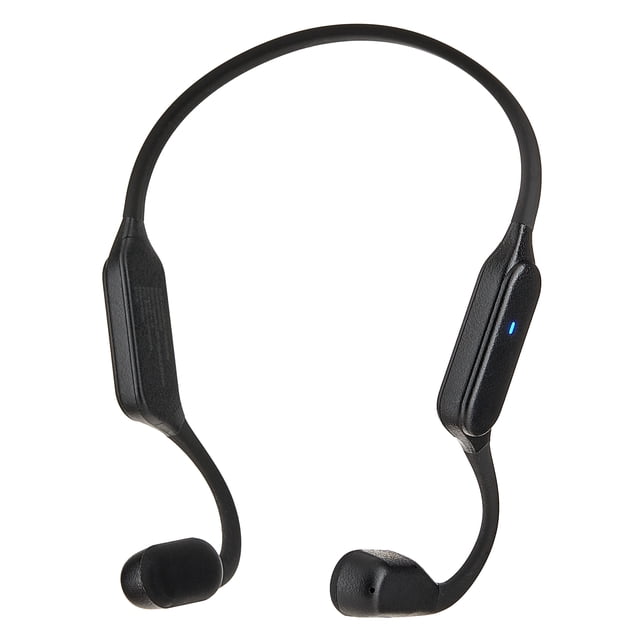
The power button is often located near one end of the neckband. It may share functions with the play, pause, call, or Bluetooth controls. Look for a button marked with a power symbol, a circle with a line through it, or an “M” symbol.
How to Turn On onn Bone Conduction Headphones
Follow these steps in order.
1. Charge the headphones if needed
Connect the charging cable to the headphone charging port and a suitable USB power source. Let the headphones charge before trying to turn them on if the battery is new, fully drained, or has been stored for several months.
The charging light may turn red, orange, or another color while the battery fills. The exact color depends on the model. Do not assume that a dark light means the headphones are broken; some models show a light only while the cable is connected.
2. Disconnect the charging cable
Remove the cable before powering on the headphones. Some rechargeable headphones will not start while they are connected to a charger.
Close the charging-port cover after unplugging the cable. This helps protect the port from sweat and moisture during normal use.
3. Press and hold the power button
Press and hold the Power or Multifunction button for about 3 seconds. Keep holding the button until one of these signs appears:
- A startup tone
- A voice prompt
- A flashing blue or white light
- A changing LED pattern
- A visible Bluetooth name on your phone
A quick press may only start or pause music. It may not turn the headphones on.
4. Check the status light or voice prompt
A flashing light usually means the headphones are on. A faster or alternating flash may mean they are ready to pair.
If the headphones say something such as “power on,” they have started successfully. The exact wording can vary by model.
5. Pair the headphones with your device
On your phone or other Bluetooth device:
- Open Settings.
- Select Bluetooth.
- Turn Bluetooth on.
- Wait for the onn headphones to appear under available devices.
- Tap the name that matches your headphones.
- Confirm the connection if your device asks.
The listing may include the word onn, bone conduction, or a model code. If several devices appear, use the name printed in the product guide or on the package.
6. Play audio at a safe volume
Start playback at a low volume. Bone conduction headphones leave the ear canals open, but they can still produce sound that is too loud.
Use the phone’s volume controls or the volume buttons on the headphones. Stop and lower the volume if the sound feels harsh, causes discomfort, or makes it hard to hear important sounds around you.

How to Put onn Bone Conduction Headphones Into Pairing Mode
If the headphones turn on but do not appear on your phone, place them in pairing mode.
First, turn the headphones off. Then press and hold the power button for about 5 to 10 seconds. Release it when the LED begins flashing in a different pattern or you hear a pairing prompt.
On some models, pairing mode starts automatically the first time you turn the headphones on. On other models, you must hold the button longer than you would for normal startup.
Pairing mode and normal power-on mode are not always the same:
| Action | Typical button hold | Result |
|---|---|---|
| Turn on | About 3 seconds | Headphones start |
| Turn off | About 3 seconds | Headphones shut down |
| Enter pairing mode | About 5–10 seconds | Headphones search for a Bluetooth device |
| Reset | Model-specific | Stored Bluetooth data may be erased |
These times are common controls, not a guarantee for every onn model. Use the instructions printed for your exact model when the button response differs.
What the onn Headphone Lights Usually Mean
LED colors are model-dependent, so treat the following table as a general guide rather than a fixed code.
| Light or sound | Likely meaning | What to do |
|---|---|---|
| No light or sound | Off, empty battery, or charging issue | Charge the headphones and try again |
| Red or amber light while charging | Battery is charging | Leave them connected |
| Blue or white flashing light | On, pairing, or connected | Check Bluetooth settings |
| Alternating light pattern | Pairing or reset mode | Select the headphones on your device |
| Startup voice or tone | Power is on | Continue with Bluetooth setup |
| Low-battery warning | Battery needs charging | Recharge before extended use |
The most reliable sign is the combination of the light, sound, and behavior. For example, a flashing light with an onn device shown in your phone’s Bluetooth list usually means the headphones are ready to connect.

What to Do If onn Bone Conduction Headphones Will Not Turn On
Work through the checks below in order. Start with power and charging because they are the most common causes.
Check the charging connection
Try a different USB power source and, if possible, a different compatible cable. Make sure the plug is fully inserted into the headphone port.
If the charging port has dirt, do not push a metal object into it. Disconnect the charger and gently remove loose debris with a dry, soft brush. Keep liquid away from the port.
Charge them for longer
A deeply discharged battery may not show an immediate response. Leave the headphones connected for at least 30 minutes, then disconnect the cable and hold the power button again.
If the charging light never appears, test the power source with another device. A faulty wall adapter, USB port, or cable can look like a headphone problem.
Use a firm, long press
Press the power button directly and hold it without tapping. Try holding it for 5 seconds. If the headphones enter pairing mode instead of normal startup, they may already be on.
Check whether they are already connected
The headphones may be powered on but connected to another nearby device. Turn off Bluetooth on tablets, laptops, or phones that have used the headphones before.
Then open Bluetooth settings on the device you want to use and look for the onn headphones.
Restart the headphones
Turn them off, wait about 10 seconds, and turn them on again. This can clear a temporary control or Bluetooth state without deleting all saved connections.
Reset only when necessary
A reset method can vary between onn models. It may involve holding the power and volume buttons together, holding the power button for an extended time, or using another button combination.
Do not guess if the instructions for your model are available. Search the model number printed on the headphones, box, receipt, or manual and follow that model’s reset directions. A reset may erase saved Bluetooth pairings.
Stop using a damaged or wet unit
Do not charge or use the headphones if the battery area is swollen, the cable or port is damaged, the unit becomes unusually hot, or liquid entered the charging port. Disconnect it from power and contact the retailer or manufacturer for support.
How to Tell Whether the Headphones Are On
The headphones are likely on when at least one of these signs appears:
- The LED flashes after you hold the button.
- You hear a startup tone or voice prompt.
- Your phone lists them as an available or connected Bluetooth device.
- The headphones respond to volume or playback buttons.
- Audio plays after you select them as the output device.
A flashing light alone does not prove that the headphones are connected. It may only show that they are searching for a device. Open Bluetooth settings to confirm the connection.
How to Turn Off onn Bone Conduction Headphones
Press and hold the same Power or Multifunction button for about 3 seconds. Release it after you hear a shutdown tone or see the LED turn off.
Turn the headphones off when you will not use them for a while. This saves battery and prevents them from reconnecting to a nearby phone.
If the headphones do not shut down, disconnect them from Bluetooth, wait a few seconds, and try the long press again. Avoid repeatedly pressing random button combinations because some combinations may start pairing or reset functions.

Common Mistakes That Prevent Startup
Several simple mistakes can make working headphones seem dead.
Pressing the button too quickly
A short tap may control music or answer a call. Hold the button until the startup signal appears.
Trying to power on while charging
Many wireless headphones do not operate normally while plugged in. Unplug the cable before startup.
Pairing with the wrong device
A nearby phone or computer may connect first. Disable Bluetooth on unused devices, then pair with the device you want.
Ignoring the battery
A charging cable can be connected without actually charging the battery. Check that the cable fits correctly and that the charging light responds.
Using the wrong model instructions
onn headphones can use different controls and light patterns. Instructions for one model may not apply to another. Confirm the model before using a reset sequence.
Covering the bone-conduction transducers
The small contact areas should rest against the bones in front of the ears, not inside the ear canal. Do not cover them with thick clothing or place them behind the ears in a way that changes their position.
When to Contact Support or Request a Replacement
Contact the seller or manufacturer when the headphones remain unresponsive after a proper charge and the correct startup steps. Support may ask for the model number, purchase date, charging behavior, and the steps you already tried.
Request help sooner if:
- The headphones become hot while charging.
- The battery looks swollen.
- The charging port is loose or damaged.
- The unit smells burnt.
- The headphones shut down repeatedly at a full charge.
- The device has physical or water damage.
Do not open the battery housing. Small rechargeable batteries can create a fire or injury risk if damaged or handled incorrectly.

Frequently Asked Questions
How long do I hold the power button on onn bone conduction headphones?
Hold the power button for about 3 seconds for normal startup. If you want pairing mode, hold it longer, often 5 to 10 seconds. The exact timing can vary by onn model.
Why are my onn headphones not showing up on Bluetooth?
They may be off, already connected to another device, or not in pairing mode. Charge them, turn off Bluetooth on nearby devices, then hold the power button until the LED flashes in a pairing pattern.
Can I use onn bone conduction headphones while they are charging?
Usually, you should unplug them before trying to use or power them on. Many wireless headphones do not support normal playback while charging.
How do I know when onn bone conduction headphones are fully charged?
The charging light may change color or turn off when charging is complete. Because LED codes vary by model, check the manual or product label for the exact meaning.
Do I need an app to turn on onn bone conduction headphones?
No. You normally turn them on with the physical power button and connect them through your device’s Bluetooth settings. An app is not normally required for basic startup.
Conclusion
To turn on onn bone conduction headphones, disconnect the charging cable and hold the Power or Multifunction button for about 3 seconds. Confirm startup with a tone, voice prompt, or LED light, then pair the headphones through your phone’s Bluetooth settings.
If nothing happens, charge the headphones, try another cable or USB power source, and repeat the long press. If the unit becomes hot, swollen, wet, or damaged, stop using it and seek support rather than attempting a repair.