Best Headphone For Work: Office Audio Guide

The best headphone for work balances clear calls, comfort, useful noise control, and simple device switching.
Long workdays can make poor headphones feel like a real burden. Your ears may hurt, your voice may sound distant, or office noise may break your focus. I reviewed wired headsets, wireless work headphones, and noise-canceling models to find the best headphone for work in different settings. The picks below suit video meetings, remote work, call centers, shared offices, and quiet home desks.
See the differences between my top picks at a glance.
| Model | Type | Work Strength | Battery | Best For | Amazon |
|---|---|---|---|---|---|
| Logitech H390 Black | Wired USB-A | Simple calls | Not required | Desk work and meetings | View on Amazon |
| Wireless Work Headset | Wireless with dongle | Flexible connection | Rechargeable | Remote work and calls | View on Amazon |
| Upgrade ANC & ENC Headset | Bluetooth and dongle | ANC, ENC, flip mute | Rechargeable | Busy work areas | View on Amazon |
| Beats Solo 4 | Wireless on-ear | Long battery life | Up to 50 hours | Music and calls | View on Amazon |
| Sony WH-CH720N | Wireless over-ear | Noise canceling | Up to 35 hours | Focus and travel | View on Amazon |
| Logitech H390 Rose | Wired USB-A | Clear desk calls | Not required | Simple home offices | View on Amazon |
| HomeSpot Work Headphones | Bluetooth earbuds | Noise reduction | Up to 24 hours | Worksites and loud areas | View on Amazon |
Logitech H390 Wired USB Headset

The Logitech H390 is a practical wired headset for people who want a simple work setup. It connects through USB-A, so you do not need to manage Bluetooth pairing or battery charging. Its noise-canceling microphone is designed to reduce some nearby sound during calls. The headset also includes in-line controls for common call and volume tasks.
This model makes sense for a fixed desk, home office, school office, or call center. The wired connection keeps audio ready whenever your computer is on. It works well for video meetings, voice calls, and light music between tasks. Since it uses USB-A, check your computer ports before buying, especially if you use a newer laptop with USB-C only.
Pros:
- USB connection keeps setup quick and reliable
- Noise-canceling microphone supports clearer work calls
- In-line controls make volume changes easy
- No battery is needed during the workday
- Good fit for regular video meetings
Cons:
- USB-A limits compatibility with some newer devices
- The cable can feel restrictive away from a desk
- It lacks wireless freedom and active noise cancellation
What Amazon Buyers Are Saying
Common buyer feedback points to easy setup and dependable use for meetings. Many users like the microphone, simple controls, and plug-and-play design. Review patterns also show that wired headsets appeal to buyers who dislike charging. Some complaints focus on cable limits, fit differences, and the need for a USB-A port.
My Recommendation
I recommend the Logitech H390 for basic computer work and frequent online meetings. It is not the most advanced headset here, but it offers strong value when reliability matters more than wireless features. It is a good choice for a home office with a standard USB-A computer.
| Category | Rating |
|---|---|
| Call Performance | 4.2/5 |
| Comfort for Desk Work | 4/5 |
| Connection Reliability | 4.6/5 |
| Work Features | 3.8/5 |
| Value for Money | 4.5/5 |
| Overall Rating | 4.3/5 |
Wireless Headset With Mic and USB Dongle

This wireless work headset targets people who need more freedom than a wired model can offer. It supports Bluetooth and includes a USB dongle for connection to compatible computers. That combination can help when a computer has poor Bluetooth support or when you want a faster setup. The built-in microphone also includes a mute function for calls.
I see this as a useful option for remote workers who move between a laptop, phone, and desk. The design is aimed at calls, meetings, and call-center tasks rather than only music. Wireless use removes cable clutter, but you must keep the headset charged. Actual range, battery time, and call quality can vary with the connected device and nearby wireless traffic.
Pros:
- Wireless design gives useful freedom at a desk
- USB dongle offers another way to connect to a computer
- Bluetooth supports compatible phones and laptops
- Microphone mute helps during online meetings
- Designed for remote work and repeated calls
Cons:
- It needs regular charging
- More connection choices can require extra setup
- Sound and range may vary by device
What Amazon Buyers Are Saying
Buyers commonly value the wireless design, included dongle, and microphone controls. These features can make daily work less cluttered. Review themes for this type of headset often include praise for flexible device use, along with concerns about pairing, battery habits, or microphone performance in noisy rooms. I suggest checking recent buyer comments for your exact computer and phone setup.
My Recommendation
This headset is worth considering if you want a flexible wireless tool for calls without moving into a premium price class. The dongle is useful for computers, while Bluetooth adds phone support. I would choose it over a wired model for a mobile work routine, but I would choose a wired headset for the simplest setup.
| Category | Rating |
|---|---|
| Call Performance | 4/5 |
| Wireless Flexibility | 4.4/5 |
| Microphone Controls | 4.2/5 |
| Ease of Use | 4/5 |
| Value for Money | 4.1/5 |
| Overall Rating | 4.1/5 |
Upgrade ANC and ENC Wireless Work Headset

The Upgrade ANC and ENC headset focuses on communication in busy work spaces. ANC refers to active noise cancellation for the listener, while ENC helps reduce some outside sound picked up by the microphone. It also offers Bluetooth 5.4 connectivity and a USB dongle. The flip-to-mute feature gives you a fast way to stop microphone pickup during a call.
This combination of features suits open offices, shared rooms, and home offices near household noise. The headset can connect to a computer, phone, or other compatible device. Its main appeal is control: you can use the dongle, Bluetooth, noise reduction, and flip mute based on the task. Noise control is not a substitute for a quiet room, and results depend on the sound around you and the fit of the earcups.
Pros:
- ANC can reduce some background sound for the listener
- ENC supports clearer microphone pickup in many work settings
- Flip-to-mute action is quick and easy to remember
- Bluetooth 5.4 and a USB dongle offer connection flexibility
- Useful feature set for meetings and call-center work
Cons:
- Noise cancellation can affect battery use
- More features may mean a longer learning curve
- It may feel less suitable for users who want a very light headset
What Amazon Buyers Are Saying
Review patterns for this model tend to focus on its mute control, wireless connection choices, and noise-control features. Buyers who work in shared spaces often value the ability to manage both what they hear and what callers hear. Some users may report differences in fit, battery behavior, or noise reduction based on their environment. I recommend reading the latest reviews if microphone quality is your top concern.
My Recommendation
This is one of the strongest choices here for a noisy work area. I like the flip-to-mute control because it solves a common meeting problem without searching for a software button. Buy it if you want advanced work features and wireless use. Skip it if you only need a basic headset for an occasional call.
| Category | Rating |
|---|---|
| Noise Control | 4.4/5 |
| Microphone Features | 4.4/5 |
| Connection Options | 4.5/5 |
| Meeting Convenience | 4.5/5 |
| Value for Money | 4.2/5 |
| Overall Rating | 4.4/5 |
Beats Solo 4 Wireless On-Ear Headphones

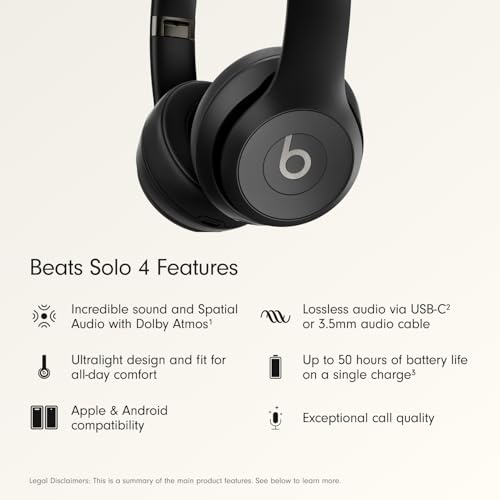
The Beats Solo 4 is a wireless on-ear headphone made for people who want work audio and personal listening in one device. Beats lists up to 50 hours of battery life, which can reduce the need for daily charging. Its lightweight design can work well for music, podcasts, and calls during a normal work routine. It supports both Apple and Android devices.
On-ear headphones sit on the ears instead of surrounding them. That can feel cooler than over-ear cups, but comfort depends on clamp pressure and ear shape. The Solo 4 is not the best match if you need strong active noise cancellation or a dedicated boom microphone. It is better for workers who want a stylish, portable headphone for calls, focus music, and breaks.
Pros:
- Up to 50 hours of listed battery life
- Lightweight form suits travel and mobile work
- Works with Apple and Android devices
- Balanced sound supports music and spoken audio
- Folds for easier storage and transport
Cons:
- On-ear pads may cause pressure during long sessions
- It does not provide the same isolation as an over-ear model
- It is not a dedicated office headset with a boom mic
What Amazon Buyers Are Saying
Common buyer interest centers on the long battery life, low weight, sound, and compact design. Many people choose this type of headphone for mixed use, such as work, travel, and music. Review concerns often depend on personal comfort, on-ear pressure, and the level of outside sound. Buyers who need a strong work microphone should compare it with a dedicated headset before ordering.
My Recommendation
I recommend the Beats Solo 4 for flexible everyday use rather than intensive call-center work. It is a strong pick for a worker who values battery life, portability, and music. If your top need is a boom microphone or deep noise control, another model in this guide will serve you better.
| Category | Rating |
|---|---|
| Battery Life | 4.8/5 |
| Portability | 4.7/5 |
| Music Quality | 4.4/5 |
| Long-Call Comfort | 3.9/5 |
| Work Call Suitability | 3.8/5 |
| Overall Rating | 4.2/5 |
Sony WH-CH720N Wireless Noise Canceling Headphones
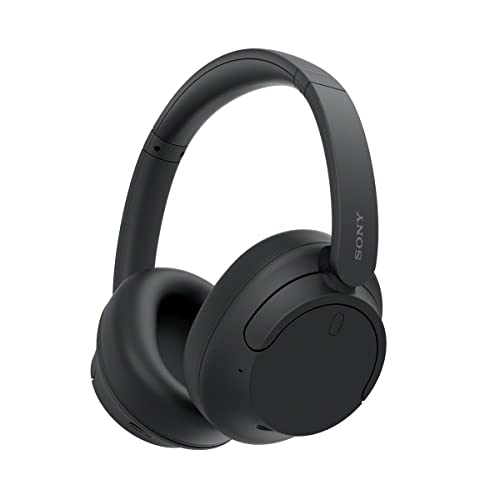
The Sony WH-CH720N is a lightweight over-ear headphone with active noise canceling. Sony lists dual noise sensor technology, up to 35 hours of battery life, and quick charging. It also supports multipoint connection, which can help you switch between two compatible devices. These features make it a strong option for workers who split time between a computer and a phone.
The over-ear design can block more outside sound than a basic on-ear model, while ANC can further reduce steady background noise. It works well for focus time, remote meetings, travel, and general listening. However, it is not the same as a business headset with a large boom microphone. For the best call results, place the headset well and check your meeting app settings before an important call.
Pros:
- Active noise canceling supports focused work
- Over-ear design offers useful passive sound blocking
- Up to 35 hours of listed battery life
- Multipoint helps manage two compatible devices
- Lightweight build is useful for long desk sessions
Cons:
- It lacks a traditional boom microphone
- ANC performance depends on the type of outside noise
- Wireless charging is still part of the routine
What Amazon Buyers Are Saying
Amazon review themes commonly highlight the light fit, noise canceling, battery life, and multipoint function. Many buyers use it for work, travel, and music instead of one single task. Some users note that comfort and microphone results vary by head size, room noise, and device settings. The most useful reviews are those that describe long meetings and real computer use.
My Recommendation
The Sony WH-CH720N is my top choice for workers who need focus and flexible everyday listening. It offers a strong mix of noise control, comfort, battery life, and device support. Choose it as the best headphone for work if you spend long hours in a shared space and do not require a boom microphone.
| Category | Rating |
|---|---|
| Noise Canceling | 4.5/5 |
| Long-Session Comfort | 4.5/5 |
| Battery Life | 4.4/5 |
| Device Switching | 4.4/5 |
| Work Call Suitability | 4.1/5 |
| Overall Rating | 4.4/5 |
Logitech H390 Wired USB Headset in Rose

This rose version of the Logitech H390 offers the same basic work-focused design in a different color. It uses a USB-A wired connection and includes a microphone built for computer calls. The plug-in design keeps the headset ready without pairing or charging. In-line controls let you manage volume and common call functions from the cable.
I would consider this model for a home office, student desk, or shared workstation where appearance matters but reliable function comes first. The cable works well when you stay near your computer. It also removes the worry of wireless battery loss during a long meeting. As with the black version, you should confirm that your computer has a USB-A port.
Pros:
- Reliable wired connection for daily computer work
- Distinct rose color adds a personal style choice
- Noise-canceling microphone supports online calls
- No battery charging is needed
- Simple controls are easy for new users
Cons:
- USB-A may need an adapter on some laptops
- The cable limits movement around the room
- No wireless or active noise-canceling function
What Amazon Buyers Are Saying
Buyers often like this headset for its simple setup, microphone, and bright color option. Review patterns also support its use for classes, video calls, and routine office tasks. Common limitations include the fixed cable, USB-A connection, and fit differences between users. These points make it important to match the headset to your desk and computer before buying.
My Recommendation
This model is a good value for anyone who wants a dependable wired headset with a softer color choice. It performs the same basic job as the black H390, so the decision mainly comes down to availability and style. I recommend it for fixed desk work, but not for people who need to move freely during calls.
| Category | Rating |
|---|---|
| Call Performance | 4.2/5 |
| Desk Comfort | 4/5 |
| Connection Reliability | 4.6/5 |
| Ease of Setup | 4.6/5 |
| Value for Money | 4.5/5 |
| Overall Rating | 4.3/5 |
HomeSpot Bluetooth Work Headphones

The HomeSpot Bluetooth Work Headphones take a different approach from the over-ear models above. They use earbuds with soft three-flange silicone tips and are listed as OSHA-compliant with a 27 dB NRR. The design also includes Bluetooth 5.4, a stated range of up to 100 feet, aptX HD support, and up to 24 hours of playtime. These features target work areas where sound reduction and compact size both matter.
This model may suit workshops, warehouses, outdoor tasks, and other active settings better than a large desk headset. Ear-tip fit plays a major role in comfort and noise reduction, so users should select the right tip size with care. The product is not a typical video-meeting headset with a boom microphone. It is better for listening, communication through a compatible device, and reducing unwanted worksite sound.
Pros:
- Compact earbud design suits active work
- Listed 27 dB NRR supports noise-reduction needs
- OSHA-compliant positioning may suit certain work settings
- Bluetooth 5.4 and aptX HD support modern wireless use
- Up to 24 hours of listed playtime
- Three-flange tips allow users to adjust the fit
Cons:
- Ear-tip fit may not suit every user
- It is not a full office headset with a boom microphone
- Noise protection depends on correct insertion and use
What Amazon Buyers Are Saying
Buyer interest commonly centers on the small design, noise reduction, battery life, and fit options. Users who work in louder spaces may prefer earbuds over bulky earcups. Review concerns can include comfort, ear-tip sealing, and differences in use between phones and other devices. For safety-related work, I would always follow workplace rules and treat the stated rating as product information, not a replacement for required protective procedures.
My Recommendation
I recommend the HomeSpot for active work and noise-reduction needs, not as the first choice for office video meetings. It offers useful wireless features in a compact form. If you need a traditional work headset for Zoom or Teams, choose a model with a dedicated microphone instead.
| Category | Rating |
|---|---|
| Noise Reduction Design | 4.3/5 |
| Portability | 4.7/5 |
| Battery Life | 4.2/5 |
| Worksite Suitability | 4.4/5 |
| Office Call Suitability | 3.5/5 |
| Overall Rating | 4.1/5 |
How to Choose the Best Headphone for Work
The right work headphone depends on your job, room, devices, and daily routine. A call-center worker needs a clear microphone and easy mute control. A remote worker may want Bluetooth and multipoint pairing. Someone in a loud office may care more about ANC than music quality. Use the points below to narrow the list without paying for features you will not use.
1. Match the Microphone to Your Work Calls
Start with the microphone if you spend much of the day in meetings. A headset with a dedicated boom mic often gives more direct voice pickup than standard music headphones. Noise-canceling microphone features can help reduce some nearby sound, but they cannot remove every voice, fan, or keyboard tap. Place the microphone near your mouth, but do not let it touch your face or clothing.
A flip-to-mute feature adds useful control. It lets you mute without finding a small button. In-line controls also work well for simple desk calls. If you mainly listen to music and speak only now and then, the Beats Solo 4 or Sony WH-CH720N may be enough. If calls define your day, consider the Logitech H390 or a wireless headset with a dedicated work microphone.
2. Choose the Right Connection and Battery Plan
Wired USB headphones offer a steady connection and do not need charging. They work best when you stay at one desk. Check the connector before buying. USB-A remains common, but many newer laptops use USB-C. An adapter may solve the issue, but it can add another item to your desk.
Wireless headphones offer more movement and less cable clutter. Bluetooth works well with many phones and laptops. A USB dongle can offer a simple computer connection, especially when built-in Bluetooth is weak or unavailable. Multipoint is useful when you move between a laptop and phone. Remember that battery claims describe listed conditions. Real use can change with volume, ANC, calls, and connection strength.
3. Prioritize Comfort, Noise Control, and Total Value
Comfort matters more than a long feature list. Over-ear cups can feel more relaxing for some users, while on-ear pads may feel cooler. Earbuds save space but need the right tip to stay secure. Try to think about your longest meeting, not just the first ten minutes of use.
Active noise canceling works best against steady sounds, such as an air conditioner or engine hum. It may not fully remove nearby speech. Passive isolation comes from the fit and materials. If you work near loud equipment, check the product’s safety information and follow workplace requirements. Finally, compare the total value. A low-cost wired headset may beat an expensive wireless model if you only need clear calls at one desk.
Final Verdict: Which Should You Buy?
The Sony WH-CH720N is my top overall pick for focus, comfort, battery life, and noise control. For frequent calls, the Upgrade ANC and ENC headset offers stronger work features. Choose the Logitech H390 if you want the simplest low-cost wired setup.
The best headphone for work is the one that fits your room, device, and call routine. Pick comfort and reliable voice quality first, then add wireless freedom or ANC as needed.
FAQs Of best headphone for work
What is the best headphone for work calls?
The Upgrade ANC and ENC wireless headset is a strong choice for work calls because it offers a microphone, noise-control features, a USB dongle, and flip-to-mute control. The Logitech H390 is a simpler wired option.
Are wired or wireless headphones better for work?
Wired headphones suit fixed desks and remove battery concerns. Wireless headphones suit people who move between devices or need less cable clutter. Choose based on your daily work habits.
Is noise canceling useful in an office?
Yes. Active noise canceling can reduce steady sounds such as fans and air conditioners. It may not remove nearby speech, so a good fit and a clear microphone still matter.
How long should work headphones last on one charge?
Battery needs vary by schedule. A model with 20 or more listed hours can suit many workweeks, but frequent calls and ANC may reduce actual use time. Wired models do not need charging.
What should I check before buying a computer headset?
Check the connector, operating system support, microphone controls, comfort, and return policy. Also confirm that USB-A, USB-C, or Bluetooth matches your computer.